Chris Gearhart
Well-known member
- Joined
- Dec 28, 2006
- Messages
- 704
- Reaction score
- 0
- Points
- 0
I don't think the camera automatically generates a QT wrapper. It has to be passed though a (quick but off-camera) program called REDquick first.

Follow along with the video below to see how to install our site as a web app on your home screen.

Note: this_feature_currently_requires_accessing_site_using_safari

That's funny... I'm still trying to figure out how to do something as simple as delete a file on my Mac!The delete key doesn't seem to do anything... and I certainly don't want to have to drag each file into the trash every time... can you shed some light on the subject, oh master of convenience?


Sorry. I can see why it can seem counter intuitive for a Mac newcomer.Oh you think I'm joking!
so, the redquick generates a proxy from the camera files,
what format does the red write to then?
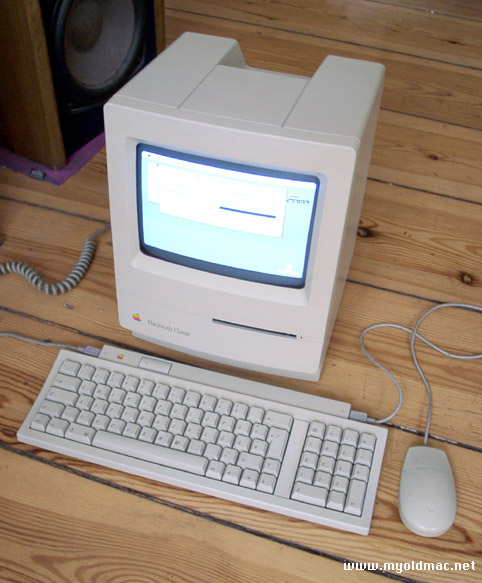
Interesting. I assume that's a pretty old model there, but looking at that pic I'm sure that's where it stems from. You learn something new every day!I think the reason for the use of backspace, is that many Mac keyboards are missing the delete key.
I am guessing that both the camera and Redquick can generate the proxy files. (They announced/mentioned Redquick after; I don't think the original camera proxies will be replaced by Redquick.)I don't think the camera automatically generates a QT wrapper. It has to be passed though a (quick but off-camera) program called REDquick first.

I will resist Mac with all my strength. What's the point in buying a $10,000 editing computer if I can't play video games on it?
That's exactly what my 8 year old nephew tells me!I will resist Mac with all my strength. What's the point in buying a $10,000 editing computer if I can't play video games on it?
Yeah, that's a really good point. It also has better Blu-ray support - right now, anyway - which is important to me, because there's really no other way to get your HD content into consumer hands. 40GB files aren't too reasonable for mass downloading.The Adobe solution is looking very attractive since it's cross-platform.

Interesting. I assume that's a pretty old model there, but looking at that pic I'm sure that's where it stems from. You learn something new every day!
I admit that most of my frustrations have to deal with the fact that the Mac does everything differently and I'm just not used to it. I'm not convinced that the Mac does them any better (like our previous example), but I have been a PC user for over 20 years and I suppose that will take a little while to put aside. For instance, it really bugs me that there's no way to just maximize a window to fill up the whole screen so I can see everything well. The little green "+" button seems to have different behaviors for different windows... but it isn't doing anything I want it to.
Still, I'm trying to be open-minded about it... mostly because I know that with Red it's going to be inevitable. Not only am I convinced that the integration is going to be far and away the best in Final Cut, but the app that I used to use exclusively to edit video with on the PC (Vegas) has gone down the tubes. If I have to pick up and learn something new from scratch, it might as well be the one that's best suited for Red. I'm just glad my keyboard has a delete key.
It took them 20 years to admit that having a 2 button mouse wasn't that bad of an idea... but even so, they couldn't just add a button, they had to make a mighty mouse that could sense where your fingers are, and sometimes get it right and sometimes not. I would have preferred 2 buttons years ago. Brook? Jeff? Haak? Be my swimming buddies on this one.
Thanks, Casey. Just from your description, it sounds like that program may be very helpful. The copy/paste thing was definitely bugging me, too. Fortunately, I'm using the same keyboard and mouse I use with my PC, so that made the transition a bit easier. Just personally, I can't stand either of the ones that come with the Mac (but again, this is just as much me being used to my components as anything else).For example, it helps if you are used to the Windows Copy/Paste method (which uses the control key, rather than the Mac's command Key), which is just too cramped for easy copy paste using the keyboard.
One other change I use all the time is remapping the forward slash key to be a delete key, since the Mac Book Pro doesn't have one (!). I know you can shift-backspace, but who wants to have 2 key strokes for delete when typing any text document? Not me.
Here is the link to Double Command, I hope it helps..
http://www.versiontracker.com/dyn/moreinfo/macosx/12295
If I can't even figure out how to delete a file, you may regret extending that offer...So if anybody has any "how do I...?" Mac questions, I can answer them.
the mac is a x86 pc.Mac or PC?
That's exactly what my 8 year old nephew tells me!