Welcome to our community

Be a part of something great, join today!

  • Hey all, just changed over the backend after 15 years I figured time to give it a bit of an update, its probably gonna be a bit weird for most of you and i am sure there is a few bugs to work out but it should kinda work the same as before... hopefully :)

Do i HAVE to get a MAC

I don't think the camera automatically generates a QT wrapper. It has to be passed though a (quick but off-camera) program called REDquick first.
 
so, the redquick generates a proxy from the camera files,

what format does the red write to then?
 
That's funny... I'm still trying to figure out how to do something as simple as delete a file on my Mac! :) The delete key doesn't seem to do anything... and I certainly don't want to have to drag each file into the trash every time... can you shed some light on the subject, oh master of convenience? :unsure:

Go on the file you liked to delete and press this two buttons

modcm.gif
+
moddl.gif


Mac or PC? The MAC will win this game, not only because it is a powerfull computer but also, because RED is very macfriendly. And this for a good reason.
 
If you gotta get a new computer, why NOT get a Mac when you could run either Windows OR OSX OR both on the same box. At least you have the option to change your mind.
 
i actually owned a mac and ran parallels, but vegas dropped frames like crazy, and thats the most important app to me as it generates the most income from corporates and industrial videos.

it comes down to two choices, own both a mac and pc (bad for me)

or provide excellent support for red on a pc and wont have to buy a mac
(good for me)
 
That's like saying that having the Cubs and WhiteSox in the same stadium means they are on the same team.

There can be only one.
 
Oh you think I'm joking!
Sorry. I can see why it can seem counter intuitive for a Mac newcomer.
When I first started out using Mac, notably the endless modifier keys was so steep to learn.

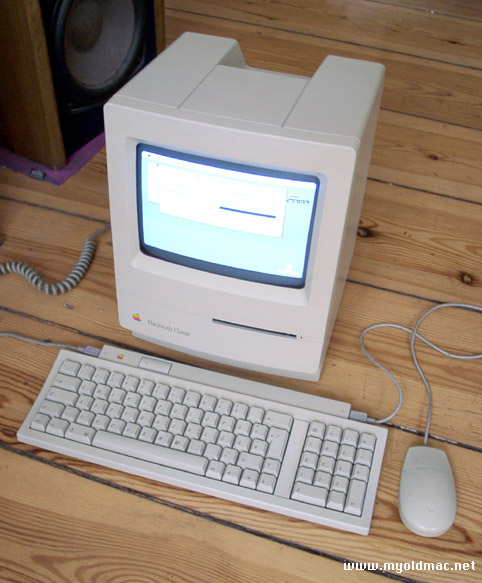
I think the reason for the use of backspace, is that many Mac keyboards are missing the delete key.
MacClassic.jpg
 
so, the redquick generates a proxy from the camera files,

what format does the red write to then?

Their own brilliantly conceived wavelette-based media file(s). (The drives are FAT32 which means they are limited to 4 GB chunks, presumably.)
 
I think the reason for the use of backspace, is that many Mac keyboards are missing the delete key.
MacClassic.jpg
Interesting. I assume that's a pretty old model there, but looking at that pic I'm sure that's where it stems from. You learn something new every day!

I admit that most of my frustrations have to deal with the fact that the Mac does everything differently and I'm just not used to it. I'm not convinced that the Mac does them any better (like our previous example), but I have been a PC user for over 20 years and I suppose that will take a little while to put aside. For instance, it really bugs me that there's no way to just maximize a window to fill up the whole screen so I can see everything well. The little green "+" button seems to have different behaviors for different windows... but it isn't doing anything I want it to. :)

Still, I'm trying to be open-minded about it... mostly because I know that with Red it's going to be inevitable. Not only am I convinced that the integration is going to be far and away the best in Final Cut, but the app that I used to use exclusively to edit video with on the PC (Vegas) has gone down the tubes. If I have to pick up and learn something new from scratch, it might as well be the one that's best suited for Red. I'm just glad my keyboard has a delete key. :-)
 
I don't think the camera automatically generates a QT wrapper. It has to be passed though a (quick but off-camera) program called REDquick first.
I am guessing that both the camera and Redquick can generate the proxy files. (They announced/mentioned Redquick after; I don't think the original camera proxies will be replaced by Redquick.)

The camera will generate proxies for one resolution.

With Redquick, you can presumably specify whether you want 2k, 1k, or 0.5k res proxies. Maybe in the future you could even specify if you want timecode overlays/burns or not.
 
I will resist Mac with all my strength. What's the point in buying a $10,000 editing computer if I can't play video games on it? :)

You have time to play games? ...Lucky bastard. :clown2: Hehe, most of the good games come on Mac too, but I still have my PCs and use one for games. I haven't really played a good game for about a year though. I spend too much time here, but that's different, I'm generating previews and babysitting renders.

Anyway, no, you don't need a Mac to use RED. RED will work with any Quicktime capable NLE software via QT wrappers over REDCODE. Apple is including native REDCODE support in a future update of FCP, so that will be nice.

I'm thinking that for most people, unless they're already established with something else like Avid, either a Final Cut Studio or Adobe solution will be ideal. And the Adobe solution is looking very attractive since it's cross-platform.
 
The Adobe solution is looking very attractive since it's cross-platform.
Yeah, that's a really good point. It also has better Blu-ray support - right now, anyway - which is important to me, because there's really no other way to get your HD content into consumer hands. 40GB files aren't too reasonable for mass downloading.
 
Interesting. I assume that's a pretty old model there, but looking at that pic I'm sure that's where it stems from. You learn something new every day!

I admit that most of my frustrations have to deal with the fact that the Mac does everything differently and I'm just not used to it. I'm not convinced that the Mac does them any better (like our previous example), but I have been a PC user for over 20 years and I suppose that will take a little while to put aside. For instance, it really bugs me that there's no way to just maximize a window to fill up the whole screen so I can see everything well. The little green "+" button seems to have different behaviors for different windows... but it isn't doing anything I want it to. :)

Still, I'm trying to be open-minded about it... mostly because I know that with Red it's going to be inevitable. Not only am I convinced that the integration is going to be far and away the best in Final Cut, but the app that I used to use exclusively to edit video with on the PC (Vegas) has gone down the tubes. If I have to pick up and learn something new from scratch, it might as well be the one that's best suited for Red. I'm just glad my keyboard has a delete key. :-)

I recently bought a Mac from product placement on a show I worked on. Yes, it took a steal of a deal + bootcamp + RED to get me to buy it. But I have a feeling with RED's background / NAB demos, the BEST work flow will be available first for Apple users.

For those of you who may be adding a Mac into your toolkit, I highly recommend "Double Command", which is shareware app that allows for re-mapping of the keyboard.

There are many options it has for remapping keys (Ctrl, Command, Delete, Function, etc.) and saving those changes.

For example, it helps if you are used to the Windows Copy/Paste method (which uses the control key, rather than the Mac's command Key), which is just too cramped for easy copy paste using the keyboard.

One other change I use all the time is remapping the forward slash key to be a delete key, since the Mac Book Pro doesn't have one (!). I know you can shift-backspace, but who wants to have 2 key strokes for delete when typing any text document? Not me.

Apple is a great company, and has created some great tools for the industry. Unfortunately, they also can be a bit stubborn. :) It took them 20 years to admit that having a 2 button mouse wasn't that bad of an idea... but even so, they couldn't just add a button, they had to make a mighty mouse that could sense where your fingers are, and sometimes get it right and sometimes not. I would have preferred 2 buttons years ago.

As far as a 2 button track pad, there is an option now for a 2 finger "tap" for right mouse button, that helps when you can get it to work right, and also other 3rd party utilities for mapping areas of the track pad, but the Mac Book Pro's single button just is wasted at being that size with only one function.

Here is the link to Double Command, I hope it helps..


http://www.versiontracker.com/dyn/moreinfo/macosx/12295
 
For example, it helps if you are used to the Windows Copy/Paste method (which uses the control key, rather than the Mac's command Key), which is just too cramped for easy copy paste using the keyboard.

One other change I use all the time is remapping the forward slash key to be a delete key, since the Mac Book Pro doesn't have one (!). I know you can shift-backspace, but who wants to have 2 key strokes for delete when typing any text document? Not me.

Here is the link to Double Command, I hope it helps..

http://www.versiontracker.com/dyn/moreinfo/macosx/12295
Thanks, Casey. Just from your description, it sounds like that program may be very helpful. The copy/paste thing was definitely bugging me, too. Fortunately, I'm using the same keyboard and mouse I use with my PC, so that made the transition a bit easier. Just personally, I can't stand either of the ones that come with the Mac (but again, this is just as much me being used to my components as anything else).

Your comments about the stubbornness also ring very true; sometimes I think this helps them but often it does not. My only hope is that with their market share continuing to grow, they will pay attention to the influx of feedback that they're receiving from new users. They do a lot of things well, but some things just don't make any sense whatsoever and "stubbornness" isn't a very good excuse for that. We need more companies like RED who respond and react to user input.

So if anybody has any "how do I...?" Mac questions, I can answer them.
If I can't even figure out how to delete a file, you may regret extending that offer... :)
 
Mac or PC?
the mac is a x86 pc.
nothing more, nothing less.

using the osx, you won´t have 4k finishing - not with fcs, at least, as it only works with 2k.

some examples for pcs with full 4k and the windows/linux operation system instead of osx :
full 4k with redcode support, there is assimilate scratch.
even faster (multistream 4k with realtime cc) would be dvs clipster.

- however, they are somewhat more expensive than a monstered out 8 core intel apple with storage.
 
Microsoft Mouse...

Microsoft Mouse...

As someone who jumps back and forth from Mac / Final Cut to PC / Vegas hourly, I find that equipping every computer with an identical Microsoft Intellimouse Explorer helps tremendously. Whenever I buy a Mac, the first thing I buy for it is one of these mice. All the buttons are supported from plug in, but downloading actual OSX drivers (currently on version 5, I believe - http://downloads.zdnet.co.uk/0,1000000375,39065851s,00.htm) enables key mapping and the like. I really believe that having PCs running Vegas and Macs running Final Cut Studio is truly the best of both worlds. When I need to do quick cutting for end-to-end work (especially DV) Vegas is great, but when I am working on something that needs integration in the professional world, FCP is there for me. Different projects, different tools. Most carpenters have more than one hammer, as they say.
 
Back
Top