Welcome to our community

Be a part of something great, join today!

  • Hey all, just changed over the backend after 15 years I figured time to give it a bit of an update, its probably gonna be a bit weird for most of you and i am sure there is a few bugs to work out but it should kinda work the same as before... hopefully :)

Desaturated shadows?

Christoffer Glans

Well-known member
Joined
Jun 11, 2007
Messages
4,993
Reaction score
36
Points
48
Age
41
Location
Stockholm, Sweden
So, after many tests, I've seen something keep appearing in regular grades and IPP2 conversions. The shadows of a shot from Komodo seem to lose a lot of colors. It feels like at the lower end, colors lose a lot of color information and things get very "muddy" and grey instead of rolling off nicely. I'm not sure if this is due to IPP2 or what is going on. I've tried to look at a number of different displays, but see it on them all.

To illustrate, here's a cutout of one shot.
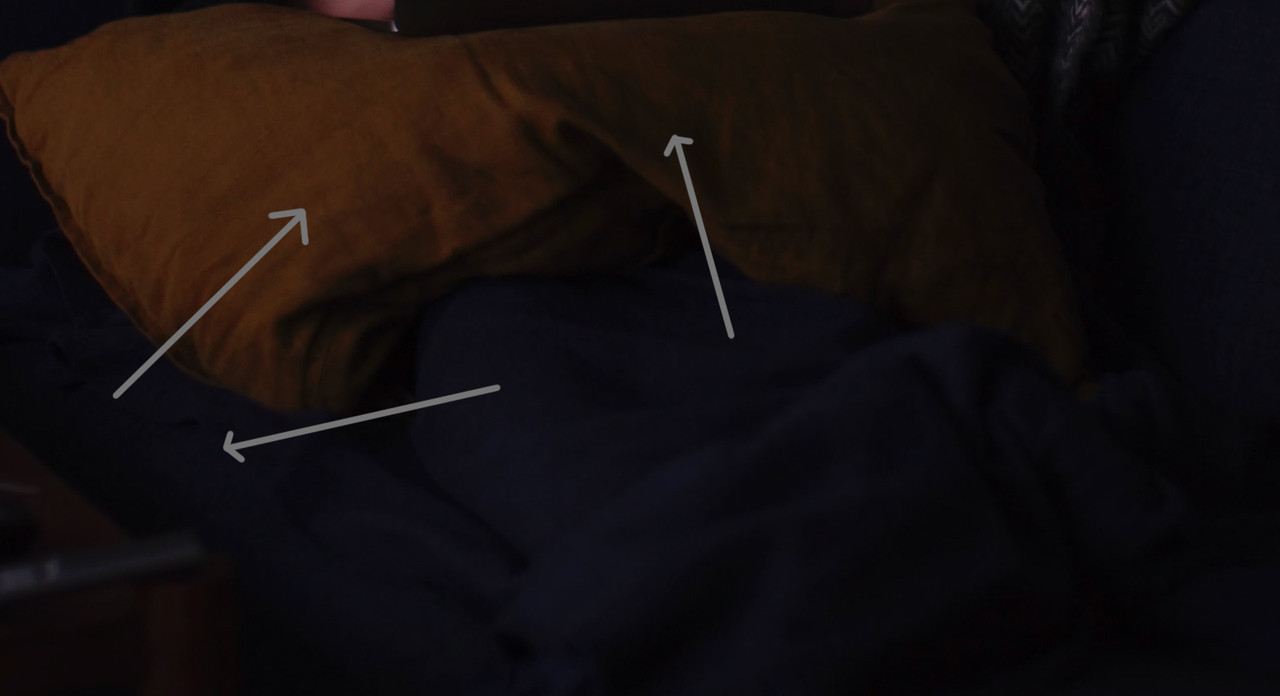


There's no real pushed grades here, just a regular IPP2 Rec709 conversion, but notice how the yellow pillow's darker areas just lose the yellow color as soon as it gets under a certain luminance level. And other areas of the image that just gets "patchy".

If this is just a conversation thing and there are methods to get rid of it, that would be good to know, because whenever I do low key stuff it feels like the entire image gets a bit blotchy with desaturated areas that should roll off a bit nicer than they do. Don't really notice this on my Dragon.
 
We can punch that up in post. I generally tell people to watch the key-to-fill ratio and fill a little more, knowing we can crush it down more in post if we need it. Of course, tests will give you the best answers. Assuming this is what you're using, I wouldn't look on Red Cine-X Pro as anything but a temp dailies tool -- but it's fine for that.
 
We can punch that up in post. I generally tell people to watch the key-to-fill ratio and fill a little more, knowing we can crush it down more in post if we need it. Of course, tests will give you the best answers. Assuming this is what you're using, I wouldn't look on Red Cine-X Pro as anything but a temp dailies tool -- but it's fine for that.

It's not really about having fill lights and such, some shots need to be low-key and you can't get shots without shadows anywhere, there will always be contrast. Desaturation of the low end is very visible on faces where the skin tones just take a deep dive into nothing at a certain shadow value.


I'm not sure what is going on here, because it seems like the tonal curve just goes down close to shadows and then hard cuts to pure black from being a grey mess. Tried to counter this by grading from a scratch LOG3G10 starting point, but even if it's possible to smooth out the shadow curve, there are no colors there.

We know that Komodo doesn't use colors at its last stop of highlights because it's generally unnecessary since it roll off the highlights. But for low key it's much more visible if it does so there as well. There seem to be a cutoff point where colors just disappear and it creates a color hard edge look to the roll-off into shadows. Instead of nuances going into pure black, color cuts off before it should and it doesn't look so good.

So how can this be countered in post? Are there any errors to the IPP2 conversion that needs a firmware update or something? I'm not sure how to counter this and it makes low-key shots look rather dull. Komodo handles really well in high key, but low key dark shots become a grey mess.
 
Noticed the same thing and stopped using Komodo, probably it's a similar approach to the last stop of the HLs like you mention, probably to keep chroma noise under control, but at the expense of lack of chroma info in the shadows in general.
 
Noticed the same thing and stopped using Komodo, probably it's a similar approach to the last stop of the HLs like you mention, probably to keep chroma noise under control, but at the expense of lack of chroma info in the shadows in general.

Did you notice this in comparison to any DSMC2s? I would wish to hear from Red about this. Is it hardcoded into the hardware or can this be improved with firmware updates? This is by far the worst thing I've seen about the image out of Komodo so I really hope it can be fixed in some way.
 
i’ve seen this happen on exports from dsmc2 ipp2 cameras. generally it is very dark low contrast part of the image. i’ve only done this in Davinci Resolve.

what is your conversion process?
 
Doesn't matter really, you can see it in-camera. Did some test shots of changing aperture and on the built-in screen, my link cabled iPhone, in Resolve when playing the material and in the export. Here's an example of it, especially the blue sofa textile losing saturation at an almost sharp edge. There's no roll-off for saturation at all.


Can someone at Red maybe explain this? Because it doesn't look good and especially in a low-key shot if the face of an actor gets this edge cut-off, it doesn't look good at all. As long as this isn't hardcoded into the sensor in some way, it should be addressed in an update to the color science.
 
have you not talked to red tech support first?


If it's something that all cameras have because it's part of Komodo's design, Red tech support can't do much about it. This needs to be addressed by the ones who designed how the saturation curve works over the DR range.
 
Red has some issue with color space conversations, as can be noted in this thread about the EVF imaging chain:

http://www.reduser.net/forum/showthread.php?183398-RED-OLED-EVF-settings-poll&p=1924791#post1924791


maybe all of this is interrelated somehow. the evf has an exagerated version of what you are showing in your clips.

Only thing I can see in that thread is that it's about the video feed from the camera, but this is about what you actually get in your R3D files.
 
you mentioned it was the rec709 conversion, so those two things would be interlinked, at least from a topical point of view.

the raw files having the greyed out bits in the shadows, then yeaj, that might be the algorithmic image processing that the Komodo does to get more DR. i’ve seen it in IPP2 on r3d from dsmc2 cameras, but push and pull and some of it goes away. and the fault may have been my davinci resolve workflow is off somewhere.


the bigger picture issue may be the way red is doing color management and video output monitoring. it is all interrelated at some point, starting with the R3d.

i know a monitoring issue won’t fix your r3d, but if there is a bigger issue with the ipp2 workflow, seems red could take a big look at their whole process and have a more complete fix, rather than patchwork fixes. if that makes sense?


but in specifics to your issue, are you seeing this grey stuff even when messing with the curves tool in redcinex? or are you seeing this in all of the NLE’s? or just the one you are using? what are your monitor settings?
 
Last edited:
Christoffer, send me R3D snapshots of what you're experiencing please.

Was going to write up a long post covering a few things, but sort of need to see the images before I go hard into three topics.
 
Can you post a .r3d frame? It's hard to tell what can/can't be recovered from a normalized image. Also it's hard to tell how buried in the noise floor it is? Is it the last/lowest stop that would be unusably noisy anyway or is it up in the lower-mids?

If it is in fact by repeatable/by design, maybe these colourless highlight and low-light stops are how they managed to get their advertised (monochrome) DR numbers on a Global Shutter. And If that's the case, maybe they could re-introduce a Rolling-Shutter mode to get it to behave like the rest of the line-up (as they were originally intending).
 
Last edited:
i know a monitoring issue won’t fix your r3d, but if there is a bigger issue with the ipp2 workflow, seems red could take a big look at their whole process and have a more complete fix, rather than patchwork fixes. if that makes sense?


but in specifics to your issue, are you seeing this grey stuff even when messing with the curves tool in redcinex? or are you seeing this in all of the NLE’s? or just the one you are using? what are your monitor settings?

Yeah, I think that some update to IPP2 might be the way, maybe a IPP3, taking a sneak peak at what Light Iron did or something. At the same time, many studios use ACES for their grading and if this doesn't disappear in ACES, there has to be some firmware update to the actual cameras on how they roll off saturation.

Seeing it on all monitors while shooting and in all softwares in post, Redcine, Resolve etc. But this doesn't seem to be related to just my camera, head others have this as well. Just pick up your camera and shoot something with color while increasing the aperture. At a certain point the colors just "switch off" while the luminance still has bits to go.
 
Christoffer, send me R3D snapshots of what you're experiencing please.

Was going to write up a long post covering a few things, but sort of need to see the images before I go hard into three topics.

https://we.tl/t-INtTwurjXS

Just a snapshot doesn't work since it's about a cut off point for colors in shadows. In those shots, notice how the colors "turns off" with lots to go on the luminance. The chart and the candle with the blue glass, the sofa all becomes a grey "mush" instead of following the image darkening in line with the rest.

It might seem subtle, but in a low key shot where a person has a key light and the other side is in shadow, there's sometimes a clear saturation cutoff and then the entire shadow area is just grey with the darkest parts also at a hard cut. Like a visible step from pure black to some variations of grey and then color in three steps. There's no rolloff between any of them.

It really looks like a conversion problem, how it handles the DR range. If it's grey at the bottom stops like that, then a tweak to IPP2 would be to use an additional stop for a rolloff at the low range, otherwise it seems we get this weird hard cuts.
 
The camera shoots raw. What you see when looking at the images on a screen is just interpretation of that raw data it could be done in many different ways. Even as a straight / nothing added to it IPP2 import there his quite a few different ways / curves to use all treat the shadows, highlights and everything in between differently.

To evaluate the image captured you kind of need a reference set of data to compare to same shot different camera or such. Just looking at these images does not say much, not sure what the lighting conditions was as I have not looked at the raw file. But the further away from a neutral balanced light you get the worse the camera will preform in the low and high ends of the spectrum as that's where the signal clipping occurs first. For example if shooting in tungsten ligtht the B channel is very limited, in the lowlights its often close to none existing, the next chanel to go flat in such setup is green, then its only one solo red chanel to go by. Color science can compensate for these things, likely the scene was not shot with complete red colors in the lowlight so what ever is registering in the R chanel is then often better to interpret as more neutral.

Same goes for highlights. As shown in that stop chart test of komodo. When one or 2 channels clips IPP2 interpret incoming light as more neutral / curves it of to white. Which is normal and how our eyes and celuoid film work as well. For example a overexposed red break light of a car does not look 100% red on a celluloid exposure, it will read as close to 100% white, not 100% but close to it, the film rounds it of / does not let anything reach 100%. A feature that most people find appealing to look at. So in that sense I think the dynamic rounding on komodo in IPP2 make sense in a filmic kind of way. Sure, it makes it difficulty to define exact number of stops that the camera can capture etc. as there is some magic math going on between the channels in the developing process. But what ever extends the range is usually for the better if you don't use your camera as a lab instrument to capture wavelengths of lights or such then it would be a complete nightmare, but as most use them just to capture appealing looking images I think its a great feature.


Chrisoffer what happens if you bring up lowlight saturation? If nothings there the shot is underexposed as you need to feed some light to the sensor to define colors.
 
It's 2:20am here and I'm about to hit the bed, got a meeting in the AM.

But immediately the first thing to do is toggle Chromatic Noise Reduction on and off. Gets you a bit more down there.
 
The camera shoots raw. What you see when looking at the images on a screen is just interpretation of that raw data it could be done in many different ways even as straight / nothing to it IPP2 import there his quite a few different ways to go, all treat the shadows, highlights and everything in between very differently.

To avaluate the image captured another you kind of need a reference set of data to compare to.

What happens if you bring up lowlight saturation? If nothings there the shot is underexposed as you need to feed some light to the sensor to define colors.

Yes, this is why I'm talking about how IPP2 handles the files, especially from Komodo. IPP2 was developed before this sensor so I'm wondering if there are some problems with how IPP2 handles Komodo's RAW files. You can check the files I linked in the previous post.
The issue isn't underexposed shots, but how low-key shots tend to get the lowlight parts of the image and the transition between highlights and lowlight in those shots. If there's a saturation cutoff point and the darkest part of the image handles the lowest part of the DR in a messy way, all low light areas of the low-key shot will be a grey mess while the highlights and mid parts will look fine.

This is why all high key shots, like outdoors daylight looks so good on Komodo, because none of this is really visible there. But as soon as you do a low-key shot it's noticeable. If you look at the original post you can see how the pillow gets "spots" of grey and there's no rolloff for its color, it just cuts to a grey or very desaturated color. But check out the shots I linked to above and see for yourself. My idea is that it's a problem with how IPP2 handles the shots, that tweaks to the color science might improve how it handles the lowest range of the DR span.
 
It's 2:20am here and I'm about to hit the bed, got a meeting in the AM.

But immediately the first thing to do is toggle Chromatic Noise Reduction on and off. Gets you a bit more down there.

Did this, but it doesn't really reduce the issue. But if you have time, see if you can spot the same thing as I do. I find it very noticeable on the blue sofa cover when increasing the aperture. At a certain point, it's like a rim going over the sofa and the saturation cuts off before we've gotten to the end of the DR range's lowest part.

The interesting thing is that increasing ISO gives you color back, so this is why I think there's something bonkers with the IPP2 conversion.
 
Back
Top