Christoffer Glans
Well-known member
So, after many tests, I've seen something keep appearing in regular grades and IPP2 conversions. The shadows of a shot from Komodo seem to lose a lot of colors. It feels like at the lower end, colors lose a lot of color information and things get very "muddy" and grey instead of rolling off nicely. I'm not sure if this is due to IPP2 or what is going on. I've tried to look at a number of different displays, but see it on them all.
To illustrate, here's a cutout of one shot.
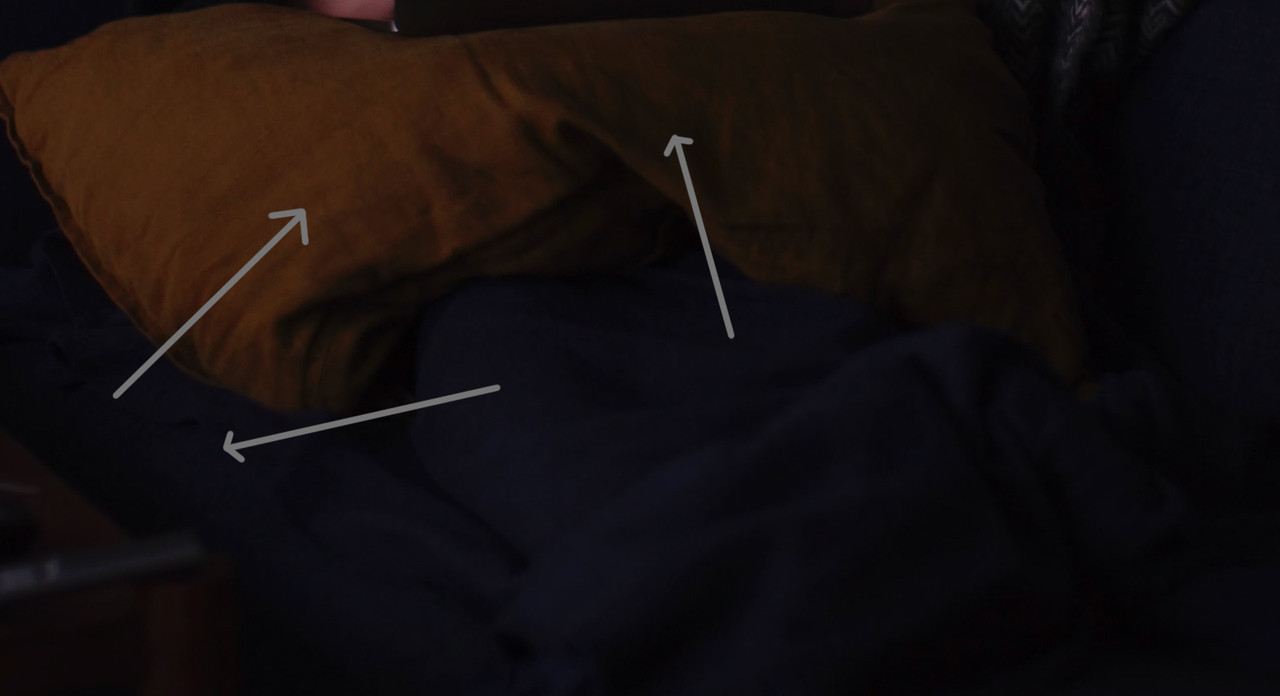
There's no real pushed grades here, just a regular IPP2 Rec709 conversion, but notice how the yellow pillow's darker areas just lose the yellow color as soon as it gets under a certain luminance level. And other areas of the image that just gets "patchy".
If this is just a conversation thing and there are methods to get rid of it, that would be good to know, because whenever I do low key stuff it feels like the entire image gets a bit blotchy with desaturated areas that should roll off a bit nicer than they do. Don't really notice this on my Dragon.
To illustrate, here's a cutout of one shot.
There's no real pushed grades here, just a regular IPP2 Rec709 conversion, but notice how the yellow pillow's darker areas just lose the yellow color as soon as it gets under a certain luminance level. And other areas of the image that just gets "patchy".
If this is just a conversation thing and there are methods to get rid of it, that would be good to know, because whenever I do low key stuff it feels like the entire image gets a bit blotchy with desaturated areas that should roll off a bit nicer than they do. Don't really notice this on my Dragon.