Welcome to our community

Be a part of something great, join today!

  • Hey all, just changed over the backend after 15 years I figured time to give it a bit of an update, its probably gonna be a bit weird for most of you and i am sure there is a few bugs to work out but it should kinda work the same as before... hopefully :)

DaVinci Resolve waveform monitor/RGB parade bug

Brian Boyer

Well-known member
Joined
Jan 4, 2011
Messages
943
Reaction score
6
Points
0
We are pleased to announce the release of DaVinci Resolve 11.

There are full licensed versions for Mac, Windows and Linux OS available on our support web site in the "Latest Downloads" section. These are no charge upgrades for existing customers. Also available at no charge are DaVinci Resolve Lite for Mac and Windows.

For new users or system up-graders, please refer to the new configuration guides for Mac, Windows and Linux. These can be found in the support site in the section called "Latest Support Notes".

http://www.blackmagicdesign.com/support/family/davinci-resolve


THIS ISSUE HAS BEEN ADDRESSED AS OF VERSION 11.1.2.


Peter, I hate to do this but...

I REALLY wish BMD would fix the waveform monitor/RGB parade graphs in Resolve. They’ve been broken since Resolve 9 and, apparently, no one else has noticed or has and doesn’t much care. From what I’m told, they behave incorrectly in UltraScope as well.

You told me it was on the list of things to get fixed back in the middle of March of this year. You said it was on a very long list of things and, while not at the top, it wasn’t forever away and to give it a few releases. Well, that was 5 months ago. My patience is wearing a little thin.

Okay, I'm editing this post (and subsequent ones) from this point on to reflect some new information I've learned, correct some mistakes and clarify where I think the bug in Resolve actually exists.

What I was calling incorrect behavior from Resolve (and FCP X) is not entirely accurate. What I characterized as "traditional" behavior from Premiere isn't accurate either.

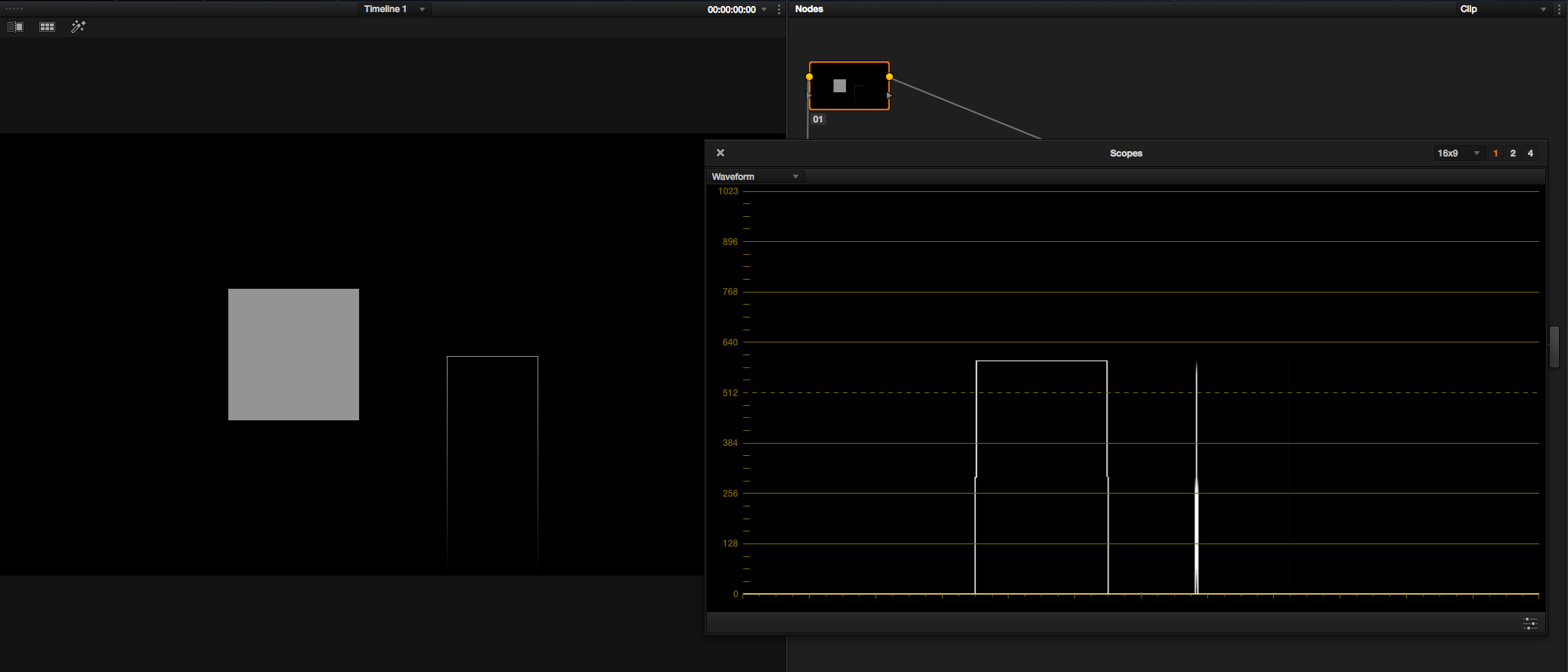
I was informed by Adam Wilt that Resolve and FCP X are actually going through a lot of trouble to recreate the trace lines that analog WFMs displayed when values changed abruptly. However, those trace lines were quite a bit dimmer than what Resolve and FCP X currently show.

So, the two vertical lines extending down in the graph are NOT incorrect, per se. They are much too prominent and add unnecessary clutter, if you ask me.


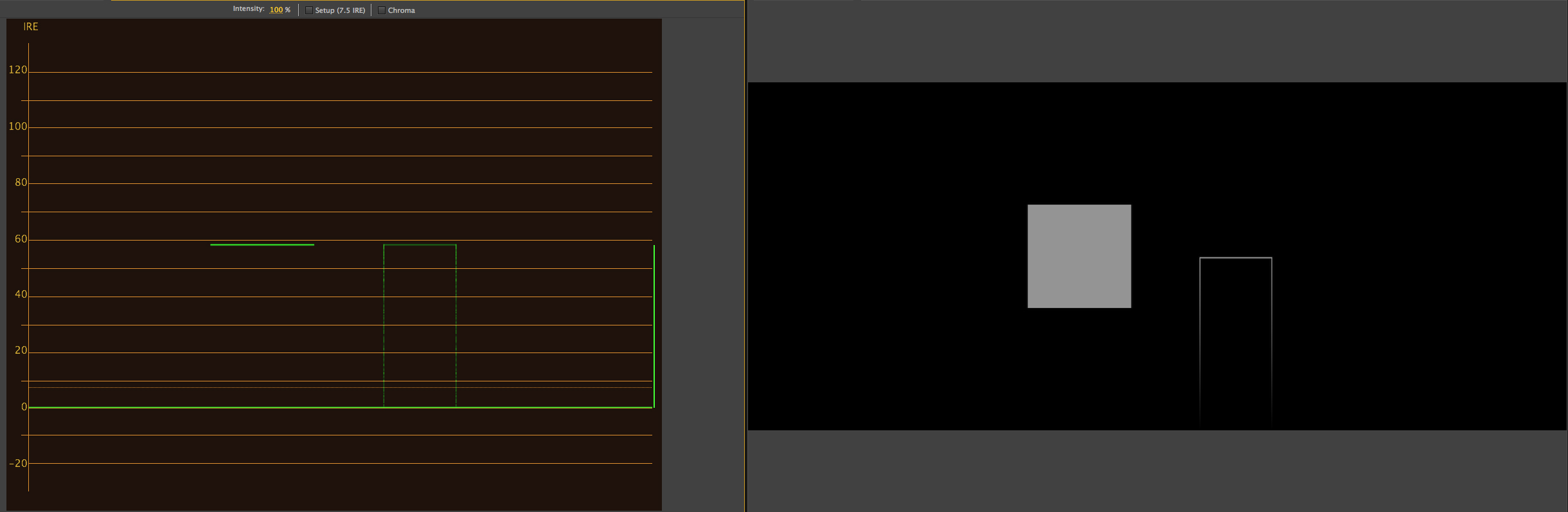
Premiere CS6 screenshot (preferred behavior, IMO - the vertical line at the right of the graph is normal for Premiere and represents the total brightness range):
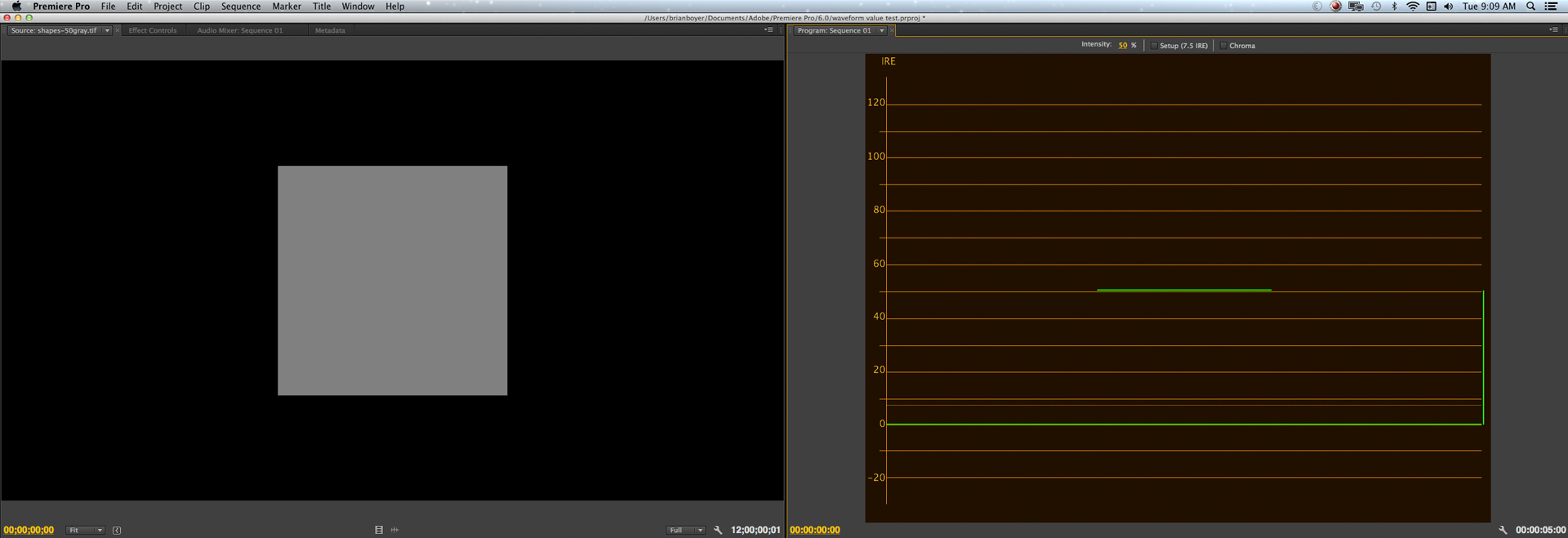
shapes-50graypremcs6.jpg


Resolve 10 screenshot [NOTE: the behavior is the same in version 11] (undesirable behavior, IMO, unless the vertical trace lines are made to be quite a bit dimmer). :

shapes-50grayresolve.jpg


Resolve does seem to have a bug that I was mistakenly conflating with the prominent vertical trace lines you see in the waveform above. Since I had never seen any other software behave like this, I thought this was also indicative of the bug, but it turns out it's not (although it kinda sucks from a design and readability standpoint).

There are more observations on the behavior here: http://bit.ly/1t12YCg
 
Last edited:
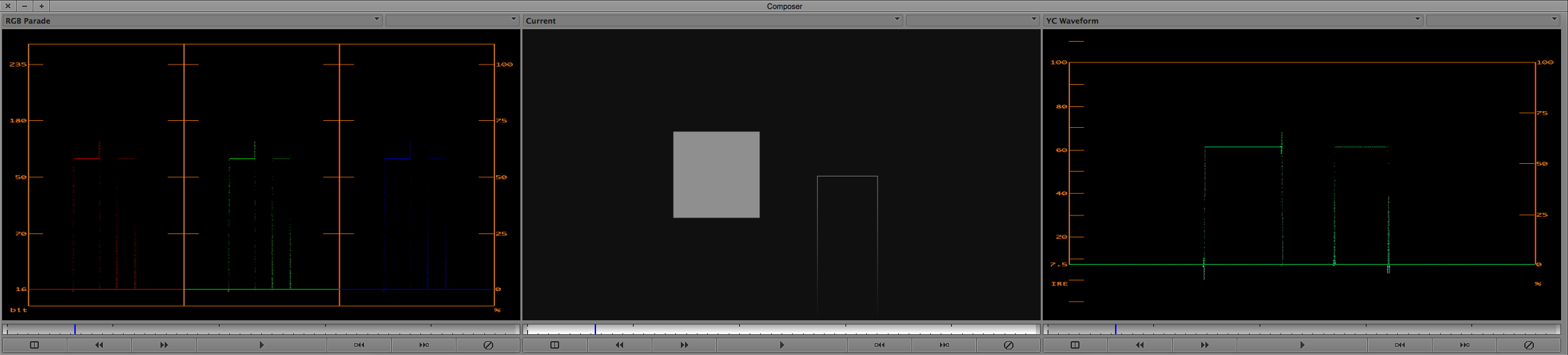
I suspect this may have to do with PC vs. Video levels. Brian, is your pattern above 0, 128 or 16, 126? (Black background and gray window) A lot of apps tend to remap the content range. Using 8-bit values for simplicity.

I use a Tek WFM 5250 and it plots what comes in, I just need to know if the HDMI/HD-SDI input(s) are PC or Video.
 
These tracing lines are also on their SmartScope Duo. It's infuriating and makes the Waveform completely and utterly unusable on it. On my DIT cart I've got it set to Histogram and Vectorscope instead. The Vectorscope also has tracelines, but it's at least still discernible what's going on.

Unusable. Really, I can get used to a lot, and I can overlook a lot, and if I'm saying it's unusable, it means that I tell anybody and everybody that will listen that it's goddamn unusable. Seeing as how a Waveform is much more useful than a Histogram in figuring out *where* a certain thing in the image is, well . . .
 
The scope shows a trace of the signal. See the link to a real Tektronix scope here (showing colorbars):

http://en.wikipedia.org/wiki/Waveform_monitor#mediaviewer/File:Waveform_monitor.jpg

Run the graphic I provided through a Tektronix WFM and tell me what you see. It won't be those two vertical lines extending down to the bottom of the graph. A rep from BMD did this and confirmed the Resolve scope is behaving in a non-standard manner.

A bug has been acknowledged. It's now a matter of how many people are aware it's there and how much longer it will take to get fixed. It's 5 months and counting from when I alerted them to it. It's been over a year since Resolve 9, when the big first appeared.

I have a copy of Resolve 8.2.2 in which the WFM behaves as expected.

EDIT: Actually, the graphic above was not the one that illustrated the bug. You're right about the trace. I do have a problem with how Resolve draws the trace lines so prominently. I prefer they not be there at all. Short of that, I would like them to be quite a bit dimmer.
 
Last edited:
These tracing lines are also on their SmartScope Duo. It's infuriating and makes the Waveform completely and utterly unusable on it. On my DIT cart I've got it set to Histogram and Vectorscope instead. The Vectorscope also has tracelines, but it's at least still discernible what's going on.

Unusable. Really, I can get used to a lot, and I can overlook a lot, and if I'm saying it's unusable, it means that I tell anybody and everybody that will listen that it's goddamn unusable. Seeing as how a Waveform is much more useful than a Histogram in figuring out *where* a certain thing in the image is, well . . .


I think all of BMD's products that contain a scope got the same bad code ported to them.
 
I suspect this may have to do with PC vs. Video levels. Brian, is your pattern above 0, 128 or 16, 126? (Black background and gray window) A lot of apps tend to remap the content range. Using 8-bit values for simplicity.

I use a Tek WFM 5250 and it plots what comes in, I just need to know if the HDMI/HD-SDI input(s) are PC or Video.

I'm not quite sure what you're asking about 0, 128 or 16, 126. Or, more accurately, I know they are but don't how they relate to what you're asking. Does that make sense?

If you mean what I think you mean, wouldn't the WFM just represent the remapped values as slightly moved horizontal lines (a slightly higher line for the black bg, for example)? It doesn't seem like it would change the way they're supposed to be drawn on the graph.

I created the gray square on black in an 8-bit (I believe) Photoshop file. I used that configuration for simplicity's sake because it's easy to imagine what that would look like on a WFM, given how they work.
 
Last edited:
What RGB values did you use for the black background? 0 or 16? 0 is PC black and 16 is video black in 8-bit. What RGB value did you use for the gray window? 128 is 50% in PC world and 126 is 50% in video world.

The WFM is converting the RGB file into YCbCr. It may be adjusting the levels while performing the conversion. That could be where the problem is.
 
What RGB values did you use for the black background? 0 or 16? 0 is PC black and 16 is video black in 8-bit. What RGB value did you use for the gray window? 128 is 50% in PC world and 126 is 50% in video world.

The WFM is converting the RGB file into YCbCr. It may be adjusting the levels while performing the conversion. That could be where the problem is.

Oh, okay. I follow you now. I originally used 0 for black, 128 for gray.

I just did it using 16 for black and 126 for gray. It makes no difference other than shifting the horizontal lines, as I suspected. Those pesky vertical lines are still there.

So there's no confusion, this isn't just a problem I'm having with a specific graphic. All of us are experiencing it. It's just that many people didn't notice they were. Like I said, the bug has been acknowledged.

I encourage everyone to test images of their own making containing vertical lines (even a circle will cause the vertical lines at the very left and right edges) from which they can predict the outcome on the graph before they even see it. Then, compare it to any other WFM they have access to.

Granted, this entails knowing what a WFM is supposed to be showing you, but that shouldn't be a problem for this crowd.
 
Last edited:
It was brought to my attention that FCPX and Avid Symphony have the same vertical line behavior as Resolve.

Symphony's lines are more like lightly sprinkled, randomly spaced, vertically aligned dots. FCPX's lines are more egregious, but not quite as bad as Resolve's.

It was also suggested that this may be an intentional design choice on the part of the software developers. I certainly hope not, as the lines serve no discernible purpose, clutter and complicate the display, obscure actual image info and fundamentally change how waveform monitors have behaved for decades and how they should be read.

EDIT: According to Adam Wilt, the way Resolve and FCP X draw these waveforms is deliberate and they went through more trouble to make them behave similar to how analog WFMs do. Where I think they failed is by making the lines much too prominent, especially in relationship to the actual image info.

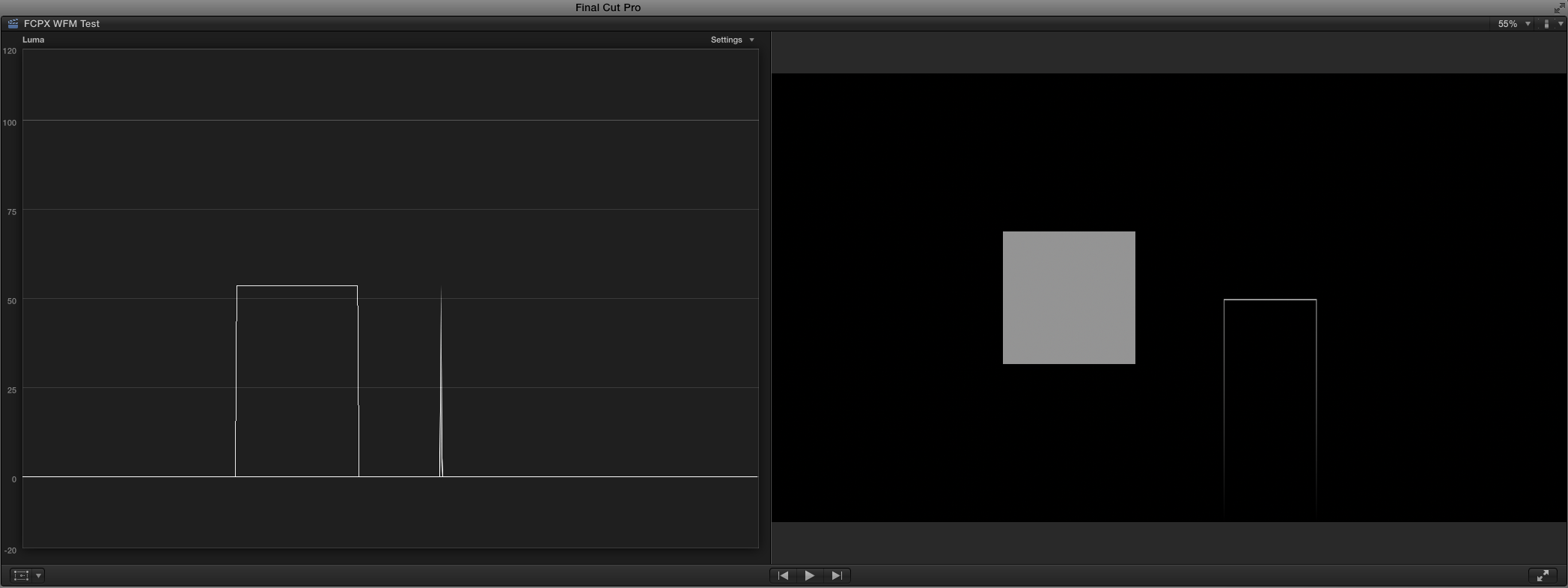
Here's FCPX doing some of its nasty business (all images courtesy of Gunleik Groven):

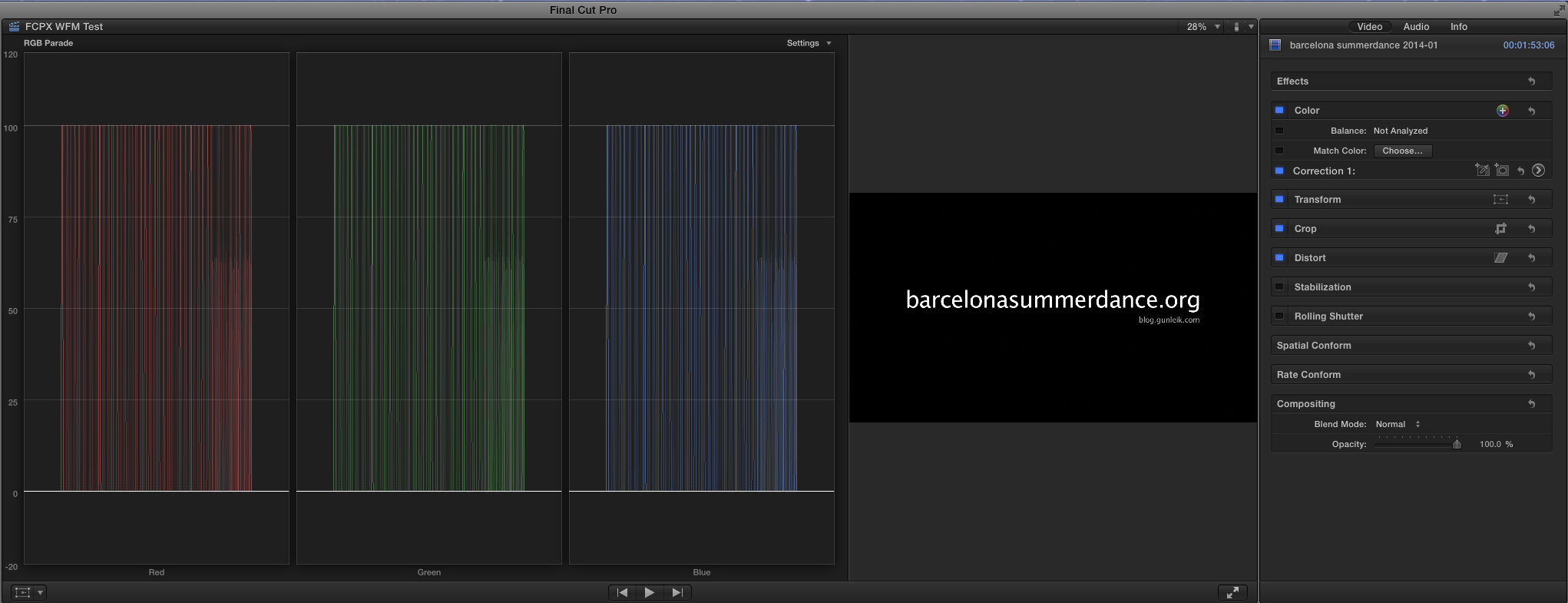
FCPX-white-text-on-black-bg.png


Look at what the tiny bit of text in the letterbox is doing to the waveform monitor. It seems to be indicating there are dark areas on the sides of the image that aren't really there.

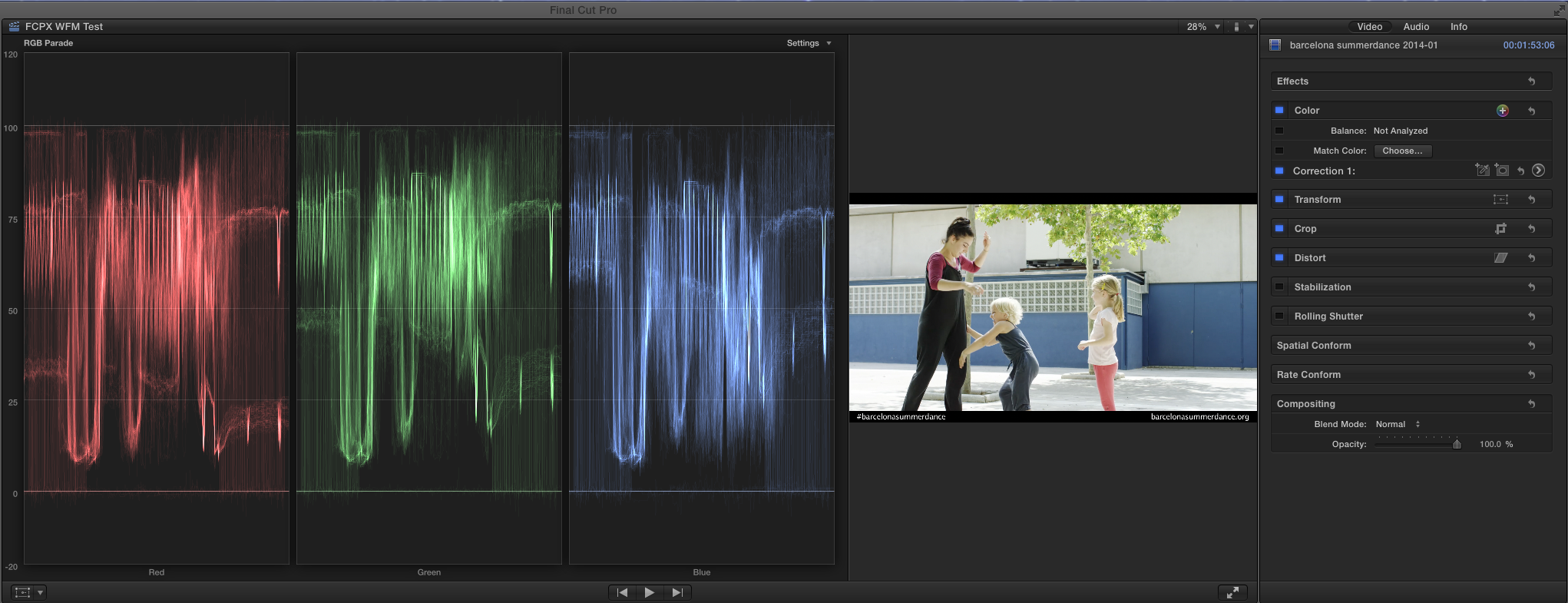
FCPX-kids.png


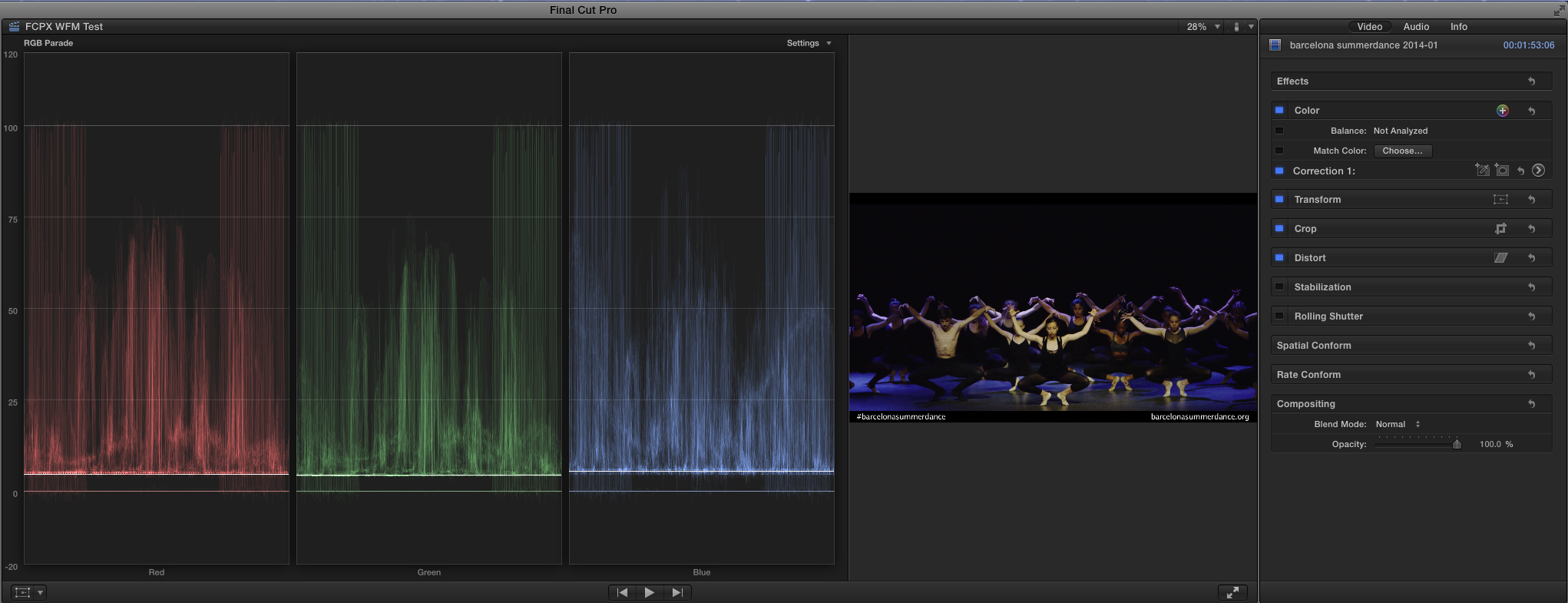
The opposite effect is happening in the mostly dark image. That same tiny text is making it seem as if there are very bright areas in the image that aren't there. Gunleik has the original R3Ds of these images and I'm quite sure they don't appear with all the extra lines in Redcine-X like they do in Resolve and FCPX.

FCPX-dancers-on-dark-stage.png
 
Last edited:
EDIT: Okay, after some enlightenment from Adam Wilt, I'll stop referring to Resolve's behavior as a bug and start referring to it as not preferable, dubious or confounding.


Open images in a new window for larger versions.

As a reminder, this is how Resolve draws the gray square on black:

shapes-50grayresolve.jpg


And this is how Premiere CS6 draws that same shape (what I call the "preferred" way, for my purposes):

shapes-50graypremcs6.jpg


Knowing how WFMs usually work, I knew what it would take to draw the 50% gray square on black in Premiere CS6 the way Resolve and FCP X do it now. A 2 pixel wide vertical line on a traditional WFM can be generated by a 2 pixel wide vertical gradient from a higher luma value to a lower one (in this case, from gray to black).

If I place two of these gradient lines below and at either end of a non-gradated, horizontally oriented rectangle of the same brightness as the brightest value in the gradient, it should produce the same waveform as Resolve and FCP X draw when the image is only the gray square.

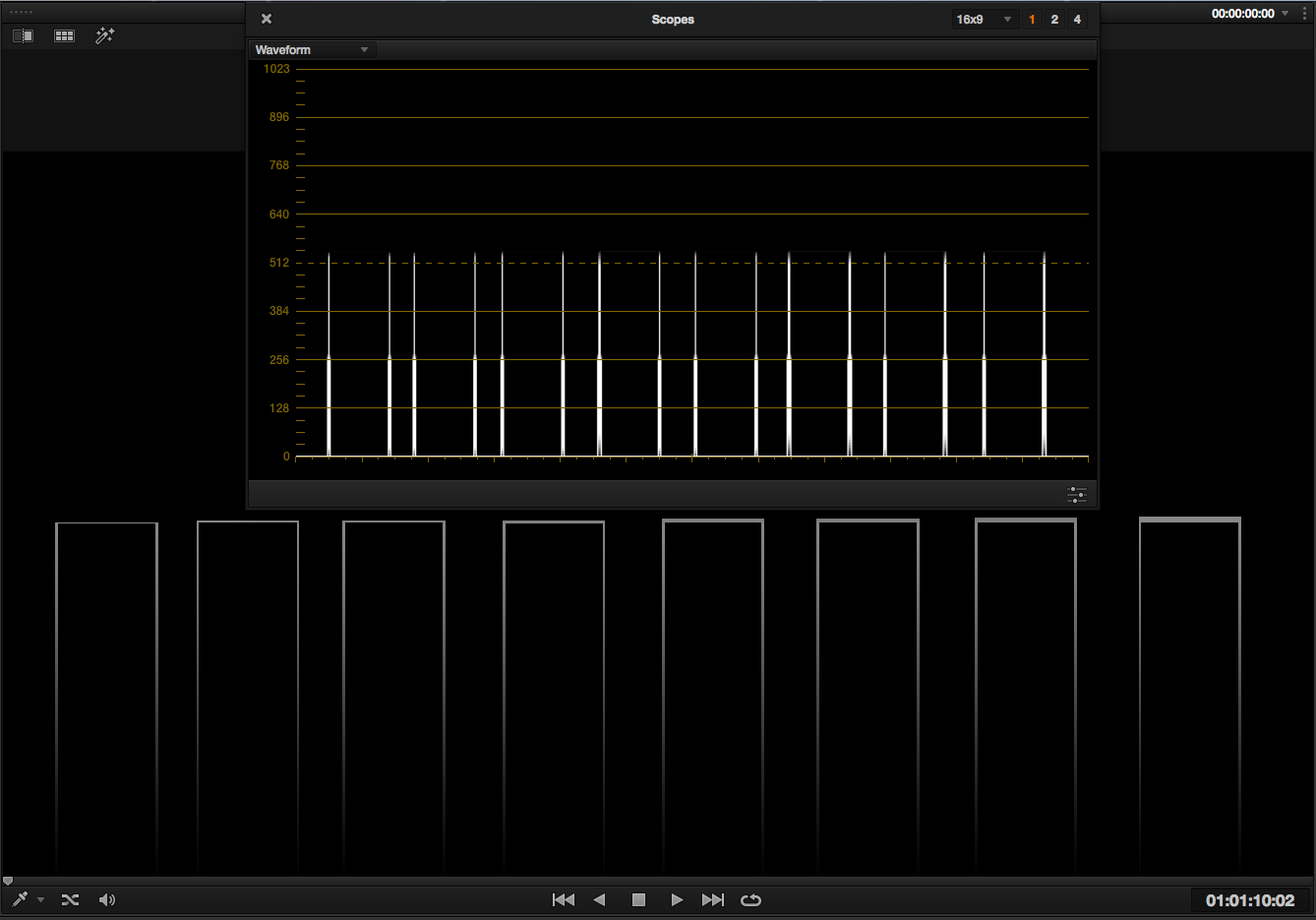
I made a graphic with both a square and the gradient line shape I just described.

grayscale-sqr%26grad_lines.jpg


I imported it into Premiere CS6, Resolve 11, FCP X 10.1.2 and Avid Symphony 8.0. Since Premiere behaves in the traditional manner, it held no surprises.

The square is drawn as a single horizontal line and the gradient line shape is drawn as the horizontal line with two vertical lines extending down to the bottom of the graph from both sides, like Resolve and FCP X draw the square.

Sqr-Grad_Line-PremCS6.jpg


Symphony also draws the outline shape correctly, even though it does show more "trace" in the waveform than Premiere does.

Sqr-Grad_Line-Sym8.png


However, Resolve and FCP X draw the gradient line shape without the horizontal line or the rightmost gradient line. They apparently draw the waveforms with bigger H and V subsampling steps than the other programs.


Resolve 11:

Sqr-Grad_Line-Resolve11.jpg


FCP X 10.1.2:

Sqr-Grad_Line-FCPX.png


Now, subsampling math aside, the biggest problem I guess I have with these two programs is they seem to give the "connect-the-dots" (as Adam Wilt refers to them) lines that I find so offensive more visual weight than the actual image derived waveform.

The shapes below have horizontal lines ranging in height from 1 to 8 pixels. You can barely see them represented in the graph and the 8 pixel version is no brighter than the 4 pixel version.


grayscale-grad_lines_1-8x4pixels.jpg


Resolve and FCP X seem to be working in a technically legitimate manner. In terms of design and functionality, it's still a poor choice, methinks. These are the best looking scopes on the market but the worst behaved, in terms of functionality and readability.

I wish they would strive to avoid the clutter. At the very least, they could dim the trace to minimize it and bring up the intensity of the image derived portions of the trace.
 
Last edited:
It's only THE most major pro coloring program, you'd think they'd be all over this fix. Hmmm
 
It's only THE most major pro coloring program, you'd think they'd be all over this fix. Hmmm
All of the major post houses I know of use external scopes, since the internal scopes within Resolve don't give you the whole story. Scopebox is only $99, plus the cost of a video card and a cheap computer.

Be glad we're not in the bad old days of (say) 6-7 years ago, when a hardware HD vectorscope was $30,000 and a hardware HD waveform monitor was about $25,000 (assuming Leader or Tektronix). The last standard-def scopes I owned cost about $1500 each. There are things in post on which you can't skimp; monitors and scopes are high on that list, since those are what anchor you to the outside world, not the "virtual" world on a computer screen.

Me, I just use the scopes within Resolve as a reasonable guideline for color, and if it's inserting very tiny white lines on a box test signal, I don't give a crap. As long as it's telling me the truth about overall color and brightness, I can roll with the punches and make decent pictures. I don't expect it to be perfect for the simple reason that the scopes are about 1% of the program (which costs $995). For $9 scopes, they're fantastic.
 
We are not ignoring the request..... as Adam may have mentioned it's not trivial to make digital data look like analog waveforms.. every projects starts on the big list..and I'm the guy who you can say hasn't pushed it up fast enough for you... others are comfortable with the priorities, but either way.. we are not ignoring the request... stay tuned.
 
We are not ignoring the request..... as Adam may have mentioned it's not trivial to make digital data look like analog waveforms.. every projects starts on the big list..and I'm the guy who you can say hasn't pushed it up fast enough for you... others are comfortable with the priorities, but either way.. we are not ignoring the request... stay tuned.
Great News..................Thanks

Sunil Prem
 
We are not ignoring the request..... as Adam may have mentioned it's not trivial to make digital data look like analog waveforms

As a matter of fact, he did mention that to draw the waveforms like Resolve does takes more coding than "inertialess" designs. I have no doubt that coding for Resolve as a whole is no trivial task.

I never thought you were ignoring the request but I also know that one person complaining about a utilitarian issue can get drowned out by several thousand complaining about a whiz-bang feature that isn't working properly.

Also, as you may have noticed, as he enlightened me on some of the inner workings and underlying math, I went back and edited my posts and toned them down. I'm a reasonable guy.

There are many things I like about the scopes. For one, they're not crudely drawn (despite the seemingly big subsampling jumps) and pixelated like some others. I can scale the Scopes window as big as I want (another welcome feature, although, it could use OS type max/min buttons) and the integrity of the waveform is maintained, without getting overly pixelated.

I have to say, I do like FCP X's Luma mode better. The way it adds the color in that mode is very nice. The reality that some people might hate that about it is not lost on me.


..every projects starts on the big list..and I'm the guy who you can say hasn't pushed it up fast enough for you... others are comfortable with the priorities, but either way..

Lest someone finds this misleading, I'll try to add some perspective to your comment. In this age of forums, YouTube videos, comment sections and social media, instant communication, instant agitation and the desire for instant gratification are commonplace.

Part of me feels like a douchebag for bringing it up here at all. On the other hand, I waited 5 months to mention it even once publicly. That's forever, by today's standards.

There were features added to Resolve that weren't implemented when I first brought this to your attention, were found to have bugs and subsequently had those bugs fixed by the next update, all while this issue lingered. I didn't say anything then, either.

I think we all know many others would've taken to the streets immediately after finding fault and ranted incessantly during this whole time. I'm sure BMD is no stranger to that, especially since the BMCC introduction.

I think waiting 5 months to finally publicly voice my concerns and to gauge whether anyone else is bothered or negatively affected by this issue is more than fair.
 
Can I add "histograms behind qualifiers" to the list? It would be awesome to see graphical representations of chroma and luma in the qualifier section, behind the selection range - especially with the luma since it doesn't seem to be mapped right anyway. I mean, have you ever made a luma qualification that required a selection beyond 3qtrs left? (does that make sense?).
 
Back
Top