Welcome to our community

Be a part of something great, join today!

  • Hey all, just changed over the backend after 15 years I figured time to give it a bit of an update, its probably gonna be a bit weird for most of you and i am sure there is a few bugs to work out but it should kinda work the same as before... hopefully :)

DAVINCI RESOLVE and ***HACKINTOSH***

I can't find it now either, but I know for a fact it works. There are several reports of it working. Anything X58 and ICH10R works. Audio/LAN I can't be sure of. I definitely don't want to waste a pci-e slot for a LAN card unless its 4 port and supports 802.3ad.
 

Yes i found a few times that SR-2 is compatible with OSx but some guide will be very helpfull. I heard that's not very easy to do and also LAN not working.

So if someone have some experiences with this board i think a lot of people waiting for some advice. Thanks
 
Who needs liquid cooling when you have two turbines from a Lear Jet inside your computer case? :nono:


Last edited:
Please people
use this thread we speak only of P6T7 supercomputer for installation and Davinci, if you want , open another thread for the sr-2.:smile:
 
Please people
use this thread we speak only of P6T7 supercomputer for installation and Davinci, if you want , open another thread for the sr-2.:smile:


My mistake. I did not see "P6T7 Supercomputer Only" in the title of your post. All I saw was, "DaVinci Resolve and ***Hackintosh***". I will sit closer to my monitor next time.
 
DEAR Wachowski
Cinebench is not Davinci .....
and
*****I will sit closer to my monitor next time***** :hand:


Please open another thread with its beautiful photos of to help people reduser. Make a guide on how to install OS X on a Hackintosh with maiboard sr-2, provided that everything is working with various tools, I hope you will be able to do so.


thanks

Luigi
 
Last edited:
excuse me Kyle,
but what do you do with ICH10R?
if you want to make a raid, is possible only with Apple software.
with p6t7 is possible make a raid with 5 disk but 1 disk is for boot.
 
The integrated RAID in the south bridge is kinda crap and AHCI has a performance penalty. It doesn't jive 100% EFI monitoring in OSX, either. It can occasionally screw with the system being able to properly suspend or sleep. Apple ignores the ICH10R RAID, AHCI, etc.. for a reason. AFAIK, Apple has their own hardware configuration system within the Apple EFI that is not AHCI compliant.

I have yet to see any on-board RAID integrated into an Intel chipset or on a production motherboard that is worth a crap. Always have had better luck with third-party RAID hosts. In OSX and for hackintosh use, the best two options are ATTO and Areca. ATTO is a bit more robust and interfaces properly with LTO systems. Areca has some nice config options and are EFI bootable for OSX (ATTO is not). If we're just talking Windows PC, then the cards from 3Ware and HighPoint are great too. I've given up on Adaptec, their SAS solutions are a step behind everyone else it seems. HighPoint is good on the Mac for eSATA solutions, but their SAS doesn't like LTO and their HBAs are not bootable. They still do Mac/PC eSATA RAID that's pretty fast and cheap though.
 
I tried to set up my system with Luigi's guide (thanks again for it!). I installed OSX from a MacMini to an Sata hard disk drive which I connected later to the Sata1 port on the P6T7.
Unfortunately, after the BIOS screen, all I see is a blinking underline.

My setup (from CPU downwards)

1 - empty
2 - empty
3 - GTX480
4 - Decklink 3D+
5 - GTX480
6 - Areca RAID 1880-i (8 port sata)
7 - GTX480

I can't really change this setup, since all 3 GPUs are connected over a watercooling bridge which I don't really want to take out since it took me already years to make it work.
And the other cards are under that bridge (Aquacomputer Twinconnect). Does someone know where the error might be? Or how to integrate drivers into the OSX installer?

There's an other walkthrough (http://aquamac.proboards.com/index.cgi?board=hack1&action=display&thread=1062) but it's configured for 2x GTX285.
I got the files for 3x GTX480 (http://aquamac.proboards.com/index.cgi?board=hack1&action=display&thread=509) and installed them into the com.apple.boot.plist on the OSX install (the hard drive, not the 1GB USB bootloader).
But without success.

Does someone know if I can first install to a normal drive and then (if it finally works) somehow clone the install to the RAID?
 
Last edited:
I tried to set up my system with Luigi's guide (thanks again for it!). I installed OSX from a MacMini to an Sata hard disk drive which I connected later to the Sata1 port on the P6T7.
Unfortunately, after the BIOS screen, all I see is a blinking underline.

My setup (from CPU downwards)

1 - empty
2 - empty
3 - GTX480
4 - Decklink 3D+
5 - GTX480
6 - Areca RAID 1880-i (8 port sata)
7 - GTX480

I can't really change this setup, since all 3 GPUs are connected over a watercooling bridge which I don't really want to take out since it took me already years to make it work.
And the other cards are under that bridge (Aquacomputer Twinconnect). Does someone know where the error might be? Or how to integrate drivers into the OSX installer?

There's an other walkthrough (http://aquamac.proboards.com/index.cgi?board=hack1&action=display&thread=1062) but it's configured for 2x GTX285.
I got the files for 3x GTX480 (http://aquamac.proboards.com/index.cgi?board=hack1&action=display&thread=509) and installed them into the com.apple.boot.plist on the OSX install (the hard drive, not the 1GB USB bootloader).
But without success.

Does someone know if I can first install to a normal drive and then (if it finally works) somehow clone the install to the RAID?


CIao DAvid,
yes you have wrong this:


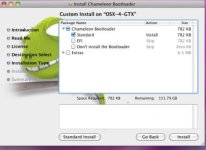
you not have selectect in chameleon standart efi , this cause a blink after bios ;)

try again David
excuse me not have write in the guide ;(
i post foto

attention if you install Chameleon, get yet my utility after

Does someone know if I can first install to a normal drive and then (if it finally works) somehow clone the install to the RAID?
Yes david is possible ;)
 

Attachments

  • Screen shot 2011-01-29 at 5.42.39 PM.jpg
    Screen shot 2011-01-29 at 5.42.39 PM.jpg
    16.2 KB · Views: 0
Last edited:
Hi Luigi,

it was connected to Sata port0, which is labeled Sata1 on the mainboard. There was some problem with chameleon, but finally OSX started. OSX runs perfectly, all the GPUs are recognized.

Should I still install the modified Fermi drivers from TonymacX?

Do you have by chance a collection of drivers for ethernet, audio etc? Those aren't yet recognized in OSX

Thanks again for all the help!
 
Hi Luigi,

it was connected to Sata port0, which is labeled Sata1 on the mainboard. There was some problem with chameleon, but finally OSX started. OSX runs perfectly, all the GPUs are recognized.

Should I still install the modified Fermi drivers from TonymacX?

Do you have by chance a collection of drivers for ethernet, audio etc? Those aren't yet recognized in OSX

Thanks again for all the help!


Ok David , If you can see DESKTOP,fermi are ok ;) , i think problem is you not have patched with my tools ASUSU SUPERCOMPUTER NVIDIA after chameleon.THIS IS IMPORTANT you see my guide.
not need drivers, and everything 'already included
 
Last edited:
*******NEW NEW NEW NEW****:hurray:
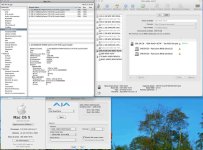
well as promised today I finished the new installer for 4 gtx.
look at the first post********

****WONDERFUL HACKINTOSH****


work:

4 gtx 460/470/480
blackmagic 3d
audio+digital out
6 sata port (ich10r)

not work:

sas port
external sata ( i work for this kext)
 

Attachments

  • 9.jpg
    9.jpg
    70.1 KB · Views: 0
  • 10.jpg
    10.jpg
    29.8 KB · Views: 0
  • 11.jpg
    11.jpg
    89.2 KB · Views: 0
  • 12.jpg
    12.jpg
    80.1 KB · Views: 0
Last edited:
David Kellermann write to me email :

Hi Luigi,with the latest firmware, bios etc the Areca 1880 works perfectly... I'm booting OSX from it :thumbup:
Thanks you David for testing Areca 1880i in p6t7 mainboard with my patch.:biggrin:

David configured Asus : 1 free slot ,2 blackmagic 3d, 3 gtx 480,4 Areca 1880i,5 gtx 480,6 free slot,7 gtx 480

Ok i wait your result another person to test REDROCKET card in this system.


thanks

LUIGI
 
Last edited:
Thanks to Luigi, I was able to set up my Hackintosh. Everything is working flawlessly!

The components:

ASUS P6T7 WS SuperComputer, X58
Intel Core i7-950, 4x 3.06GHz
24GB DDR3 1600 RAM
3x GTX 480 watercooled (Aquacomputer connected via Twinconnect)
DeckLink HD Extreme 3D+
RAID (8x 1TB RAID0 ARC-1880-i)

My configuration:

1 - empty
2 - empty (HMDI output)
3 - GTX480
4 - Blackmagic Decklink 3D+
5 - GTX480
6 - Areca 1880i
7 - GTX480

I partitioned the RAID0. Booting from it works perfectly (I'll set up a dual boot with Windows 7).

The read/write speeds are awesome. Aja disk test (system cache disabled) 3500MB/s read / 2000MB/s write:eek:

Does someone know how to disable the system cache (either for OSX or for DaVinci)?

Would you place a 4th GPU (GT210 or something similar) into the first PCIe slot? Or would it slow down the three GTX480s?

I'll post some DaVinci tests in the next days...
 
The read/write speeds are awesome. Aja disk test (system cache disabled) 3500MB/s read / 2000MB/s write:eek:

AMAZING DAVID :hurray: your RAID is a SHUTTLE eheheh

Would you place a 4th GPU (GT210 or something similar) into the first PCIe slot? Or would it slow down the three GTX480s?

Is possible only if you insert, in your case, another gtx 480 in slot 6 and position your areca card in slot 1 or 2 and download my patch for 4 gtx ;)
But for this is important up sistem with 3 gtx , download my patch for 4 gtx and run, shutdown , insert video card and change slot for Areca and up system.

Well i wait your test , you are colorist? thanks again
 
Red Rocket works perfect in my P6T7. After a recent re-install, to a new larger SSD. I realized I had compiled DSDT without Red Rocket and BlackMagic present in the computer. Got a DSDT error during startup... So You'll maybe need to extract a new DSDT when using them, meaning inserting NULLCPUpowermanagement.kext to /Extra/Extensions/, removing DSDT.aml, repairing Extensions.mkext, booting, extracting new ACPI table, editing, then remove NullCPUPM.kext, repair Extensions.mkext, and insert new DSDT.aml.
 
Red Rocket works perfect in my P6T7..

WOW ,Thanks ALex , I appreciate your post.
How many fps you have in play with video 4.5k to timeline 1080.


Got a DSDT error during startup..

Yes ALex , this is a problem with a different configuration.
What is your configuration ? (card in slot)

if you want to send your extra folder to make an installer for those who make a setup like yours, are you okay ALEX?
 
Back
Top