Welcome to our community

Be a part of something great, join today!

  • Hey all, just changed over the backend after 15 years I figured time to give it a bit of an update, its probably gonna be a bit weird for most of you and i am sure there is a few bugs to work out but it should kinda work the same as before... hopefully :)

Davinci Resolve 16 Beta

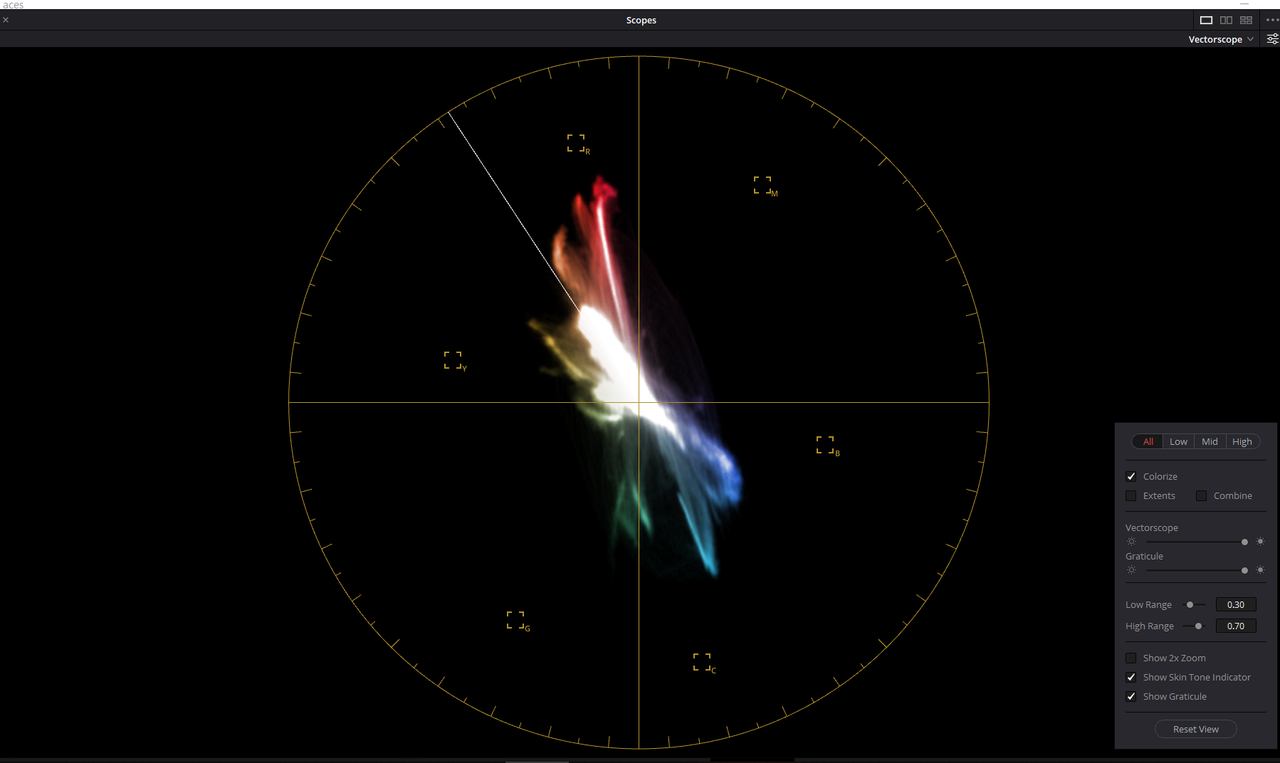
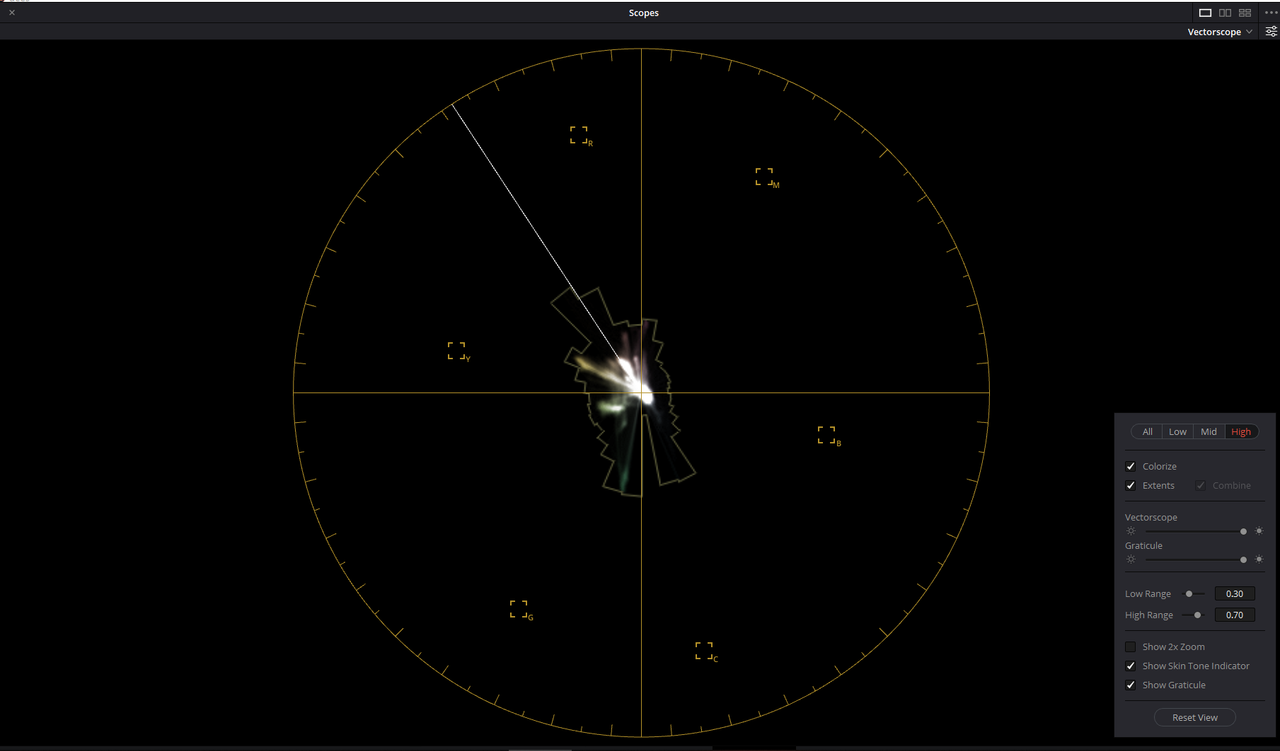
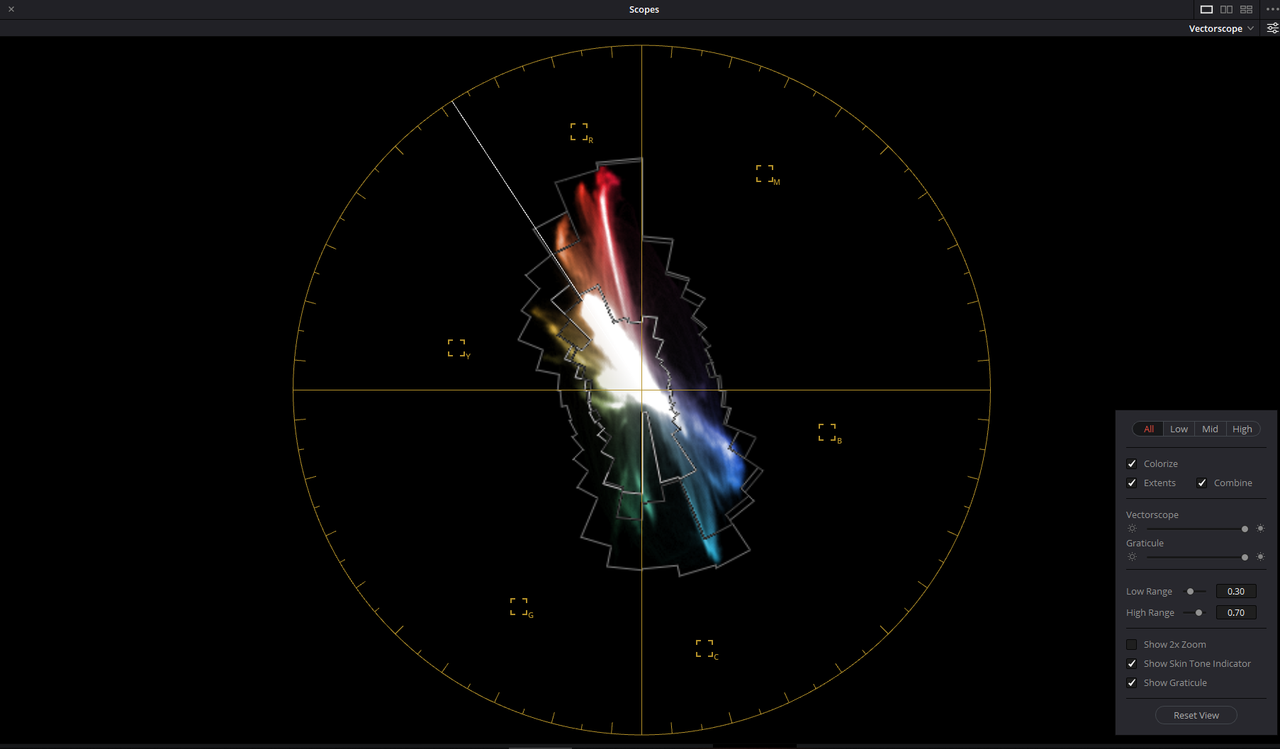
I love the New Vector Scope In Davinci Resolve 16 Beta.


Example for Vectorscope


test-1-1-1-1.jpg


You can see the colors in just Black and White
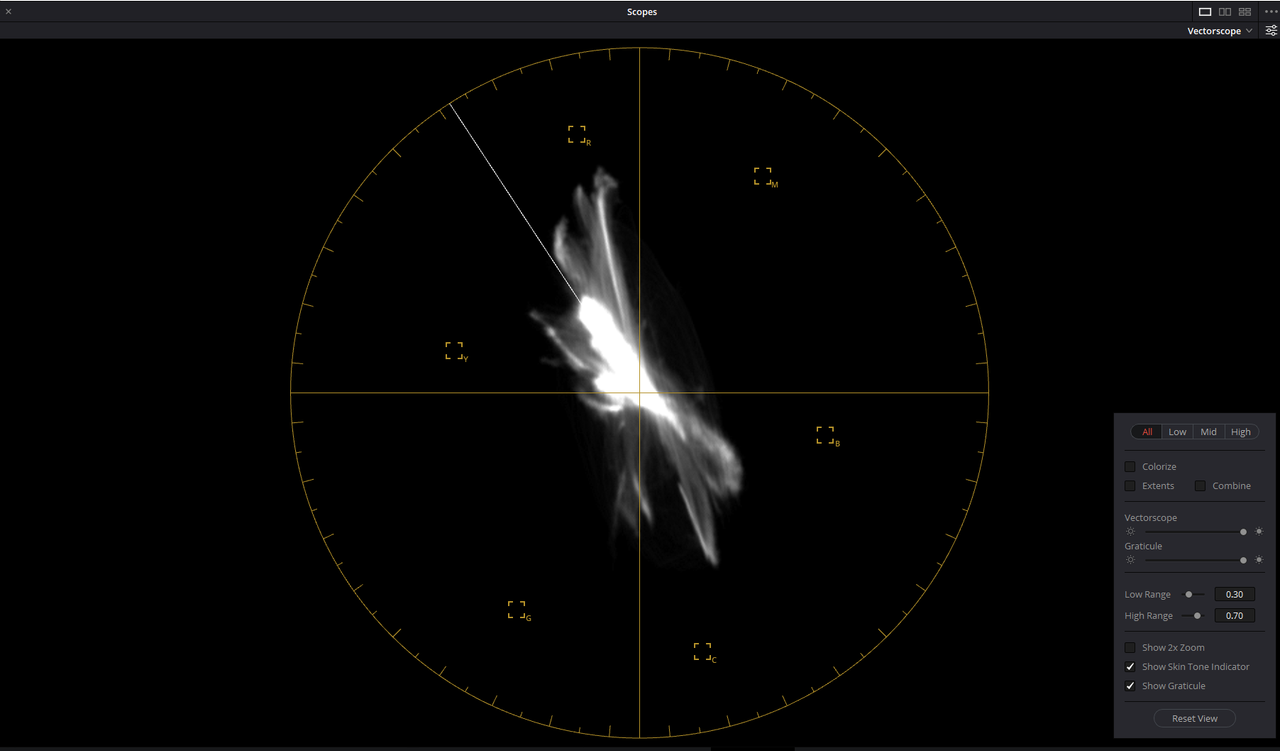

Screenshot-236.png


You can see the colors in Color


Screenshot-237.png


You can see just the colors of the Lows and the Outer most Parameters
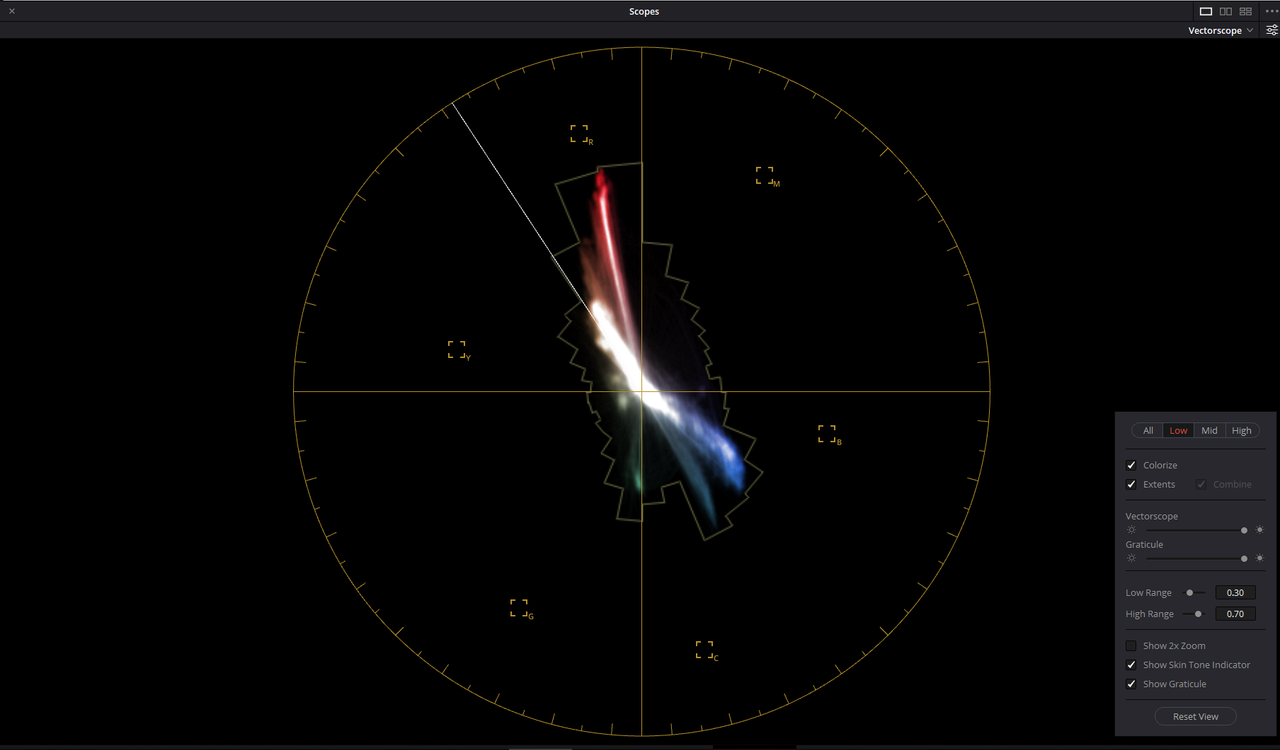

Screenshot-239.png


You can see just the colors of the Mids and the Outer most Parameters
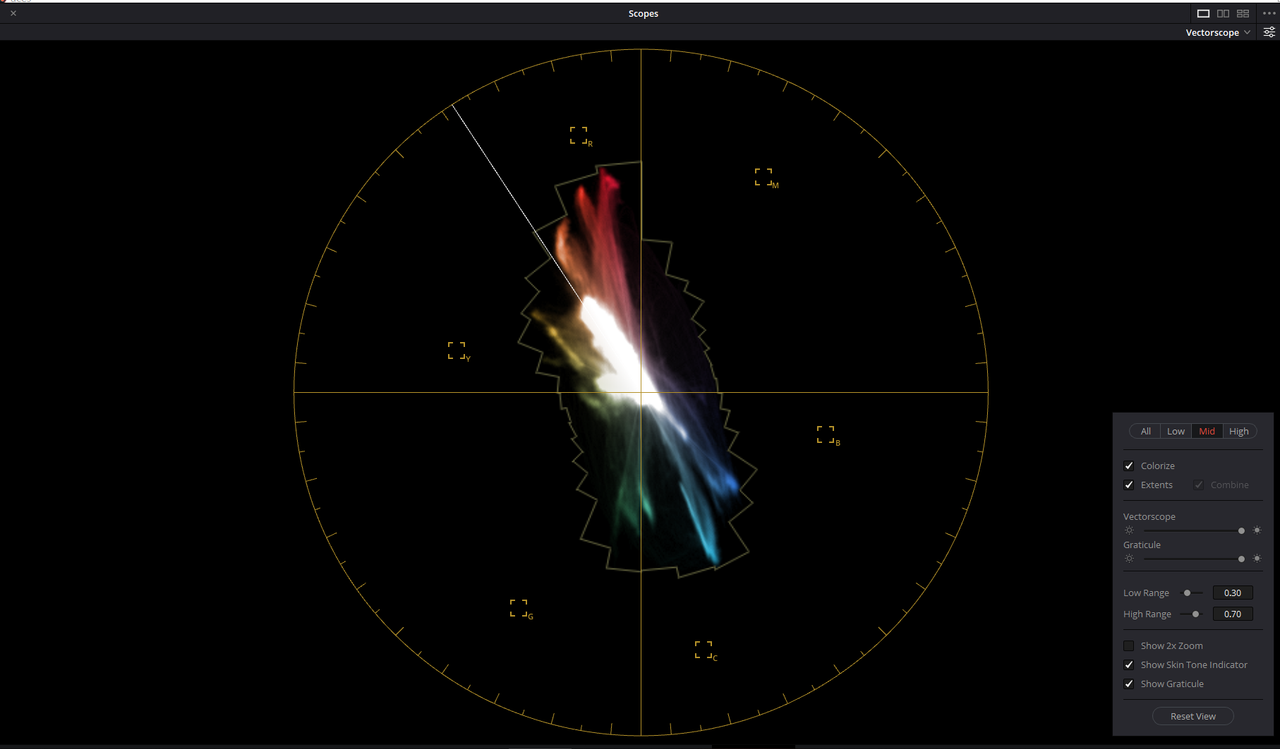

Screenshot-240.png


You can see just the colors of the Highs and the Outer most Parameters

Screenshot-241.png


And you can see all the colors combined with their Outer most Parameters combined

Screenshot-238.png


You can now better judge your white point plus better judge skintones without having to qualify the skin all the time to check.
 
Last edited:
Learn OBJECT REMOVAL in Davinci Resolve 16


By Jason Bullock


In this video, let's look at one of the new tools in Davinci Resolve 16, the Object Removal tool.
 
Blackmagic DaVinci Resolve 16 at NAB 2019


By KITPLUS


Direct from NAB 2019 - Las Vegas

Please subscribe to our channel and for more of our content please visit: https://www.kitplus.com/video
 
The best (Unpublicized) features in Davinci Resolve 16


By MiesnerMedia


SURPRISE! A new version of Davinci Resolve just dropped! Blackmagic has some really good videos about the bigger new features, but most of those features didn't really excite me. Luckily there are some smaller features that flew under the radar that I found out about and thus this video was born!
 
Davinci Resolve 16 RIPS off FCX (but better) - Will I switch?


By Max Yuryev


Blackmagic copied Apple with their new CUT page but I LOVE it!
What're your thoughts on their new editing keyboard https://bhpho.to/2G3U6Jh ?
 
Codecs and Delivery


AMD hardware accelerated decoding of H.264 and H.265 on Windows in DaVinci Resolve Studio
AMD hardware accelerated encoding of H.264 and H.265 on Windows in DaVinci Resolve Studio
Improved support for NVIDIA H.264 and H.265 rendering parameters on the Delivery page on Windows and Linux in DaVinci Resolve Studio
Improved support for Intel Quick Sync H.264 and H.265 parameters on the Delivery page on Windows in DaVinci Resolve Studio
Option to select the hardware acceleration method for decoding H.264 and H.265 on Windows and Linux - DaVinci Resolve Studio
Improved performance when decoding H.264 and H.265 clips on macOS
Improved performance when encoding H.264 and H.265 clips on macOS
Option to select hardware or software encoding for H.264 in macOS
Ability to set the Entropy mode when encoding H.264 on macOS
Improved display of options for H.265 profiles with implicit bit depth selection in the Deliver page on macOS
Improved HDR metadata encoding when rendering to H.265
Improved performance when encoding to AVI formats
Support for D-Gamut and D-Log for DJI RAW clips
Support for GPU accelerated decoding of Canon RAW clips using the Canon SDK
Support for decoding Canon C700 Full Frame clips
Support decoding Canon RAW clips in half res and quarter res mode
Support for decoding and encoding Avid DNxUncompressed formats
Support for decoding ARRI HDE clips
Ability to control QuantScale and MaxFrameSizeInPercent parameters when encoding to Grass Valley formats
Improved IMF composition settings options with the ability to rename native assets
Improved naming support for native DCP and IMF renders
Removed folder extensions from IMF/DCP renders

And yet, no Prores RAW anywhere to be found. FilmLight, MTI, Assimialte already announced their support for it.
Many camera manufacturers and makers of external recorders are planning to support the format. Unless things change, that can become a problem for Resolve users when the material will be recorded as Prores RAW.
 
Jake


I believe BMD probably didn't want Prores Raw to compete with their Blackmagic Raw codec. But you're right, if more people use Atomos or other external Recorders that support Prores Raw and Cameras that also support ProRes Raw, how is that going to work.
 
And yet, no Prores RAW anywhere to be found. FilmLight, MTI, Assimialte already announced their support for it.
Many camera manufacturers and makers of external recorders are planning to support the format. Unless things change, that can become a problem for Resolve users when the material will be recorded as Prores RAW.

Yes AVID, Adobe, BMD, etc.. are in big trouble.

They only support consumer RAW codecs like .R3D, ARRIRAW, X-OCN, etc...
 
Jake


I believe BMD probably didn't want Prores Raw to compete with their Blackmagic Raw codec. But you're right, if more people use Atomos or other external Recorders that support Prores Raw and Cameras that also support ProRes Raw, how is that going to work.
Yeah, you’re probably right. That would be the same reason why BM “doesn’t want” Prores on Windows? :)
 
Yes AVID, Adobe, BMD, etc.. are in big trouble.

They only support consumer RAW codecs like .R3D, ARRIRAW, X-OCN, etc...
And don't forget Final cut 7 and X:)
Please don't confuse acquisition codecs and the editing codecs.
No one still edits with ".R3D, ARRIRAW, X-OCN" and that is why almost everyone transcodes to Prores or DNX for editing. On the other hand, Resolve, beside editing, VFX and sound, is still mostly used for color grading. So, the client walks in with XML and a drive with Prores RAW recorded on Atomos or Panasonic and you say... what???
BTW, It looks like Premiere had been supporting Prores RAW for a while now. I wouldn't be surprised if Avid jumps on the bandwagon as well now after they finally decided to up the ante with their latest Avid re-incarnation.
If ARRI, after saying "ProRes RAW is a new addition to the family of ProRes Codecs... we are currently looking into it" decides to go for it, it will be tough to ignore Prores RAW.
 
https://www.provideocoalition.com/p...umber-of-post-production-systems-at-nab-2019/


I was just reading this article from Provideocoalition, which you have probably already seen, that suggests that we may not see ProRes Raw in Davinci Resolve at all. But surely with the increasing demand for prores raw that's got to change.

Yes, that may be a big problem for BM if or when Prores RAW goes mainstream. It's not a problem for big houses, as they still do most of the color grading and VFX using DPX or EXR transcoded from OCN, but for smaller outfits its going to be tough proposition.
 
Davinci Resolve 16 Object Removal


By Aram K


Davinci Resolve 16 Object Removal. In this short tutorial, I am explaining the basics of the new object removal tool in OFX.
 
And don't forget Final cut 7 and X:)
Please don't confuse acquisition codecs and the editing codecs.

Sorry my mistake I thought ProResRAW is an acquisition codec.

No one still edits with ".R3D, ARRIRAW, X-OCN" and that is why almost everyone transcodes to Prores or DNX for editing.

True you can't edit those codecs on Apple iwhatevers, they are way to slow, they only work with ProRes or DNX.
Puget Systems is running those Davinci Resolve and Adobe software benchmarks with 8k.R3D just for fun (ARRIRAW was to light for their workstations so the don't test it anymore), nobody is using it.

On the other hand, Resolve, beside editing, VFX and sound, is still mostly used for color grading. So, the client walks in with XML and a drive with Prores RAW recorded on Atomos or Panasonic and you say... what???

You fire up your workstation in hackintosh mode, start your $300 FCPX and transcode everything to the codec you want to edit in (ProRes whatever), FCPX is the only way (atleast at the moment) to handle ProResRAW.
Didn't know Panasonic had a ProResRAW recorder, to my knowledge only DJI and Atomos have some support.

BTW, It looks like Premiere had been supporting Prores RAW for a while now. I wouldn't be surprised if Avid jumps on the bandwagon as well now after they finally decided to up the ante with their latest Avid re-incarnation.
If ARRI, after saying "ProRes RAW is a new addition to the family of ProRes Codecs... we are currently looking into it" decides to go for it, it will be tough to ignore Prores RAW.

Didn't know that, but wouldn't be surprised, Adobe is renowned for their codec support (one of the reasons we used it was their Cineform support) and rumors are that they will only support ProResRAW when they are also allowed to use ProRes encoding in WINDOWS.

Looking forward to all the fun with the external ProResRAW recorders on ARRI Camera's or the lawsuites between RED and someone who makes ProResRAW recording in camera, new chances for CineformRAW(the Chinese will welcome this) when the ProResRAW camp wins these lawsuites from RED. Meanwhile DR16 look pretty impressive(even without ProResRAW).
 
Sorry my mistake I thought ProResRAW is an acquisition codec.
You're either very confused or you just being stubborn. Prores RAW is an acquisition codec and you shouldn't edit using acquisition codec the same way, as you shouldn't edit with R3D, ARRIRAW or OCN or grade using lower quality transcoded material. In either case, knock it off...


True you can't edit those codecs on Apple iwhatevers, they are way to slow, they only work with ProRes or DNX.
Puget Systems is running those Davinci Resolve and Adobe software benchmarks with 8k.R3D just for fun (ARRIRAW was to light for their workstations so the don't test it anymore), nobody is using it.

Just because you can do something doesn't mean you should. If you want to sit in the basement playing with your Puget Systems computers, fine. Meanwhile professionals use professional tools and accepted business practices, i.e see above...

You fire up your workstation in hackintosh mode, start your $300 FCPX and transcode everything to the codec you want to edit in (ProRes whatever), FCPX is the only way (atleast at the moment) to handle ProResRAW.
Didn't know Panasonic had a ProResRAW recorder, to my knowledge only DJI and Atomos have some support.
Again, see above...


Didn't know that, but wouldn't be surprised, Adobe is renowned for their codec support (one of the reasons we used it was their Cineform support) and rumors are that they will only support ProResRAW when they are also allowed to use ProRes encoding in WINDOWS.
Adobe can encode Prores on Windows since their last Studio update.
 
Davinci Resolve 16 - Color Page Changes and Project Notes


By Learn Davinci Resolve


In this video we look at the changes to the Color page in the beta version of Davinci Resolve 16.

MisnerMedia
https://www.youtube.com/miesnermedia
 
So wich one of you is brave souls and have installed the beta. I have backed up the database and it seams you can rename the davinci folder and have booth 15 and 16 beta installled.
What is you experiences? is the playback slower than in 15? What bugs did you run into?
 
You're either very confused or you just being stubborn. Prores RAW is an acquisition codec and you shouldn't edit using acquisition codec the same way, as you shouldn't edit with R3D, ARRIRAW or OCN or grade using lower quality transcoded material. In either case, knock it off...

That is upto the editor and with current hard and software it's no problem these days.


Just because you can do something doesn't mean you should. If you want to sit in the basement playing with your Puget Systems computers, fine. Meanwhile professionals use professional tools and accepted business practices, i.e see above...

Puget Systems makes well balanced workstations and even test it with your prefered software before delivery and their warrenty policy is also pretty good, all things considering it looks pretty professional to me. The last time I saw a review from any other workstation vendor concerning Davinci Resolve or Adobe software was never.


Again, see above...

Again, see above

Adobe can encode Prores on Windows since their last Studio update.

Adobe must have put some pressure on Apple, because it was basically Mac only with ProRes encoding(with a few exceptions) for the last 12 years and we all survived those, Microsoft didn't go bankrupt and many NLE's that didn't support ProRes encoding under microsoft windows or linux for the last 12 years are still alive.

But ProRes was not the topic here, it was about ProResRAW in combination with Davinci Resolve.
 
That is upto the editor and with current hard and software it's no problem these days.
Puget Systems makes well balanced workstations and even test it with your prefered software before delivery and their warrenty policy is also pretty good, all things considering it looks pretty professional to me. The last time I saw a review from any other workstation vendor concerning Davinci Resolve or Adobe software was never.
Again, see above
Adobe must have put some pressure on Apple, because it was basically Mac only with ProRes encoding(with a few exceptions) for the last 12 years and we all survived those, Microsoft didn't go bankrupt and many NLE's that didn't support ProRes encoding under microsoft windows or linux for the last 12 years are still alive.
But ProRes was not the topic here, it was about ProResRAW in combination with Davinci Resolve.

Despite what you may think, in the real world, no professional editor working on the real network show, a feature or a commercial etc would be using RAW images to edit with regardless of the power of their system. That is why the transcoded material is being delivered to the editors by DITs in the professional world. So, stop with this Puget Systems nonsense, it has no bearings on anything. I don't care what Adobe did to Apple or why Apple allowed Adobe to write Prores on Windows, the true fact of the matter, as of now, Resolve is the ONLY software platform that is not allowed to write Prores on Windows. All the rest, at least all color grading/editing/VFX Windows-based apps can write Prores- Digital Vision, Mistika, Assimialate, MTI, Colorfront, Adobe and many others.
You keep moving goal posts and then you asking why that happened, when you decided to bring in R3D, ARRIRAW and OCN. Or it wasn't you?
The bottom line, anyone considering sticking with Resolve may want to look at the possibility, that Resolve may well be the only platform, that may not be able to write Prores on Windows and even more importantly, not being able to read and write ProresRAW on any of their platforms.
And finally, based on your statement, please give me ONE example of Linux based NLE that is alive today? And, no, I don't mean some open source thingy, that someone keeping it alive in their spare time for some nostalgic reasons. No, I mean NLE, that is used to do some real work.
 
Back
Top