Welcome to our community

Be a part of something great, join today!

  • Hey all, just changed over the backend after 15 years I figured time to give it a bit of an update, its probably gonna be a bit weird for most of you and i am sure there is a few bugs to work out but it should kinda work the same as before... hopefully :)

Database handling in Resolve for large projects.... Speedup tips...

I am not indifferent to changing the projectstructures, if that helps - on new projects.

Doing that on current ones, would be a mess...

If you fancy yourself or someone in your employ as a scripting maven.......

Unlike almost all other Mac programs, Resolve just happens to understand and respect symbolic links. You might want to use that to do a "virtual consolidation" of your source files. Giving you more details would probably be a bit inappropriate for reasons I won't go into, but extrapolate and you'll get the point.

That is, if you happen to have a scripting maven available...
 
If you fancy yourself or someone in your employ as a scripting maven.......

Unlike almost all other Mac programs, Resolve just happens to understand and respect symbolic links. You might want to use that to do a "virtual consolidation" of your source files. Giving you more details would probably be a bit inappropriate for reasons I won't go into, but extrapolate and you'll get the point.

That is, if you happen to have a scripting maven available...

We owe you a beer. Or a keg thereof.

Ages ago, I wrote a two quick scripts:
- one builds a plaintext list of all R3D / RMD files on a given volume, with their locations. You can append the results of multiple volumes, I think.
- the other compares an EDL against that list of R3Ds and locations, then outputs a bash shell that will collect those R3Ds into one place with copy commands

Just need to find the script and try changing the cp command to symbolic links instead.

If anyone is interested I can put the sources up - it's really crap code though and probably has plenty of bugs. I just needed to bash something out that would work for my own projects. Think the one was just some shell scripts with grep, The second one I think was written in C for some reason because it is late at night and perl, grep etc confuses me late at night.

As Mike said, probably a scripting maven could do this no prob. Probably better to do it that way.

THANK YOU THANK YOU THANK YOU MIKE!

Bruce Allen
www.boacinema.com
 
Think the one was just some shell scripts with grep, The second one I think was written in C for some reason because it is late at night and perl, grep etc confuses me late at night.

Python is really good for stuff like this, especially for the text file processing.

As a side note, I like Samuel Adams. :cheers2:
 
Thanks Mike!

Sounds like you know one of those Mavens... :)

I definitely am not, but we have some around...

And a virtual Consolidate sounds like music to my ears!
 
Would be very kind if you can put them up somewhere, Jamie!

TIA!
 
ok,
no warranties obviously and please make sure you test it all out before emabarking on anything big...
it worked on my 10.6.6 system, and should work over networks as long as file paths do not have any non normal characters in.
let me know if it doesn't work and i'll try to fix it.
http://homepage.mac.com/lindsayellis/Sites/SYMLINKERZ.zip
these are just the compiled programs.
if anyone wants the bash shell script then please pm me.
cheers
j
 
I think you are finding the real weakness of resolve going forward.

The ability to handle large databases.

This was always AVIDs biggest strength and we can also see in new NLEs the great focus placed on database power.

Resolve was always predominately tape to tape, film to tape very powerful color corrector but now with the huge databases it seems from your experience to be sort of not up to the task.

I hope they get this right because the media databases are only every going to get bigger.
 
Resolve was always predominately tape to tape, film to tape very powerful color corrector ...

Resolve was never a tape to tape system. That would require live video pass through and real time processing for it. That's what the DaVinci 2K was and still is for. Resolve has always been a software system that requires ingest of any video based material prior to any work being done.
 
I think you are finding the real weakness of resolve going forward.

The ability to handle large databases.

This was always AVIDs biggest strength and we can also see in new NLEs the great focus placed on database power.

Resolve was always predominately tape to tape, film to tape very powerful color corrector but now with the huge databases it seems from your experience to be sort of not up to the task.

I hope they get this right because the media databases are only every going to get bigger.


Hi, as i mentioned earlier, we do not store the media within the database, just pointers to file locations, so its not growing exponentially and I doubt anyone has anywhere near the database size used for Avatar so lets not confuse the issues. Database and selecting media from the storage are too different items.
Thanks
Peter
 
fool_symbolink

fool_symbolink

And a virtual Consolidate sounds like music to my ears!

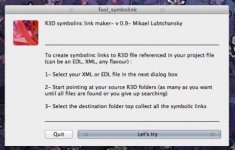
Just wrote a small and free script to do just that... fool_symbolink

it reads any EDL, XML or text file... looking for R3D clip references
then you point it to the sources folders/volumes with your R3Ds
once all clips are found it will create symbolic links to the .RDC folders in the location of your choice.

free, simple and easy to use... check it out here : http://foolcolor.net/fool_symbolink
 

Attachments

  • fool_symbolink.jpg
    fool_symbolink.jpg
    20.1 KB · Views: 0
Back
Top