Welcome to our community

Be a part of something great, join today!

  • Hey all, just changed over the backend after 15 years I figured time to give it a bit of an update, its probably gonna be a bit weird for most of you and i am sure there is a few bugs to work out but it should kinda work the same as before... hopefully :)

Color Space, and able to change it after offloading clip.

Thanks Marc for the suggestions. Yeah I initially tried the Color Space Transform and I got it close when I used the " Luminance Mapping" to try to account for the " Highlight Roll- Off" of the Ipp2 Transform. And I tried " Saturation Compression" to try to account for the "Out Of Gamut" component of the Ipp2 Output Transform. However as Phil stated you need to use the exact opposite of the IPP2 Output Transform used for it to work as it should.
Yes, no question sometimes you have to experiment a bit. I've had CST nodes flat-out fail for unknown reasons (on BMD footage), and I just had to go in and whack the controls until it cooperated. It might have been a gamut-clipping error, I dunno, but we got it under control with some work. I think out of maybe 1200-1300 shots in a feature, 10 of them had the problem. They mixed and matched cameras so this may have been an issue where an older camera got thrown in with old firmware, and it went nuts.

The most recent Red feature I did last month was flawless (to me), and there were zero problems with our normal IPP2 workflow. We came up with a few radical looks: 1979, 1950s, 1960s, and some wild flashblack looks. Worked great, everybody was happy. I felt some of the underexposed scenes were a bit noisy, but they actually liked the textiure and felt it wasn't too far removed from film grain, so there you are. This was gritty, scary, tense, and so on.
 
You guys Rock and this is why Im glad to be part of the community...

First of all thanks to all for input which has lead to the bottom of the issue....:emmersed:


Nice work Mikael. your post about the RMD files lead me to what I believe is the issue...Thank you...

Thank you Rand, I will check the preference settings you mentioned as they are probably the issue. Or something very close to the issue... Going to check again tomorrow the settings on any of the machines that have RCX and what the preferences are set to..

Earlier today after reading Mikeal's post last night about RMD sidecars I started thinking and went back with our post department and took a look at the folders with the Rec 709 issue files in them and compared them with other folders with clips that didn't have the issue and guess what???? all the Rec 709 clip file had the RMD sidecar file in them but none of the regular RWGrgb files had a RMD file..

So what we discovered is that regardless if I or any of the editors or post folks had looked at the clip in RedCine X and made a look adjustment of any kind,(to see say what a clip would look like with a basic contrast curve or with the highlight roll off adjusted) when closing RedCine X it would ask if I would like to save any of the changes. I would click no not to save anything, but just me opening the file in RCX and making any adjustments to just see say. if the shadows were safe. or if an affect when colored would look the same when saturated it would save a RMD file with the clip in the server... Which may be a bug in RCX because if I chose not to save any thing upon exiting or closing the App that seems like it should not add anything to that clip file unless you said or clicked to save something. right????kind of strange to me...

On a similar note were also looking in to why our servers allowed a file to be added with out being cleared, or at the very least a screen notice of do you want to add this file blaw blaw blaw.. We have strict locks on the servers and everything going in and out needs to be ok'ed so that has brought up an entire new set of meetings with new people and more emails.... Argh... nothing is simple anymore.... bummer but at least its not the camera/s.....

So, sorry for all the run around but the issue has been or at least seems to be solved and Im very glad to say its not a camera issue but kind of still mystified by the RCX App still saving a RMD even when I feel all I have done is taken a look and when exiting always not saved any of the changes. Just to be clear if you simply open RCX and don't make any changes but just view the clip no RMD is saved... And you don't get the popup of do you want to save any of the etc......
 
Yes, no question sometimes you have to experiment a bit. I've had CST nodes flat-out fail for unknown reasons (on BMD footage), and I just had to go in and whack the controls until it cooperated. It might have been a gamut-clipping error, I dunno, but we got it under control with some work. I think out of maybe 1200-1300 shots in a feature, 10 of them had the problem. They mixed and matched cameras so this may have been an issue where an older camera got thrown in with old firmware, and it went nuts.

The most recent Red feature I did last month was flawless (to me), and there were zero problems with our normal IPP2 workflow. We came up with a few radical looks: 1979, 1950s, 1960s, and some wild flashblack looks. Worked great, everybody was happy. I felt some of the underexposed scenes were a bit noisy, but they actually liked the textiure and felt it wasn't too far removed from film grain, so there you are. This was gritty, scary, tense, and so on.

Marc,

Yeah, I think we all always try to solve any Color Management problems with all the conventional ways of thinking first and foremost. However when those conventional ways of thinking and resolving issues fail, then those unconventional not so mathematically correct and accurate ways of doing things gets the problem solved, or atleast to a degree where everyone can live with.
 
You guys Rock and this is why Im glad to be part of the community...

First of all thanks to all for input which has lead to the bottom of the issue....:emmersed:


Nice work Mikael. your post about the RMD files lead me to what I believe is the issue...Thank you...

Thank you Rand, I will check the preference settings you mentioned as they are probably the issue. Or something very close to the issue... Going to check again tomorrow the settings on any of the machines that have RCX and what the preferences are set to..

Earlier today after reading Mikeal's post last night about RMD sidecars I started thinking and went back with our post department and took a look at the folders with the Rec 709 issue files in them and compared them with other folders with clips that didn't have the issue and guess what???? all the Rec 709 clip file had the RMD sidecar file in them but none of the regular RWGrgb files had a RMD file..

So what we discovered is that regardless if I or any of the editors or post folks had looked at the clip in RedCine X and made a look adjustment of any kind,(to see say what a clip would look like with a basic contrast curve or with the highlight roll off adjusted) when closing RedCine X it would ask if I would like to save any of the changes. I would click no not to save anything, but just me opening the file in RCX and making any adjustments to just see say. if the shadows were safe. or if an affect when colored would look the same when saturated it would save a RMD file with the clip in the server... Which may be a bug in RCX because if I chose not to save any thing upon exiting or closing the App that seems like it should not add anything to that clip file unless you said or clicked to save something. right????kind of strange to me...

On a similar note were also looking in to why our servers allowed a file to be added with out being cleared, or at the very least a screen notice of do you want to add this file blaw blaw blaw.. We have strict locks on the servers and everything going in and out needs to be ok'ed so that has brought up an entire new set of meetings with new people and more emails.... Argh... nothing is simple anymore.... bummer but at least its not the camera/s.....

So, sorry for all the run around but the issue has been or at least seems to be solved and Im very glad to say its not a camera issue but kind of still mystified by the RCX App still saving a RMD even when I feel all I have done is taken a look and when exiting always not saved any of the changes. Just to be clear if you simply open RCX and don't make any changes but just view the clip no RMD is saved... And you don't get the popup of do you want to save any of the etc......

Russ,

I'm glad I could help you finally zero in on what was the problem with the files. IPP2 is a really great pipeline for developing the Red R3D image.But at times it seems that there are so many variables in that pipeline that can screw you over at times. From making sure you had the right settings in Redcine-X when you were just previewing images. To making sure that Resolve or any other NLE had the correct Project or Camera Raw settings.

Maybe in the next iteration of RED's IMAGE PROCESSING PIPELINE the workflow and the numbers of variables that could affect the image will be greatly reduced and simplified.
 
You guys Rock and this is why Im glad to be part of the community...

Nice work Mikael. your post about the RMD files lead me to what I believe is the issue...Thank you...

this sidecar file is a great feature but if you are not aware of it it can become a headache...

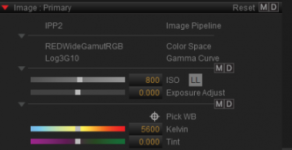
in RED-CINE-X you can always revert to Camera Metadata using the M button at top right :

LL_400x206.png

And maybe Scratch has the option to bypass those files and read the original in camera metadata values...

Glad I could help you find the answer to this !

Mikael
 
Back
Top