Welcome to our community

Be a part of something great, join today!

  • Hey all, just changed over the backend after 15 years I figured time to give it a bit of an update, its probably gonna be a bit weird for most of you and i am sure there is a few bugs to work out but it should kinda work the same as before... hopefully :)

Canon 7D looks quite Nice

fine horizontal patterns look like the biggest issue

fine horizontal patterns look like the biggest issue


Thanks for that link! Very interesting, and informative. On this particular test chart, I do not see much jaggies and I see only moderate problems with fine vertical lines. I do see some pretty strong green/magenta color aliasing on fine horizontal lines.

EOS-7D-1080p-still-crop.png
 
Thanks for that link! Very interesting, and informative. On this particular test chart, I do not see much jaggies and I see only moderate problems with fine vertical lines. I do see some pretty strong green/magenta color aliasing on fine horizontal lines.

EOS-7D-1080p-still-crop.png

Looks about the same as the 5D on aliasing. Both are relatively clean only to about 450 lines.
 
I think the 7D's aliasing is caused by pixel binning on the sensor so HDMI out would contain the same

Based on a shot of a thin metal mesh garbage can recorded out of the HDMI one would guess part of it was from the h.264 compression.

The link is in one of my earlier posts. Unfortunately no comparison to with the same shot out of the CF card.

The rest of the image looks very nice to me. Very "Red". But the right side of the trash can still shows some issues and you can only get a 720p out of it.
 
The rest of the image looks very nice to me. Very "Red". But the right side of the trash can still shows some issues and you can only get a 720p out of it.

If the HDMI is outputting 1920x1080 (I know some people are thinking it may only be 1440x1080), if you are aiming for a 2.35:1 aspect ration, you are still talking about ~1920x800.
 
I have a 7D and can tell you that the HDMI-out while shooting is strange: It's 1920 x 1080i, BUT, there are black bars left and right, as well as grey translucent bars top and bottom. Basically it's outputting an HD16:9 frame, but putting a regular 4:3 image in the middle of it. Then, it's cropping the 4:3 to 16:9. And then there's the red "record" dot that you can't get rid of, upper right corner, obscuring some of what would otherwise be a useable frame.

A lot of resolution is lost. My feeling is that the HDMI out on the 7D isn't usable for anything. Not worth it.
 
I forget what button you need to press and the 7D I was playing with isn't my own, but there is a button you have to press to get the 7D to output full res. By default it was scaled down to a lower res on our monitor...
 
Looks like 160, 320, 640, are best for noise.

For what it's worth, the reason why they have less noise is because they clip highlights.

When you select "ISO 320", what the camera actually does behind the scenes is set the analog ISO to 400, then reduce brightness digitally with a -1/3 stop pull. That makes it look as if you had used ISO 320, except that 1/3 stop of highlights are clipped. The upside is that noise is less.

It's like the opposite of HTP (highlight tone priority). HTP sets the analog ISO to one stop below whatever you pick, giving 1 extra stop of highlights, then increases the brightness digitally with nonlinear EC (to preserve highlights), which increases the visibility of noise. So HTP trades shadows for highlights.

The other tweener ISO settings (125, 250, 500, 1000) should be avoided, because they do a 1/3-stop push, but don't bother to preserve the highlights, so they increase noise for no benefit.

Hope that helps.
 
So which are the ones with the most dynamic range and acceptable levels of noise?

I guess this is Canon's deal with their other cameras and you have looked into them quite a bit already. So, considering the h.264 compression, perhaps it is best to get rid of noise in camera... right?

Speak to me Daniel. What's the order from best to worst regardless of exposure?
 
So which are the ones with the most dynamic range and acceptable levels of noise?

If you adjust ISO, but keep brightness the same by changing exposure, then the dynamic range is highest at ISO 100, stays about the same at 200, then starts going down from there. The dynamic range will vary most greatly by the picture profile settings. With low contrast settings, ISO 200 will have more dynamic range than ISO 400. But with high contrast, the difference may not be noticable.

The "plus 1/3" ISO settings (125, 250, 500, 1000) should be avoided, as explained above. The "minus 1/3" ISO settings are fine, as long as you know that they have 1/3 less highlight headroom.

Highlight tone priority trades one stop of shadow noise for one stop of highlight headroom. I use it a lot. It should always be enabled for ISO 3200 and 6400, since in those cases there is no noise penalty from HTP, so you get the one stop of highlight headroom for free.

The "acceptable level of noise" varies by exposure, light, settings, and personal taste. A high key shot at ISO 1600 can look like ISO 100 because it has so little noise. Shooting in the perfect magenta light can make ISO 6400 look like ISO 800.

So, considering the h.264 compression, perhaps it is best to get rid of noise in camera... right?

Yes. But the most important thing for their compression, by far, is to have as little in focus as possible. If there is too much detail, the aliasing artifacts will overwhelm the compression engine. Thin DOF helps a lot.
 
If you want a little cheaper the Zeiss Contax Yashicas primes are basically the same optically as the compact primes zeiss is selling now and can be used on Canon with a $20 adapter. If you really want to go cheaper the Zeiss Vario-Sonnar 3.5-4.5/28-70mm in C/Y mount goes for about $150 on ebay.


Hi Micheal,

what is the name of the adapter for Zeiss Contact Yashicas to Canon? Prefer Nikon but I'm guessing it wouldn't work because of the focal length - Nikon 45.5mm and Canon 44mm.

Thanks.
 
Hi Micheal,

what is the name of the adapter for Zeiss Contact Yashicas to Canon? Prefer Nikon but I'm guessing it wouldn't work because of the focal length - Nikon 45.5mm and Canon 44mm.

Thanks.

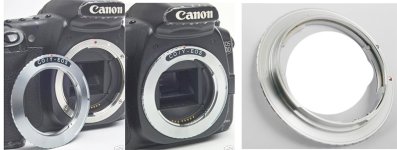
Contax Yashica C/Y lens to Canon EOS

http://cgi.ebay.com/Adapter-Fits-Co...635432969&_trksid=p3286.c0.m14#ht_1784wt_1167

If you just search on Contax to EOS you should come up with a lot of them - I have seen them as cheap as $7.

Contax was the original Zeiss made 35mm SLR and they sold the rights to their camera operation to Yashica. C/Y is the common abbreviation for the the Contax/Yashica non-AF mount. The Zeiss Contax/Yashica mount lenses are extremely good and feel a lot like the cinema lenses and are the basis for the ZF, ZE series of lenses and now the compact Primes.
 

Attachments

  • cyadapter2.jpg
    cyadapter2.jpg
    77 KB · Views: 0
So when you select the ISO, do you get a little indicator as to whether you are in a "normal", plus 1/3, or minus 1/3 ISO?

No. You could fill a forum, a *lot* of forums, with stuff that Canon doesn't tell you. And they have. Which is why I read!

[That's my favorite line from Ratatouille.] FWIW, here are some of the other things about ISO that Canon doesn't tell you anywhere (in the camera, manual, or Canon web sites):

  • What analog setting (gain/amplification) is used by a given ISO.
  • How much digital gain is applied in-camera (highlights clipped or shadows pushed/pulled).
  • Whether or not positive digital gain is applied nonlinearly (to preserve highlights) or just clipped.
  • If the digital gain applies to the raw (e.g. ISO 125) or just the metadata (e.g. HTP).
  • How much the shadow noise changes with ISO setting (a whole lot from 100 to 200, much less from 800 to 1600) and fixed exposure.
  • The ratio between loss of highlight headroom and decrease in read noise for each ISO increase.
  • Which ISO settings are braindamaged and should be considered harmful (e.g. ISO 250, 3200 without HTP, etc.).

For example, ISO 50 and ISO 200+HTP produce the exact same raw still file, only the autoexposure meter, JPEG engine, and metadata are different. ISO 6400+HTP and ISO 3200 produce the *exact* same amount of shadow noise, but one has a full stop more highlight data (+1 dynamic range).

Unfortunately, Canon is the last place to look for useful information about how to get the most out of their cameras, especially if you shoot raw.
 
Ok... Is there a cheat sheet somewhere for me to carry letting me know which are the best ISOs, which are acceptable, and which are "brain damaged"? :)

I think I will be able to tell somewhat, at least which are the worst, and stay away from those. But a fine print little chart or list might be a wise thing to keep somewhere with the camera, at least till I have it memorized.

I would do it myself but I am not sure which are 1/3 over and which are 1/3 under. All I know is the full list (and not even sure about that till I get my 7D this Thursday).

100, 125, 160, 200, 250, 320, 400, 500, 640, 800, 1000, 1250, 1600, 2000, 2500, 3200, 4000, 5000, 6400.
 
Back
Top