Welcome to our community

Be a part of something great, join today!

  • Hey all, just changed over the backend after 15 years I figured time to give it a bit of an update, its probably gonna be a bit weird for most of you and i am sure there is a few bugs to work out but it should kinda work the same as before... hopefully :)

Best settings for IPP2 in Resolve

Ok, but doesn't the macbook pro have some type of Rec709 display option? I thought I saw an option for that in the article I linked to above.
Without calibration, the OS numbers don't mean anything. Ten MacBook pros set to Rec709 will all look different, because they're not calibrated. I'm not convinced they can actually be calibrated well, because the displays aren't good enough.
 
Marc,

Not disagreeing with you on the calibration part. What I'm saying is if Paul is going to use his macbook pro for the purpose he stated, make sure , along with some form of calibration or the best he can get with a macbook pro, to set the display up for rec709 if has that option available.

There are better displays to grade a professional image on, and I'm sure Paul already knows this. He stated in a previous post that he has a workstation with a monitor calibrated with a Light space Lut.
 
Rand, you say:

[...]

BTW,

A "Color Managed Workflow" works terribly with Luts.

I say: but why?

It's taken me many more minutes than I'd like to admit, but there's a bit more to be said on that subject when you look at all the places that color management touches. And it touches a lot of places. To wit:

First and foremost, when you bring R3D (or any media) into the media pool, that media gets assigned a color science, color space, and gamma curve based on (1) the Color Management regime and/or (2) Camera RAW settings. If Color Management is DaVinci YRGB (in the Project Settings->Color Management->Color Space and Transforms window), then the clip has its parameters set by the Project, Camera Metadata, RED default, or the Clip (the selection of which resides in the Color->RAW tab, and which can be changed as a Clip Attribute if you want to do that). If that's not confusing enough, if set by Project, those parameters are in the Project Settings->Camera RAW->RED dialog; if Camera Metadata, it comes from the metadata of the clip, and if RED default, it's some magic that RED tells Blackmagic to incorporate. If Color Management is RCM (in the Project Settings->Color Management->Color Space and Transforms window), then the parameters are set according to RCM (and they are greyed out--eventually--in the Color->RAW tab). Needless to say, there's a lot of different places in the GUI that these various parameter controls live; moreover, some selections override the operations of other selections, and those overrides are not reflected in the GUI until a save operation is performed, so you can think you are free to do one thing when in fact that thing you just did will have no effect (which you won't notice until after you execute a Save operation and then re-open the GUI controls). Be advised.

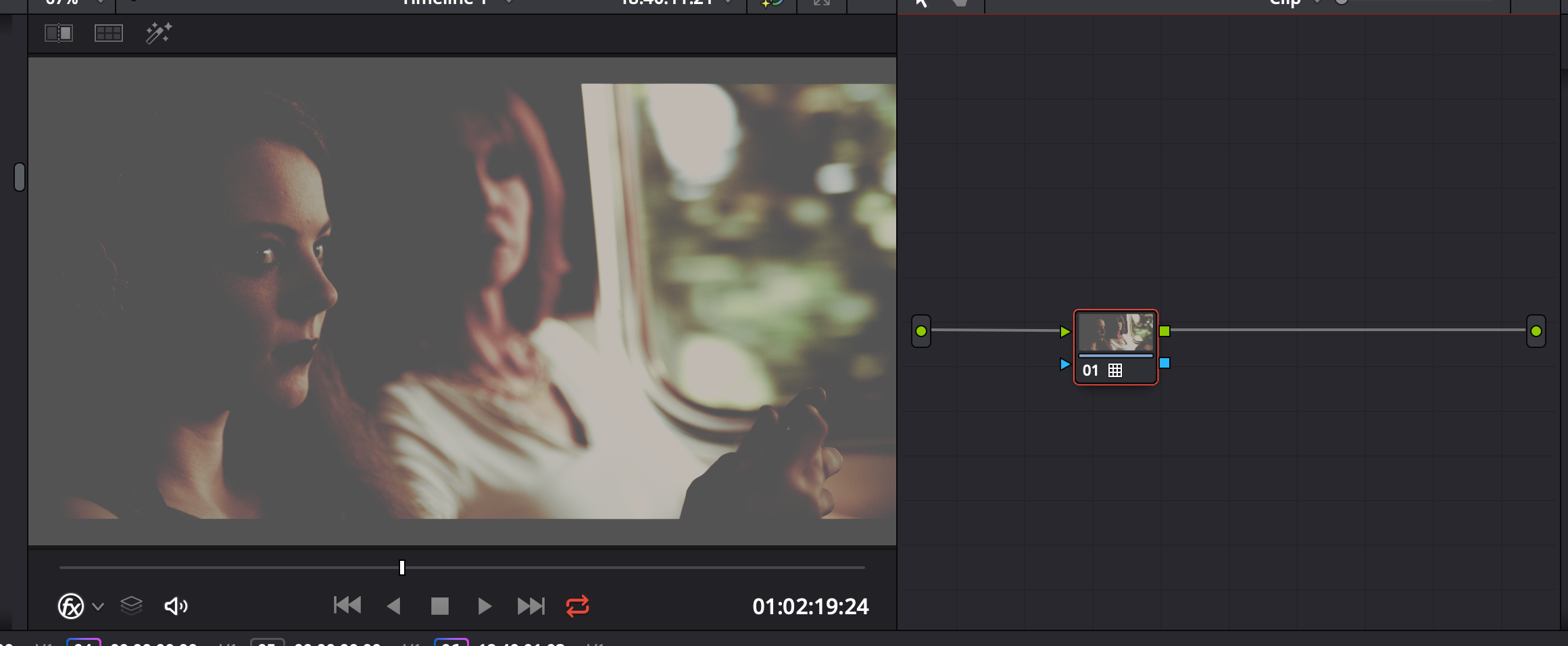
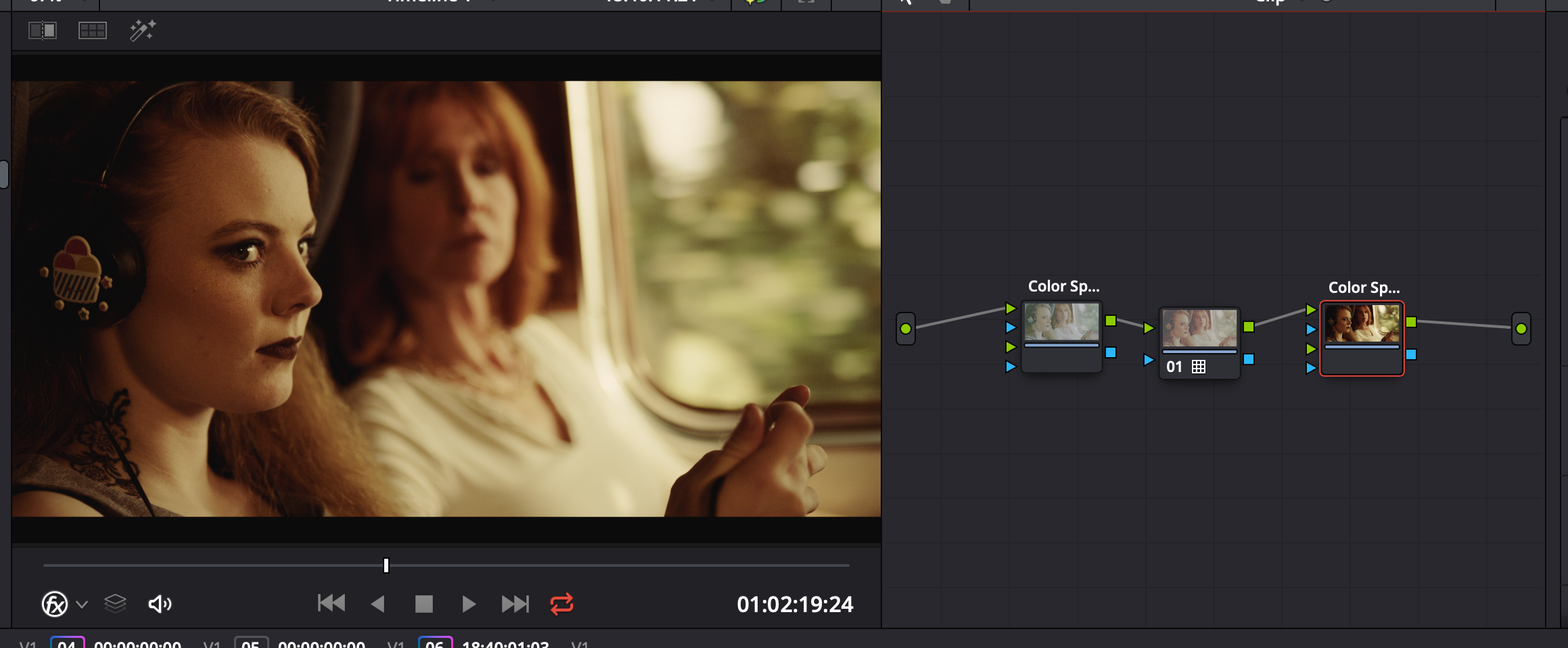
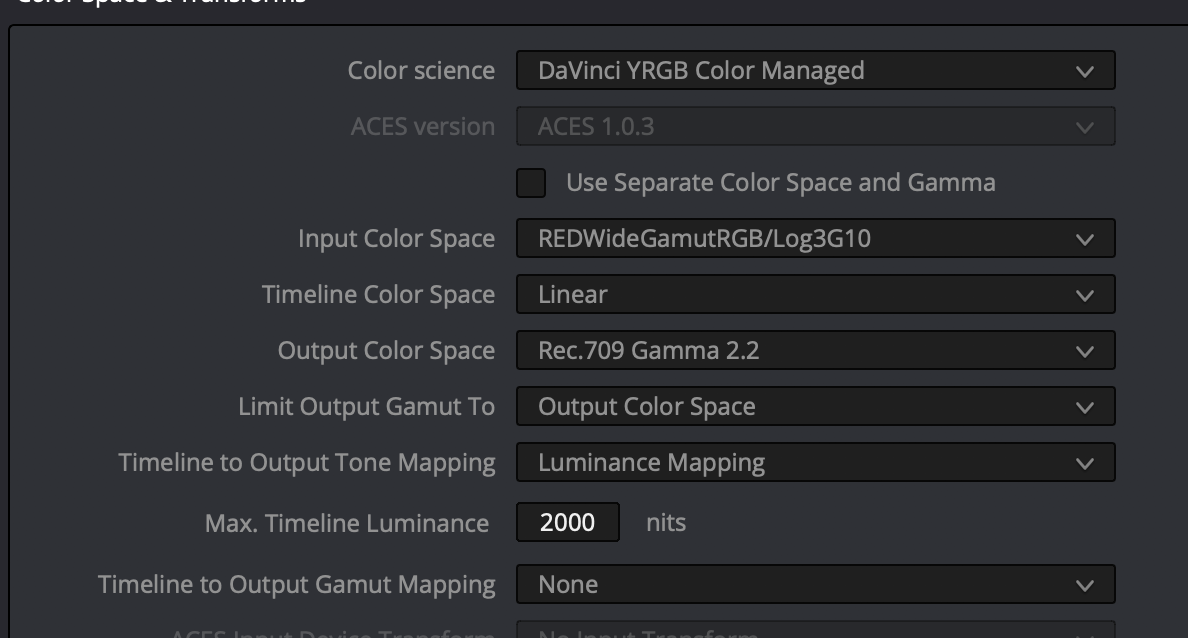
In Case #1 (DaVinci YRGB), and when the clip's Color Science, Color Space, and Gamma Curve resolve to IPP2, REDWideGammutRGB (RWG), and REDLog3G10 (Log3G10) respectively, LUTs like philmColor v2 work great as a first node out of the RAW decode. (The RAW decode being where you can set ISO, WB, Tint, etc.) At this point you have an exciting choice to make: what is the proper Timeline Color Space? Alas, this is a trick question! In my testing of Resolve 15.2.3, there is no operational difference between choosing Rec.709 and RWG/Log3G10 for the timeline. Such a choice may influence how OFX color space conversion nodes work, but there's no difference in the final output, and there's no option (if the timeline space is considered to be Rec.709) to apply Output Tone Mapping and/or Highlight Rolloff (as there is when the RAW processing is considered to be Rec.709).

It is also worth pointing out that the OFX Color Space transform nodes do convert from RWG/Log3G10 to Rec.709 and do offer some form of Output Tone Mapping and Highlight Rolloff within the plugin, but what they do not offer is any of the convenient GUI interfaces to do these functions as they are done in the RAW settings. There is an option to use the Clip as a way to lookup what sort of Output Tone Mapping and Highlight Rolloff should be done, but the Clip's controls for those (RAW) parameters are silently overriden by the initial RAW parameters selecting RWG/Log3G10. So, if you want to use the convenient GUI controls for Output Tone Mapping and Highlight Rolloff, there really is only one way to do it: convert your R3D clip into something that has a Gamma curve (e.g. Rec.709) at the very beginning. Maybe you can sneak a (RWG/Log3G10 Color and Gamma preserving) Creative LUT into the RMD metadata of the clip before it hits the Gamma conversion, but that's really one's last chance to use a creative LUT if you want to use the GUI instead of a verbosely-named LUT for output conversion.

Another case to consider is that you are using a conversion LUT, such as Omeno Primers (which convert from RWG/Log3G10 into something Gamma-corrected). To make this work the Primer LUT must be applied to a RWG/Log3G10 node, which might mean a RAW clip that uses IPP2/RWG/Log3G10 upon ingest, or it might be something that uses an OFX Color Space Conversion to convert things to RWG/Log3G10 for the Primer LUT. Because Primers have their own concept of Output Tone Mapping and Highlight Rolloff, there is no GUI support other than using the LUT Viewer to apply verbosely named LUTs to nodes in the RWG/Log3G10 world to create a Rec.709-ish (or P3-ish) world.

Back to the topic of the Timeline Color Space. As I said before, it appears that this setting is most relevant when using OFX Color Space conversion nodes (which can inherit the properties of the timeline for conversion from or to the Timeline's Color Space), or when being a true radical and using non-RGB color spaces (such as YUV or CIE L*a*b. But in the RGB world, which is a big one, Resolve seems blissfully unaware that a timeline claiming to be Rec.709 might be full of RWG/Log3G10 data or vice-versa. And once we are out of the RAW conversion business, there's no particular advantage to having a timeline be one or the other. If the pixel values in the timeline really and truly relate to RWG/Log3G10, then qualifiers and many other color tools are going to be sloppy in their scope and application. If the pixel values in the timeline truly relate to Rec.709, then the qualifier and many other color tools will work more precisely and sensibly, as they were designed. But whether one lies or is truthful in the selection of the timeline color space, the qualifier is going to work on the pixels in the pipeline, not governed by the label attached to the pipeline by the Color Space selection in the Color Management window. Be advised.

TL;DR Summary: Color Management: D YRGB, Timeline color space might as well be Rec.709; Camera RAW: IPP2, Rec.709, Rec.709; Creative LUT: at Input stage or Group Pre-Clip or first node of clip; Output Tone & Highlight Rolloff: As you like using Camera RAW and Clip, RED Default, Metadata, or Project preferences. Unless using Omeno Primers, in which case Camera RAW should select RWG/Log3G10 and the primer does the Output Tone Mapping and Highlight Rolloff.

In case #2 (DaVinci Resolve Color Managed, RCM), don't be fooled by elements of the GUI that don't update until after you've saved and re-opened the Project Settings dialog box. Before re-opening the Project Settings, it will look like you can manipulate Color Science, Color Space, and Gamma Curve as you can in Case #1, but those changes will all be ignored once RCM is actually applied through the Save operation. At this point, setting Input Color Space to RWG/Log3G10 will read the image file in a way that's friendly to LUTs expecting to operate on RWG/Log3G10, such as philmColor v2 and/or Omeno Primers.

philmColor v2 LUTs will preserve RWG/Log3G10, but many (most?) color tools in Resolve are designed to work on Rec.709 data, so it's a good idea to do a Color Space conversion as the Input hits the Timeline. Omeno Primers do that conversion in a single step. philmColor v2 LUTs can be applied to Rec.709 pixels (or any other kind of Pixels), however such application will have significantly different and significantly reduced effect compared to applying to RWG/Log3G10 pixels and then converting those to Rec.709. Be advised.

If you choose to keep the timeline in Log space (because you really like very sloppy qualifiers and the very glitchy behavior of small changes in Log space leading to very large changes in Gamma space), then of course you'll need to change the Output to something suitable--Gamma space if you plan to display, Linear if you are feeding such a pipeline, or Log if your intermediate isn't linear. If you've already set your Timeline to a display gamma space, then you can keep that designation in your output or use "Bypass". But not all is as easy as it seems.

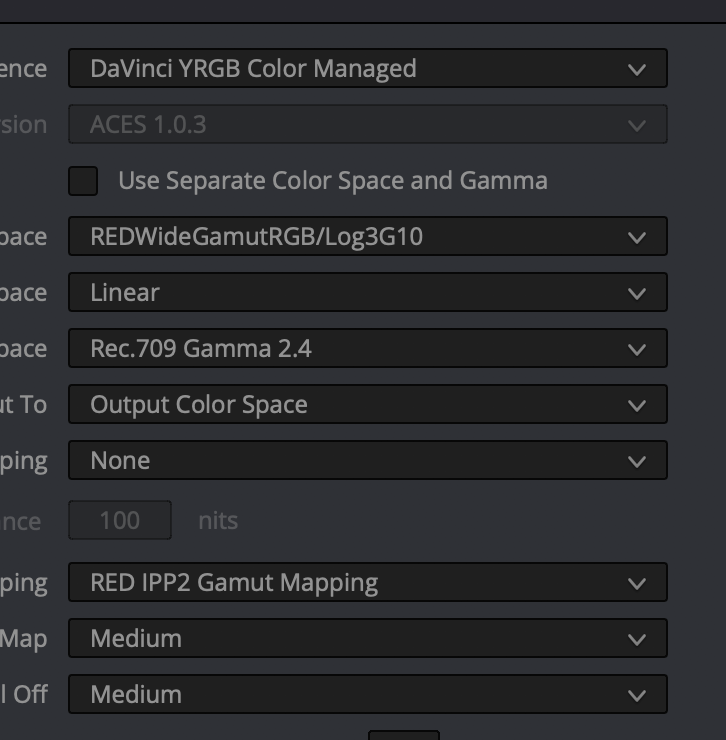
If Timeline is Rec.709 Gamma 2.4 and Output is Bypass or Rec.709 Gamma 2.4, you can select RED IPP2 Gamut Mapping and it works as expected, with Output Tone Map and Highlight Roll Off selections working as expected.

If Timeline is RWG/Log3G10 and Output is Rec.709 Gamma 2.4, you can select RED IPP2 Gamut Mapping and it works as expected, with Output Tone Map and Highlight Roll Off selections working as expected.

If Timeline is RWG/Log3G10 and Output is Bypass, you can select RED IPP2 Gamut Mapping BUT IT DOES NOT WORK AS PRESENTED: Output Tone Map and Highlight Roll Off selections DO NOTHING. There are other selections one can make for Input, Timeline, and Output Color Spaces that will cause the RED IPP2 Gamut Mapping option to disappear from the Timeline to Output Gamut Mapping option list. But it is annoying that the RED IPP2 Gamut Mapping option appears in cases where it is absolutely not honored.

So...what have we learned? LUTs are LUTs and they have their place in the color grading toolbox and pipeline. But it is very important to understand what domain (input) the LUT is designed to work on, what range (output) the LUT is designed to produce, and how that fits within the Color Space and Gamma of the timeline and pipeline you are working on. And it is equally important to understand when and how the IPP2 Output Tone Mapping and Highlight Rolloff parameters can and do work (despite sometimes not working for reasons that are clear in the above discussion--they only work on Gamma elements and they never work on non-Gamma elements--despite what the GUI might suggest to you).
 
Last edited:
Due to vagaries of the forum, I could not contain the following final paragraph due to the arbitrary limit of 10,000 characters in a single posting. Here's the nice, encouraging text that I had to place in this separate post:

Resolve has gotten much better since it first supported IPP2 two years ago. But there are still many places where Resolve falsely gives the impression that a control you can select is going to do what it says its going to do (it's not!). And there are still some places where there should be a control that would be convenient and consistent with the IPP2 pipeline and LUTs and it's not there. It's rough that the parameters that do control what happens are set in so many disparate locations, and it's rough that the manual in still somewhat incomplete on this topic. But Resolve does keep getting better, and perhaps some of the points made above will directly contribute to prioritizing future improvements. One can always hope!

I'm afraid that if I have to further correct or expand the text above (due to insightful comments or helpful corrections), I may have to split the text further and more arbitrarily to fit within the 10,000 character subject. I guess there's only so much complexity one can address at one time on the forum :emote_couch:
 
Back to the topic of the Timeline Color Space. As I said before, it appears that this setting is most relevant when using OFX Color Space conversion nodes (which can inherit the properties of the timeline for conversion from or to the Timeline's Color Space), or when being a true radical and using non-RGB color spaces (such as YUV or CIE L*a*b. But in the RGB world, which is a big one, Resolve seems blissfully unaware that a timeline claiming to be Rec.709 might be full of RWG/Log3G10 data or vice-versa. And once we are out of the RAW conversion business, there's no particular advantage to having a timeline be one or the other. If the pixel values in the timeline really and truly relate to RWG/Log3G10, then qualifiers and many other color tools are going to be sloppy in their scope and application. If the pixel values in the timeline truly relate to Rec.709, then the qualifier and many other color tools will work more precisely and sensibly, as they were designed. But whether one lies or is truthful in the selection of the timeline color space, the qualifier is going to work on the pixels in the pipeline, not governed by the label attached to the pipeline by the Color Space selection in the Color Management window. Be advised.

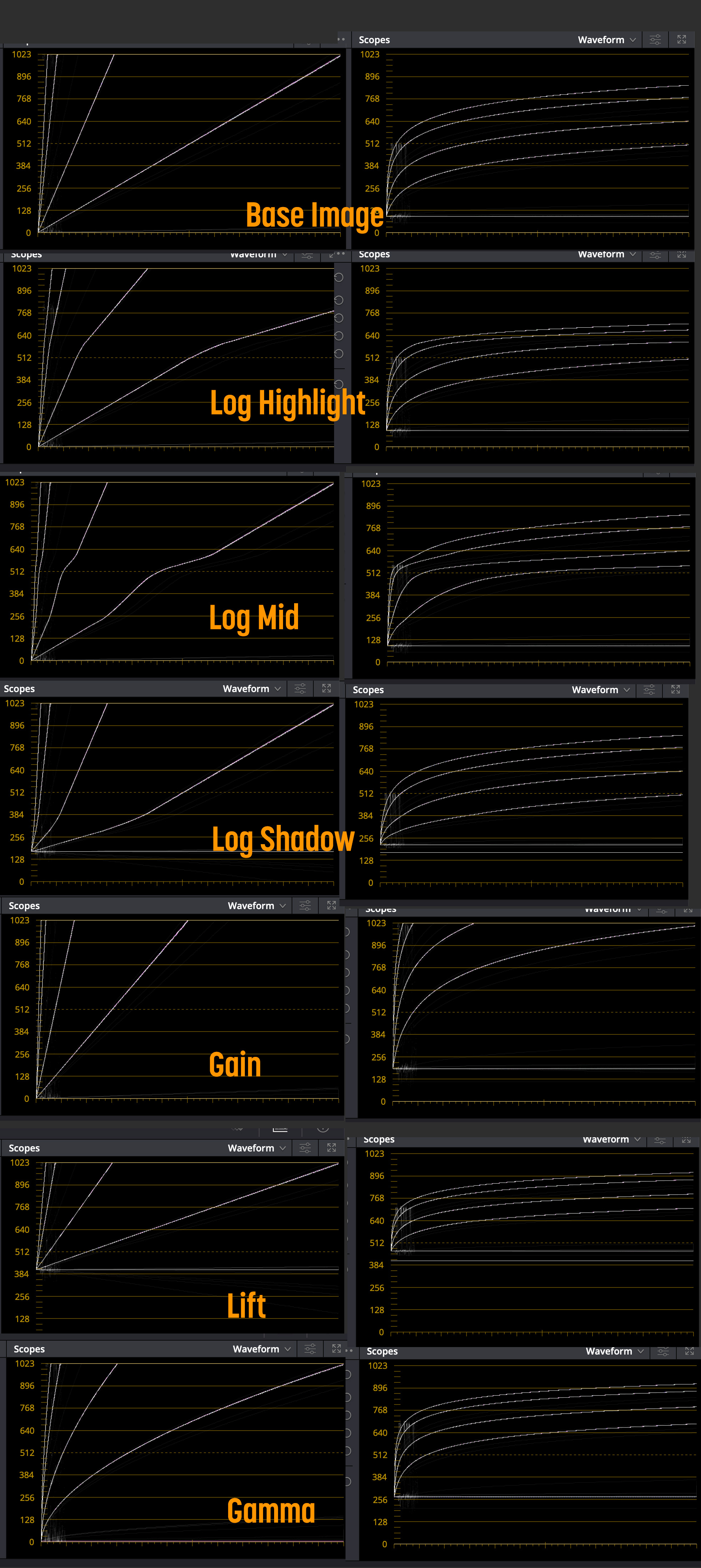
In my 'diving headlong into Resolve' i naturally set timeline to be RWG/LogG10 which sounds like an ideal match for Red? Superficially it is but then i noticed that actual grading controls weren't really doing it. Then i ran a series of RWG/LogG10 Ramps from nuke through to resolve to watch and then it dawned on me. Well it's pretty obvious really. The timeline is in LogG10 but the controls aren't really designed for that. Lift Gamma Gain works terribly on log footage and to be fair the Log controls don't work very well either (designed for cineon i guess).

I was making up a chart to show the difference, if you run ramps through it's blindingly obvious what's going on.

What i've found is that i'm setting the timeline to Linear. To me this is the most obvious setting. In Linear all the controls work as expected (or at least as how i expect). Yet under the colour managed thing i still seem to be able to do the IPP2 mapping and it appears so far to be identical to using a RWG timeline.

I'm in the middle of experimenting but so far this appears to be the sensible route...

cheers
Paul
 
Michael and Paul,

Yeah, I only came to the workflows I described in the previous posts from trial and error with resolve. The sensitivity of the Primary Bars and Wheels is the reason I love using the CDL grading tool in Redcine-X Pro. One click up or down in the Primary tools Bars and Wheels makes a big change in RWG/LOG3G10 image. The CDL grading tool in Redcine-X Pro allows for much smaller increments of change. This is also why I always use the " Apply CDL" option inside Resolve.
 
In my 'diving headlong into Resolve' i naturally set timeline to be RWG/LogG10 which sounds like an ideal match for Red? Superficially it is but then i noticed that actual grading controls weren't really doing it. Then i ran a series of RWG/LogG10 Ramps from nuke through to resolve to watch and then it dawned on me. Well it's pretty obvious really. The timeline is in LogG10 but the controls aren't really designed for that. Lift Gamma Gain works terribly on log footage and to be fair the Log controls don't work very well either (designed for cineon i guess).

I was making up a chart to show the difference, if you run ramps through it's blindingly obvious what's going on.

What i've found is that i'm setting the timeline to Linear. To me this is the most obvious setting. In Linear all the controls work as expected (or at least as how i expect). Yet under the colour managed thing i still seem to be able to do the IPP2 mapping and it appears so far to be identical to using a RWG timeline.

I'm in the middle of experimenting but so far this appears to be the sensible route...

cheers
Paul

Looking forward to hearing more about this. Vanilla YRGB or RCM? What's your color space with Linear Gamma? RWG or Rec.709? Do you need to insert any OFX Color Space Transforms or does it "just work" the way you are setting it up?
 
Michael and Paul,

Yeah, I only came to the workflows I described in the previous posts from trial and error with resolve. The sensitivity of the Primary Bars and Wheels is the reason I love using the CDL grading tool in Redcine-X Pro. One click up or down in the Primary tools Bars and Wheels makes a big change in RWG/LOG3G10 image. The CDL grading tool in Redcine-X Pro allows for much smaller increments of change. This is also why I always use the " Apply CDL" option inside Resolve.

Looking forward to hearing more about this. Vanilla YRGB or RCM? What's your color space with Linear Gamma? RWG or Rec.709? Do you need to insert any OFX Color Space Transforms or does it "just work" the way you are setting it up?

So here's a rough comparison. I created some linear ramps in RWG/LogG10 as a 4444XQ movie from Nuke. The ramps go from 0 to 1 and 0 to 64 i think at the most. So exercising the full range. I did some comparisons first between source R3D and 4444XQ RWG and found very very little different in Resolve. So i am confident that the artificial ramp is a true reflection

I then adjusted the ramp using the controls listed. You can see that Lift/Gamma/Gain on a RWG/LogG10 timeline is utterly futile. In fact if you use those controls i reckon you're causing a massive headache for yourself. The Log controls are slightly better but i do feel that those controls are looking for a cineon curve NOT a LogG10 and in reality what they are offering is quite limited. Now in all cases you can adjust the ranges and so that would help.

grade%20comparison.jpg


But on the left of the image is the linear version and frankly this is how colour is supposed to work.

I can see no reason why you would not have your timeline set to anything other than linear. I don't yet understand the finer details of resolve and how it is applying conversions or what having the timeline in linear actually means.

So on the left is linear and right is RWG. On these there are no output mappings (Bypass) so there's no upstream manipulation so you can see what's going on with the controls.

However when grading for real you can use an output of 709 and then access the IPP2 mapping - which does appear to work fine. In my case i have an additional monitor output LUT which is pulling my MBP to 709 space (calibrated with LightSpace)

Screenshot%202019-01-28%20at%2010.05.47.png


So far i believe this is the *correct* way to work in Resolve with Red footage. I'm prepared to be wrong though!

What i need to check now is how LUTs are applied, like the philmcolor ones. I have a *feeling* that there may need to be conversions to RWG in and out for them to work correctly....

cheers
Paul
 
Just to add to the above post, LUTs

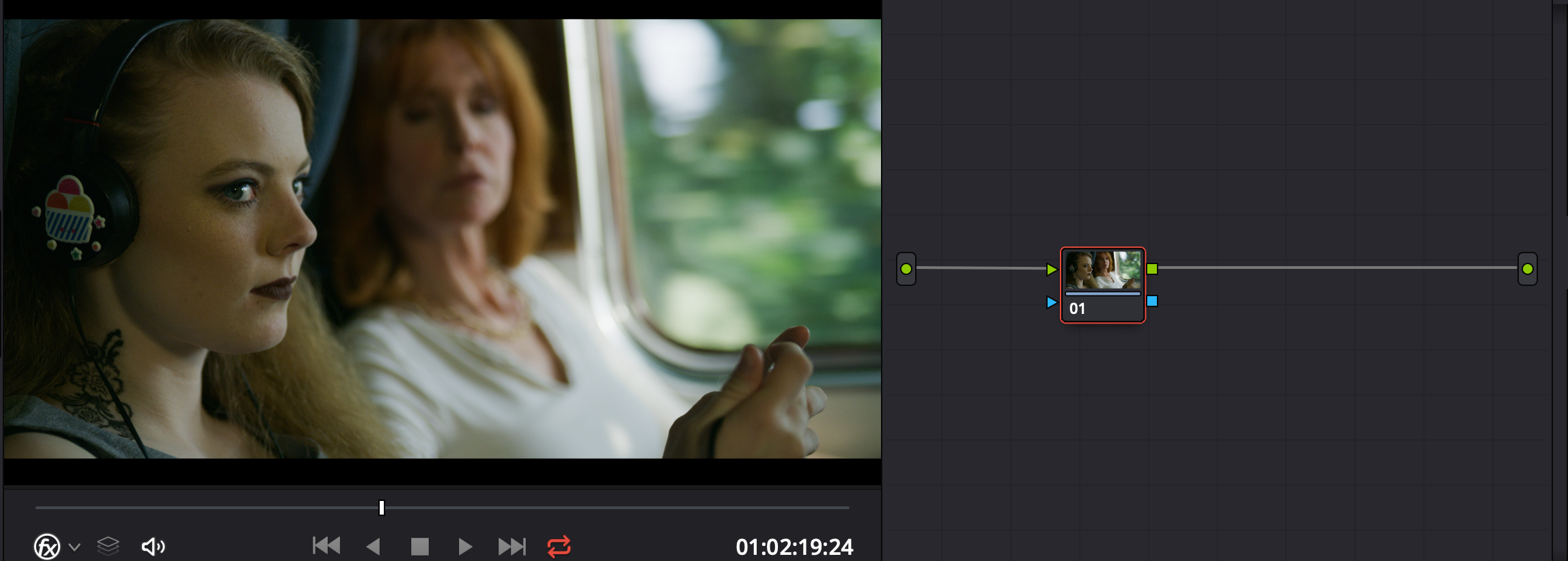
So basic image

Screenshot%202019-01-28%20at%2010.24.50.png


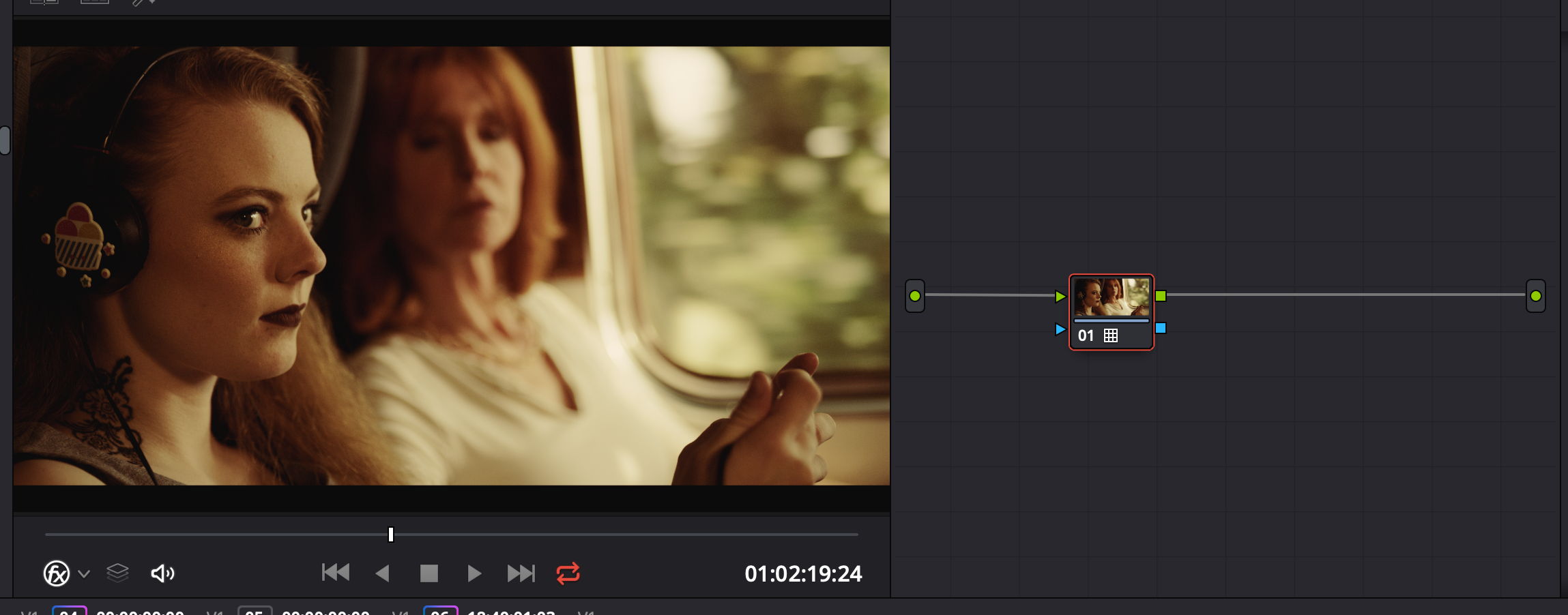
With timeline being LogG10, apply one of Phils LUTS (a drastic one for comparison)

Screenshot%202019-01-28%20at%2010.25.14.png


Switch to Linear timeline and the LUT fails as expected

Screenshot%202019-01-28%20at%2010.27.16.png


Pop in some gamma conversion (keep colourspace just go from Linear->LogG10 and LogG10->Linear

Screenshot%202019-01-28%20at%2010.27.57.png


And that works. So you would need to wrap OFX conversions between nodes that expect LogG10 as you'd expect. It's a shame that a node within Resolve can't have an option to choose which gamma it should work under. Or maybe it does and i just don't know where?

cheers
Paul
 
Great response Paul! What do your ramps look like with Rec.709 Gamma?

So if you just limit to 709 then it applies a 709 style curve but will clip harshly

Screenshot%202019-01-28%20at%2013.14.40.png


If you add IPP2 mapping then

Screenshot%202019-01-28%20at%2013.13.41.png


You can see even with super brights that IPP2 (medium and medium in this case) will roll off nicely

I do wonder whether you could actually take footage from *anywhere* convert it to RWG and LogG10 and take advantage of these rolloffs. I see no reason why not.

The brightest ramp is actually 0 to 32 (not 64 as i put), so with mid grey being 0.18 then that is about 7.5 stops over at 32ish.

If you want the QT file for the ramps then PM me or i'll find somewhere to host it

cheers
Paul
 
You can also achieve similar to IPP2 by setting the timeline nits value and doing luminance mapping

Screenshot%202019-01-28%20at%2013.23.46.png


with these settings

Screenshot%202019-01-28%20at%2013.25.03.png


They look like similar curves but IPP2 will be doing gamut mapping and be more subtle with Red footage i would guess.

cheers
Paul
 
If you want the QT file for the ramps then PM me or i'll find somewhere to host it

cheers
Paul

There's a Linear Ramp generator in Resolve, plus several other test patterns. When these are put under different Gamma curves, the effects you describe can be observed in the output monitor.
 
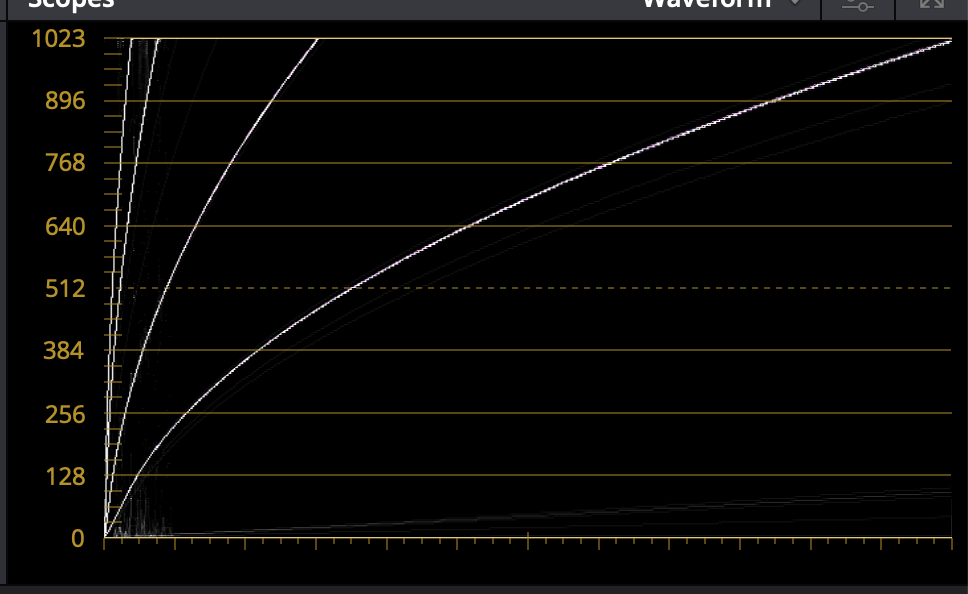
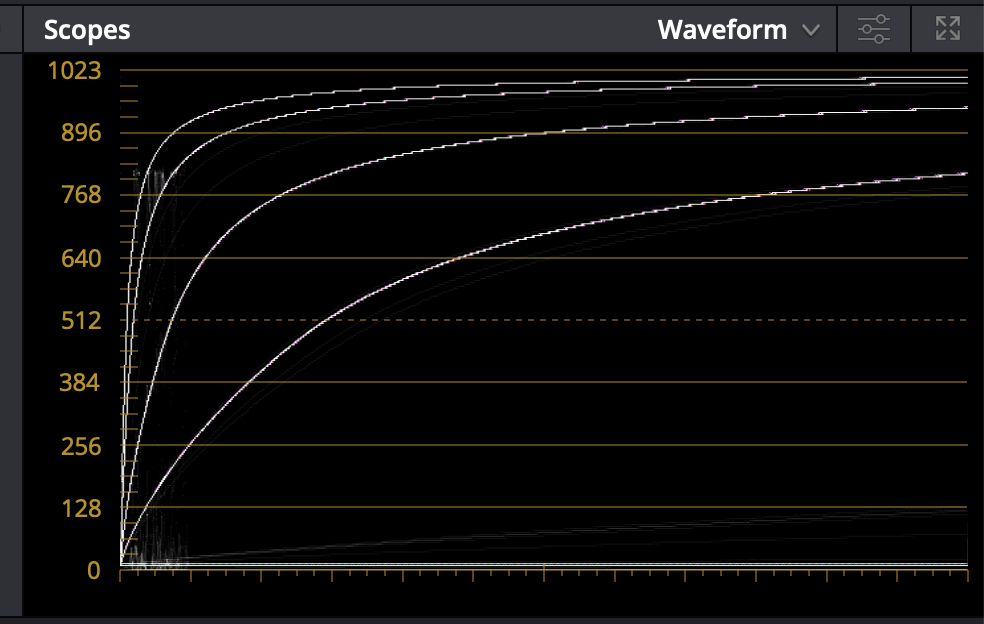
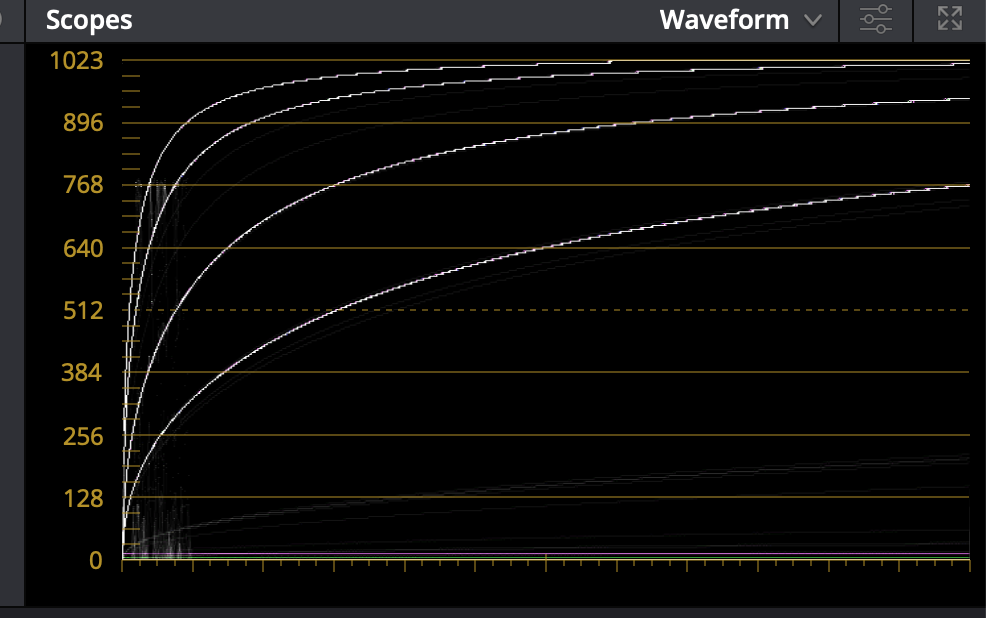
What I see when I put a linear ramp into Resolve (and then wrap it in a compound clip so that Color controls actually affect it) is that I get the mathematically expected LGG results when Timeline and Output are Rec.709 (Scene). When Timeline is Linear and Output is Rec.709 (Scene), the Waveform's straight line representation of the linear ramps gets bendy with Lift, Gain, and Offset. (Gamma is bendy no matter what.) When Timeline is Rec.709 (Scene), Lift, Gain, and Offset twist or move the straight line without bending it.
 
What I see when I put a linear ramp into Resolve (and then wrap it in a compound clip so that Color controls actually affect it) is that I get the mathematically expected LGG results when Timeline and Output are Rec.709 (Scene). When Timeline is Linear and Output is Rec.709 (Scene), the Waveform's straight line representation of the linear ramps gets bendy with Lift, Gain, and Offset. (Gamma is bendy no matter what.) When Timeline is Rec.709 (Scene), Lift, Gain, and Offset twist or move the straight line without bending it.

My Ramp is sourced from RWG/LogG10 - is the inbuilt ramp going to have the same starting place. My input colourspace is still RWG/LogG10.

To view the effect of the Linear ramp as shown above, the Timeline is Linear but no output mapping, otherwise it would get bent. I don't think your underlying image is 'bending' but you're putting it through a Linear -> 709 map at output.

Am i making sense?

Paul
 
My Ramp is sourced from RWG/LogG10 - is the inbuilt ramp going to have the same starting place. My input colourspace is still RWG/LogG10.

To view the effect of the Linear ramp as shown above, the Timeline is Linear but no output mapping, otherwise it would get bent. I don't think your underlying image is 'bending' but you're putting it through a Linear -> 709 map at output.

Am i making sense?

Paul

Yup. I made my own ramps with linear RGB and Gamma RGB in GIMP. I confirmed that when timeline gamma and node gamma agreed (whether Linear, Rec.709, or REDLog3G10), straight lines stayed straight and the gamma-curved line moved as expected, with extremes pinned to the extremes of the linear line. When timeline gamma and node gamma did not agree, the linear line was bent as expected when lift and/or gain were applied.

On page 2157 of the Resolve 15.2 manual there's this text:

The Color space submenu available when you right-click a node in the Node Editor supports four different color spaces that you can set each node to work within. When you choose a color space other than RGB, all channel-specific controls (the Custom curves, Soft curves, RGB Lift/Gamma/Gain sliders, and RGB mixer) operate on the particular channels of that color space, rather than the default YRGB channels. By switching color spaces, you can achieve very different kinds of adjustments by swinging values among mathematically different axes.

What I've noticed is that in similar fashion, those channel-specific controls honor the relationship between the Timeline and the Node settings of Color Space and Gamma (which is essentially what I said in my findings above). HOWEVER, the Qualifier tool is not one of those (despite the fact that the H, S, and L of the HSL qualifier could be seen as channel-specific controls). The Qualifier seems to have been designed to work on Rec.709 Scene-referred color space and gamma. Hilarity ensues when attempting to use the Qualifier tool on Log or Linear Gamma, or on Wide Gamut color spaces. Thankfully, Resolve promises that its floating-point math promises that squeezing REDWideGamutRGB colors down to Rec.709 can be loslessly translated back to RedWideGamutRGB. I haven't tested that yet, but since the qualifier is not a tool that itself winds up in the image pipeline output, it's always possible to convert REDWideGamutRGB to Rec.709 for the purposes of using the qualifer and then selecting the bits of the REDWideGamutRGB image that one wants to manipulate without losing any original color information.
 
I have investigated further Resolve's handling of color space and gamma space conversions. To first and second approximations, the math they use makes it very difficult to overflow or create rounding errors that hurt. That said, when working with Log3G10 footage, it is possible to use large amounts of gain and/or very steep curves to manipulate values so that when converted to non-Log gammas, the results are so extraordinarily beyond the pale (like 30+ stops overblown) that the math falls apart. But that's just dumb. For all intents and purposes, my testing of the color space and gamma space conversions show no errors in converting between Log3G10, Rec.709, Linear, and back again, across any color space and across a wide, wide range of exposures, saturations, etc. Use the OFX Color Space converter without worry!
 
Adding to this.

You can right click on a node and change the gamma and colourspace for that single node. So you don't need to wrap OFX ColourSpace conversions when applying a LUT, just a single node. (I can't remember who pointed this out but i read it here somewhere, might have been Marc)

But a wider question is really

Why set colourspace to Linear for grading instead of 709 or something else?

To me Linear fits because it's what i'm used to in Nuke, it's how i think. But all the controls in Resolve are designed with a colourspace in mind. So what are the pro's opinions on this? Looking in Resolve tutorials and so on, often this colourspace is set to 709. Why?

cheers
Paul
 
Correction: not all the color tools are designed to work with all color spaces. There are a specific few that are truly pan-spatial, but the Qualifier Tool, for example, is designed to work on REC709. It will greatly over-select wide gamut and/or Log gamma images.
 
To me Linear fits because it's what i'm used to in Nuke, it's how i think. But all the controls in Resolve are designed with a colourspace in mind. So what are the pro's opinions on this? Looking in Resolve tutorials and so on, often this colourspace is set to 709. Why?
Tradition.

Also, most experienced colorists can work faster in Rec709, at least assuming that's what they're used to working in. There are pros and cons to confining your working color space to a specific range. Most of what I do mixes footage from different sources, so it's better for me to use a display-referred system. Use whatever you're comfortable with and what works for the project.
 
Back
Top