Welcome to our community

Be a part of something great, join today!

  • Hey all, just changed over the backend after 15 years I figured time to give it a bit of an update, its probably gonna be a bit weird for most of you and i am sure there is a few bugs to work out but it should kinda work the same as before... hopefully :)

$1299 Seiki UHDTV 50" SE50UY04 - Bought it today

... I think that this is the purpose of the Seiki for red shooters. At least that's how I see it. Good 4k client viewing to show off all the potential and res of red. I'd stick to fsi for color critical monitoring. The sieki is wonderful as it has good viewing angles from what I've seen. We just need an easier way to connect it to cards or breakout boxes. I'll wait a bit and once there is a clear workaround I'd cash in for one. After all its the only way we can see our 4k material. ...

I agree. I don't think anyone seriously suggests that the $1,200.00 Seiki is designed or marketed as a substitute for a real grading monitor. When Flanders Scientific or Dolby comes out with a 4K grading monitor ... you ... and your wallet will certainly know it! However, the Seiki is ... what it is .... a cheap-n-cheerful way for us early adopters to see what the 4K fuss is all about. I am sure 6 months or a year from now there will be even more cost-effective choices.

______________________________
Scarlet X # 1859 “Bettie Page”
“… preparing to ‘whip’ the competition …”

Zeiss Lenses:

CY 21/2.8
ZF 28/2.0
CY 35-70/3.4
CY 50/1.4
ZF100/2.0

Nikon Lenses:
G 14-24/2.8
G 24-70/2.8
D 80-200/2.8

Tokina Lenses:

11-16/2.8
 
Last edited:
Good 4K client viewing ?
I'm still trying to get that with my Seiki's.
My playback still judders here and there on compressed playback. Amazing detail, but the judders make it unprofessional as a 'show off' presentation.
We are talking motion pictures , I would hope!
Playing r3d's is useless in my opinion, I want to show final edited and processed long play material.

So at this point nobody can play long format UHD media glitch free on the Seiki. Please correct me if I'm missing something here.
I am actually starting to feel that Red Users for the most part do not finish in 4K at this time. They have never seen their work at 4K playing on an affordable system.
I base my deduction on the lack of people inquiring about this playback problem. I seem to be the only one squawking about it.
While I'm on a bit of a rant... this partially explains the positive image evaluations from the magic lantern 5DIII raw hack. I displayed the sample file on the Seiki and it looked like low res 1080 crap.
But if you are used to seeing 1080, I guess it looks fabulous.
I've only been looking at sharp UHD for the last 3 weeks. It really does change your perspective. HD looks as bad as SD did. I'm not making this up.
Ok, I feel better now ... ;)


So
Thanks Bill.

I think that this is the purpose of the Seiki for red shooters. At least that's how I see it. Good 4k client viewing to show off all the potential and res of red. I'd stick to fsi for color critical monitoring. The sieki is wonderful as it has good viewing angles from what I've seen. We just need an easier way to connect it to cards or breakout boxes. I'll wait a bit and once there is a clear workaround I'd cash in for one. After all its the only way we can see our 4k material. I only managed to see a dcp from any of my footage twice on a projector.
 
Good 4K client viewing ?
I'm still trying to get that with my Seiki's.
My playback still judders here and there on compressed playback. Amazing detail, but the judders make it unprofessional as a 'show off' presentation.
We are talking motion pictures , I would hope!
Playing r3d's is useless in my opinion, I want to show final edited and processed long play material.

So at this point nobody can play long format UHD media glitch free on the Seiki. Please correct me if I'm missing something here. ... Ok, I feel better now ... ;)

We are all glad that you feel better. When these feelings arise ... take a deep breath ... inhale ... exhale ... sooner or later it will all be good! All joking aside, since you are local, you might want to talk to Neil Smith over at Hollywood DI and LumaForge. Here is what he is reporting:

Yep ... we did some more testing on Sunday ... colorimetry is coming along nicely ... we can dial the chroma, gamma and luma levels in pretty well now and 4K EPIC footage looks crisp and sweet ... the test footage we threw up on the screen on Sunday just happened to be a cute looking young lady (yer, I know) ... her skin tones were very natural ... fine hair detail shone through and her blue eyes really popped.

The issue at the moment is connectivity .... we've been testing BMD DeckLink Extreme 4K card plus TITANs plus NVIDIA K5000 using every combination of Display Port, HDMI and DVI connectors on Macs and Windows ... reliable drivers on both platforms is the hold-up at the moment ... we're getting close but not yet ready for public consumption ... we'll see how engineering gets on this week and we'll do some more testing next weekend.

We have a Kona 3G and Hi5-4K on its way .... it'll be interesting to see if that combination works ... I've always trusted the purity of the AJA HD SDI signal and how well they architect their protocols .... just hoping the Hi5-4K can take care of the handshaking and conversion from SDI to 4K HDMI .... AJA Kona 3G/Hi5-4K and Apple FCP X and Adobe apps will be a great 4K combination once we'v got it all to work.

BMD engineering are also on the case investigating the DeckLink 4K handshaking with the SEIKI UHDTV monitor .... once they get that sorted we'll be able to test Resolve 4K out to the both the SEIKI and the 4K projector.

Interestingly, in my lab at the moment I have 3 x SEIKI UHD TVs plus the 4K projector (when the engineers let me play with it) ... on Sunday whilst playing out EPIC 3840x2160 footage on all four display devices it struck me as quite sublime how far we've come in such a short time ...

I've got the K3G + Hi 5-4K on order as well and I am eager to see how it works. I know for a fact that the guys at AJA are testing the K3G and Hi 5-4K on several Seiki panels. We are the early adopters ... there WILL be bumps in the road.


______________________________
Scarlet X # 1859 “Bettie Page”
“… preparing to ‘whip’ the competition …”

Zeiss Lenses:

CY 21/2.8
ZF 28/2.0
CY 35-70/3.4
CY 50/1.4
ZF100/2.0

Nikon Lenses:
G 14-24/2.8
G 24-70/2.8
D 80-200/2.8

Tokina Lenses:

11-16/2.8
 
SEIKI UHD TV plays 4K just fine

SEIKI UHD TV plays 4K just fine

Good 4K client viewing ?
I'm still trying to get that with my Seiki's.
My playback still judders here and there on compressed playback. Amazing detail, but the judders make it unprofessional as a 'show off' presentation.
We are talking motion pictures , I would hope!
Playing r3d's is useless in my opinion, I want to show final edited and processed long play material.

So at this point nobody can play long format UHD media glitch free on the Seiki. Please correct me if I'm missing something here.
I am actually starting to feel that Red Users for the most part do not finish in 4K at this time. They have never seen their work at 4K playing on an affordable system.
I base my deduction on the lack of people inquiring about this playback problem. I seem to be the only one squawking about it.
While I'm on a bit of a rant... this partially explains the positive image evaluations from the magic lantern 5DIII raw hack. I displayed the sample file on the Seiki and it looked like low res 1080 crap.
But if you are used to seeing 1080, I guess it looks fabulous.
I've only been looking at sharp UHD for the last 3 weeks. It really does change your perspective. HD looks as bad as SD did. I'm not making this up.
Ok, I feel better now ... ;)


So

Hi Les,

Not sure what your setup is but we're not having any problems with playback on the SEIKI 50 inch ... we have three of them now and have tried several different combinations and they all play back just fine:

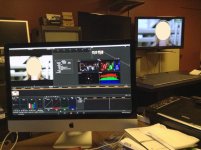
1) Mac Tower with BMD DeckLink Extreme 4K HD SDI card going out dual link SDI to the BMD SDI to 4K HDMI convertor box ... plug it into the HDMI port on the SEIKI and in Resolve we use the SEIKI as the SDI/HDMI out monitor ... we've play 5K EPIC footage and SONY F55 footage absolutely OK at 24 fps ... I've attached a couple of screen shots of a TV show shot on EPIC which plays back just great out of Resolve (the actress in the show is well known so I've had to mask out her face) ... I shot the screens on my iMac Mini ... the first is a long shot of Resolve in the foreground and the SEIKI in the background ... the second one is a close up of the SEIKI showing the resolution ... 3840x2160 at 24Hz.

2) PC with NVIDIA GTX TITAN playing back Resolve on the SEIKI desktop ... go into full screen mode and we can play back 4K DPX (3840x2160) back in real time ... we ran a 4K Workflow Training session last month and showed the SEIKI in action to 25 attendees ... no one had anything negative to say about the playback performance.

3) Mac Pro with Quadro K5000 playing Prem Pro and SpeedGrade .... looks just great ... we're waiting for AJA to ship us a KONA 3G and Hi5-4K convertor box to test out on the Adobe CS6 4K workflow ... haven't tried it yet but suspect it will be just fine ... will let you know ... we'll also test it on CS CC beta.

Just so you know, we're running an Adobe CS 6 4K Workflow Training session this Saturday (May 25th) on The Lot in West Hollywood... if you want to come along and see three SEIKIs in action, sign up and ejnoy the fun ... here's the link to our Events page:

http://www.lumaforge.com/styled-2/index.html

One other thing in terms of using the SEIKI as a 4K client display, we have ours professionally calibrated to a close match with Rec. 709 .... we have to use the service menu and an $18,000 spectroradiometer but after we finished calibrating it, the 4K image quality is really quite good ... the panel is a 10bit display and once calibrated, the color rendition is very pleasing.

We're offering a service whereby we'll buy in a SEIKI, calibrate it as close as possible to Rec. 709 and resell it for $1500 ... if you want one, give me a call.

Cheers,
Neil
 

Attachments

  • SEIKI_UHDTV_01.jpg
    SEIKI_UHDTV_01.jpg
    66.5 KB · Views: 0
  • SEIKI_UHDTV_02.jpg
    SEIKI_UHDTV_02.jpg
    43.4 KB · Views: 0
Neil, very interesting.
I want to play a compressed stream. Say a Cineform UHD , or even lower bitrates as in h264 or whatever.
Any luck with those?
The CPU does not look like the limit, as the same media plays on a 30" just fine. Titan and gtx660 do the same thing for me. Stutter every second or so.
 
For all those that have done calibration professionally, can you guys post calibration/gamma values for your seiki's?
I'd like to compare 'em to see if there aren't some generic trends for display matrix/factory calibration, so that maybe some rough/generic tweaking can be aplied by everyone even without own colormeter/calibrator hw.
(of course imho to benefit widest enduserbase maybe it won't hurt to also send that to seiki so that they change defaults in next firmware updates?)
 
Would any one recomend this TV set for a High class hotel or is the upscaling hardware to bad to display badly compressed TV footage corectly on it?

Is it better to stay on normal HD TV?

Pat
 
Would any one recomend this TV set for a High class hotel or is the upscaling hardware to bad to display badly compressed TV footage corectly on it?

Is it better to stay on normal HD TV?

Pat

The Seiki really should be connected to an external scaler (4K upconverting receiver, Oppo BDP 103/5, etc.) to watch anything other than a native 4K signal...which in my mind is exactly what you want in a 4K monitor. It's not really a TV, and for a hospitality application I would highly recommend the new Sony 55/65" 4K with great integrated speakers and good upconversion along with "smart" TV features.
 
Neil, very interesting.
I want to play a compressed stream. Say a Cineform UHD , or even lower bitrates as in h264 or whatever.
Any luck with those?
The CPU does not look like the limit, as the same media plays on a 30" just fine. Titan and gtx660 do the same thing for me. Stutter every second or so.

What application are you using for playback of UHD h264 files? I've had good luck using VLC on both Mac OS and Win8 when playing off a fast SSD. Using QuickTime Player or Windows Media Player has always resulted in dropped frames.
 
What application are you using for playback of UHD h264 files? I've had good luck using VLC on both Mac OS and Win8 when playing off a fast SSD. Using QuickTime Player or Windows Media Player has always resulted in dropped frames.

I REALLY recommend that you PC guys try CoreAVC if you are having problems with Windows Media Player... actually it's not the player, it's the decoder. The native Microsoft H264 decoder may be less efficient at decoding UltraHD than CoreAVC. FFDShow (used by VLC) is about the same as Microsoft's decoder wrt H264 efficiency. CoreAVC really shines for GPU decode. It's a $10 decoder - so - seems like it's worth a shot.
 
What application are you using for playback of UHD h264 files? I've had good luck using VLC on both Mac OS and Win8 when playing off a fast SSD. Using QuickTime Player or Windows Media Player has always resulted in dropped frames.

I have the best results so far with MPC-hc64 ( media player classic derived ), but I've tried many others. MPC has a lot of options however, and I may have misses the magic settings to make it work well.
As I said before, it does not seem to be a decoding issue, the cpu is typically at less than 25% loaded and the exact same media file plays smoother on the 30".
Almost as if there is a handshaking hickup happening on the hdmi going to the Seiki.
The system is a SandybridgeE with 64gig, playing from SSD. Used a Titan, gtx480, gtx660 with same results.

Jimmy , are you playing UHD and getting smooth playback on Windows8 ?
 
Interconnect standard with a future

Interconnect standard with a future

(snip) I don't think HDMI 2.0 is the answer we're looking for. It's just not forward-thinking enough. DisplayPort is also not getting the attention it needs. Either one could become the next dominant standard. What we really need is a high-speed interface for desktop use as well as HFR presentation on both the commercial and consumer sides of the market. IMO, we need something that supports 4K 12bit @ 240Hz. That's what I would be shooting for in the near term and make sure it has the ability to go dual or quad channel over the same interface cable/ port in the future so it can expand the same ability to 8K. ...Unfortunately, no one calls me when they're thinking of designing this stuff. I'm sure we'll have to sit and watch the painfully slow and deliberately lumbering progression of several HDMI revisions to get there.

This is exactly the discussion that needs to be happening NOW. Even with the 2.0 revision HDMI is barely able to manage the immediate term demands of the UHD topology.

One of the Madman's core tenets is "obsolescence obsolete", which while unattainable in the absolute, is a VERY worthwhile goal. As we stand on the cusp of our long awaited move to UHD/4K, with HFR and S3D implementations on the horizon, now is the time to move to an interconnect standard with a future.

Cheers - #19
 
This is exactly the discussion that needs to be happening NOW. Even with the 2.0 revision HDMI is barely able to manage the immediate term demands of the UHD topology.

One of the Madman's core tenets is "obsolescence obsolete", which while unattainable in the absolute, is a VERY worthwhile goal. As we stand on the cusp of our long awaited move to UHD/4K, with HFR and S3D implementations on the horizon, now is the time to move to an interconnect standard with a future.

Cheers - #19

I'm certainly no authority on the subject but Jeff Kilgroe's statement that Display Port needs to be considered caused me to learn more about it. On the surface, it looks like that has more headroom to grow... just needs to have more push into the consumer market.
 
If you count as consumer market PC users then it's widespread (for monitors) enough imho. Just that this particular thread is about TV with different 'default'/'most widespread' connector sets.
 
If you count as consumer market PC users then it's widespread (for monitors) enough imho. Just that this particular thread is about TV with different 'default'/'most widespread' connector sets.

Agree that monitors probably (haven't bought a new dedicated monitor in a few years... Dell SP2309W 2048x1152) do have that port. But I just recently bought a TCL 48" TV (within the past six months) that, while it has an SPDIF port, doesn't have the Display port. And though there are adapters for Display port connectivity to HDMI, DVI, and VGA, I suppose the true capability is limited to what is adapted from. I think dedicated Display ports on the consumer TV side is where that would push the wider adoption of the connection.
 
Last edited:
1) Mac Tower with BMD DeckLink Extreme 4K HD SDI card going out dual link SDI to the BMD SDI to 4K HDMI convertor box ... plug it into the HDMI port on the SEIKI and in Resolve we use the SEIKI as the SDI/HDMI out monitor ... we've play 5K EPIC footage and SONY F55 footage absolutely OK at 24 fps ... I've attached a couple of screen shots of a TV show shot on EPIC which plays back just great out of Resolve (the actress in the show is well known so I've had to mask out her face) ... I shot the screens on my iMac Mini ... the first is a long shot of Resolve in the foreground and the SEIKI in the background ... the second one is a close up of the SEIKI showing the resolution ... 3840x2160 at 24Hz.

Hi,

How's the BlackMagicDesign SDI to 4K HDMI converter working for you ?
I have hard time getting the TV to sync to the HDMI signal, most of the time I get 'Not support' on the TV. Plugging and unplugging and resetting the converter or the source works once in a while. (The TV works fine from a Windows+Nvidia computer).

Did you try 4 single link cables or always 2 dual link ?

Luc
 
BMD DeckLink Extreme 4K to BMD 4KSDI to 4K HDMI convertor

BMD DeckLink Extreme 4K to BMD 4KSDI to 4K HDMI convertor

Hi,

How's the BlackMagicDesign SDI to 4K HDMI converter working for you ?
I have hard time getting the TV to sync to the HDMI signal, most of the time I get 'Not support' on the TV. Plugging and unplugging and resetting the converter or the source works once in a while. (The TV works fine from a Windows+Nvidia computer).

Did you try 4 single link cables or always 2 dual link ?

Luc

Hi Luc,

The combination works just fine .... but let me just make sure you're using it in the same way that we are:

1) we have the BMD DeckLink 4K Extreme PCIe card insidea MacPro Tower or MAGMA Thunderbolt to PCIe expansion box on a 27inch iMac.

2) running two HDI SDI cables out of the DL Ex card into the BMD HDSDI to 4K HDMI convertor box.

3) running the blue HDMI cable that came with the SEIKI out of the 4K HDMI into one of the three HDMI inputs on the SEIKI.

4) install the necessary BMD software for both the DL 4k Ex card and the 4kto4K convertor box - you might have to do a firmware upgrade using a USB cable.

5) set up the DL Ex4K card to output 3840x2160 @24Hz plus select 'Use p and not psf where ever possible' option .... don't select use 3G option.

6) go into Resolve (you have ot have the full version with a dongle not the Lite version) ... set up a new project with a 3840x2160 TimeLine and Video output as 4K UHDTV @24

7) conform 5K/4K media and press play.

8) make sure you've selected the correct HDMI input on the SEIKI ... I toggle between an incorrect port and the one I'm actually using to make sure the display is working at 3840x2160 @24Hz ... a small green box with the details comes up in the top right hand corner for a couple of seconds.

8) press play and hey presto! .. 4K image plays nice and smoothly on the SEIKI ... if you don't calibrate the display it won't look that good but once you've dialed it into Re. 709 or sRGB color space it'll look pretty damn sweet.

Just so you know, the BMD 4K DL card doesn't work with Apple FCP X at the moment ... problem is being addressed.

BTW, you don't have to select 24 Hz ... choose the refresh rate that matches the frame rate of your footage and just make sure that Resolve and the Decklink card are set to the same settings.

Also, make sure the DL card is NOT set to 'extend desktop' but use 'display last frame played' option.

Let me know if that helps.

Neil
 
Anyone using UltraStudio 4K Thunderbolt Capture & Playback with Seiki?
 
Neil, Have you any luck playing a distribution ( compressed ) media file smoothly on the Seiki ?
 
Back
Top