Welcome to our community

Be a part of something great, join today!

  • Hey all, just changed over the backend after 15 years I figured time to give it a bit of an update, its probably gonna be a bit weird for most of you and i am sure there is a few bugs to work out but it should kinda work the same as before... hopefully :)

$1299 Seiki UHDTV 50" SE50UY04 - Bought it today

And it looks normal? When DVI is > 165 Mhz it is dual link DVI. This is why this didn't make sense to me as that is not really compatible with HDMI.

I tested this and sure enough once i go from 165 -> 165.01 Mhz it goes from a clear picture to one missing half its lines because the video card switched to dual link DVI. You are actually getting a good picture with this method?

My unit is dead, but very briefly yes. But I suspect my unit was performing oddly. I will retest when when my replacement arrives.
 
Excellent 10-bit color resource: http://www.ronmartblog.com/2011/07/guest-blog-understanding-10-bit-color.html

Which confirms what I've found - basically HDMI = 8 bit only because no GPU company is enabling it. Also Mac OS = 8-bit color only period. So, if you want 10-bit on this monitor - HDMI Deepcolor from a blu-ray or other play is possible - but desktop will have to come from output device that supports 10-bit HDMI - which GPUs don't. Or a displayport to HDMI that support 10-bit. Not sure if that exists.

It seems clear the panel can support it though.
 
GTX 660 (EVGA) - One monitor display port at 1920 x 1200, one DVI at 2560 x 1600, one DVI to HDMI to Seiki at 4K.

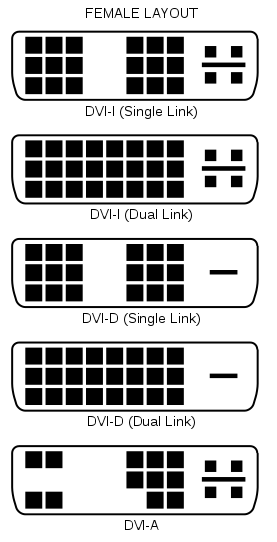
Also... The cable your using.. Is the DVI end dual link DVI or single link?

277px-DVI_Connector_Types.svg.png
 
Nvidia does it fine under Windows. Linux and OSX resolution support is severely lacking. There is also disparity between cards from different manufacturers and how they have implemented their video out abilities. Both ATI and nvidia have been driving 3840x2160 and similar resolutions for some time now. Same with ATI. It doesn't require their expensive high-end cards to do so. Well, it does if you actually want to move polygons about and have real frame rates at those resolutions, but the displays themselves are still limited to a paltry ~30fps with current HDMI 1.4.

Under OSX, AMD/ATI is the superior graphics solution most of the time. Unfortunately, most of us around here are running nvidia due to Adobe CS6, Resolve and other R3D and related applications requiring CUDA support.

Who knows... The REDRAY has always had multiple HDMI 1.4a outputs and RED Projector has always had both HDMI 1.4a input and output. We'll need HDMI 2.0 in order to support REC2020 and other upcoming color spaces. Any 18Gbps capable HDMI cable can support HDMI 1.4[a], it's not like there's a magic new cable. In a nutshell, any quality cable that meets the HDMI 1.2b spec is good for now. And the cheap ones from vendors like Monoprice are actually some of the best performing cables out there in my testing. I've had fewer of their longer cables die than anyone else's too! Perhaps he had to upgrade some older garbage cables... I've had to do that here and there. HDMI 2.0 will require cables rated for a higher speed, but I don't recall that off the top of my head.

Of course, but for now most clients are not going to have any method of playing back 4K. Sony's 4K player ships later this year, but unlike REDRAY, it's an entirely closed ecosystem, so only content obtained through Sony's media store and channels will play on it. It should also support Amazon, Netflix and a few others.

Not sure what you mean by that specifically. But if you feed it a standard UHD feed over HDMI and it works just fine at full resolution. There is no internal 4K tuner for OTA or ATSC feeds, but the ATSC has yet to officially adopt UHD and no broadcasters anywhere, in the world, have decided on any common means by which to send UHD.

Several computers with Thunderbolt, predominantly the first round of PCs with it, would only run video from the onboard Intel GPU through the Thunderbolt port. There have been other issues and many only have a very finite selection of supported resolutions via there firmware. As limited as the Apple TB to HDMI abilities are, they're still the best out there as far as I'm aware.

Hi Jeff, I meant there was some fundamental compatibility problems at the extremes, besides the version of dp in tb only does 2k from memory. Some report over at macrumors or tom most likely.

Are you sure no 4k usb h264 mpeg2 playback. In video cards, I'm thinking playback functionality in low end cards, never said you doubted it, but people talk like you need a very high end computer.

Remember my post where I suggest a low end computer for clients to play back. If $200-300, would be great. Gpu hardware acceleration of playback of course.
 
Man I really just don't see how it can be doing it. The info on the screen does say 3840x2160 right? and the picture looks good?

Info did say 3840 X 2160. But I did not have much a chance to check picture since my unit flaked out and is now in box to go back. I did not expect it to work either, especially with the crap cable. I actually thought for a moment that I still must have the HDMI plugged in but did not.
 
Just got the tv today. It looks great. After many tests with a EVGA GTX 580 I was able to display 3840x2160@30Hz on Windows . The card has miniHDMI 1.4 and DVI. No luck with a mini HDMI -HDMI cable. Only working solution for me was a DVI-D (single link) - HDMI cable. To make it work I needed to set a custom resolution of 3840x2160 and set Timing to manual with "Active pixels" at 3840 2160 and "Total pixels" at 4000 2200. I hope this can be useful to somebody else.
 
May I ask is the text sharp? I understand text rendering for HD TV is no good, text rendering on UHD TV should be improve greatly. Are you able to see small font text clearly. Is the graphics and text rendering comparable to desktop monitor (e.g. 24" Dell 2412M or 27" AOC I2757FM). May I ask anyone has test the power consumption at 20%, 50% and 80% brightness. I am interest to get UHD TV as desktop for office work like surfing web pages, watch you-tube, word document and excel spreadsheet. Thanks.
 
Ok I am gonna stop by newegg tomorrow and pick up an active DP -> HDMI adapter and give that a shot (for usage under linux) Hopefully I will atleast be able to get > 165 Mhz but not holding my breath for the full 30Hz.

Honestly I feel the scaling is not quite dot to dot for me almost like its scaling across sub-pixels at points. Also when starting X with nothing (which is a checkered pattern which usually looks grey-ish I see a line in the middle where I think its doing 2 pixels instead of 1 which makes me think its not doing dot 2 dot scaling. THat being said I have no problems reading everything on X windows with DPI set at 75 from around 6-9 feet away but its more comfortable at my normal distance which is about 3 feet.
 
Honestly I feel the scaling is not quite dot to dot for me almost like its scaling across sub-pixels at points. Also when starting X with nothing (which is a checkered pattern which usually looks grey-ish I see a line in the middle where I think its doing 2 pixels instead of 1 which makes me think its not doing dot 2 dot scaling. THat being said I have no problems reading everything on X windows with DPI set at 75 from around 6-9 feet away but its more comfortable at my normal distance which is about 3 feet.

OMG no wonder. It was their stupid "sharpness' plugin or whatever which is active even @ 4k. Turn that shit down to 0 and its way better now and everything looks dot-to-dot.

You can see it fucking up for anyone who has the monitor if you open this image (and make sure its zoomed to native size) in 4k mode and you will see the line down the middle like I was talking about. With the shaprness at 0 it went away and things look *a lot* better now:

http://box.houkouonchi.jp/x_bg.png


I *highly* recommend anyone using this as a monitor to do this.

The sharpness was probably effecting me more than others as I am using super small fonts (x set at 75 DPI). Turn it off and be amazed =)
 
HDMI Deepcolor from a blu-ray or other play is possible
There are no Blu-rays with Deep color because it's not supported/allowed by the Blu-ray spec.

desktop will have to come from output device that supports 10-bit HDMI - which GPUs don't. Or a displayport to HDMI that support 10-bit. Not sure if that exists.
Blackmagic Intensity Pro has a 10-bit HDMI output, I've been told.
 
There are no Blu-rays with Deep color because it's not supported/allowed by the Blu-ray spec.
Sorry, my lack of clarity don't mean from Blu-Ray disc - just Blu-ray player (several of them do support Deep Color from a USB or network file. Also, my Western Digital Live box which is upstairs but may move supports Deep Color off HDMI and plays a bunch of formats - but I have to wait for my replacement unit to arrive.
 
There are no Blu-rays with Deep color because it's not supported/allowed by the Blu-ray spec. ...

While that may be true with respect to the BD spec., there certainly are BD players that offer Deep Color for their HDMI outputs. For example the OPPO 103 and 105 have settings for 36 bits (12-bit per channel), and 30 bits dithered & undithered (10-bit per channel). The OPPO players also have HDMI through-puts, so they can act as a media player / server of sorts, together with a fairly decent 4K up-scaler. I plan to use the 103 with my 4K monitor.
________________________________
Scarlet X # 1859 “Bettie Page”
“… preparing to ‘whip’ the competition …”

Zeiss Lenses:

CY 21/2.8
ZF 28/2.0
CY 35-70/3.4
CY 50/1.4
ZF100/2.0

Nikon Lenses:
G 14-24/2.8
G 24-70/2.8
D 80-200/2.8

Tokina Lenses:

11-16/2.8
 

Thanks for the link, here's the official press release:

http://www.vesa.org/news/vesa-intro...solution-interoperability-with-hdmi-displays/

"With the release of this new VESA specification, existing adaptors will now be referred to as “Type 1” adaptors, and the new adaptors as “Type 2.” A Type 2 adaptor will be backward compatible with an existing Dual-Mode DisplayPort source device, but it will only support up to a 165MHz TMDS clock rate unless it is used with a “Type 2 enabled” Dual-Mode DisplayPort source device. Some existing systems will be software updatable to support Type 2 adaptors. A Type-2 enabled Dual-Mode DisplayPort Source devices, together with a Type 2 Dual-Mode DisplayPort-to-HDMI adaptor, will enable support for HDMI 1.4 display modes such 1080p 3D at 60Hz, or Ultra HD (4K x 2K) up to 30Hz frame rate, as well as 1080p with deep color. Type 2 adaptor prototypes are currently available from multiple suppliers"...

"Prior to the updated Dual-Mode Standard release, Dual-Mode cable adaptors were limited to a TMDS clock rate of 165MHz providing support for display resolutions up to 1080p with 60Hz and 24 bits color. In this latest specification, a new Dual-Mode cable adaptor configuration is defined that enables a TMDS clock rate of up to 300MHz. While the DVI standard limits TMDS clock rates up to 165MHz, the HDMI 1.4 specification allows TMDS clock rates up to 297MHz, enabling the support of 1080p 3D at 60Hz, or Ultra HD (4K x 2K) up to 30Hz frame rate"...


So, in practice, you need BOTH a :

Type-2 enabled Dual-Mode DisplayPort Source device

- and a -

Type 2 Dual-Mode DisplayPort-to-HDMI adaptor, which enables "support" for HDMI 1.4 display modes such 1080p 3D at 60Hz, or Ultra HD (4K x 2K) up to 30Hz frame rate


I still have no idea if that means the current generation nvidia Kepler Quadro desktop and mobile displayport connectors will work with the new adaptors, but I'll keep digging... and, in case you were wondering...

Yes, my head hurts...
 
On a much lighter note, your next 4K 30fps UHDTV media player may be a smartphone, iPad / tablet:

http://www.engadget.com/2013/04/26/qualcomm-snapdragon-800-mass-production-late-may/#comments

Article excerpt: "the 800 comes with the new Adreno 330 graphics processor with 30fps 4K playback capability" ...


Also, with this week's AMD 7990 release with the 4K gaming bundle of Crysis® 3, Far Cry® 3, Tomb Raider™, BioShock® Infinite, Deus Ex: Human Revolution™, Sleeping Dogs™, Hitman: Absolution™, and Far Cry® 3 Blood Dragon PC Games, looks like 4K is off to the races this year ...
 
Last edited:
I still have no idea if that means the current generation nvidia Kepler Quadro desktop and mobile displayport connectors will work with the new adaptors, but I'll keep digging... and, in case you were wondering...

Yes, my head hurts...

I agree - I'm digging as well when I can and yes, it's clearly the bleeding edge as I'm waiting for my sinuses to bleed.
 
May I ask is the text sharp? I understand text rendering for HD TV is no good, text rendering on UHD TV should be improve greatly. Are you able to see small font text clearly. Is the graphics and text rendering comparable to desktop monitor (e.g. 24" Dell 2412M or 27" AOC I2757FM). May I ask anyone has test the power consumption at 20%, 50% and 80% brightness. I am interest to get UHD TV as desktop for office work like surfing web pages, watch you-tube, word document and excel spreadsheet. Thanks.

At this point, at least by working with my set, I can't recommend it as desktop monitor (and this is exactly what I bought if for since I stare at small fonts all day). Yes, it appears to be displaying dot-to-dot, but even at sharpness set to 0, there is a subtle edge processing going on.
You cant's see it when you look at most dot-precise test patterns, but it's obvious when you look at darker, crossing lines or bold fonts. It adds ugly single pixel "hints" to darker line crossings basically. I tried all possible picture control combinations, cables, some timings, different video cards, all to try to get rid of this effect. ATI based cards seem to have a slight edge, with fewer edges affected.

I took a 3840x2160 screenshot and loaded it as full image through a built in picture viewer (USB port). At full screen, the viewer is in 4K dot-by-dot as well. But looking at problem areas on screenshot, the extra pixels are still there. This proves to me that it's not dependent on input source, this is just what the panel does.

Did anyone else notice it ? Maybe I have a bad unit...
 
Back
Top