Welcome to our community

Be a part of something great, join today!

  • Hey all, just changed over the backend after 15 years I figured time to give it a bit of an update, its probably gonna be a bit weird for most of you and i am sure there is a few bugs to work out but it should kinda work the same as before... hopefully :)

$1299 Seiki UHDTV 50" SE50UY04 - Bought it today

I took a 3840x2160 screenshot and loaded it as full image through a built in picture viewer (USB port). At full screen, the viewer is in 4K dot-by-dot as well. But looking at problem areas on screenshot, the extra pixels are still there. This proves to me that it's not dependent on input source, this is just what the panel does.

Did anyone else notice it ? Maybe I have a bad unit...

I saw this too. But did you try Noise Reduction off and Sharpness set to 0? Also, I wonder if the font display tech in operating systems right now has no code for UHD and that might be the issue?
 
I saw this too. But did you try Noise Reduction off and Sharpness set to 0? Also, I wonder if the font display tech in operating systems right now has no code for UHD and that might be the issue?


Yes, NR and Sharpness were both off, same as DLC, I also tried combinations of contrast/brightness/color and backlight, but the edge processing persists. I'm hoping there may be some tweaking room left in service mode menu you found for us. My test with image loaded on USB stick worries me. It shows that (whatever it is) happens across inputs - the USB input (some internal linux media player) has nothing to do with Windows UI composition or sub-pixel font rendering that you'd expect from computer input.
 
Yes, NR and Sharpness were both off, same as DLC, I also tried combinations of contrast/brightness/color and backlight, but the edge processing persists. I'm hoping there may be some tweaking room left in service mode menu you found for us. My test with image loaded on USB stick worries me. It shows that (whatever it is) happens across inputs - the USB input (some internal linux media player) has nothing to do with Windows UI composition or sub-pixel font rendering that you'd expect from computer input.

Well, I'm not sure I would trust image display from USB either - probably code to optimize photographs for home viewing there. I think test signal via HDMI out of something like a Black Magic intensity or 10-bit display port signal from Kepler in a supported app under windows is probably the best way to send a pure signal.
 
Well, I'm not sure I would trust image display from USB either - probably code to optimize photographs for home viewing there. I think test signal via HDMI out of something like a Black Magic intensity or 10-bit display port signal from Kepler in a supported app under windows is probably the best way to send a pure signal.

+1

Though I find it ironic that a unit with apparently so little sophistication in processing might actually be dumbing down one of its inputs based on the type of images it expects people to supply via that tap.

Cheers - #19
 
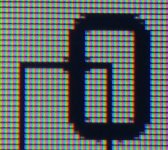
At this point, at least by working with my set, I can't recommend it as desktop monitor (and this is exactly what I bought if for since I stare at small fonts all day). Yes, it appears to be displaying dot-to-dot, but even at sharpness set to 0, there is a subtle edge processing going on.
You cant's see it when you look at most dot-precise test patterns, but it's obvious when you look at darker, crossing lines or bold fonts. It adds ugly single pixel "hints" to darker line crossings basically. I tried all possible picture control combinations, cables, some timings, different video cards, all to try to get rid of this effect. ATI based cards seem to have a slight edge, with fewer edges affected.

I took a 3840x2160 screenshot and loaded it as full image through a built in picture viewer (USB port). At full screen, the viewer is in 4K dot-by-dot as well. But looking at problem areas on screenshot, the extra pixels are still there. This proves to me that it's not dependent on input source, this is just what the panel does.

Did anyone else notice it ? Maybe I have a bad unit...

Thanks for the info. Hopefully the below web links may provide some clues.
http://community.insigniaproducts.c...n-Overscan-off/m-p/607?view=by_date_ascending
http://insignia.lithium.com/t5/Televisions/NS-L42Q-10A-HDMI-text-rendering-issue/td-p/4309
 
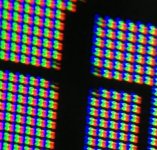
Here's a zoom in with a loop on single pixel details on text with sharpness at 0.
 

Attachments

  • pixelSeikiZoom.jpg
    pixelSeikiZoom.jpg
    18.9 KB · Views: 0
  • zoomIn.jpg
    zoomIn.jpg
    23.5 KB · Views: 0
  • zoomIn.jpg
    zoomIn.jpg
    20 KB · Views: 0
Last edited:
I took 3 different pics at Sharpness 0, 50, and 100 in Standard mode:
 

Attachments

  • 0.jpg
    0.jpg
    5.6 KB · Views: 0
  • 50.jpg
    50.jpg
    5.8 KB · Views: 0
  • 100.jpg
    100.jpg
    5.7 KB · Views: 0
Woot! Good news!

So today I stopped by newegg to pickup this adapter:

http://www.newegg.com/Product/Product.aspx?Item=N82E16815158348

My testing with active single-link adapters brought me to the conclusion it could get around the nvidia driver limitations as it uses DFP-4 (display port with its 960Mhz bandwidth limit) instead of DFP-1/HDMI-1 which says 165 Mhz max as the active adapters actively convert the DFP LVDS to TMDS.

Up to 27Hz on linux. I bought an active DP -> HDMI adapter and it will do up to 238.50 MHz (doesnt work @ 238.90 Mhz) which upped my limits.

At 238.90 Mhz I get:

Code:
(II) Apr 26 14:29:53 NVIDIA(GPU-0):   Validating Mode "3840x2160":
(II) Apr 26 14:29:53 NVIDIA(GPU-0):     3840 x 2160 @ 27 Hz
(II) Apr 26 14:29:53 NVIDIA(GPU-0):     Mode Source: X Configuration file ModeLine
(II) Apr 26 14:29:53 NVIDIA(GPU-0):       Pixel Clock      : 238.90 MHz
(II) Apr 26 14:29:53 NVIDIA(GPU-0):       HRes, HSyncStart : 3840, 3888
(II) Apr 26 14:29:53 NVIDIA(GPU-0):       HSyncEnd, HTotal : 3920, 4000
(II) Apr 26 14:29:53 NVIDIA(GPU-0):       VRes, VSyncStart : 2160, 2163
(II) Apr 26 14:29:53 NVIDIA(GPU-0):       VSyncEnd, VTotal : 2168, 2222
(II) Apr 26 14:29:53 NVIDIA(GPU-0):       H/V Polarity     : +/-
(WW) Apr 26 14:29:53 NVIDIA(GPU-0):     Mode is rejected: Unable to construct hardware-specific
(WW) Apr 26 14:29:53 NVIDIA(GPU-0):     mode timings.


I now was able to do:

3840x2160 @ 26.8 hz (ths is so much better than the 18.6 Hz I had before)
1920x1080 @ 103.2 Hz
1280x720 @ 192.3Hz

Screenshots:


This also means now I can game @ 1080p with high responsiveness not just 720p which is also a big improvement.

Also this could be just my imagination but it seems like I am getting less banding in colors (almost like its 10 bit now). Again could just be my imagination.

Now if only I could find an active DP -> HDMI 1.4 adapter. They don't seem to be sold anywhere as far as I can see.
 
I took 3 different pics at Sharpness 0, 50, and 100 in Standard mode:

Thank you. Please look at this sample on your Seiki. One is line crossing pattern that is NOT a font and it should not be aliased. The other is what it looks on my panel.
 

Attachments

  • test_png.png
    test_png.png
    276 bytes · Views: 0
  • Seiki_pattern.jpg
    Seiki_pattern.jpg
    20.3 KB · Views: 0
Calibrated SEIKI ....

Calibrated SEIKI ....

As mentioned the other day, we had our 4K SEIKI UHD TV calibrated by our regular calibration guru and it came up amazingly well after he had dialed in the controls in the service menu ... yesterday I showed the calibrated panel playing a 3840x2180 uncompressed Quicktime to two colorists (whose opinions I totally respect) and they both scratched their heads in surprise and said it looked remarkably good ... and these guys have no reason to BS ... as well as doing color correction on paying gigs they both teach color classes at prestigious film schools.

We'll be showing the calibrated SEIKI playing UHD EPIC footage tomorrow at our 4K MADE EASY training class tomorrow ... i'll leave it to the attendees to report back on what they see with their own two eyes.

Interesting times, guys ... decent looking 4K coming to a TV near you!

Cheers,
Neil
 
Thank you. Please look at this sample on your Seiki. One is line crossing pattern that is NOT a font and it should not be aliased. The other is what it looks on my panel.

This is your sample on my Seiki. I think since the panel is BGR then any black vertical line will always have a red shadow on the left side and a blue shadow on the right side as you can see from my zoom in @ sharpness 0.
photo.jpg
 
I gotz the 4K now! :)

Mine arrived about 20 minutes ago, I've unboxed it, but have been racing around doing other things too. Will try to get some testing done this weekend, but I have a really full plate. First order of business is to connect it to the Oppo 103 4K upscaling BluRay player and MBP retina. Dig through service menus and see if I can rearrange my cluttered workspace enough to get it connected to the Z820 w/ Titan GPU.
 
I gotz the 4K now! :)

Mine arrived about 20 minutes ago, I've unboxed it, but have been racing around doing other things too. Will try to get some testing done this weekend, but I have a really full plate. First order of business is to connect it to the Oppo 103 4K upscaling BluRay player and MBP retina. Dig through service menus and see if I can rearrange my cluttered workspace enough to get it connected to the Z820 w/ Titan GPU.

Jeff, in the service menu, make sure you dial down the LCD backlight levels ... guess they really crank it up for the showrooms and consumer market ... bring down the overall luma levels helps with the color matrix ... also have to dial out the reds in the low mid greys.

You have to go into the TITAN NVIDA control panel under PC option to set the resolution to 3840x2160 @30 Hz to get a HDMI signal to work ... couldn't get the SEIKI to register a Display Port to HDMI signal ... let me know if you have any luck with DP signal.

BTW, the company that makes the panel is a large Chinese OEM .... this is the not their first panel ... which could explain why it looks so good at the price point.

Let us know how you get on ... definitely worth calibrating it.

Neil
 
First impressions.... For the $, it's not too bad. No apparent dead pixels or stuck pixels on my unit. Have to leave now, but will really dig into this later.

Need to get this thing wall-mounted ASAP, the included stand is pretty darn flimsy. Build quality overall is very "cheap". Here's what my wife said about it, "Oh is that the new TV you were talking about... What brand is that? SUCKY?". Hehe. I threw the Prometheus BD in the Oppo. Boom. Looks pretty impressive right out of the box. Initial test complete.
 
Watching a BD of Les Miserables up-scaled to 4K through the OPPO 103. Looks pretty darn good to me. I will compare it later tonight played thru my 50" Pioneer Elite Plasma in 2K. However, so far ... not bad at all (for the money). With a little luck, next week I wil have my AJA Kona3G and then the fun will begin.

________________________________
Scarlet X # 1859 “Bettie Page”
“… preparing to ‘whip’ the competition …”

Zeiss Lenses:

CY 21/2.8
ZF 28/2.0
CY 35-70/3.4
CY 50/1.4
ZF100/2.0

Nikon Lenses:
G 14-24/2.8
G 24-70/2.8
D 80-200/2.8

Tokina Lenses:

11-16/2.8
 
I ran the Refresh rate Multi-tool on this display and also verified 1080p @ 120Hz (since I was running windows again to run the tool).

It looks like when it gets input from > 120Hz its just dropping the additional frames so it can't do over 120Hz:

 
Seiki dropped in today, two weeks before I was expecting it! Can't wait to put it through the paces. Have the BMD Ultra Studio 4k and OPPO BMD-105 on the way. Here we go - jumping headlong into the 4K realm...
 
Back
Top