Welcome to our community

Be a part of something great, join today!

  • Hey all, just changed over the backend after 15 years I figured time to give it a bit of an update, its probably gonna be a bit weird for most of you and i am sure there is a few bugs to work out but it should kinda work the same as before... hopefully :)

White balancing to a white card Vs 18% grey card. Interesting read.

Nice thorough test.

There was an interesting discussion here on REDuser back in 2011 where I shared a few notes.

Short story, I prefer using 18% Gray exposed properly as my White Balance Reference.

Medium length story, I've found it useful to have both 18% Gray and something White to balance to and/or problem solve tricky situations.

Long story short story, I pretty much always have a Color Chart of some sort on me. In my pocket, in my kit, on the slate, wherever. It's what I use the most.


Here's my old post:

You can use gray or white. I don't think there's anything wrong either way. But, I'll share my experience with this insanity.

I prefer to use an 18% gray card for the majority of white balance adjustments/readings. Mostly due to white cards picking up too much reflected light. If the scene has a lot of ambient object color contamination I've found white to be a bit inaccurate on numerous types of materials. I am often angling my gray card towards the key light or grabbing a specific shot at a better angle for color reference.

I tend to slap a white and gray card on the back of my slate and flip it just before a take so I have the option for both when color correcting later.

While I do prefer gray, I'll give you an example where white was very useful recently. I was shooting an interior with one key, one fill, and ambient daylight fill through windows and a screen door. I noticed that the sun bounced off the aged stucco wall and was producing a greenish yellow light. You could see this by rotating the white card towards my balanced K5500 key light. Added a bit of filtration to the key and fill and to get a bit more green in there. When color correcting in post I balanced to the bounced light off the wall. Adding some color to the lights and paying attention to color cast in the reflected daylight solved a potentially hazardous skin tone and color cast issue later on.

Beyond white balance, it is useful to have a white and gray reference for exposure and metering purposes, especially when lighting for close ups and tighter shots. For precision work though I use a full color card. I keep a Passport Color Checker on me pretty much at all times. Handy little bugger. Rugged too.

_MG_6855.jpg

I'm pretty darn sure this is my most photographed subject.


If you guys have been following what I've been doing here on the boards I can recommend the Passport Color Checker (there's a new "Video" one now too), DataColor SpyderCHECKR, and any of the DSC LABs charts like the Toni or ChromaDuMonde 12 + 4 or the Front Box One Shot which is shown in the article.


What Art's locked onto here is the subtle nuance that can be found by matching to a properly exposed Middle Gray target.

In these times where so many are critical of skin tones, besides the light quality, a decent White Balance method and developed Exposure Logic is important if you are looking to maintain consistent and high quality results.

Here's a grab out of RED Weapon. Exposed to meter, confirmed to 18% Gray using the In Camera Exposure Tools, and White Balanced in camera to 18% Gray. This was ISO 800 DRAGONcolor2/REDgamma4 with nothing else done.

phfx_REDWPN_StandardOLPFProperExposureAndWB.jpg
 
The color checker passport, which is what I have used a lot lately has an 18% grey reference built in that is a bit larger than one of the chips. I have my assistant put this up iand record a bit in every new lighting situation. It's super handy and easy when in those quick run and gun doc shoots.

http://www.bhphotovideo.com/c/product/651253-REG/X_Rite_MSCCPP_ColorChecker_Passport.html

Also handy when you are on your own because you can upen it up and it sits on a table on it's own.

David
 
Last edited:
Nice thorough test.

There was an interesting discussion here on REDuser back in 2011 where I shared a few notes.

Short story, I prefer using 18% Gray exposed properly as my White Balance Reference.

Medium length story, I've found it useful to have both 18% Gray and something White to balance to and/or problem solve tricky situations.

Long story short story, I pretty much always have a Color Chart of some sort on me. In my pocket, in my kit, on the slate, wherever. It's what I use the most.


Here's my old post:


If you guys have been following what I've been doing here on the boards I can recommend the Passport Color Checker (there's a new "Video" one now too), DataColor SpyderCHECKR, and any of the DSC LABs charts like the Toni or ChromaDuMonde 12 + 4 or the Front Box One Shot which is shown in the article.


What Art's locked onto here is the subtle nuance that can be found by matching to a properly exposed Middle Gray target.

In these times where so many are critical of skin tones, besides the light quality, a decent White Balance method and developed Exposure Logic is important if you are looking to maintain consistent and high quality results.

Here's a grab out of RED Weapon. Exposed to meter, confirmed to 18% Gray using the In Camera Exposure Tools, and White Balanced in camera to 18% Gray. This was ISO 800 DRAGONcolor2/REDgamma4 with nothing else done.

phfx_REDWPN_StandardOLPFProperExposureAndWB.jpg

As always, and incredibly thorough and generous response from Mr. Holland. Thank you for taking the time to answer in such detail!
 
The color checker passport, which is what I have used a lot lately has an 18% grey reference build in that is a bit larger than one of the chips. I have my assistant put this up iand record a bit in every new lighting situation. It's super handy and easy when in those quick run and gun doc shoots.

http://www.bhphotovideo.com/c/product/651253-REG/X_Rite_MSCCPP_ColorChecker_Passport.html

Also handy when you are on your own because you can upen it up and it sits on a table on it's own.

David

Thank you for your suggestions David. I've been looking to add a color chart to my kit as the color bars on my slate are just not cutting it for me. I'll add this one to my list! Thanks!
 
Just read your article. Great read! Thanks for sharing! And I'll add this new chart to my list as well. I didn't think that choosing a proper color chart was going to be so research intensive :)
 
Thanks,

Charts, IMHO are the number one thing needed as a basic reference. Not shooting charts is like not laying down tone for audio. Critical if you care about color.

David
 
Totally agree. I thought I would be able to get away with the color bars on my slate but it's simply not good enough.

The tough part is, if I start getting serious about color on set, that means that I'll need to match that in post by investing in color managed post pipeline as well.

Looks like I've got some penny pinching to do :)
 
White balancing on grey is a good idea. You don't want to white balance on a chip that is clipping making it reasonable to avoid white. Cameras use linear light data for white balance, so although you're viewing through a gamma or log encoding and seeing some degree of highlight compression, that's not the data the camera or white balance algorithm is using. Where this can be an issue is human visibility of subtle differences in white balance (because in an RGB colour space, all bright colours are closer to white and the brightest colours are compressed nearly to white. White is the brightest colour at the peak of the upper point of the RGB cube), but it makes no difference to a camera actually measuring or applying an accurate white balance.

Graeme
 
White balancing on grey is a good idea. You don't want to white balance on a chip that is clipping making it reasonable to avoid white. Cameras use linear light data for white balance, so although you're viewing through a gamma or log encoding and seeing some degree of highlight compression, that's not the data the camera or white balance algorithm is using. Where this can be an issue is human visibility of subtle differences in white balance (because in an RGB colour space, all bright colours are closer to white and the brightest colours are compressed nearly to white. White is the brightest colour at the peak of the upper point of the RGB cube), but it makes no difference to a camera actually measuring or applying an accurate white balance.

Graeme

Thank you for your clarification sir! I always appreciate hearing from you when I have a technical question!!! Thanks a million!
 
Great thread guys!
 
Really interesting argument on the advantages of white balancing off a grey card for modern digital cinema cameras.
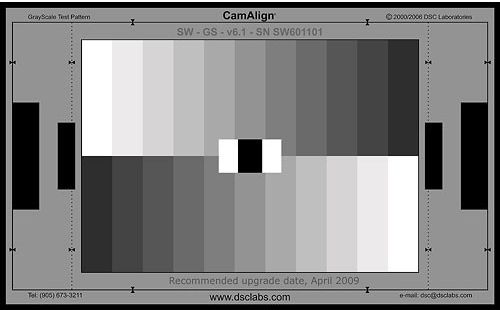
My opinion for color-correction is that I'd rather have a 10-step grayscale chart:

DSC_Labs_GSJ_GrayScale_Junior_CamAlign_Chip_532967_zps41xlmsqj.jpg


When you can see the entire stairstep of grayscale values on a waveform monitor, you can get a good sense of how the midtone adjustments need to be made. I've done at least 200-300 episodic TV shows with just a grayscale chart. One hopes if the chart is 100% neutral, the relative color values will fall in line and you'll know where they need to be with experience (and scopes). In truth, how it looks on the monitor is the most important thing.

I have never found that an 18% gray card helps us very much in digital. I think this did help photochemical lab people, but that's another world.
 
I Like the spider cube.

It got gray, white, black super black and most important also the brightest bright of your scene even if it´s a light source coming from behind behind camera. thats like two more points of info than any chart gives. The as its a cube you possibly also get shadow side for white / black / gray. A pretty neat tool.

In combo with the spider checker board it´s difficult to get things wrong. Super nice when matching CG to hot / graded scenes. Just bring all to linear match and then flip it back.
 
Back
Top