Welcome to our community

Be a part of something great, join today!

  • Hey all, just changed over the backend after 15 years I figured time to give it a bit of an update, its probably gonna be a bit weird for most of you and i am sure there is a few bugs to work out but it should kinda work the same as before... hopefully :)

Which monitor are you all using?

Mark Kuroda

Member
Joined
Nov 21, 2022
Messages
14
Reaction score
0
Points
1
I had a SmallHD 702 Lite, and got a Portkeys as part of a package with my Komodo. Do you all find yourself wishing you had a touchscreen for your monitors, or even wanting a EVF? Thank you, so stoked to have a Komodo and the footage is so gorgeous. Coming from a Blackmagic Pocket 4k with Nikon lenses since I was more of a stills photographer before. Thanks all.
 
I have a Cine 7 I use on my Komodo. The Indie 7 came out later. I rarely use the control interface on the Cine 7, though it works fairly well. The Top LCD of Komodo is literally right there however and I tend to rig straight out of the SDI.
 
I have the SmallHD Indie 7, never use the camera control. (It requires a 2nd cable, and I don't love the interface, so I just wind up not bothering.)

I also have and occasionally use the Portkeys OEye EVF, though generally just if I'm going shoulder mount. It's ok, but I haven't found a mount I really like for it. (The rosette doesn't fit the Zacuto Axis Mini EVF arm-- I think the Zacuto uses a non-standard thread? I think a Bright Tangerine Titan Arm would probably work better.)

I've found Red Control (the free version) on an iPad a useful feature as a director monitor and as remote control when I've mounted the camera overhead. It hasn't been 100% reliable, though, so I don't rely on it.
 
Jonathan Keane it does but the old monitor I have is 7" and I think I prefer the size to the touch screen ability. Using the iPhone app or just the top of the camera seems to be working out fine.

Hi all thanks for the responses, looks like the Indie 7 is a popular one. I got the 702 Lite up and running and I'm more than happy with it, got a D-Tap dummy battery running to it.
 
IPhone 14 Max with Komodo link and RED Control.
Yes- an unorthodox choice but a very powerful combo.

It’s solid and has none of the issues experienced with the a Komodo’s built in wireless video monitoring.
Working through RED control to me is the best way to interface with Komodo.

Additionally, a portable router, RED Control Pro, and an iPad inexpensively makes working with multiple Komodos
into one of the more streamlined and flexible production setups I ever fit into a backup.

While I have the option of a couple of cheaper FeelWorld monitors I don’t use them much.

Brian Timmons
BRITIM/MEDIA
 
I am just starting out and have the SmallHD Cine 7 and the Indie 7. I tried using RED Control on my iPhone 12 Max Pro and it was basically unusable. Serious lag.
 
Last edited:
I’ve been using an iPhone 12 Pro Max and Red Control exclusively for the past 5-6 months, works beautifully.
 
Last edited:
I’ve been using an iPhone 12 Pro Max and Red Control exclusively for the past 5-6 months, works beautifully.

Hi Jon. My experience has been bad with the iPhone 12. The lag on the screen is so bad it would be impossible to do much. Can you confirm your setup? OS version? Maybe I did something wrong with the wifi configuration on the Red Komodo. It would be nice to have the ability to use my iPhone and keep the rig really small.
 
I use the Portkeys with wireless control. But when traveling light I use my iPhone with Red Control… nothing unorthodox about it… lots of us work that way.

Pro Tip: If you are having lag/connection issues look into upgrading the Komodo stock antenna.
 
Wow super cool, to those working with their iPhones, what are you using to mount your phone to the camera? Thanks!
 
Han Vogen what is the antenna replacement you'd recommend? Sounds like it would be a worthwhile upgrade.
 
I have a Cine 7 with the Remote Control Kit. The monitor is well build, aluminium housing and fanless. The OS is updated regularly and offers any function you might think of even cross conversion, LUT, anamorphic desqueeze and much more. The remote integration is extensive and driven reliably by wire. Even AF and moving the AF frames works. The price is steep considering several aspect of the monitor alone e.g. SDI inputs, panel quality. It is the combination of characteristics together with the excellent remote integration which makes the difference. Do you really need a 3000$ monitor? As alway it depends on your individual needs and expectations. A personal test might give you a better idea than pure technical data alone.
 
I use the Portkeys BM5WR, the interface takes some time getting used to, but it's a really fast way for changing simple settings like ISO, WB, FR etc. It's just a shame that you can't access the playback menu from the Portkeys. For that you'll have to use the Komodo LCD. The best thing about it is that it only needs a SDI connection. It automatically connects to the Wi-Fi of the Komodo really fast.

It's especially useful in a gimbal setup. I ordered these to quickly change from gimbal to handheld setup. Very handy!
 
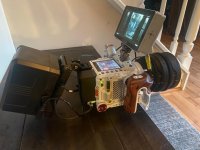
SmallHD Focus Pro 5" (discontinued) + Komodo screen works well but I'm just as comfortable if I use the SmallHD for control. What you can't see is my Tilta handle rotated downward on the left side for handheld. I'll rotate the screen downward and I can flip the handle up to the center for low shots. Also I don't always use that big of a V-Mount battery.


fIMG_9640.jpg - Click image for larger version  Name:	IMG_9640.jpg Views:	0 Size:	58.4 KB ID:	3807553
 
Last edited:
Back
Top