Welcome to our community

Be a part of something great, join today!

  • Hey all, just changed over the backend after 15 years I figured time to give it a bit of an update, its probably gonna be a bit weird for most of you and i am sure there is a few bugs to work out but it should kinda work the same as before... hopefully :)

What went wrong, if anything, here? Dragon noise level

Joined
Aug 17, 2007
Messages
9
Reaction score
0
Points
0
Hello,

I'm a complete newbie and sorry for another thread on a subject that comes up a lot, but I could use some pro eyes on this. I received this footage, shot on Dragon, and I expected it to be a bit cleaner than it is noise-wise. The iso on these shots isn't super high or anything. They seem to be exposed correctly when looking at a waveform. But when viewed at 100% or simply played back, the noise is quite pronounced to me (some shots more than others).

Did something not happen right when it was shot? Is this simply how it looks and there's things in post I need to do (these are not corrected in any way).

Would love some help. Thanks.

Here's a dropbox link to 3 R3D stills:
https://www.dropbox.com/sh/s1bclfg006ss91l/AABK5bQqnina-nWCG4wp1uILa?dl=0
 
Brian, I took a look, and a couple things appear worth mentioning:

1) Most of these shots are 1000 and 1280 ISO, even outside. If this was the Skintone OLPF, then that may certainly be pushing the noise threshold (though these frames don't look "noisy" to me per se, but there is "texture" yes). For CLEAN Skintone OLPF footage, ideally you shouldn't be going over 640 (whereas the Lowlight OLPF can be used comfortably btw 800-2000 iso)

Moreover, if you look at these same shots at 320iso (which is closer to what camera was probably seeing), you'll notice how dark they are. At 1000 and 1280 they look better yes, but with 2 stops of gain (noise).

2) Another factor that may be contributing to noise is these shots appear captured at 4K, not 5K or 6K where Dragon is more optimal. What that means is...by shooting at 4K...you are cropped in on the sensor, and also on the noise (ie you're "closer" to the offending pixels).

By shooting at 6K and 5K, the noise is "smaller/thinner" proportionally, while also giving you a much larger canvas to denoise and "print" back down to 1080 with.

Luckily the compression on these is quite good (6:1). I'm pretty sure with a good grade these shots could come out very nice!!

Going forward, I recommend shots like these be done on Dragon Skintone's more optimal settings - 6K at 320-640 iso. WIth the same healthy compression you were already using (6:1). Or shoot with Lowlight OLPF at 800-1280 at 6K.

Hope this helps!!! And best of luck!!
 
Last edited:
Brian,

Welcome to Reduser!

Can you share the lens and ND used. The two exteriors look like heavy ND was used. The car guy, looks like there is some flaring (milky blacks). The other 2 look about as I would expect if the camera was being rated at 1280.

I also think there is some light diffusion there adding to things, maybe a locon or a light promise or digicon.

I think the interior looks really nice BTW, but that is just my taste for that texture.

Battistella
 
Last edited:
Also,

I will add that the shutter was set to 240 and 360 degrees. I would also double check that the camera operator did a Black shading calibration for those shutter angels or at least close to those shutter angles.

So, just pricing this together based on the data. Shot at 1280 ISO outdoors with a 360 and or 240 degree shutter. Aperture, if set to F11 to F22 might have introduced diffraction (lens softening due to closed aperture) add some ND into the mix and this underexposed shot looks about right under the circumstances you describe.

DEB does help. My guess is they were going for a specific Fstop through shutter, ISO and ND and ended up with this.


Battistella
 
My first question here would be if A. Was the footage shot within the Black Shade Calibration's Shutter Speed and Temperature Range?

Also, when was the last time this body was Black Shaded and how was it done?
 
My Dragon is strange, sometimes I see noticeable noise at 800 and other times I've overcranked to 48fps to ramp if necessary and rolled the dice with 1600 ISO and it's come out clean enough. I've noticed that you get a lot less noise if there are strong sources or whites in the frame and you're simply overcranking and trying to compensate by higher ISOS (rather than trying to push to 1600 in a dimly lit room to get a higher room stop in general). If that makes sense?
 
Just a very basic thing as well. To see the actual amount of texture you should be looking at the clips in FULL resolution, in 1/2 or 1/4 it will seem quite noisy, esp. with REDlog film as the gamma space.

DEB works on FUL and 1/2 res premium.

Battistella
 
Last edited:
Also,

I will add that the shutter was set to 240 and 360 degrees. I would also double check that the camera operator did a Black shading calibration for those shutter angels or at least close to those shutter angles.

So, just pricing this together based on the data. Shot at 1280 ISO outdoors with a 360 and or 240 degree shutter. Aperture, if set to F11 to F22 might have introduced diffraction (lens softening due to closed aperture) add some ND into the mix and this underexposed shot looks about right under the circumstances you describe.

DEB does help. My guess is they were going for a specific Fstop through shutter, ISO and ND and ended up with this.

Battistella

The Sherlock Holmes of Dragon Imagery! Impressive. ;)
 
Thanks a ton guys!

As I look through the footage more I think it's simply a matter of exposing in the 800-1280 range and since this was (i think) the Skintone OLPF that introduced the texture I'm seeing. I don't mind it in a number of the shots, sort of reminds me of certain film stocks. I guess from looking at so many low-light tests with matches and such and how clean it all still looked that I would not seen this much texture in some shots.

And I think shooting at 4K also contributed to is since it's cropped in on the sensor and "closer" to the texture/noise. There were some other shots done at 5K and it is less noticeable.
 
I need to look into the Black Shading Calibration. My guess is that this was NOT adjusted on the day when he went to 360 shutter. That feature is new to me so I'm still looking into that. But it makes a considerable difference in the blacks?
 
I need to look into the Black Shading Calibration. My guess is that this was NOT adjusted on the day when he went to 360 shutter. That feature is new to me so I'm still looking into that. But it makes a considerable difference in the blacks?

The RED camera in general will perform its best when it heats up to the optimal temperature, and when its black shaded to the corresponding shutter. This will give you cleaner images.
Here's a great place to start to learn about black shading.

http://www.reduser.net/forum/showthread.php?111628-BLACK-SHADING-For-Dummies-amp-Experts
 
I need to look into the Black Shading Calibration. My guess is that this was NOT adjusted on the day when he went to 360 shutter. That feature is new to me so I'm still looking into that. But it makes a considerable difference in the blacks?


What I do now is bring the camera up to temp and black shade it BETWEEN 360 and 180 (172.8 in europe).
Why?

I can swing the shutter between anywhere from 172.8 and 360. If I create and store a second one BETWEEN 1 degree and 172.8, then I can switch to that calibration when I want to move to a narrower angle.

The DRAGON stores 5 Black Shading calibrations onboard (one factory and four user presets) and they can be switched and managed in about ten seconds.

So my strategy is to rock two

1 172.8 and wider - 360
2 172.8 and narrower 4.0 or 1 degree (although 1 degree most likely would need it's own.

Number one is loaded all the time as it lets me go from regular to TL shooting without any Black Shading warnings.


Battistella
 
Just to avoid confusion here because people are talking in shutter angles. Shutter *ANGLE* has nothing to do with black shading. What matters is shutter duration.

So if you shoot at 48fps and 360* shutter you're at 1/48th shutter. If you then shoot at 24fps and 180* shutter that's also 1/48th of a second. Both would use the same blackshade.

2c.

As to the frames specifically they look perfectly normal for 1280ISO Dragon Skin Tone OLPF footage as far as noise is concerned, I don't think this is a case of bad black shade. What might have happened was the DP exposed for an 18% gray card as their middle gray but didn't take into account for two of the shots that the talent's skin tones won't match an 18% gray card. If you want your skin tones centered in your dynamic range you'll need to open up a couple stops with darker skin.
 
I need to look into the Black Shading Calibration. My guess is that this was NOT adjusted on the day when he went to 360 shutter. That feature is new to me so I'm still looking into that. But it makes a considerable difference in the blacks?

Yep. If this was out of whack and if there were warning indications on the T/E this is likely what lead to this.

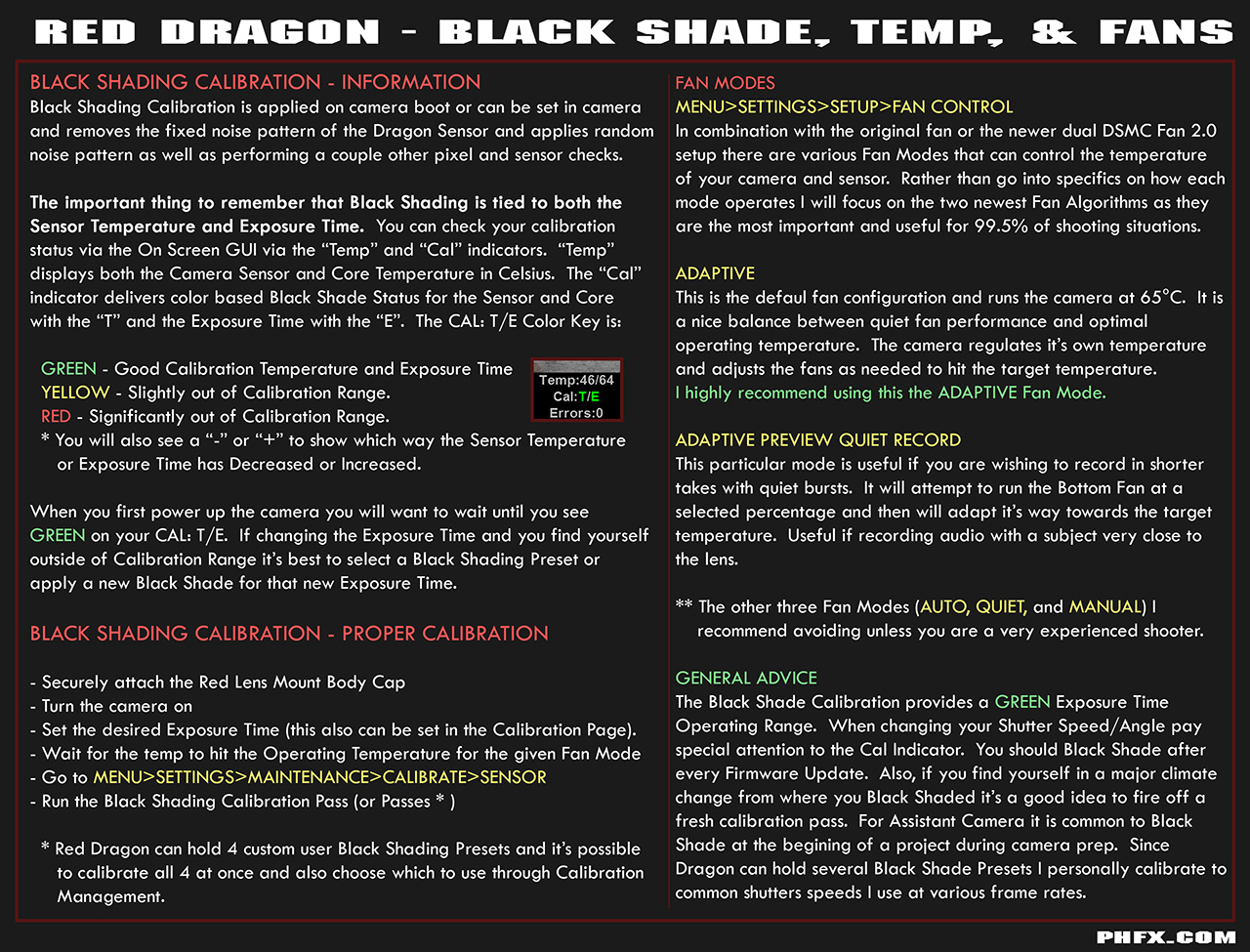
Black Shading is a concept new to a few people when moving up to Red cameras and it's often overlooked. I've stumbled across a few shooters out there who never have Black Shaded outside of the factory default, which isn't a recipe for the best images possible.

I wrote a handy guide on Black Shading, Fan Control, and Operating Temperature just for that very reason:


What Gavin states about Shutter Angle versus Shutter Speed is correct. You Black Shade using the approximate or exact Shutter Speed. This is also tricky for those coming from film sometimes, but it's not too difficult to wrap your head around.
 
Thanks Bob for the link, and Phil for the guide. Good to have on reference.
 
in regards to sensor cropping...

I often hear the dragon is optimized for 5K or 6K. So since this footage was shot at 4K it was cropping the sensor and my texture/noise will look bigger than if I shot 6K and then scaled it down. My question is the dragon, shot at 4K, actually inferior in some respects to shooting 4K on a sensor that is optimized for 4K? How does the dragon stack up shooting 4K verses some of the older/different sensors that are "optimized" for 4K?
 
in regards to sensor cropping...

I often hear the dragon is optimized for 5K or 6K. So since this footage was shot at 4K it was cropping the sensor and my texture/noise will look bigger than if I shot 6K and then scaled it down. My question is the dragon, shot at 4K, actually inferior in some respects to shooting 4K on a sensor that is optimized for 4K? How does the dragon stack up shooting 4K verses some of the older/different sensors that are "optimized" for 4K?

Depends. There's normally no issue shooting Dragon 4K or even 3K. I shoot 3K and even 2K on MX all the time. The only issue is you have to make sure to shoot cleaner/more carefully as you are losing the advantages of shooting at higher resolutions.

Basically, 4K Dragon is a bit less forgiving of under exposure for the reasons you've already mentioned. But properly exposed it's amazing. The "Fences - Arrows" music video used 4K Dragon quite a bit I believe, and I think it looks GREAT:


Bear in mind if you're footage had been shot on the Lowlight OLPF I don't think you'd have seen ANY noise at all, even at 4K.
 
Basically,

it is a windowed 4k not a scaled 4k.

It is the same as If you shot 6k and only took the center (4k) cut of the 6k frame.

Shooting 6k gives you all that look around and space to play in a 4k frame.
shooting 4k that look around space is cropped out (using only a 4k center crop of the sensor) so that is why you get higher framerates etc., but you can also capture lower compression. 4:1 compared to 6:1 as an example using about the same amount media.

battistella
 
Back
Top