Welcome to our community

Be a part of something great, join today!

  • Hey all, just changed over the backend after 15 years I figured time to give it a bit of an update, its probably gonna be a bit weird for most of you and i am sure there is a few bugs to work out but it should kinda work the same as before... hopefully :)

What formats are you using for post production

Joel Arvidsson

Well-known member
Joined
Nov 3, 2008
Messages
3,044
Reaction score
6
Points
38
Age
46
Location
Sweden
If it shot will be comped or keyed I render it out to uncompressed open exr. I dig how well every bit of data is kept even thoe the file sizes are perhaps not as fun.
But when Im rendering out pure alpha channels I think its a big waste to render out to uncompressed exr.

Also if you comp involves many layers of open exr it really goin to eat upp your computer so what is the second best?

What format do you use for b&w alpha channels?

What proxy format are you using? or are you rendering out segments of a larger comp. What is you strategy?
 
I think very soon BM will make "reentry nodes" resolve. Then staying native becomes much more easy and only the clips that need treatment will bounce in and out of the grading timeline in preferred format and preferably with a working lut to go with it.

Until then anything flies that suite the needs I guess. You could put a 8bit matte into a EXR container next to a 16bit float source clip, no?
 
Exr has a zip and dwb format that are real nice to reduce file size. I end up for a lot of things using png format for my alpha files, it's not the best but it's one of those things that is practical and easy. I probably use the prores 4444 alpha chanel most of the time if I realistically just look at what's stored on my NAS.
 
I did some testing with EXR compression a while back for doing 3d renders and also a little video encoding. Wanted to get away from using DPX's cause hey its the future right.
So first off uncompressed EXR is pretty much overkill for just about anything your gonna do. i would say use Zip compression or Zip24 compression. Its pretty much visually lossless as well as very close to being mathmatically lossless. Not to mention the files sizes drop to next to nothing. Talking about 5-10MB per frame vs 40-60. Also if your encoding video files i would recommend using PIZ compression which i think dreamworks made specifically to handle the random noise and grain in video files. Also the great thing is its all starting at 16 bit and goes all the way to 32 bit which i mean just to do 16 bit for a dpx things get a little dicey with opening it in various programs.
 
Man, I just go out and buy bigger drives. It's a question of doing what's necessary to get the job done.

At least now, it doesn't cost a fortune to get a few extra TB of drives. I can recall a time not too long ago when a fast 1TB drive was well over $100K. Be glad they're dirt-cheap today.

Note, BTW, Fotokem wound up having to deal with 1PB of footage for Star Wars: The Last Jedi... and that was shot on film. So there was film storage AND data storage involved.
 
Man, I just go out and buy bigger drives. It's a question of doing what's necessary to get the job done.

At least now, it doesn't cost a fortune to get a few extra TB of drives. I can recall a time not too long ago when a fast 1TB drive was well over $100K. Be glad they're dirt-cheap today.

Note, BTW, Fotokem wound up having to deal with 1PB of footage for Star Wars: The Last Jedi... and that was shot on film. So there was film storage AND data storage involved.

Not so much about discspace. The bottle neck today is network and accessibility for multiple users. Sure you can store a few peta bytes on a server but when multiple compositors starts to pull footage for comps involving a lot of layers that server needs multiple pretty random access to all of it... then things starts to lag. There is workaround with proxies, fast mirror drives etc. But for sure smaller / faster files makes it all very different.

Would be interesting to know how much those peta bytes that makes it into the final starwars film, like how much of the shot footage actually comes to use? Then also how much that is downscaled and cropped before composting. Usually a very very tiny fraction that later is archived as used source.
 
Curious, what size digital plates are most working in?

I remember a while ago the debate was 2K.
 
Curious, what size digital plates are most working in?

I remember a while ago the debate was 2K.

Debate is an interesting word. It's more of a production's specific workflow and pipeline. I haven't worked with anything VFX related in under 4K since 2010 in DPX, EXR, TIF, etc.... Most of my post work on the image sequence side is 4K through 8K.
 
Not so much about discspace. The bottle neck today is network and accessibility for multiple users. Sure you can store a few peta bytes on a server but when multiple compositors starts to pull footage for comps involving a lot of layers that server needs multiple pretty random access to all of it... then things starts to lag. There is workaround with proxies, fast mirror drives etc. But for sure smaller / faster files makes it all very different. .
I'm working out of my house and I think I have about 250TB' of material on various RAIDs on shelves, some of which are connected right now for current projects. And I'm just a guy. If I can afford to do it, anybody can afford to do it. Parts of the system are running 24/7 because of backups and renders, but it's a manageable process if you stay on top of it. (I have about 20 alarms in my phone so I can get up and check on the status of different renders and processes.)

If this were part of a real company, then you'd have "people" to do all this, and just keep pushing the data through as best you can. 4K is doable, 2K is practically a piece of cake. The real problems (to me) are monitoring and processor speed. On my current system, I think I can copy about 1TB per hour through Thunderbolt 2, and that's totally workable for me. If I was involved in a dailies situation (which I haven't in many years), I'd tell the assistants and DITs to use multiple systems so that while one system is churning out viewing copes, another system is copying and backing up files, and a third system is uploading the viewing copies to the cloud and/or a secure server. All of these processes can be accomplished if you have the time and money available to do it right. Without that, either shoot at a much lower resolution or don't get in this business.

BTW, the book Modern Post: Workflows and Techniques for Digital Filmmakers goes over a number of strategies in terms of file formats, dailies formats, finishing formats, and archival formats. To my knowledge, this is the only current book that covers the subject (and includes strategies for 4K, 2K, HD, and so on). It's fair to say that you can justify a number of different methods, but a lot depends on available budget and what the client's expectations are.

613n7eJkvuL._SX403_BO1,204,203,200_.jpg
 
I do all keying and roto in 8k and thats fine. Some times on roto I render out 8k png to speed up things. But when doing a comp in 8k with a few layers of 8k open exr 16 bit uncompressed its not a snappy experience. I think from memory that every 8k open exr frame in 16 bit uncompressed is around 200meg frame. So Jacin's suggestion on PIZ compression was welcome will try to that out.
 
I do all keying and roto in 8k and thats fine. Some times on roto I render out 8k png to speed up things. But when doing a comp in 8k with a few layers of 8k open exr 16 bit uncompressed its not a snappy experience. I think from memory that every 8k open exr frame in 16 bit uncompressed is around 200meg frame. So Jacin's suggestion on PIZ compression was welcome will try to that out.

Yes definitely try compressed 16 bit .exr. Some apps will prefer different types of .exr compression, but any of the compression types will give you much better performance in any compositing app than uncompressed .exr. Also, apps like Nuke will generally perform better with .exr than After Effects, especially when it comes to using multi-channel .exr, but that is more of a concern when doing 3d render/vfx compositing.
 
I just got some openexr with dwab compression files back from vfx, man they were dinky and I couldn't tell the difference from normal exr (they were close to 10x times smaller). Blackmagic design fusion 9 supports openexr dwab, as well as redcine-x. I tested dwab a long time ago, but it wasn't fully implemented in my compositing and grading system so I kind of dropped it. Now i'm like, man, everything's going openexr dwab.
 
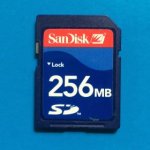
I think from memory that every 8k open exr frame in 16 bit uncompressed is around 200meg frame.

200MB? No problem! You can hold an entire frame - and then some - on this inexpensive SD card!
 

Attachments

  • 256MB_SD.jpg
    256MB_SD.jpg
    10.4 KB · Views: 0
Back
Top