Welcome to our community

Be a part of something great, join today!

  • Hey all, just changed over the backend after 15 years I figured time to give it a bit of an update, its probably gonna be a bit weird for most of you and i am sure there is a few bugs to work out but it should kinda work the same as before... hopefully :)

Truth or .... False Color

i agree. maybe in lieu of 'raw' we could see a 'clip' mode - black and white image showing under/over

We just need EXPOSURE to work the same as it works in RAW mode now - just not in RAW view mode. Eliminate the green - or make the green = middle gray tied to ISO while RED and PURPLE indicate actually sensor/raw level metering like the stop lights - independent of ISO.
 
Love the idea of having false color tied to RAW sensor, but only the purple and red ( shadow noise and clipping ) and I would love to see green tied to ISO, but maybe that can confuse even more... What I would really love is a WAVEFORM!!!!
 
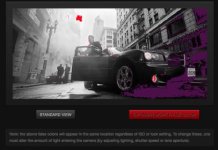
Mark, look at this:
Note: the above false colors will appear in the same location regardless of ISO or look setting. To change these, one must alter the amount of light entering the camera (by adjusting lighting, shutter speed or lens aperture).
 

Attachments

  • Screen Shot 2014-02-10 at 9.24.13 PM.jpg
    Screen Shot 2014-02-10 at 9.24.13 PM.jpg
    19.1 KB · Views: 0
Mark, look at this:
Note: the above false colors will appear in the same location regardless of ISO or look setting. To change these, one must alter the amount of light entering the camera (by adjusting lighting, shutter speed or lens aperture).

I know it says that - but that is NOT what it does.

If it DID do that - I wouldn't have started this post.

Go ahead ... try it on your camera.

It will ONLY behave that way if you select RAW mode. Which messes up the monitor path. We need this tool to work while in Redgamma3 or RedLog
 
I know it says that - but that is NOT what it does.

If it DID do that - I wouldn't have started this post.

Go ahead ... try it on your camera.

It will ONLY behave that way if you select RAW mode. Which messes up the monitor path. We need this tool to work while in Redgamma3 or RedLog

Wow, Mark, I totally believed that documentation until now. I'll test it out and make sure I hit RAW before EXPOSURE whenever I use that tool. Fully support your proposed changes, although, perhaps it's a technical limitation of the processing that doesn't let RAW and RedGamma3 debayer at the same time.
 
yeah ... and technically ... I fail to see the logic of adding green unless the green does move with the ISO. I think it might actually be a mistake as it is not in any documentation or release notes unless I missed it.

Hit the "Help" button when in the tools dialog and everything should be clearly documented. This same documentation can be found in the user guide.

In this documenation under Exposure mode it reads:

Exposure

Displays a multi-color overlay on top of a monochrome image that allows you to check for proper exposure.


Purple (underexposure) and red (overexposure) are based on RAW data, which means that these colors show which areas are clipping or close to clipping. This also means that these indicators are not affected by any RGB domain adjustments, such as ISO, FLUT, white balance, gain, or other Look information.


Green is based on the RGB levels of the video out signal (that is, the "cooked" look, and not the RAW data).
 
And you don't need to be in RAW view mode for the EXPOSURE view to work.

RAW view mode can be a useful way of working for self-shooters (such as wildlife camera people) without clients looking over a monitor, who want to see what the sensor is getting all the time. I'm sure I've read posts where some people ONLY look at RAW view mode. If it's never useful to you, just map RAW view default buttons to something else.
 
Here's what I want RED to change to help everyone with exposure:

#1: Under TOOLS - when you select EXPOSURE - and get the "false color" display - RED, GREEN, PURPLE - but it SHOULD NOT be downstream from IRE processing (it should NOT change when you move the ISO) - it should, perform exactly like it does when you are in the RAW view mode now. This way, your monitor path is set how you want it - but the EXPOSURE tool is showing you want is happening at the "raw/sensor" level - like the clipping stoplights.

#2: Under TOOLS - eliminate RAW view. You can't view RAW - this RGB representation only confuses people and really serves no meaningful purpose IMO. It does much more harm than good - with the ONE critical exception - which is if you switch to RAW view mode and select EXPOSURE tool - you will see a VERY accurate representation of what's about to clip/clipping and what's hitting the noise floor. The problem is - to use this tool - you have to switch to RAW view mode - which sends this horrific, ugly "RAW" view out the monitor path and the clients freak out - or the ACs forget to switch back, etc. -

Make the EXPOSURE tool work like it should - (see #1) - and eliminate RAW view mode (see #2)

If RED would change these two things - we would be able to pull up the EXPOSURE "false color" tool anytime - and not disrupt the monitor path - and REGARDLESS of ISO - we would know what's happening at the top and bottom of our image at our exposure choice - in a much more meaningful, detailed way than the stoplights. And there would be less confusion.


Mark is a wise man.... :)

i would have loved the histogram to be at least switchable between pre/post metadata, if possible, too. (I would probably leave it pre.)
 
Mark is a wise man.... :)

i would have loved the histogram to be at least switchable between pre/post metadata, if possible, too. (I would probably leave it pre.)

That begs the question though, what is "pre" metadata? Linear light is pretty much useless for exposure, and the old EI320 RAW view is extremely dated as Mark has pointed out.
So where does that leave us? I'd argue for a LOG like view that just flattened out the image at your chosen EI with the exposure false color overlay would be more useful. That way you could be confident of your hi/low clipping areas while maintaining the middle grey point of your chosen EI.
 
That begs the question though, what is "pre" metadata? Linear light is pretty much useless for exposure, and the old EI320 RAW view is extremely dated as Mark has pointed out.
So where does that leave us? I'd argue for a LOG like view that just flattened out the image at your chosen EI with the exposure false color overlay would be more useful. That way you could be confident of your hi/low clipping areas while maintaining the middle grey point of your chosen EI.

You can view log at 320. That does not always make clients happy, though...
But I agree, that would be good.
 
Here's what I want RED to change to help everyone with exposure:

#1: Under TOOLS - when you select EXPOSURE - and get the "false color" display - RED, GREEN, PURPLE - but it SHOULD NOT be downstream from IRE processing (it should NOT change when you move the ISO) - it should, perform exactly like it does when you are in the RAW view mode now. This way, your monitor path is set how you want it - but the EXPOSURE tool is showing you want is happening at the "raw/sensor" level - like the clipping stoplights.

#2: Under TOOLS - eliminate RAW view. You can't view RAW - this RGB representation only confuses people and really serves no meaningful purpose IMO. It does much more harm than good - with the ONE critical exception - which is if you switch to RAW view mode and select EXPOSURE tool - you will see a VERY accurate representation of what's about to clip/clipping and what's hitting the noise floor. The problem is - to use this tool - you have to switch to RAW view mode - which sends this horrific, ugly "RAW" view out the monitor path and the clients freak out - or the ACs forget to switch back, etc. -

Make the EXPOSURE tool work like it should - (see #1) - and eliminate RAW view mode (see #2)

Very good request!

But I would go even further. A common problem that arises with freshmen using an Epic is the misconception of ISO regarding light-level/contrast. Noise is the most heard criticism when people are talking about Red. This happens because people think that dialling up the ISO is a meaningful method to cope with low light environments and bringing down ISO in a sunny environment is logically the right way to go. We all know that the truth is the other way round. This issue leads to the conclusion that regardless of endless threads and years of teaching Red's approach is too complicated for the majority of users. Things have to be much more easier.

My suggestion is that there are two type of menus. One called Standard and one called Pro. The Pro contains all the bells and whistles available and thus is complicated like the one we have now. It ist recommended for S3D usage, multi cam, LUTs etc....

The standard menu is the main menu and is aimed for the vast majority of users that use the camera standalone, perhaps with a TC synced sound device. This menu allows for standard settings every DP understands such as sensor frame rate, TC-frame rate, gamma (selectable Log and Rec709, get rid of RedGamma what? 2,3, film eh..?), and Kelvin in standard steps (3200, 4600, 5600). We can select the ISO in 3 steps: 320, Standard (500), and 800. Histogram, False colour, and Zebra rely solely on 320ASA as Mark rightfully points out. The ISO numbers for Dragon will be probably a bit different: 320, Standard (800), and 1200.

This way the common misunderstanding of Red's concept of RAW and Metadata will hardly lead to noisy, funky pictures.

If you have a look at the menu of she BMCPC you will get an idea what I think an uncluttered interface could look like.

Hans
 
In this documenation under Exposure mode it reads:
…these indicators are not affected by any RGB domain adjustments…
…Green is based on the RGB levels of the video out signal (that is, the "cooked" look, and not the RAW data).
This is exactly what Mark is saying he wants, and how I agree it logically should be. I do not have an Epic here to test. Can somebody who does clarify whether this is in fact the case?

In terms of Mark's request to remove RAW view, while I agree RAW view causes confusion, I do not agree with the notion of removing any functionality which has always been there, and which some may find useful (although I personally don't use it). Maybe there could be something like the "Show Advanced Controls" option in the REDCINE-X preferences so new users would not have access to RAW view by default, but those who have been shooting RED for some time, and have developed an exposure methodology which uses RAW view and works for them, would have the ability to enable it.

And as others have said, I would also vote for the option to have a single button flip over to REDlogFilm at current ISO (optionally with exposure overlays) and would suggest that the default be that the change lasts only as long as the button is held down, to prevent the possibility of accidentally leaving the mode engaged, as I have seen happen with RAW view.
 
Actually,

Don't you think more clean feeds directly off the camera would solve this problem as you describe it freaks clients out rather than people who understand the tools and how and why they are laid out the way they are? False color freaks out the clients as much as the raw view does. If there was a dedicated clean client feed at all times with a nice juiced up image with a 3d LUT applied, wouldn't that be better than reverse engineering tools operators have learned over the past seven years?

getting rid of RAW view? Not sure about that one, we'd be in Alexa land there. The idea behind that is to allow the dop operator have a very good idea of how light is falling an the film plane without having to look at linear sensor data. Now that image would freak the shit out of a client. The client might be paying, but I don't think we shouldn't take away solid exposure tools, I think we should be asking for more, better monitoring paths.

Actually the red pro io module solves this problem giving you three more independent monitoring paths, one of which could certainly have a nice juicy image piped to the client monitor. Problem is most of these paying clients don't want to actually pay you for this luxury.


False color should always be displaying based on what the sensor sees.

battistella
 
And you don't need to be in RAW view mode for the EXPOSURE view to work.

RAW view mode can be a useful way of working for self-shooters (such as wildlife camera people) without clients looking over a monitor, who want to see what the sensor is getting all the time. I'm sure I've read posts where some people ONLY look at RAW view mode. If it's never useful to you, just map RAW view default buttons to something else.

Eric - you are missing the point. If you use EXPOSURE when you are NOT in RAW view - is does not work as advertised - the Purple and the Red move with ISO - when you are in RAW view mode - they DO work they way they should.
 
Actually,

Don't you think more clean feeds directly off the camera would solve this problem as you describe it freaks clients out rather than people who understand the tools and how and why they are laid out the way they are? False color freaks out the clients as much as the raw view does. If there was a dedicated clean client feed at all times with a nice juiced up image with a 3d LUT applied, wouldn't that be better than reverse engineering tools operators have learned over the past seven years?

David - there is a now a TOOLS checkbox in the monitor setup that allows you to EXCLUDE the false color from the SDI feed - that problem is solved - what is NOT solved is that it only works as correctly when you are in RAW view mode. Which I would NEVER send out a monitor path.
 
Very good request!

But I would go even further. A common problem that arises with freshmen using an Epic is the misconception of ISO regarding light-level/contrast. Noise is the most heard criticism when people are talking about Red. This happens because people think that dialling up the ISO is a meaningful method to cope with low light environments and bringing down ISO in a sunny environment is logically the right way to go. We all know that the truth is the other way round. This issue leads to the conclusion that regardless of endless threads and years of teaching Red's approach is too complicated for the majority of users. Things have to be much more easier.

If you have a look at the menu of she BMCPC you will get an idea what I think an uncluttered interface could look like.

Hans

if someone can't drive in F1 they move to F2 or F3. If you can't drive you hit the wall. If you don't know the car, that is not reds problem. It's a professional tool, not a handy cam. Some want it basic, some want all the tools.

Next problem becomes, "well I had it in basic mode and my picture still look like shit" well, the pictures look like shit because you have been using cameras that compensate for a lazy lack of talent. Red is not a complicated camera, it's actually an honest camera. Many students blew a few hundred feet of film because of lack of knowledge, not because the film was no good. That's good, that's a learning process.

Red should not not be holding peoples hands so that everyone loves them. I think it's laid out pretty well now, based on a lot of user input from the start.

battistella
 
Back
Top