Welcome to our community

Be a part of something great, join today!

  • Hey all, just changed over the backend after 15 years I figured time to give it a bit of an update, its probably gonna be a bit weird for most of you and i am sure there is a few bugs to work out but it should kinda work the same as before... hopefully :)

Titan X performance

Hmm, alright, do you have any tip on what kind of setup to get? I'm not very into RAID controllers so I'm not sure what to get to make it work. I understand the card, but how do I set it up and what drives/external cases do I need? Seems like that card is a setup for an internal RAID?

Yes, this card is for internal setups. I haven't seen if they have one with external ports. But there are cards like the Areca ARC-1993x (12Gbps) or the ATTO R680 (6Gbps) that offer external connectivity. Both of those models have dual external SAS ports with 4 discreet 12 or 6 Gbps channels, respectively, in each SAS port. Likewise, ATTO also makes 12Gbps adapters, Areca also has 6Gbps ones as well. Those were just model numbers I pulled off the top of my head. LSI controllers, like the one mentioned in the few posts above, work well on Windows. Although there are times that LSI comes up short with driver support -- especially for Linux and OS X, sometimes on Windows too. The LSI RAID controller built into many C6xx series Xeon workstations like the HP Z820 and several SuperMicro motherboards, for example, is pretty much crap. Not only that, but the drivers are crap too and these systems have known issues like Windows taking 1 to 5 minutes longer to fully boot while initializing the RAID. Very frustrating.

Generally speaking the good RAID cards will have both BIOS and software management tools for creating your RAID setup and drivers and tools so you can monitor most aspects of it. Really no different than if you were to buy a pre-built RAID setup from some fully integrated vendor. They tend to use a lot of these same RAID controllers, but what you pay the premium for is customer support and warranty's above and beyond what the HDD makers offer -- which is usually a pretty crappy warranty that's difficult to take advantage of, by design. Some vendors have great customer support, others not so much. Some of the nicer systems also have extra sensors and management in their external RAID systems to account for environmental factors, monitoring temperatures, fan performance, that sort of thing. Most of which you can also assemble yourself from available components, it's just more work and not really necessary for smaller desktop or desk-side RAIDs.

For an 8-bay external drive enclosure already set up with SAS ports, the Sans Digital ones are pretty decent and reasonably priced: http://www.sansdigital.com/towerraid-12g/tr8x12g.html

Combine those with an appropriate RAID controller for inside your system, add your drives and cabling in between and you're ready to go. For drives you really need to go for the enterprise class hard drives. Good ones like the Western Digital RE series or their RED Pro NAS series are $250 per drive here in the states for 4TB capacity drives.
 
Gigabyte Z87 OR Z97 series motherboards with integrated thunderbolt controllers are the easiest to install the Mac OS on, Asus motherboards are almost as easy to install the Mac OS on.

Yeah, and that's a whole other can of worms there... For anyone looking to run Mac OS on these systems and if you're also looking at RAID controllers, best to stick with Areca and ATTO. They're the best two RAID controllers for Mac OS. Best driver support. Bootable on a Mac too, well in the old Mac Pro tower, anyway. Not sure about over Thunderbolt, have not tried.... Not sure why you'd want to...
 
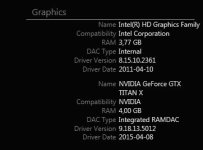
Thanks for the info, I'm gonna look into that. I downloaded the Intel Extreme Tuning Utility to see if I could benchmark and get info about the ability to overclock my processor for a little extra boost in performance (because my processor is a bottleneck right now). In the system info I found this. Everywhere else in windows it states 12gb of vram but here, under Titan X it shows only 4Gb? Why is that? I tried doing noise reduction at radius 3 with Neat Video in Resolve on a 4K UHD file, but it immedetly crashed due to lack of memory.
Is there something going on that blocks my Titans vram and locks it at 4Gb?
 

Attachments

  • vram.JPG
    vram.JPG
    21.3 KB · Views: 0
It's possible you may have a memory addressing conflict. There could be something in the system BIOS that also restricts VRAM addressing. Hard to say for sure.

What is the system currently? Which motherboard, BIOS version, etc..? Which version of Windows are you running? This is an issue with the 32bit version of Windows as well, I would assume you're on 64bit Windows since that's what all the Adobe apps require these days and I thought RECDINE-X Pro and Resolve did as well..
 
This is my current system. I'm planning on upgrading the entire thing when Skylake has arrived together with a good motherboard, so I know that this isn't really a good setup, but it will do for now.

Motherboard
Fatal1ty Z68 Professional Gen3
Bios unknown, but probably a late 2011 build (I do know it's not the last update, which I have but waiting to finish a project before tampering too much with the system).

Processor
CPU Core i7 2600K at 3,4 GHz

RAM
Corsair 16GB (4-KIT) DDR3 VENGEANCE 1,5V LOW BLUE

GPU
EVGA Titan X clocked at 1216MHz
12GB VRAM

Power
PSU Corsair TX 750W V2 /80+ Bronze

System HDD
SSD 160GB Intel 320 OEM 2.5''/3Gbps

Video out
Blackmagic DeckLink HD Extreme 3D

OS
Windows 7 - SP1 64bit
Latest GPU drivers

(Also a Corsair H80 water cooler for CPU, typhoon fans and a Fractal Design Define R3 rig so it's possible to overclock quite a bit I think)
 
Back
Top