Welcome to our community

Be a part of something great, join today!

  • Hey all, just changed over the backend after 15 years I figured time to give it a bit of an update, its probably gonna be a bit weird for most of you and i am sure there is a few bugs to work out but it should kinda work the same as before... hopefully :)

Titan X performance

Christoffer Glans

Well-known member
Joined
Jun 11, 2007
Messages
4,993
Reaction score
36
Points
48
Age
42
Location
Stockholm, Sweden
So I bought the Titan X 12gb to boost my performance when working with Draogn, but I don't really see any improvements over my GTX 580 3GB card I had earlier. What's going on?
At 1/8th resolution it isn't real time. My RAID streams around 150-170 mbit/s so I surely should get a little better playback no?

I'm using Resolve Lite, but even so it shouldn't reduce performance on 1 card right?
 
Your RAID is definitly not fast enough. Need to have 400-600 if I remember well.
Also, what type 5400rpm 720rpm 1000rpm ? sata3 sata6 ?

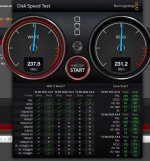
If you have blackmagic desktop video, it has a HDD speed test and a nice chart to see what works with your hardware.
 
This is the result. It's a Lacie RAID 7200 6TB over USB3.0 at RAID0 (2 drives)
 

Attachments

  • speedtest.jpg
    speedtest.jpg
    88.1 KB · Views: 0
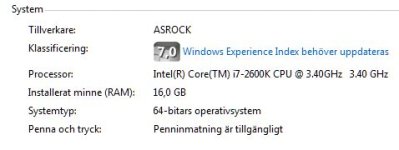
The RAID is definitely a bottleneck. But I'm sure there are other bottlenecks in the system too. Your old GPU was a GTX580 card -- that's a few years old, so what are the specs for the rest of the system? Titan X performs very well, but you need to have the memory, CPU and PCIe bandwidth to feed it. And GPUs only accelerate portions of the pipeline, much is still handled by the CPUs. All the GPU power in the world won't accelerate your workflow if your system can't hold up its end of the pipeline.
 
Yeah, that's what I thought, I do have an old system. I bought the card as a "step 1" and when Skylake is out I will get the processor and DDR4 memory as "step 2".
Right now it's a system from 2011.

I've tried to find a RAID that really reach the level of throughput I want, but I cannot find any real good RAIDs for PC. Not at a good price point. I want to update my motherboard to be able to handle Thunderbolt 2 but there aren't many (only one I know of) out there.
So either I use USB3.0 or Esata, but there's no Esata 6GB/s RAID that I know of that reach that speed.
 

Attachments

  • system.JPG
    system.JPG
    22.9 KB · Views: 0
Although, it doesn't make sense that my GTX580 could play 1/8th resolution in Resolve and my Titan-X is stuttering like hell, so why is that?
 
The Titan X may actually be overrunning your system. It has almost as much RAM as your system does. That could account for the stuttering, so could other things like driver conflicts and maybe a fresh install of video drivers or other components might help here. Hard to say without more direct testing.

You won't find an external RAID that plugs into an eSATA or USB port that is going to go a whole lot faster than what you have now. At least not an off-the-shelf solution. Well, technically there are a few 6Gbps eSATA options out there that can get close to 480MB/s sustained speeds, and IMO that's the bare minimum for R3D workflows right now. In the end, you'll want to probably build yourself a RAID with a good host card (Areca, ATTO, LSI, etc..). The latest host adapters offer 6Gbps and 12Gbps per port with anywhere from 4 to 32 ports on a single PCIe card, internal, external or a combination of the two. Thunderbolt is nice and convenient, but not the only option and not the first thing I would recommend to most PC users.
 
Your USB3 or eSATA connection is going to be a bottleneck, it only has a single I/O. No matter how fast your RAID is, it will always be restricted by a USB3 or eSATA connection to around 200-250 MB/s on a shared PCI-e lane, or 400-450 MB/s on a full PCI-e lane. You really need a multi-lane connection, either SAS or TB are most common.

I can also point out that LSI no longer has Mac OS support, you'll be limited to Windows/Linux only. You also might get better performance if you set your Cache/Render drive to something other than your system drive or work drive.
 
Last edited:
Yeah, I got the cache on another drive.

If I were on Mac it wouldn't be a problem cause then I would just get a Thunderbolt 2 RAID and be safe. The problem is that because I'm PC-based I'm limited to either Esata 6GB/s or USB3.0. I thought though that the Esata connection is dual lane, isn't it just a smaller connection for SATA? Either way even a single lane should be enough, no? You only stream the footage in one direction, the calculations aren't written to the drive with the media on it.

Does anyone have any experience with a PC motherboard that features Thunderbolt 2? I know of one such motherboard and it feels like it's the only real solution for me. A SAS would work, but that would limit the drive so I couldn't acess it on my Macbook Pro if needed.
 
Being on a pc makes it much easier than a mac. Just put hard drives inside your box and throw a raid card in there and you are set.
 
SATA and eSATA are the same thing. The e in eSATA stands for "external" and the plugs are nearly identical except for some extra grounding/ shielding. The data is identical. A [e]SATA port is bi-directional, but one channel and come in 3Gbps, 6Gbps or the new 12Gbps speeds. 12Gbps is pretty rare at this point, 6Gbps is a common interface amongst most newer HDDs and SSDs. You can get around 500MB/s over a single 6Gbps SATA port, if you have a decent RAID connected. USB3 tops out at 4.8Gbps and it has a lot of legacy overhead built in, so you tend to see top speeds hover more around the 250~300MB/s or what you're seeing with your LaCie unit.

Ideally, with a decent RAID controller, you connect each drive to its own SATA or SAS channel and gain the combined bandwidth of the system. That's how you can start gaining speeds of 1TB/s and faster.

SAS is the way to go for a dedicated RAID controller. It does not limit the drives you can install. In fact, it increases your selection. You can connect normal SATA drives to a SAS controller because SATA is the consumer derivative of SAS. The only restrictions there is you can't mix SAS and SATA devices on the same segment (group of 4 channels) and in some cases, not on the same host controller. You can't connect a SAS drive to a SATA controller, but you can always connect a SATA drive to a SAS controller.

There are solutions to connect SAS RAIDs to Macs without expansion slots. ATTO makes a nice Thunderbolt2 to SAS RAID host as an example, or you can put your PCIe RAID controller into a Thunderbolt expansion system. What you will not want to do is move a RAID between systems and connect to different host controllers, even if they're the same type. You're best off to connect a good RAID to your PC and just leave it there. If you need to access from a Mac, do it over a network connection. If you need to be portable and have something with your MacBook Pro in the field or something, then use something like your LaCie as a portable interim solution.

As for PC motherboards with Thunderbolt, your best bet is ASUS. All their X99 motherboards support one Thunderbolt 2 channel with their add-in Thunderbolt card that occupies an X4 slot. They do have a card that provides two Thunderbolt 2 ports as well, but it shares the same X4 lane header, so the two ports share bandwidth. Which is also the case on the 2013 Mac Pro cylinder -- 3 TB2 headers split into 6 ports. OTOH, the MacBook Pro has dual TB2 ports with discreet bandwidth to each.

If you work with Macs in addition to your PC, then I would definitely recommend a Thunderbolt port when you upgrade your system. However, I would not recommend a Thunderbolt RAID to swap between the systems. That is asking for a lot of headache. Better to have the nice RAID on the PC and reserve the TB port for connecting other TB peripherals you may share with the Mac systems or use the TB port to quickly set up a 10Gbps network link between the PC and a Mac.
 
Thanks a lot Jeff, that's really a lot of great info there that clears up things.
Right now I'm holding off to see what types of motherboards that will be around with Thunderbolt2 and ability to use DDR4 RAM and Skylake infrastructure. I don't think the Asus X99 is prepared for Skylake and DDR4, so I'm hoping for a new version of it.

If nothing comes out I will go with a SAS dedicated RAID. Are there any recommended products for that? Remember looking into it some time ago, but most of them are so very pricy compared to a Thunderbolt2 solution.
 
I really don't know how pricing compares in your market vs. here in the USA. Here the cost of assembling our own RAID solution is typically cheaper than most pre-packaged solutions, even the simplistic Thunderbolt units that present themselves as a bargain.

As an example, an 8-channel SAS RAID controller card from ATTO or LSI runs about $500~$600, figure another $30 for the two internal 1 to 4 fan-out cables and then the "good" RAID or NAS series enterprise class drives at 4TB go for around $250 each. That puts us at $2650 roughly to have an internal 8-drive RAID 6. That's $1250 cheaper than an 8 x 4TB Pegasus2 Thunderbolt system. Or another way of comparison, the Areca 8-drive external Thunderbolt2 unit that is very popular around here is $1600 with no drives. A decent 8-port SAS RAID card at $600 plus a decent external drive chassis with hot-swap trays is also about $500. So a bit cheaper there too... Most of the time.

There are also so many different ways to configure a RAID setup and while I use 8 drives as an example, there is no reason you have to go that direction. I would recommend 5 drives as a minimum with 8 being a very nice fit for desktop workstations. It's easy to scale to much larger setups than that, but then it starts to get a lot more expensive to do it too.
 
Are you talking about a RAID5 config? I'm aiming for a RAID0 with a slower drive to use as a backup instead. That way I will get as much speed as possible. I wouldn't use the RAID for anything else than original material and mayne cache so if I have a backup ready I can easily get it going again if something fails.
 
Please excuse the hijack, but I've just built an x99 system using the Asus Rampage board. I had planned to use the mo board raid control, but I've seen earlier suggestions that this is a bad idea, so I'm revisiting this.

I'm using an m.2 boot drive, and dual Samsung 480gb SSD in raid zero as a scratch disk. I have not yet set up the media array (8 spinning disks).

Blindly sorting through the parts pile at newegg it looks like this controller is the right choice:

http://www.newegg.com/Product/Product.aspx?Item=N82E16816118217

It comes in quite a bit lower than the $500-$600 Jeff suggests. Am I missing something? Thanks for the help!
 
Ryan, that controller is NOT a RAID controller. It is a SAS/SATA host adapter without onboard RAID functionality. There is a RAID controller version of the card, which is $500, and it looks good on paper, but I have no experience. Phil and I just discussed that very model and he is going to use it for his new X99 build, also the ASUS Rampage V motherboard. Follow his build progress starting here.


Are you talking about a RAID5 config? I'm aiming for a RAID0 with a slower drive to use as a backup instead. That way I will get as much speed as possible. I wouldn't use the RAID for anything else than original material and mayne cache so if I have a backup ready I can easily get it going again if something fails.

To address this, and also the above non-RAID controller use, I would not recommend making a RAID-0 out of any more than 4 disks. They tend to become problematic over time and often develop sync issues early on. The difference in performance to go RAID-5 or RAID-6 with a couple more drives is minimal and provides a lot more benefits than just added data redundancy.
 
Last edited:
Hmm, alright, do you have any tip on what kind of setup to get? I'm not very into RAID controllers so I'm not sure what to get to make it work. I understand the card, but how do I set it up and what drives/external cases do I need? Seems like that card is a setup for an internal RAID?
 
Hmm, alright, do you have any tip on what kind of setup to get? I'm not very into RAID controllers so I'm not sure what to get to make it work. I understand the card, but how do I set it up and what drives/external cases do I need? Seems like that card is a setup for an internal RAID?

I would go with a 8 drive setup in raid5 - read/write above 800MB/S

the cheapest would be if you have space for 8 extra drives in your PC case so you could save on an external 8bay enclosure and expensive external cables. But it´s also nice to have an external enclosure that is powered by it´s own power supply and has a perfectly setup cooling air flow.
 
Ryan, that controller is NOT a RAID controller. It is a SAS/SATA host adapter without onboard RAID functionality. There is a RAID controller version of the card, which is $500, and it looks good on paper, but I have no experience.

Thanks Jeff, I was pretty sure I was on the wrong track... Creating this monster has been a very different experience than walking into the Apple store!
 
Gigabyte Z87 OR Z97 series motherboards with integrated thunderbolt controllers are the easiest to install the Mac OS on, Asus motherboards are almost as easy to install the Mac OS on.
 
Back
Top