Welcome to our community

Be a part of something great, join today!

  • Hey all, just changed over the backend after 15 years I figured time to give it a bit of an update, its probably gonna be a bit weird for most of you and i am sure there is a few bugs to work out but it should kinda work the same as before... hopefully :)

Tilta Nucleus Nano available for PreOrder $229.

So on closer look, the DSMC1 cable doesn't fully fit into the sync port. That's probably why that guy isn't working for me. I tried the DSMC2 cable on a Scarlet W and it worked! I push record and the camera speeds but it won't cut when I push it again. Odd.
 
Just got mine a few days ago and have been playing. I made up a few p-tap cables both 5V and 12V. That little motor really moves with the 12V!


Also check out this sweet wireless focus rig I set up for my AC using the Hollyland transmitter, range no both is pretty great, through at least 4-5 walls in a house.

 
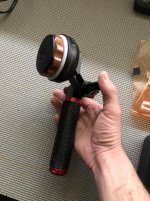
So who's using a handle/fingerwheel set-up? Any pics and list of equipment would be rad!

Also, Evan, what'd you do to make the different voltage cable? (The only ptap-to-micro that Tilta sells is 12v, right?)
 
Last edited:
I used this guy on Amazon...
https://www.amazon.com/gp/product/B00U2DGJD2/ref=ppx_yo_dt_b_asin_title_o09_s01?ie=UTF8&psc=1

but honestly I'd probably just go all 12V, seems to be no downside. The handle I built out of some spare bits lying around including an old Red Dogbone and a wooden handle from A Viewfactor BMPCC cage.


So who's using a handle/fingerwheel set-up? Any pics and list of equipment would be rad!

Also, Evan, what'd you do to make the different voltage cable? (The only ptap-to-micro that Tilta sells is 12v, right?)
IMG_5113.JPG
 
Nice. I like the compact set up, Evan. I'm hoping to rig something similar in a bit. For now, I used the 15mm rod adapter from Tilta (https://tilta.com/shop/nucleus-nano-hand-wheel-15mm-rod-adapter/), a short rod, and cheapo handle for a shoot this last weekend. Worked well enough, but I definitely would love to have a compact wooden handle attached to the hand wheel. I also had better luck powering the handwheel via a USB power bank, so I may have to incorporate one of those into my design. As those little batteries drop voltage, I notice the handwheel gets a little glitchy.
 

Attachments

  • IMG_9614.jpg
    IMG_9614.jpg
    97.7 KB · Views: 0
I got it ...
Perfect ...
Works with my Sony Cine Alta and Arri UP lds successfully
Thanks for Tilta's engineers and designers...
 
Ordered mine just before Thanksgiving and got it last week.

Read the manual then charged the batteries and arranged connecting the hand-wheel attachment plate to the cage near where my manual follow focus was located. Then turned it on… and pretty much nothing happened… an intermittent response at best.

So I called Tilta where I was asked if I was using USB power or P-Tap to the focus motor. Like much has been discussed here already they recommended getting the P-Tap to USB Micro cable which I did. It took about a week. That it's only slightly longer then 12" is amazing to me. I figured that the engineers at Tilta would know you generally need about 2 1/2 – 3' of cable to bet from the front of your camera to the battery plate on most rigs. A friend helped me make up a longer one.

But it didn't matter as it did not solve the problem. I tried it over and over again turning it on and off. It was intermittent. Sometimes there would be a response, sometimes nothing. When there was a response it was delayed by a long amount.

Then I took the hand-wheel out of the attachment plate and IT WORKED PERFECTLY! Put it back in the plate and nothing. So I called Tilta back one more time. Juan Chavez answers their tech support line. He's been super helpful throughout. He let me know that the engineers had determined that when the Hand-wheel is to close to the focus motor that there was a known issue. I moved the focus motor to the far side of the rig and with the hand-wheel attached to the attachment plate it now works fine.

Hope that this helps in case anyone else has had this issue?
 
Ordered mine just before Thanksgiving and got it last week.

Read the manual then charged the batteries and arranged connecting the hand-wheel attachment plate to the cage near where my manual follow focus was located. Then turned it on… and pretty much nothing happened… an intermittent response at best.

So I called Tilta where I was asked if I was using USB power or P-Tap to the focus motor. Like much has been discussed here already they recommended getting the P-Tap to USB Micro cable which I did. It took about a week. That it's only slightly longer then 12" is amazing to me. I figured that the engineers at Tilta would know you generally need about 2 1/2 – 3' of cable to bet from the front of your camera to the battery plate on most rigs. A friend helped me make up a longer one.

But it didn't matter as it did not solve the problem. I tried it over and over again turning it on and off. It was intermittent. Sometimes there would be a response, sometimes nothing. When there was a response it was delayed by a long amount.

Then I took the hand-wheel out of the attachment plate and IT WORKED PERFECTLY! Put it back in the plate and nothing. So I called Tilta back one more time. Juan Chavez answers their tech support line. He's been super helpful throughout. He let me know that the engineers had determined that when the Hand-wheel is to close to the focus motor that there was a known issue. I moved the focus motor to the far side of the rig and with the hand-wheel attached to the attachment plate it now works fine.

Hope that this helps in case anyone else has had this issue?

Did they mention if they're coming up with a solution (rather than having to mount it farther away as a workaround)?
 
Did they mention if they're coming up with a solution (rather than having to mount it farther away as a workaround)?

I did ask and was told no solution as of yet. He mentioned that there was a similar issue with the Nucleus-M and they solved it with a firmware upgrade.

If you're having the problem it might be a good idea to call Tilta Tech Support and let them know.

The difference to me was about 3-4 inches. My preference to mount it was on the left rail which put the motor about 3 1/2 inches from the focus-wheel. Moving it to the other side added another 3-4 inches of distance between the motor and the wheel. It also left the USB micro input pointed forward which is not a good thing. Sure hope they solve it.

Did I say how helpful Juan is. That guy's really smart and very patient. They're lucky to have him.
 
Like you guys, I bought the Title cable that was too short to power the motor from DTap... Instead of buying an extension, I ended up getting the Wooden Camera 1 to 4 D Tap Splitter. That is basically 24" long and will allow er to use the other cable to make it work... Band-aid, but might be good having more DTaps anyways...
 
Sorry to ask this again, but has anyone in here paired it with a Nucleus-M Handle and gotten it working with the fingerwheel? I'm looking for someone with first-hand experience to confirm this combo working (as well as any/all the cables/accessories required to do so).

Also rec start/stop on DSMC1 confirmed as well?

OH, and is there a 24" 12v tap-to-mUSB anywhere or have people just been splicing their own?
 
Can this be set up so the motor can be triggered to pull focus from distance A to B on command over a set period of time ...or better still record manual input for repeating later?

thanks
 
Can this be set up so the motor can be triggered to pull focus from distance A to B on command over a set period of time ...or better still record manual input for repeating later?

thanks

I don't think this is possible with the Nano, but I have not tried. From what I know, yes, you can add A and B marks, but I dont think you can automate pulls with the Nano.
 
Sorry to ask this again, but has anyone in here paired it with a Nucleus-M Handle and gotten it working with the fingerwheel? I'm looking for someone with first-hand experience to confirm this combo working (as well as any/all the cables/accessories required to do so).

Also rec start/stop on DSMC1 confirmed as well?

OH, and is there a 24" 12v tap-to-mUSB anywhere or have people just been splicing their own?

I have not tried pairing the Nano with an of the M accessories, but I can try when I have a free day. It may be a week or so before I can give it a go. But, in theory, it should be as easy as switching the Nano to slave mode and voila. Atleast according to their manual...

Took over a month, but I finally got the DSMC1 R/S cable in the mail. The lemo port is a bit wonky and doesn't fit properly into the Sync port, there fore I can't confirm if it works. I'm working on getting that resolved now. I got the DSMC2 cable to work with a Scarlet W, but it only rolls the camera, it won't cut it. I have some more experimenting to do when I have a moment.

At the moment, Tilta only seems to sell the one length for the D tap power. I hope they can offer various lengths in the near future, but til then, everyone I know has been splicing their own.
 
Guys, it's really super easy to make your own P-Tap to Micro USB cables, you can buy the P-Tap connector here...
https://www.amazon.com/Rewirable-So...s=P+tap&qid=1554581459&s=gateway&sr=8-4-spell

And pretty much any spare USB cable will do or you can buy an angled one like this in 3' or 6' and cut it to the desired length...
https://www.amazon.com/StarTech-com...s=gateway&sprefix=Angled+Micro,aps,210&sr=8-6

(Please be aware that you do this at your own risk, I and Reduser bare no responsibility for your negligence if you fry something or zap yourself).


Just use a wire stripper to expose the red and black wires and connect them so red is plus and black is minus. cut off the other two wires. You really don't even need to solder them but I highly recommend it.

Ptap.jpeg
 
Last edited:
I have not tried pairing the Nano with an of the M accessories, but I can try when I have a free day. It may be a week or so before I can give it a go. But, in theory, it should be as easy as switching the Nano to slave mode and voila. Atleast according to their manual...

Took over a month, but I finally got the DSMC1 R/S cable in the mail. The lemo port is a bit wonky and doesn't fit properly into the Sync port, there fore I can't confirm if it works. I'm working on getting that resolved now. I got the DSMC2 cable to work with a Scarlet W, but it only rolls the camera, it won't cut it. I have some more experimenting to do when I have a moment.

At the moment, Tilta only seems to sell the one length for the D tap power. I hope they can offer various lengths in the near future, but til then, everyone I know has been splicing their own.

Thanks for the response Cameron! Let us know how it goes (re: M-handle *and* the DSMC1 (and 2) R/S functionality).

Guys, it's really super easy to make your own P-Tap to Micro USB cables, you can buy the P-Tap connector here...
https://www.amazon.com/Rewirable-So...s=P+tap&qid=1554581459&s=gateway&sr=8-4-spell

And pretty much any spare USB cable will do or you can buy an angled one like this in 3' or 6' and cut it to the desired length...
https://www.amazon.com/StarTech-com...s=gateway&sprefix=Angled+Micro,aps,210&sr=8-6

(Please be aware that you do this at your own risk, I and Reduser bare no responsibility for your negligence if you fry something or zap yourself).


Just use a wire stripper to expose the red and black wires and connect them so red is plus and black is minus. cut off the other two wires. You really don't even need to solder them but I highly recommend it.

Thanks Evin; very clear/succinct!
 
I am using a nucleus M motor with a nano hand wheel, and they do indeed talk to each other. I haven't gone the other way, but I read up on it and it should work.

Nick
 
Back
Top