Welcome to our community

Be a part of something great, join today!

  • Hey all, just changed over the backend after 15 years I figured time to give it a bit of an update, its probably gonna be a bit weird for most of you and i am sure there is a few bugs to work out but it should kinda work the same as before... hopefully :)

Thoughts on Color

Yes, 4:4:4 in 2k. All the colouring is done in 4:4:4 anyway, the final codec downsampling to whatever the codec supports.

Graeme
 
you want to see this then
http://www.pandora-int.com/products.asp?opt=pogle

urgh!..

As for the scans.. are you conforming as the manual for color states?

s

I believe Pogle is in somewhat different price range :)

Yes, we are conforming as the manual states. In fact, I've read the manual before we've got actual app and everything seems so easy and straightforward according to manual...
 
it is.. but it's even worse gui than Color... but as you have found out.. it works! lol

I'm having a play with dpx over weekend.. will have a natter with Apple guy.


s

Better talk to Silicon Color guy. As I can see from looking at Silicon Color web, all that Apple did was FCP Send to Color (also not very well as I can hear) and an installer. Even the Color manual is the copy&paste from FT online doc.

Damn. Seems like Jobs has moved all Apple developers to iPhone dept...
 
And when they are "done" with Color then need to work on Shake.....
And add decent HD DVD authoring capabilities.....
 
Come on, the new Color is a vast improvement on the sketchy notes that went before!

Graeme
 
Hi,

we were looking forward to Color (never seen FinalTouch though).
But it was a disappointment.
I have a simple edl and dpx scans from northlight. Import EDL to Color, browse for source dpx files and...all I see is placeholders on the timeline. Trying to reconnect, nothing happens. Seems like developers don't care for error messages...

In the setup room there is a messages tab; that is where your error messages will appear.

As for your conform mechanism; are you certain that the EDL frame numbers match the dpx frame numbers?

EDIT: From the manual:

The key to a successful conform in Color is to make sure that the timecode data in the
EDL is mirrored in the scanned DPX or Cineon frames you’re relinking to. Color
attempts to relink to image sequence media in a number of different ways, depending
on what information is available in the file:
* First, Color looks for a timecode value in the header of the DPX or Cineon frame file. If
this is found, it’s the most reliable method of relinking.
* If there’s no matching timecode number in the header data, then Color looks for the
timecode value in the filename, and for the corresponding reel number in the
enclosing directory.
* If there’s no reel number in the enclosing directory, then Color attempts to relink all
the shots using the timecode number only.
 
In the setup room there is a messages tab; that is where your error messages will appear.

That's what I thought! But the only "error" that appears is the lowered speed of playback due to processing.


As for your conform mechanism; are you certain that the EDL frame numbers match the dpx frame numbers?

I'm very certain because of 3 facts:

1. It works on DS
2. It was used to scan files
3. I went thru it manually (reading TC and comparing to DPX header TC)

That's why I'm pissed off.

Nevertheless, at least I didn't pay $25K for the sucker.
 
I'm very certain because of 3 facts:

1. It works on DS
2. It was used to scan files
3. I went thru it manually (reading TC and comparing to DPX header TC)

Where is the EDL from and what format is it in? It sounds like Color is mis-interpreting the EDL - do you get the EDL import options when you try to import the EDL?
 
And when they are "done" with Color then need to work on Shake.....
And add decent HD DVD authoring capabilities.....

Too bad they will never do any more work on Shake. It is officially EOL'd (end of life).

Apple didn't do a single thing to DVD Studio Pro in FCS2. I think they are waiting for a good deal on Blu-ray drives before they add decent authoring capabilities to DVD SP.
 
Where is the EDL from and what format is it in? It sounds like Color is mis-interpreting the EDL - do you get the EDL import options when you try to import the EDL?

EDL is from Avid DS, in CMX3600 format (one of the most regular edls, IMHO).
Sure, when I import edl into Color I get import options, where I set framerates (over and over again to 25, because some clever programmer didn't bother to save/remember last settings), and browse path to my dpx files.
But after hitting the button all I get is placeholders on timeline (little crossed rectagles).

I am a part-time developer myself (c++) and that's one of the reasons I am being frustrated over such a bugs...
 
EDL is from Avid DS, in CMX3600 format (one of the most regular edls, IMHO).
Sure, when I import edl into Color I get import options, where I set framerates (over and over again to 25, because some clever programmer didn't bother to save/remember last settings), and browse path to my dpx files.
But after hitting the button all I get is placeholders on timeline (little crossed rectagles).

I am a part-time developer myself (c++) and that's one of the reasons I am being frustrated over such a bugs...

Are the DPX files in a flat directory or in subdirectories based on reel number?

Also, have you tried either of these:

To relink every shot in the Timeline:
1 Choose File > Reconnect Media.
2 Choose the directory where the project’s media is saved from the Choose Media Path
dialog, and click Choose.
If that directory contains all the media used by the project, then every shot in the
Timeline is automatically relinked. If there are still missing media files, you’ll be warned,
and these shots will remain offline; you’ll need to use the Reconnect Media command
again to relink them.

To relink a single shot:
1 Control-click or Right-click a shot in the Timeline, and choose Relink Media from the
shortcut menu.
2 Choose a clip to relink to from the Select Media To Relink dialog, then click Load.
If the name and starting timecode of the media file matches that of the shot in the
Timeline, the media link is restored.
 
Are the DPX files in a flat directory or in subdirectories based on reel number?

They are in one directory, since it's one reel. Directory is named as reel in edl.
I even tried it with one clip edl.

To relink every shot in the Timeline:
1 Choose File > Reconnect Media.

Both relink and reconnect don't do anything. No warning on missing frames...

Color user manual is missing one huge and important part: TROUBLESHOOTING.

There is one stupid thing (only stupid solutions now occur to me) I'll try on Monday, but I don't give it a big chance: my edl is in the same folder as dpx files - i'll try to move it elsewhere.
 
The difference between DVD Studio Pro 1.0 and 2.0 don't even look like the same applications. But the engine under the hood is the same.

DVD Studio Pro 1.5 was based on the old OS9 program which came from the aquisition of Astarte DVDirector Pro.
DVDSP006.jpg


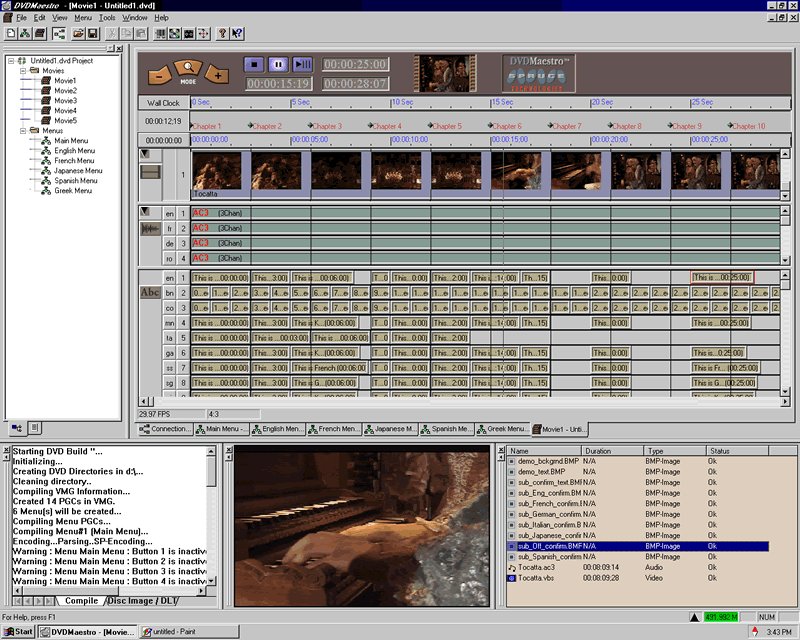
DVD Studio Pro 2 shifted it's core to another acquisition: Spruce DVD Maestro
dvd_maestro_8.jpg

Although Apple really worked more on this than any previous DVDSP version and the interface really got some Apple UI love :-)

Having tried Final Touch, I must say Color is a vast improvement...It actually works!
 
Hey Anders - thanks for the clarification. I was pretty sure Apple had acquired a 3rd party app in order to create DVDSP. I didn't realize hey'd acquired two separate ones. That would make sense as to why not only the Interface was so dramatically different, but why the core functionality was also vastly different.

I suspect that Color 2.0 will also see some massive improvements. It's too bad that won't be for another year or so.
 
I have a couple of questions about Color, I only have a PC background.

Does Color have 10-Bit Log colour correction? Or does it accept Log files, and just outputs linear files?

Does it support Print LUTs? Has Arri released LUTs for the newly released Color, or can you use LUTs meant for Final Touch with Color? Actually, has Arri released LUTs for Final Touch?

If it supports Red Codec, does it accept 4k images, and ouput at 2k? Can you zoom with the 4k images in Color and have no quality loss? or will it only accept 2k files?

sorry, if these questions have been asked before.
 
Correction inside Color is 32bit float. It accepts both log and video gamma input files. Luts - yes support, but don't know details - you'll have to dig. 2k only.

Graeme
 
From the manual:

All LUTs used and generated by Color are 3D LUTs. Color uses the .mga LUT format
(originally developed by Pandora), which is compatible with software by Rising Sun
Research, Kodak, and others. If necessary, there are also applications available to
convert LUTs from one format into another.
 
Back
Top