Welcome to our community

Be a part of something great, join today!

  • Hey all, just changed over the backend after 15 years I figured time to give it a bit of an update, its probably gonna be a bit weird for most of you and i am sure there is a few bugs to work out but it should kinda work the same as before... hopefully :)

The Gentleman's Underwater Bubble Blower Thread

i would forget the filter and shoot for post preserving the most amount of light possible for everything except pools and shallow snorkling spots. you may want to look into the h20 olpf as well.
i really need to get you guys some more color correction tips for underwater work.
 
i would forget the filter and shoot for post preserving the most amount of light possible for everything except pools and shallow snorkling spots. you may want to look into the h20 olpf as well.
i really need to get you guys some more color correction tips for underwater work.

Hi Paul,

Do you want to elaborate a bit on your point of view?

Thanks,
 
sure. what i've seen from diving and deep diving (with and without lights) is that underexposure is typically an issue. if you cut the only light that is visible with an underwater filter, you are potentially losing information in the underexposure. i believe it's better to set your white balance by eye underwater (whenever possible) or leave it default until the color correction process. i think that pretty much all underwater footage needs to go through at least basic color correction. there are a lot of tools simple and advanced to get the color of the water and objects where you would like them.

having a properly exposed blue channel will help the process of getting red and green correct. before doing advanced grading, you want to get into redcine-x and get a good white balance as a starting point. you can even boost your low channels there.
 
Rui,

I tested the Gates PA with Dragon 6K, dome port, Duclos 11-16 @ 15, and automagic recently, did not notice anything unusual, although I really did not look through the footy at the pixel peeping level.

Are you able to do a quick test with a 15 rectilinear and see if the issue persists?

I will review my PA test clips, in depth, over the next couple of days and get back to you with anything I find.

Cheers
 
That lens is the problem. Plus adding the red filter exacerbates the issue. I used that lens in perfectly blue water and saw the same issue, except that the blue was darker on those edges so I never could get a consistent blue across the frame. My thinking was that the light rays at the edges were coming in at such an acute angle, more so than the center of the lens that the image was simply vignetting. The only way I found to use that lens is with a 1.4x teleconverter and use it for close-focus wide angle. It's super sharp already and the addition of the converter allows you to focus on a subject even touching the dome...

For extra wide angle try the Laowa 12. It is very sharp all the way out to the edges and doesn't distort the edges the way the Canon 11-24 does. The Sigma 18-35 is a beast and is my new go-to zoom. Also, I'll be testing the new Sigma 14 rectilinear very soon.
 
Ron, what OLPF?

Loawa 12 and Tokina 11-16 (regardless of whether or not it is in a Duclos wrapper) are all great, but they aren't full frame fisheyes...

I don't believe I've ever seen the issue with Canon 8-15 f/4L.

Rui, I'll share more on the filters later.
 
Ryan, the issue I had was on the Dragon at 6K with the H20 OLPF. I just stopped using the lens - unless with the 1.4 TC - and went back to the trusty Zeiss 15.
Personally, I don't like fisheyes for most of my UW work. Also, BTW, the Canon 8-15 doesn't work on 6K until you get to about 13-14mm so I don't see any advantage there.
The Laowa is not a fisheye. It is rectilinear and does cover the full S35 Helium sensor. My original plan was to use it to get WA even if I had to go to lower resolution modes (7K/6K) in order to get higher frame rates on the Epic-W, but I ended up really liking it at 8K. At 2:1 aspect you can get 32 fps which is fine for slower moving subjects, e.g. tiger sharks, whales, mantas, turtles, etc. (FWIW, I never liked the Tokina 11-16 - too soft... but the 16-28 Cinemized one, that's a nice piece of kit. It just doesn't have the extra range of the Sigma 18-35, and it's huge...)
 
Precisely. Change one variable and test. You'll quickly identify the offending element.

I would shoot a white test chart above water. Do several shots, removing one element at a time to narrow it down. E.g. Change just the lens.
 

Attachments

  • Screen Shot 2017-06-04 at 12.08.36 PM.jpg
    Screen Shot 2017-06-04 at 12.08.36 PM.jpg
    18.8 KB · Views: 0
btw, you could.... 'fix it in post' (dun duh dun)

but i wouldn't shoot anything with it behaving that way
 
Slight detour...

The Canon 11-24 was mentioned as having unacceptable edge softness: as the lens works very well on Dragon 6K, where do folks start to see this happening with the 8K sensor?

This is from a Nauticam review of the lens:

...Is this a good choice for RED Dragon 6K?

Yes, and I don’t know of a better wide angle optic for this camera in its 6k mode (slightly smaller than Full Frame 35). 16-35 and 8-15 /4L have been my favorites for this format in the past, but 8-15 induces fisheye distortion that needs to be managed in framing, and 16-35 just isn’t wide enough for a lot of wide shots. 11-24 is perfect! Much of the corner smushiness in these shots won’t be apparent, falling outside of the recorded frame when shooting 6K...

http://www.nauticamusa.com/news/2015/5/29/canon-11-24-4l-usm-lens-support-testing
 
Fix it in post, hmmm...

From Wiki;

Image processing to reduce the appearance of lateral chromatic aberration

In some circumstances it is possible to correct some of the effects of chromatic aberration in digital post-processing. However, in real-world circumstances, chromatic aberration results in permanent loss of some image detail. Detailed knowledge of the optical system used to produce the image can allow for some useful correction.[13] In an ideal situation, post-processing to remove or correct lateral chromatic aberration would involve scaling the fringed color channels, or subtracting some of a scaled versions of the fringed channels, so that all channels spatially overlap each other correctly in the final image.[14]

As chromatic aberration is complex (due to its relationship to focal length, etc.) some camera manufacturers employ lens-specific chromatic aberration appearance minimization techniques. Almost every major camera manufacturer enables some form of chromatic aberration correction, both in-camera and via their proprietary software. Third party software tools such as PTLens are also capable of performing complex chromatic aberration appearance minimization with their large database of cameras and lens.

In reality, even a theoretically perfect post-processing based chromatic aberration reduction-removal-correction systems do not increase image detail as a lens that is optically well corrected for chromatic aberration would for the following reasons:

Rescaling is only applicable to lateral chromatic aberration but there is also longitudinal chromatic aberration. Rescaling individual color channels result in a loss of resolution from the original image
Most camera sensors only capture a few and discrete (e.g., RGB) color channels but chromatic aberration is not discrete and occurs across the light spectrum.

The dyes used in the digital camera sensors for capturing color are not very efficient so cross-channel color contamination is unavoidable and causes, for example, the chromatic aberration in the red channel to also be blended into the green channel along with any green chromatic aberration.

The above are closely related to the specific scene that is captured so no amount of programming and knowledge of the capturing equipment (e.g., camera and lens data) can overcome these limitations.


So yes, agree with Ron, send the lens to EBay.

Stacey, comments?
 
I have repeated the dive at the same place, same depth, same lens, same WB procedure with only ambient light, but WITHOUT any filter in the lens. Here is a picture that clearly shows that the reddish lateral bands are still there, confirming also the experience of Ron.

The funny thing is that I've used this lens several times during the last 4 years or so without any problem, in a DSLR D800 (36 Mpx).

This is the first time I'm trying it with RED Weapon, STD OLPF and Nauticam/DP-230 dome combination (although I don't believe the source of the problem is in the housing/dome).
What can be causing the problem?

UPDATE: That frame grab was white balanced at the sand, without any lights. The resulting WB was 9106K @ -79.678 tint, showing the lateral bands.
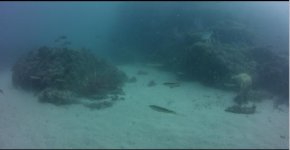
Minuts latter I did a second white balance mesure, this time with lights on (and at a slate). The resulting WB was 8406K @ -43.267 tint, and the lateral color bands were gone!!! (see the second frame grab)

So, it looks like that a heavier white balance (that is needed without lights) is causing the issue. With lights on, there is no need for a such heavier WB and no color bands appear.

UPDATE 2: To further complicate de subject, the WB of the image in my original post (with the Magic Filter in the lens) was 6960K @ -86.569, which is the lowest Kelvin of all three (due to the filter presence) but have the highest tint shift (maybe this is what is causing the color bands)? But then why just at the edges? Could it be due to the angle of light projected by this fisheye lens and a combination of the STD OLPF characteristics?
 

Attachments

  • First picture.jpg
    First picture.jpg
    12.2 KB · Views: 0
  • Second picture.jpg
    Second picture.jpg
    7 KB · Views: 0
Last edited:
Hi Ron,
Just a question about the Sigma 18-35. I assume you are using a diopter, if so what power? +1 , +2 or +3

Thanks.

Geoff.
 
Back
Top