Welcome to our community

Be a part of something great, join today!

  • Hey all, just changed over the backend after 15 years I figured time to give it a bit of an update, its probably gonna be a bit weird for most of you and i am sure there is a few bugs to work out but it should kinda work the same as before... hopefully :)

So what can you do with a Scarlet-X...

Sanjin


Where it seems we differ, is that I don't think anything is "right" or "wrong" as long as it works and looks good.
To me colorcorrection is very much not about doing stuff religiously "right" it's about finding stuff that suits the image/scene/story/film.

I wonder if I should go into some of the noise issues that have been raised. Some get noise, others not. From the same negative. That's a technical parameter which can be nice to control. But that is not to say that noise is bad. I can love noisy images!

So...

Eventually, what I try to communicate with this is all the lovely flexibility we all gain with Epic/Scarlet that hasn't been there on any other cam I know until now.

And that you really can do high-contrast photography and end up with what is in my eyes: Beautifull images, instead of a lot of cringing channels in top and bottom.

I really dig that aspect, and the flexibility of the RAW negatives and the way the channels over- and underexposes - to me that is what make these cams Epic...

Cheers

G
 
Sanjin


Where it seems we differ, is that I don't think anything is "right" or "wrong" as long as it works and looks good.
To me colorcorrection is very much not about doing stuff religiously "right" it's about finding stuff that suits the image/scene/story/film.

I wonder if I should go into some of the noise issues that have been raised. Some get noise, others not. From the same negative. That's a technical parameter which can be nice to control. But that is not to say that noise is bad. I can love noisy images!

So...

Eventually, what I try to communicate with this is all the lovely flexibility we all gain with Epic/Scarlet that hasn't been there on any other cam I know until now.

And that you really can do high-contrast photography and end up with what is in my eyes: Beautifull images, instead of a lot of cringing channels in top and bottom.

I really dig that aspect, and the flexibility of the RAW negatives and the way the channels over- and underexposes - to me that is what make these cams Epic...

Cheers

G
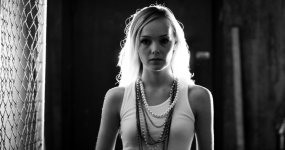
Gunleik,

I don't say that I'm right and that you are wrong just because I say what I like and do and what you like and do and also I try to explain what is a difference between the two.

Also I found noise but that's not issue to me because I can always turn that in a nice soft grain like image that I also like very much.

For example a bit "videoish" images always deal with less DR by its TV aesthetic nature and I always try to squeeze more out of images

and try not to fit or suit images in any conventional view of story/scene/film or whatever.

A sort of pure experimentalism that always try to go beyond the conventional borders...

Daily I'm dealing with 10 to 11 stops of DR with DSLR but also I know that Epic/Scarlet or Alexa must have different pictures

just because they supposed to be cine cameras for acquiring moving images with 13.5-14 stops of DR

and should not look like a video or DSLR footage at all even if so called demand of a story desperately "needs" that.

Turn it to film like and that's make all different and better.

Also that's why Epic/Scarlet have a slight advantage over any DSLR or MF camera just because have stop or two more DR to deal in post

and images must look "deeper" in shadows and highlights, with a wider color gamut, etc,...
 
I am curious about more grades... :)

ok! here's one

redcolor2, redlogfilm, 2463 kelvin, -27 tint, 500 iso, 1.27 flut, -1.7 shadow, .49 contrast, 1.6 exposure, .587 alchemy

I don't know how to get it out of redcine-x, without a color shift so I took a screenshot.

6335967300_418a5495b8_b.jpg
 
how are you guys exporting without a color shift?
My export tiffs are very different to what I see in the screen, I'm not selecting a profile on the way out
and I'm using a 2011 macbook pro
 
.

I am thinking about running a walkthrough on specific issues like noise etc ...

Gunleik

I'd love that. I'm really interested in the idea you've often talked about to "develop" then "grade" but I can't quite find a method for myself that is consistent like that. I don't really know what the developing image should look like.
 
I'd love that. I'm really interested in the idea you've often talked about to "develop" then "grade" but I can't quite find a method for myself that is consistent like that. I don't really know what the developing image should look like.

Sure. I can try to explain how and what I mean by that, but it will be over th weekend...

Kids and family now.

But keep the grades comming. From the other one as well...
 
how are you guys exporting without a color shift?
My export tiffs are very different to what I see in the screen, I'm not selecting a profile on the way out
and I'm using a 2011 macbook pro

I have had a hard time making this issue consistent.
On my own system, things match, on others they don't. Montorcalibration is def not the full missing part in the equation.

But monitoring over SDI to broadcast-calibrated monitors, gives repeatable results... :) Problem is HDRx and Rocket + RCX = no SDI.

Works in Resolve, though. Even Lite, I guess - though I haven't tried that.

Fun thing is that the change can differ from what app you are looking at it to another.

Open the same tiff in preview, photoshop, graphic converter, gimp and shake/nuke, and you'll se what I mean...


It's a mess...
Does that suffice...

On my "grade" of the other image, the skin on her right cheek (leftside) breaks into red and overexposure on some screens, while they didn't and don't on others..

It's a fun thing.

Grading within safe-zones may help a bit, though...

But colormanagement is crap. Not because it isn't possible locally, but because allmost nothing else is calibrated, so you'll stil get mess-ups.

Lower dynamics safe-zone grades will work on most screens, though...

What a brave new world of electronic standardisation...

I do hope, though, that if colormanagement somehow manages to standardize within something lke the ACES/IIF framework, one will get enough consistent material to bother to standardize a bit on screen-response and file interpretation, too...

But that is just me dreaming about what might come someday over some rainbows...

Cheers for hairpulling!

G
 
A Plastic Fantastic World or A Soft Look of Angel

A Plastic Fantastic World or A Soft Look of Angel

I'm pretty sure that now this one below finally could satisfy Gunleik :laugh::laugh::laugh:

A007_C009_09066B.0000077F-02.jpg

A bit of Alchemy in RCX-Pro and a simple play in PS+PlugIn Filters to get desired look for Beatrice and Gunleik...it was done in 2.5 minutes

You can download 5K image grade here>>>

One more from another sample

A007_C005_0906AR.0001183F.0000000-web02.jpg

A bit of Alchemy in RCX-Pro and a simple play in PS+PlugIn Filters to get desired look for Beatrice and Gunleik...it was done in 2 minutes


You can download 5K image sample grade here>>>
 
Hi, Hope I'm not OT but..

I have a bit of a noob question concerning Scarlet frame rate at 5k/4k. Does the Scarlet record an actual 4096 px image at 24 fps? Or is 4k actually a 3500-ish "bucket"? I watched video on YouTube and they mentioned some interpolation or interpretation.

The reason why I am confused is because all the specs referring to 5K is at 12fps. What I don't know is, if the image buckets are shifted from 3K to get an actual 2K at 30fps, then how does a 5K bucket shift to get 4K at 24Ps when 5K only does 12fps?

http://www.red.com/products/scarlet

16-bit RAW Processing : Compression choices of 18:1 to 3:1
1-12 fps 5K FF
1-30 fps 4K HD
1-48 fps 3K HD
1-60 fps 1080p HD
1-120 fps 1K
 
I have had a hard time making this issue consistent.
On my own system, things match, on others they don't. Montorcalibration is def not the full missing part in the equation.

But monitoring over SDI to broadcast-calibrated monitors, gives repeatable results... :) Problem is HDRx and Rocket + RCX = no SDI.

Works in Resolve, though. Even Lite, I guess - though I haven't tried that.

Fun thing is that the change can differ from what app you are looking at it to another.

Open the same tiff in preview, photoshop, graphic converter, gimp and shake/nuke, and you'll se what I mean...


It's a mess...
Does that suffice...

On my "grade" of the other image, the skin on her right cheek (leftside) breaks into red and overexposure on some screens, while they didn't and don't on others..

It's a fun thing.

Grading within safe-zones may help a bit, though...

But colormanagement is crap. Not because it isn't possible locally, but because allmost nothing else is calibrated, so you'll stil get mess-ups.

Lower dynamics safe-zone grades will work on most screens, though...

What a brave new world of electronic standardisation...

I do hope, though, that if colormanagement somehow manages to standardize within something lke the ACES/IIF framework, one will get enough consistent material to bother to standardize a bit on screen-response and file interpretation, too...

But that is just me dreaming about what might come someday over some rainbows...

Cheers for hairpulling!

G

wow ... nothing against you but I'm pretty surprised at all this. I thought it was me who was doing something wrong.
The color shifts I saw was ridiculous. I was pushing it hard though, the grade I was playing with had all high information except for the blacks (eyes, beads)

But monitoring over SDI to broadcast-calibrated monitors, gives repeatable results... :)
This seems the way to go
 
here's the difference I see between the export and what I see in the rcx viewer.
I've tried exporting tiff, dpx, display profile, no profile, and all the exports look like the lower one

6337557899_0ec2cb71ce_b.jpg
 
here's the difference I see between the export and what I see in the rcx viewer.
I've tried exporting tiff, dpx, display profile, no profile, and all the exports look like the lower one

If you use "Display color profile" on the Tiff at export, what you see in RedCine Pro X should match the export when you open it on the same display using the same color profile. Be sure you select the good "Display" profile in the list, on my macbook pro I have three profiles named identically "Display" and only one matches. And they are not in alphabetical order so they can be anywhere in the list.
 
I've been going to the top menu > File > Export. Then I select TIFF and hit the setup button. On my Macbook Pro there's only one color profile called Display. I get the same result (as above) if I choose Display or None ... frustrating :(
 
Back
Top