Welcome to our community

Be a part of something great, join today!

  • Hey all, just changed over the backend after 15 years I figured time to give it a bit of an update, its probably gonna be a bit weird for most of you and i am sure there is a few bugs to work out but it should kinda work the same as before... hopefully :)

Scarlet and the Sun and the Noise

Brian Maurer

Active member
Joined
Feb 21, 2014
Messages
36
Reaction score
0
Points
0
Hello All -

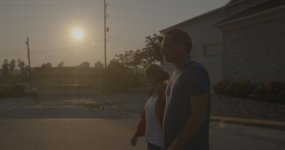
Recent owner of the Scarlet Dragon, and I've been out doing some shooting and am running into some questions that I thought maybe you all could help with. We were filming during a sunset in a rather awesome little town and have noticed that the footage is very grainy / noisy. I'm attaching a photo right out of REDCINE-X PRO. Camera settings were:

ISO: 250
Shutter: 1/48
Frame Rate: 24
Aperture: F/8
Compression was 8:1

The image here is using REDcolor 4 and REDlogFilm just for clarity sake, as the RedGamma4 crushes out the image.

My question is this: is this much grain normal for a lower light situation at ISO 250? Or is this an element of the sun messing with the sensor? We blackshaded before the shoot, but to be fair, it was much brighter when we first started filming. I have noticed that shots that either pan close to, or include the sun in any way (even if not clipping), will cause this level of noise. We did some macro work at another location that did not include the sun in any way, and most of that footage came out looking very clean.

 

Attachments

  • 1.jpg
    1.jpg
    86.2 KB · Views: 1
  • 2.jpg
    2.jpg
    79.4 KB · Views: 1
After 3 years with my Scarlet-X, I am just getting started myself with my Dragon. So, thoughts...

why ISO 250? Seems like you would have done much better at 800-2000 range. Also, try posting R3Ds so folks can get a chance to look at them in REDCineX.
 
Your shots could be said to be underexposed, but it's a matter of if you wanted the image to look this way or not.

Shooting at ISO 250 and then underexposing 2 stops down is like shooting at ISO 1000 in the first place.

You needed a bit of fill light here, or more Dynamic Range on your sensor. :)

Perhaps also your filtration could have washed out the shot?
 
These shot are very underexposed. This may be because the exposure was set to compensate the sun in one frame, and for the bright sky in the left side of the other frame; this is leads to the actual subjects in frame being underexposed and that is driving the noise issue.

In scenes like these,in order to get the proper exposure of your subject you sometimes need to let these bright areas clip a little. In the histograms, both the sun and the sky are only three quarters towards the right, there was still plenty of room to raise the exposure when shooting.
 
I would tend to agree that they are underexposed. I have found that proper exposure is even more important in Dragon than in MX. Not sure why. When you do nail it, it looks great.
 
Hi Brian,

ISO and underexposure - Ahhhh I remember those days! Actually quite easy to do at first. The higher the ISO on red (especially in MX days) the greater the highlight latitude but if you underexpose the sensor at any ISO, you will get noise. Contradictory? Exactly!

Ergo: use the raw view then check your goalposts and the greenlights for exposure and expose to the right as much as possible before clipping occurs and the exposure greenlight fires. This method you get great exposure and zero noise. If still interested, PM me your email and I'll send some pics / diagrams tomorrow.

Or just check out Phil's great sticky threads on exposing RED Dragon and ISO.

cheers,

Craig Lees
ED UK
3dstories.co.uk
 
Nick - It was the skin tone OLPF. Thank you All, and Craig. I'd love as much information as you have. I own the MX, and it just seemed like night and day shooting on them. I really appreciate the assistance. I'll try and check out the sticky thread as well!
 
Nick - It was the skin tone OLPF. Thank you All, and Craig. I'd love as much information as you have. I own the MX, and it just seemed like night and day shooting on them. I really appreciate the assistance. I'll try and check out the sticky thread as well!

Skintone at 1000 iso will be noisy.

Im more comfortable shooting 320 or lower on Skintone.

If you want more classic MX exposure (ie clean 640/800) Id recommend shooting on Lowlight. Its all we use these days.
 
Hey Brian,

The RedVolt R3D doesn't look like it has very much information in the mids or highlights. The information on the histogram is all on the left, so there might not be enough light for a proper exposure. I've only just begun shooting Epic Dragon, but coming from Scarlet MX (on which I shot almost everything at ISO 800), here's what I'm noticing (which echoes what a few have already indicated):

1. As with MX, I agree with Craig that it's critical to expose to the right of the histogram as much as possible. With Dragon, I'm less concerned about the highlights and more concerned about capturing enough light for the shadows. On a few occasions already, I've actually been surprised by how much data I can retrieve from highlights I thought were blown out.

2. The False Color tool really helps assess what areas will be noisy and blown out. It's a great exposure tool to make sure you're in the ballpark. Red indicates overexposed highlights. Purple indicates areas where noise may be an issue.

3. I'd agree with Nick that I'm noticing a cleaner image shooting at ISO 250 or ISO 320 (vs. 800) on Dragon, and then lifting as needed in post. As Craig mentioned, raising the ISO will give you more highlight protection; lowering the ISO will give you more shadow protection. I've decided I'm going to shoot mainly at ISO 320 and adjust on an as-needed basis.

4. As with MX, I'm black shade calibrating about 30 minutes after warming up (although, I'd guess that's not what you're facing here).

For what it's worth, I never really noticed much noise on Scarlet MX (except in some extreme situations), but I am noticing it more on Epic Dragon STHL. However, what I will say is that when I do feed it enough light, I really like Dragon's noise at 5K and 6K (when I can see it, that is).


Scott Wilson
www.emergence-series.com
 
Brian, What do you see on the histogram when you are shooting? have you loaded or modified a LUT for the the Camera look?

if you can, you should try restoring factory settings on the camera and shoot again to see if there is any difference.

Also (as Craig suggested) turn on the RAW look and check the histogram.

The noise that you are seeing is explained here: Exposure-with-RED-Cameras

You should compare your histograms to the examples in this reference: RED-Camera-Exposure-Tools
 
Just did another test with the same macro lens. F/2.8, ISO 800. Still seeing tremendous crawling noise. Thoughts?

http://burntbridgefilms.com/R3D/3.R3D

Again, 800 ISO on Skintone, with histogram to left, will be noisy. Its just math.

Shoot that on LLO and it woud look much cleaner (like MX, but with much better color and DR).

We generally shoot everything on LLO these days, for this very reason. However in situations with LOTS of light (ie ISO 250/320 histogram to right), Skintone can obviously be an amazing choice. Its just best to use to its strengths. Right now by underexposing it, you are revealing its weaknesses. Again, if youd like to shoot 800 iso on Dragon, do yourself a favor and shoot LLO. Its basically Dragon's MX "mode".

Best.
 
Many thanks to all, you've given me a lot to think about. Have done some other tests, and have had good results. Ultimately, looks like I'll be investing in the LLO. Greatly appreciated, all.
 
I am a bit late to the party here, but I wanted to add a few thoughts.

It's all about hitting the sensor with light. That would always be the first question. Is the sensor getting enough light? The amount of light is the single thing that will affect the amount of "grain". I will not say your image is underexposed because I do not know what you were exposing for. If you wanted to see the actors you need more exposure on that part of the image. If you wanted them in silhouette then your exposure is quite good.

On a shot like this you need a strategy based on what you want to see.

-If you want the sun and the actors faces, you need to introduce more light on them, through exposure, lighting, reflectors, etc.
-if you want the sun and the actors dark in foreground you exposed correctly.

Here you can also try to meter both parts of the image and split the exposure, but it is such a wide DR shot that you would need to augment the foreground exposure if you want to see it.


Just a comment on noise and the OLPFs.

Each OLPF can deliver similar results, (it is the same sensor after all). It depends on your own testing and where you want to map the image. The STH tends to need more exposure in the shadows, meaning you need more light to hit the sensor. That can happen in many ways, more lights, shutter or aperture.

You can rate at 1000ISO and get the sensor enough light or a nice flat histogram and get very amazing images. With film, you could take a rule like 1stop over key and be fine, that pretty much works with dragon as well.

I have a bit of a theory on what you are experiencing.

When people moved directly from MX to STH/Dragon and treated it exactly as they had previous RED cameras without doing complete testing of the new sensor and OLPF combination. The STH/Dragon sensor combo is a whole new imaging system and the exposure and developing of the footage produces a very film like image response (see phil's test charts on this).

The LLO/Dragon combination is more MX like if that is what you are used to.

It's important to know what each does and what you need to do to achieve similar results on both. That kinda sets cinematographers apart from "video makers". But what you presented is not as simple as an LLO/STH swap. I encourage you to experiment with your exposure strategies to collect the images you want to create.
 
It's true.

moving the ISO does not change the amount of light hitting the sensor. But you can use ISO as a basis for determining exposure (shutter and aperture).
 
Back
Top