Welcome to our community

Be a part of something great, join today!

  • Hey all, just changed over the backend after 15 years I figured time to give it a bit of an update, its probably gonna be a bit weird for most of you and i am sure there is a few bugs to work out but it should kinda work the same as before... hopefully :)

RED touch screen "foot" poll

RED touch screen "foot" poll

  • The pan/tilt "foot" is essential to the way I mount my LCD!

    Votes: 21 67.7%
  • I don't use the pan/tilt "foot" - I use a Noga arm or equivalent instead.

    Votes: 10 32.3%

  • Total voters
    31

Brook Willard

REDuser Sponsor
Joined
Dec 28, 2006
Messages
5,392
Reaction score
3
Points
38
Age
41
Location
Burbank, CA
Website
www.brookwillard.com
Hey folks,

I'm curious about how people use their RED touch screens on their camera. Rather than making too many options and diluting the results, I've broken it down to two options.

Do you mount your screen to the camera and take advantage of the screen's pan/tilt functionality, or do you mount your screen to a Noga arm or equivalent and position the screen using that arm?

I know that there is a grey area in between, where people take advantage of the screen's pan/tilt "foot" as well as an arm of some type, but the question really speaks to whether the pan/tilt functionality of the foot is an essential part of the way you prefer to use your screen, or if it's redundant/unnecessary.

This one's just born of idle curiosity. Thanks!
 
Hmm. My 9inch Red Touch recently broke at the hinge and was promptly repaired by Red. I usually put it on the camera rather then an arm. I found using the arm quite annoying and time consuming (especially if I have to take it on and off).

Still, wasn't a fan f bending the hinge. The 9inch did suffer from becoming wobbly and loose (a problem I hope was rectified when I sent it in for repairs). Won't know till I put some regular wear and tear on it again whether this will occur again.

Overall, when I did have a 5inch, I had no problems with the hinge and preferred it on the camera. Only problem is it can't be on the camera while using any shoulder-mount rig cause it simply would be too high.
 
I found using the arm quite annoying and time consuming (especially if I have to take it on and off).

its annoying on the arm because it has the built in pan/tilt. I dont like this design, and but still use it on a Noga arm which is awkward. I wish Red would release an older style simple monitor w/ touch screen without the pan/tilt part.
 

Attachments

  • L1000059.jpg
    L1000059.jpg
    95.9 KB · Views: 0
I think it's really neet that it has articulation built in. The thing with the Bolt on aspect is that it sucks for packing the system away in a normal hard case, and then unpacking it.

And then, to add any normal kind of quick release or swat rail, it takes away from the elegance of the design that Red put so much effort into.

I'm using this side rail (not a NATO rail) and a little slide block called a "nugget" with mine, and I can slide my EVF with articulation, or monitor without articulation on and off very fast, and with quite a bit of mobility in placement.

see here from USSYTEK:

http://www.digitalfilmstudios.com/wp2/products/utsldrl/

+ this thing:

http://www.digitalfilmstudios.com/wp2/products/utaksblk/
 
I think it's really neet that it has articulation built in. The thing with the Bolt on aspect is that it sucks for packing the system away in a normal hard case, and then unpacking it.

And then, to add any normal kind of quick release or swat rail, it takes away from the elegance of the design that Red put so much effort into.

I'm using this side rail (not a NATO rail) and a little slide block called a "nugget" with mine, and I can slide my EVF with articulation, or monitor without articulation on and off very fast, and with quite a bit of mobility in placement.

see here from USSYTEK:

http://www.digitalfilmstudios.com/wp2/products/utsldrl/

+ this thing:

http://www.digitalfilmstudios.com/wp2/products/utaksblk/

Dan,

Do you have a photo of your set-up you can post?

-P
 
I find that the pan and tilt get used a bunch. Just last week I was literally operating from the front left side of the camera in the corner of a bar.

I started with the Noga arm, but quickly desired a more "firmly" placed monitor that wasn't influenced so much by vibration or movement.

For the pan and tilt I'm all about getting the screen into the optimal position to clearly seeing the screen.

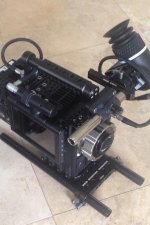
Big fan of the quick release concept. I rig the 9.0" and 5.0" Touch mostly on the top of the camera on one of two SWAT Rails. I've also made an "L bracket" out of Accessory Attachment Bracket that I use to offset the monitor on the side of the camera occasioanlly. For the Clutch I have an additional rail and a dogbone to get the display in front of me.
 
I like bolting it on the camera so it's solid for touchscreen use. I sometimes put it on an arm but always feel like I'm going to push it out of position by using the touchscreen. Never get that feeling when it's bolted on.
 
I prefer a more solid mount as well. hopefully the engineering team can now address some other tasks such as the Mirror/Flip issue. I say this because when we shoot in a conventional mode such as on a dolly with an operator/first/second....we like to put the monitor flat against dumb side of camera,(minus DSMC side handle) With this configuration all access to camera is from that side. Sound and VTR have access on that side with Pro I/O as well so it keeps some clutter away from operator We had to mod the top plate to allow the monitor to move forward to access pro I/O better. What we really would love is a Sidehandle replacement that attached the same way but only had a thin battery for hot swap, maybe one that trickle charged from camera. The red touchscreen could live there permanently. We have come to love the small DSMC style of shooting, revolts, still lenses but that is not the norm ....... most of the time its Bigger packages, Hard cases and bricks/blocks. Also trying to configure hard cases is expensive and time consuming. unscrewing things is a pain in the ass and covering the camera with widgets like swat rails and fancy recievers seems a bit silly , I have a drawer full of them
 

Attachments

  • IMG_0658.jpg
    IMG_0658.jpg
    85.8 KB · Views: 0
I don't use either because i have never found a solution that worked for me but I would consider one if was built to my standards.

So I mount the 9" Touch screen to the camera and take advantage of the screen's great pan/tilt functionality... ;)


552058_4600972462918_1907038373_n.jpg


attachment.php
attachment.php
 
There should be one or two older, quite interesting threads on this topic already, one moment...
Found it; http://www.reduser.net/forum/showthread.php?100132 and http://www.reduser.net/forum/showthread.php?99166

90 percent of the time we're fine with the monitor mounted at the top handle... it's a bit restricted when it comes to higher mounted shots like over-shoulder for standing persons due to the fact that the handle blocks the vertical swievel a bit for that direction - but usually this does the job and keeps the footprint of the camera low enough (no problem to put it in a bag with everything mounted).

10 percent of the time I mount it on a noga or RED-arm... only for setups where I need more flexibility. e.g on sliders, dollies, high level shots... works fine and gives you much more flexibility - as long as the monitor cable is long enough at least.

This pic is older already and I've posted it at 1-2 threads before but I think it shows my 10 percent solution pretty well -> in this case with a longer noga-arm; works with shorter arms too. A detailed description of how I did it can be found in the second thread I linked above.
 

Attachments

  • R0015520.jpg
    R0015520.jpg
    71.4 KB · Views: 0
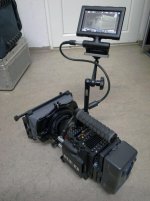
I use a noga arm attached to a manfrotto nano clamp. This allows me to quickly move it where I want it for a given shot. I use the hinge to put the mounting holes on the back when I need it lower. I run 15mm rods top and bottom, so I can always move the monitor from low to high in a few seconds. I do the same thing with the viewfinder. I find it gives the most flexibility.
 

Attachments

  • S1tFN-sqYgEZ1lbdSdFc-pOuUZcXmJ9-FaXpFsRWmSo.jpg
    S1tFN-sqYgEZ1lbdSdFc-pOuUZcXmJ9-FaXpFsRWmSo.jpg
    98.8 KB · Views: 0
  • GQvgPEGdxuwdrMRs1TxjSnanLJ816GIuXz3h7AFX08c.jpg
    GQvgPEGdxuwdrMRs1TxjSnanLJ816GIuXz3h7AFX08c.jpg
    98.5 KB · Views: 0
Generally I need the arm and a nanoclamp like Nick for the flexibility and speed of placement. Just wish the Noga arm didn't have the tendency to unscrew, or a weak axis, but can't really beat a single tightening control. The Pan/Tilt of the monitor is useful to fine tune the LCD placement without having to unlock the Noga. Unlike many operators, I don't mind the LCD off level as I've never used the LCD position to judge horizon.
 
Flip, flop and fly...

Flip, flop and fly...

Strangely, I think the addition of flip and flop will actually make me like the "foot" design on the LCDs (and to a lesser degree the EVF) more than I do now as it will increase the number of hard mount options I can rig in a functional place. As others have noted, mounting a touchscreen on a Noga arm is great in theory but often a PITA in practice.

Not to be a jerk, but if RED does reallocate some engineers to the whole monitoring pipeline, it would be great to speed up (and clean up some of the weirdness) going in and out of magnification... you know, if you're re-coding anyway :smilewinkgrin:

Cheers - #19
 
Being able to invert the monitor would improve functionality 10 fold. Being able to hang it off a noga arm upside down would be heaven. I can't for the life of me figure out why my 10 year old transvideo does it automatically and Red's can't do it at all. It's a huge deal.

Nick
 
If I'm operating and I have an AC, I use the 5" touch on an Ultralight arm. The Ultralight lives in the body case with a swat clamp that connects to the top of the body, and a cine-lock that connects to the 5" touch and lives on that as well, so building is very fast and easy. No screws. Pan/Tilt is used often to share screen without moving the whole arm.
 
Bolted on and loving the ability to face the screen to the front so I can work on setups from the front of the camera. Also, my travel case allows for 2 cams in a vertical position sans lens. Just cover the touchscreen with the pretty little grey RED bags and fold it down so the top of the carry will close.
 
Back
Top