Welcome to our community

Be a part of something great, join today!

  • Hey all, just changed over the backend after 15 years I figured time to give it a bit of an update, its probably gonna be a bit weird for most of you and i am sure there is a few bugs to work out but it should kinda work the same as before... hopefully :)

Red Dragon - It's Just Paint.

While grading by a LUT (pre-set transform made for other purpose and in this case based on other raw data) and sharpening of UHD motion imagery (from cameras made with intent of avoiding the need for sharpening) are better left perceived as subjective creative choice not to be debated on, in the context of skin tonality and first raw files made public it may be useful to mention that people usually don't have faces covered with green/blue/yellow paint.

The makeup artist does not have any paint on her, and the subject has great skintones before the paint goes on.

The skin looks sweet.
 
Very nice...
 
One last for the night. Again a bit more saturated and contrasty.

Dragon_Paint_Close_Saturated_1.4.1.jpg

I like this grade Matt, it looks awesome!

EDIT: beautiful skin tones!, thats what I am talking about!
 
I think you did an amazing job on this grade, she pops off the screen like a poster!

Decided to have a play in Resolve. For anyone else with a RR make sure to disable it or the R3D's will have no info or image available to grade.

Went for a late afternoon, slightly more saturated look on this one. Can't get over how much latitude is there.

Dragon-wide-balcony_evening_.jpg


Dragon_wide_balcony_evening_close.jpg
 
Just dropping in to let you guys know what I'm up to at the moment.

Today I went away from the one light rushed grade and finished up a more motivated color grade that I spent a bit of time on. Focused on skin primarily and a bit of a "natural scheme" across the board, and then I get a bit weird at the end. I didn't smash skin tones into one realm with any typical grading trend or look. Instead I focused on variety and nuance. Currently exporting that for review. I'm also doing some interesting grain tests, not typically my thing unless I'm trying to match something, however I'm curious about adding some texture to the highlights I've purposely blown in the grade. I'm going for a smooth yet sharp finish and not a straight down sample this time. I did grade in REDCOLOR3/REDLOGfilm through a Kodak 3D LUT this time around, which is pretty common practice. I actually loved the look straight away from that. I'll likely do a QC and clean up pass on the frames before all is said and done to make it "pristine".

This grade happened in DaVinci Resolve. Beta 2 works and plays nicely with Dragon. Although, there's two crashes I can repeat 100% of the time. Everything done in 6K using a single nVidia Titan GPU. No funky export errors or weird frames yet, which is good! Can't wait for Adobe's Speedgrade update honestly. I do prefer the look of Lumetri and the extra bit of tweaking you get with Speedgrade's controls. But hey, I love Resolve for a million reasons too. I wish I could smash these two programs together sometimes.

I'm going to take the UHD 4K master (3840x1620) to a few places to watch this shortly via REDRAY. I already have the rushed one light grade on there and it looks real pretty. That grade was pushed warm with earthy tones, this new one is the total opposite. I'm actually in love with the control over the blues now. Lots of room to play and it doesn't appear to negatively effect the footage unless you go way, way off the rails.

Mastering resolution is an interesting topic nowadays. In this particular case I'm finishing for UHD 4K with the 2.37:1 aspect ratio of the 6K WS material rather than my traditional 4K cinema workflow. I'm pretty much only mastering this way because UHD 4K displays are around for me to watch this on. I'll make a cinema master eventually as well.
 
Oh, and I should add something fun. I paint fairly often and do conceptual illustration for games and films.

Long ago I was discussing painting skin with Craig Mullins as we discussed Sargent's and Loomis's old notes while going over how light behaves. He's a much more talented painter than I and one thing I've always held onto about painting skin tones was "there's no one answer or trick to it". There was some stronger language in there too. Also, the somewhat humorous concept of what color something is isn't exactly the most important thing.

From a VFX, practical lighting, and color grading perspective there are of course certain things that skin does that one must be made aware off. Subsurface scattering of course being one of them. You may think that's just a VFX thing, but it's actually one reason to use a hard light over a soft light if you want "colorful" skin rich with variety and revealing the variation of chroma below the surface. The subtle blues, yellows, greens swimming within the sea of warm hues.

As I'm grading this Dragon footage I thought to myself about my career as a colorist. Often our job is to simplify and separate, especially in the commercial word. Most grades land in a pushed complimentary or triad scheme. In the process sometimes we lose some of that beautiful nuance and happy accidents that could happen along the way.

Maybe you want to see that vein beneath the thin skin on the inside of an arm, maybe you don't want to nuke that by going "full scheme", maybe that could be a nice touch. Or maybe you do want to go full scheme and convey a mood quickly and effectively. Maybe you want to land the simple punch. Maybe you don't. Go graphical for impact or natural for feel or perhaps explore something more of an alien territory? Tough questions.

Mostly I'm just reminiscing here as frames bake in my robot oven. However, much of my traditional art background and current theory penetrates into my motion picture work. For me it's important. I'm a bit of a process junkie and I like to draw lines between things I do. Grading this material is a test of freedom and control. You can do whatever you'd like Dragon's REDCODE RAW. There's plenty of room. But what is leading you to do so? What's the purpose? What's the intent? What do you want people to feel?

Heh. 9 times out of 10 when I speak about color theory I get lost in the chaos that surrounds this topic. It's one of my favorite wars in life.
 
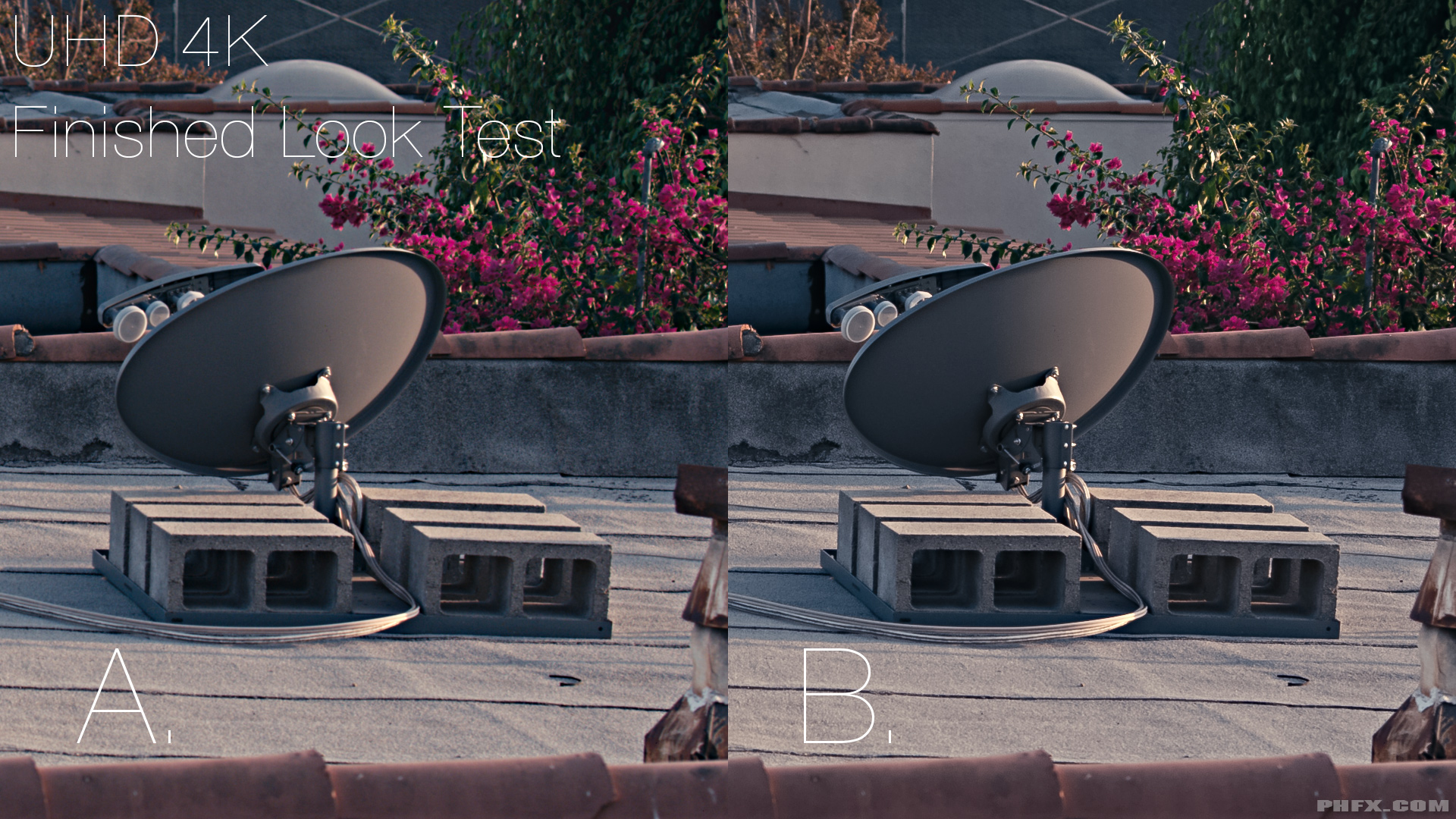
Back on topic. Here's a question and a choice.

I'm 99% sure I'm finishing this particular piece with option B for the UHD 4K finish:


Click for bigger.


Not razor sharp, but more of smooth approach. Reveal some detail without feeling too unnatural. Lock onto an edge without making detail too prickly.

Don't know if I'm going with the grain yet. I'm digging through my film scans to find something I like. Might use a digital option even.
 
How are you even getting Resolve 10 beta2 to work? I add my media to the pool, then switch to the color tab and I see nothing. No frame to color, nothing. I see a quick derezzing of the frames and some other chaos for a second then it disappears into black. :/
 
Back on topic. Here's a question and a choice.

I'm 99% sure I'm finishing this particular piece with option B for the UHD 4K finish:


Click for bigger.


Not razor sharp, but more of smooth approach. Reveal some detail without feeling too unnatural. Lock onto an edge without making detail too prickly.

Don't know if I'm going with the grain yet. I'm digging through my film scans to find something I like. Might use a digital option even.

I like B as well. The texture of the roof just seems to feel more real. If feels like I would thrash my knee if I crawled around on it, as A does not feel that same way. Now if there was a CU of someone on the roof, I might choose A. But B just feels like I'm there on the roof with the more detailed textures.
 
How are you even getting Resolve 10 beta2 to work? I add my media to the pool, then switch to the color tab and I see nothing. No frame to color, nothing. I see a quick derezzing of the frames and some other chaos for a second then it disappears into black. :/

I'm not Blackmagic's Tech Support, but I'd first see if you're video card is supported or if you have enough GPU Ram to make that happen. To grade in Resolve you "should" populate a timeline with clips.


I like B as well. The texture of the roof just seems to feel more real. If feels like I would thrash my knee if I crawled around on it, as A does not feel that same way. Now if there was a CU of someone on the roof, I might choose A. But B just feels like I'm there on the roof with the more detailed textures.

Thanks Adam. I'm pretty sure I'm going with B as a "global" look. I'll sometimes switch up if there's something super detailed that I want to pop, but this all sort of "feels" the same to me.
 
How are you even getting Resolve 10 beta2 to work? I add my media to the pool, then switch to the color tab and I see nothing. No frame to color, nothing. I see a quick derezzing of the frames and some other chaos for a second then it disappears into black. :/

Disable your Red Rocket first if you have one. If you have it enabled it will not work and the clips will not show up...
 
Back on topic. Here's a question and a choice.

I'm 99% sure I'm finishing this particular piece with option B for the UHD 4K finish:


Click for bigger.


Not razor sharp, but more of smooth approach. Reveal some detail without feeling too unnatural. Lock onto an edge without making detail too prickly.

Don't know if I'm going with the grain yet. I'm digging through my film scans to find something I like. Might use a digital option even.

I personally feel like B is the better option. A seems to be lacking detail and has an almost soft focus look. It may look good with talent, but for most purposes I think B is the better choice for a crisp final delivery.
 
How are you even getting Resolve 10 beta2 to work? I add my media to the pool, then switch to the color tab and I see nothing. No frame to color, nothing. I see a quick derezzing of the frames and some other chaos for a second then it disappears into black. :/

You have to create a timeline, in the edit window, and drag the clips into the timeline. Works for me anyway.
 
Dragon (carbon) is probably a very attractive DSMC 6K camera.

I took a tiff file from Phil's Dragon 6K set in Capture One 7 that is one of favourite application for the professional choice in imaging software.

The result is a stunning imagery and the test is more than worth it.

Hope that somebody in a near future will make R3D to Capture One plug in.

This could be specially useful for a fashion photography/cinematography on Dragon.

Below are several samples at the ICC profile of my choice Phase One IQ260 Portrait with a diverse color balance setting.

Use double click mouse button on each photo to open original image in new window.

CaptureOne7_Dragon_01.jpg

Dragon 6K on Capture one 7: ICC Profile Phase One IQ260 Portrait, Color Balance > Cool Look +0

CaptureOne7_Dragon_02.jpg

Dragon 6K on Capture one 7: ICC Profile Phase One IQ260 Portrait, Color Balance > Cool Look +1

CaptureOne7_Dragon_03.jpg

Dragon 6K on Capture one 7: ICC Profile Phase One IQ260 Portrait, Color Balance > Cool Look +2

CaptureOne7_Dragon_04.jpg

Dragon 6K on Capture one 7: ICC Profile Phase One IQ260 Portrait, Color Balance > Cool Look +3

CaptureOne7_Dragon_05.jpg

Dragon 6K on Capture one 7: ICC Profile Phase One IQ260 Portrait, Color Balance > Warm Look +0

CaptureOne7_Dragon_06.jpg

Dragon 6K on Capture one 7: ICC Profile Phase One IQ260 Portrait, Color Balance > Warm Look +1

CaptureOne7_Dragon_07.jpg

Dragon 6K on Capture one 7: ICC Profile Phase One IQ260 Portrait, Color Balance > Warm Look +2

CaptureOne7_Dragon_08.jpg

Dragon 6K on Capture one 7: ICC Profile Phase One IQ260 Portrait, Color Balance > Warm Look +3
 

Thanks for the footage Phil Holland. I color graded the video using Light Room and Film Convert. I did not use Lut or grain. Had to figure out how to go about this, the shadow and highlights were pushed to extremes, then I pushed the contrast to give it an HDR feeling. I wouldn't normally grade like this, but it's a lot of fun to see how far you can push the Red Dragon sensor, thanks Jim Jannard and the Red Team for the camera.
 
Completely non Dragon related for once:

Phil, I just noticed the new outrigger handle on the Jarred's Carbon Dragon. Can you share any info on that, too? :)

Thanks, mate!
 
You have to create a timeline, in the edit window, and drag the clips into the timeline. Works for me anyway.

I just uninstalled 10 beta and got 9.1.x installed and it works fine just not with 6k footage. 10b2 would not even open regular 5K or less clips/frames, so for now I'm backing off beta2. I will stick with RCx beta which seems to work flawlessly in my machine. Thanks
 
Completely non Dragon related for once:

Phil, I just noticed the new outrigger handle on the Jarred's Carbon Dragon. Can you share any info on that, too? :)

Ah the handlebars! Or Outrigger Handle. I've seen them a few times and have had them in my hands a bunch. I did operate with them to do some subtle moves on this shoot. Basically you get enough threaded holes to mount it to the top of the camera or Top Plate and you can also attached a LCD Touch on top of that.

The handles themselves are pretty sturdy and adjustable. Meaning you can move them forward and backwards. I think this is actually a very cool tool for handheld work as you can reposition the handles to the cameras center of gravity and achieve balance so it's both comfortable and fairly stable for sort of a "fig rig" type of operation.

Pretty handy to move the camera around too. Pretty cool accessory. I bet they could even make a swing away SWAT Rail or maybe a "stick" cheese plate so you could attach a monitor or something. Don't know where it's at in the design phase or when it's coming out exactly though.


I took a tiff file from Phil's Dragon 6K set in Capture One 7 that is one of favourite application for the professional choice in imaging software.

I used to love Capture One for stills. It's been years since I've touched it though.


Thanks for the footage Phil Holland. I color graded the video using Light Room and Film Convert.

Cheers Nick. Interesting take on the footage. The flicker that you see within your footage comes from Adobe Camera Raw/Lightroom algorithms for certain adjustments, such as clarity or some of the other sliders. They are "content dependent" and anytime the content of a frame introduces something different it will produce slightly different results. I learned that the hard way a long time ago. It's an interesting workflow for sure and I do wish it was "consistent" as I love the tool set there. I use ACR all the time.
 
Last edited:
Back
Top