

- Moderator
- #1

- Joined
- Apr 19, 2007
- Messages
- 13,392
- Reaction score
- 796
- Points
- 113
- Location
- Los Angeles
- Website
- www.phfx.com
Last year I went full on into the realm of 8K digital cinema with RED and the images from these cameras have been blowing me away. However, we now have two 8K solutions from RED. The Dragon 8K VV and Helium 8K S35 sensor technologies. And I've been slammed with questions regarding both for a long while now, and since taking delivery of my Helium upgrade I've also been curious about what each sensor does and what sets them apart.
So I put on my sleuthing hat and grabbed my curvy pipe to set off into exploring exactly what these two 8K offerings can do. In fact I spent much of the end of the year through early January doing these tests, examining results, breaking the image, etc... I've organized the most relevant images and information.
A few things we'll be looking at: Dynamic Range, ISO Performance, Color, and Skin Tones.
First and formost, we deal with motion pictures and as such the best way to experience much of this is in motion. So here's a lovely, long 14 minute video featuring several tests across all ISO Ranges, OLPFs, and with both sensors.
https://www.youtube.com/watch?v=CvtC1Kje4EQ
(I strongly recommend watching that in full screen in 4K or 8K resolution to receive the benefits of the higher bit depth YouTube encoding. What you are seeing at 8K is indeed 100% of the captured resolution for each test.)
I have thoughts, measurements, and conclusions, but first some chatter about ISO as we have some newer folks on board who might not want to dig through the dusty closets of previous REDuser posts.
ISO Core Concepts
ISO Ratings
RED Digital Cinema Cameras are always capturing the maximum available Dynamic Range. Decreasing or Increasing the ISO Rating does not effect how much light is hitting the sensor, rather, it's mapping tones and color to whatever your corresponding ISO value is. As such when recording REDCODE RAW, RED's proprietary compressed raw codec, ISO is metadata and can easily be adjusted in post. That said, you should expose as accurately to your desired ISO Rating as much as possible to get the best results. Also, getting familiar with the In Camera Exposure Tools to avoid things like clipping your highlights or crushing your shadows is highly recommended.
Image Noise
None of RED's cameras to date feature in camera noise reduction. When adjusting the ISO it is effectively digital gain, the higher the ISO Rating the more visible image noise will be apparent. The image noise typically creates a rather pleasing texture as a “digital grain”. However, it's certainly possible to take things too far and footage can indeed appear to noisy. Which is why again it's important to expose relatively accurately for your selected ISO value.
Balanced ISO Rating
The Balanced ISO Rating is an approximate ISO Rating where you have equal stops above and below 18% Gray. This middle ground is often where these cameras provide the most “cinematic appeal” as there's a light texture and a very nice workable latitude. In practice from here it's possible to explore a very film-like workflow of say pushing and pulling a stop when developing your footage in post, especially if well exposed. Side note, in terms of ISO terminology, many of us (myself included) refer to this as the Base ISO, which is indeed just not the right term for this as it technically means something else entirely. Same could be said for "Native ISO". From here on out I'll do my best to push the word and definition of what a Balanced ISO Rating is.
Oversampling During Capture, Downsampling for Delivery
RED cameras are multi-format/multi-resolution capture devices. You can indeed film say “4K for 4K”. However, there are benefits when capturing at a higher resolution than your delivery resolution. The two most noticeable are a decrease in visible image noise and an increase in visible detail. For many the standard 5K for 4K works very well especially when taking into account the Bayer pattern sensor and low pass filtration. However, it is indeed very enticing to shoot 8K for 4K or 2K delivery as it's sort of mathematically wonderful.
Onto my findings.
Phil's RED Dragon and Helium Notes
ISO
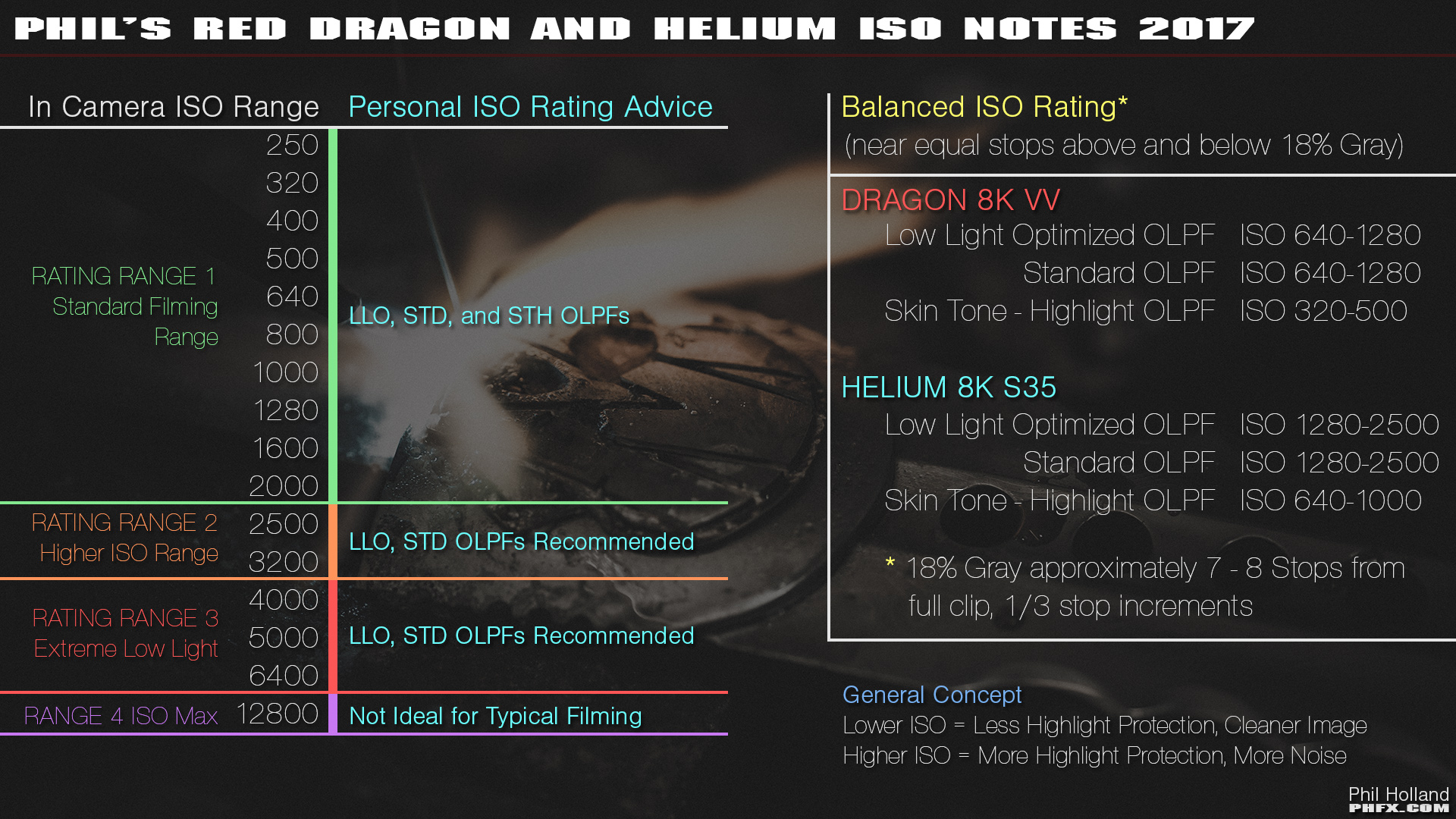
Here are the Balanced ISO Ranges for both Dragon and Helium. Take note that they are different for each OLPF.
Simply put, the Low Light Optimized (LLO) and the Standard (STD) OLPFs are alarmingly close to each other with very similar light transmission. The STD has a smidge more highlight protection than the LLO however.
The Skin Tone - Highlight (STH) OLPF has about a full stop of highlight protection over the LLO. Hence at a lower ISO you are holding more of your highlights, but the overall calibration for the STH is noisier at higher ISOs than the LLO and STD.
In the test video about I have shot the Skin Tone and Color Test with our talent at each sensor/OLPF combination's Balanced ISO Rating.
Matching Dragon and Helium
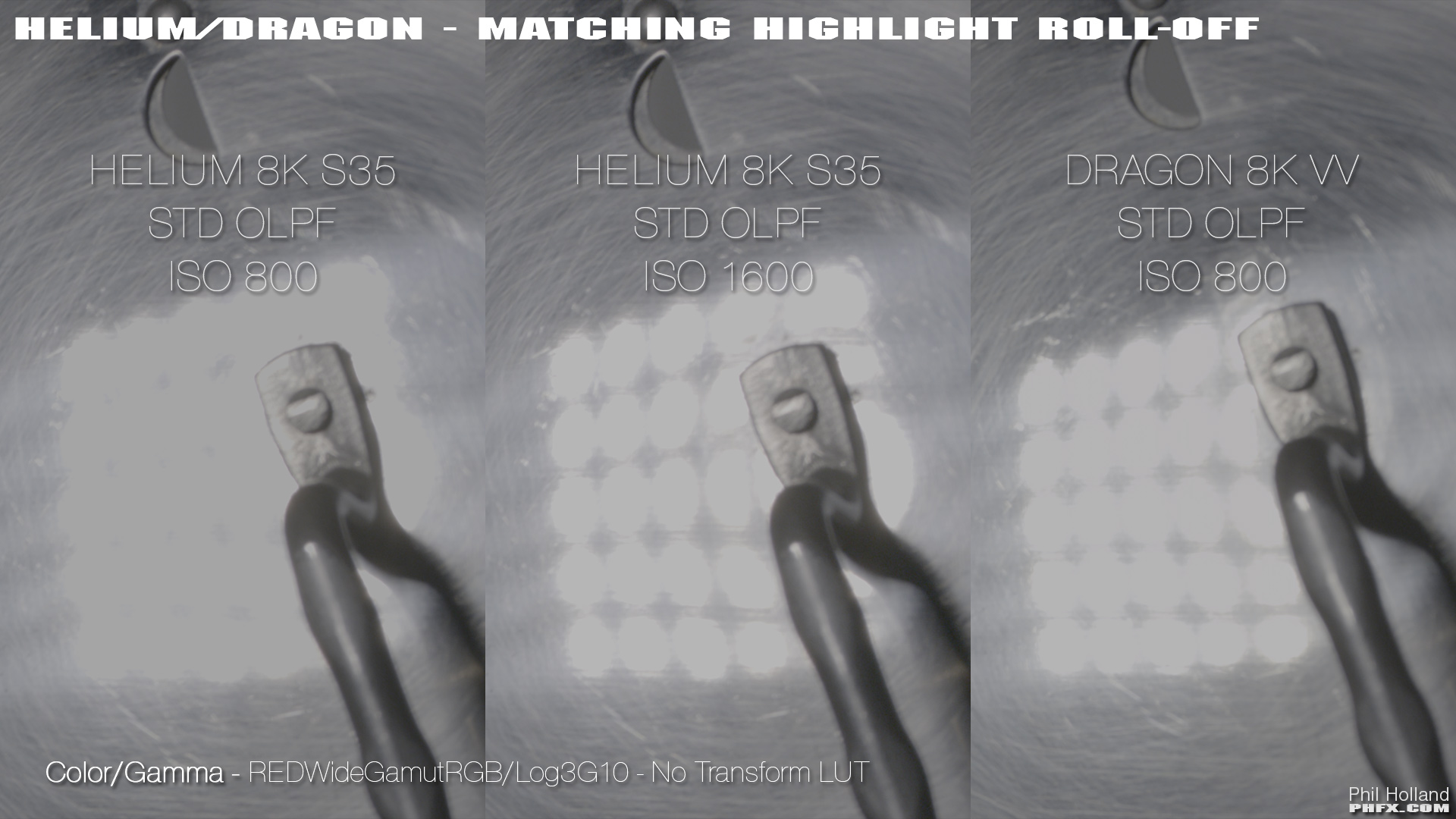
Long story short, if you are looking to "match" Dragon and Helium, Helium needs to be rated approximately 1 stop higher than Dragon. That is if you want the approximate same feel to your highlight roll-off.
Total Captured Dynamic Range
Here are two stress tests to review exactly what Dragon 8K VV and Helium 8K S35 can see.
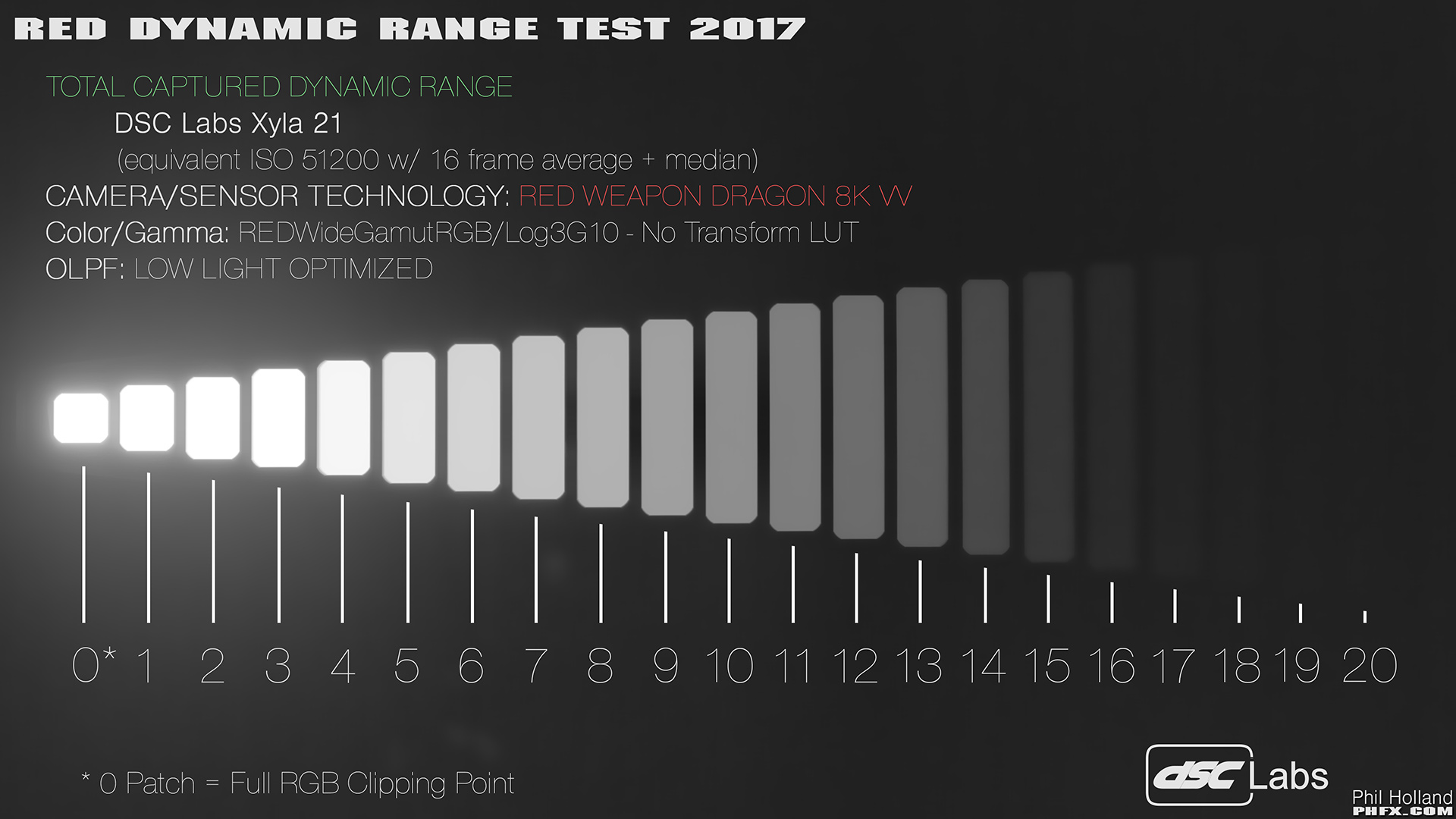
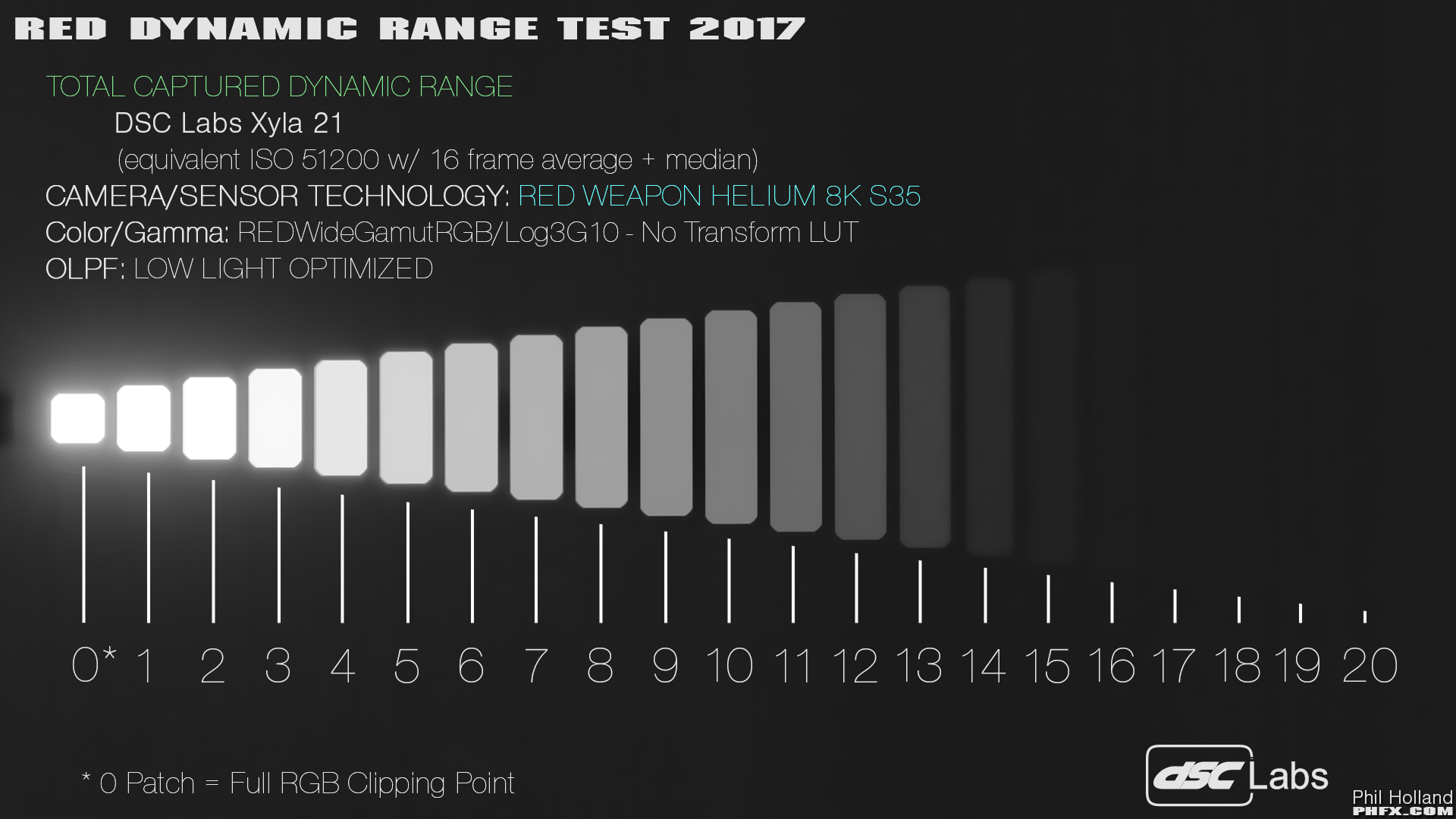
The short conclusion on this and combined with the footage in the test above. Both Dragon and Helium 8K sensors can see and use 16+ stops of Dynamic Range. The 8K VV is indeed the pure Dynamic Range king in this test, but Helium is also doing a pretty damn nice job.
Sort of a personal opinion here about DSMC and DSMC2 after some thought. Dragon in DSMC2 is almost like a "Dragon-X" sensor, if that makes any sense due to some of the additional benefits from the hardware and optical path found in DSMC2 bodies. Helium is a worthy upgrade to 6K Dragon systems due to benefits in cleanliness and resolution. However, when comparing 8K Dragon and Helium the difference between the two sensors gets a bit more complicated, but also more or less reveals that this is now truly about choosing what format size you want your 8K in. VistaVision or Super 35mm. Which from a cinematography perspective, is a good thing.
And sort of another personal opinion. What you are seeing with these two 8K sensors are truly state of the art, top of the line, digital cinema technology. I've been working with Dragon 8K VV the longest thus far and I truly can't tell you how impressed I am by what it produces. I more recently picked up the Helium 8K S35 and was also freaked out by lighting my scenes to ISO 1600 and getting stunning results. Pretty damn cool actually.
Anyways, I hope you enjoyed that rather painfully thorough test. I ran 3X Dynamic Range tests, graphed and measured the response curves from the sensor/OLPF combinations, did this again after the most recent Helium Firmware upgrade (which is what you are seeing), and shot lots of other stress tests to make sure things like Highlight Roll-Off were simply explained and concise.
Overall, this is how all of this works and I hope this helps some into capturing better quality images with these cameras.
I'll reiterate a couple of thank yous to Graeme Nattress for putting up with my nonsense during my tests and DSC Labs for providing and creating useful charts that can lead to deep camera analysis.
So I put on my sleuthing hat and grabbed my curvy pipe to set off into exploring exactly what these two 8K offerings can do. In fact I spent much of the end of the year through early January doing these tests, examining results, breaking the image, etc... I've organized the most relevant images and information.
A few things we'll be looking at: Dynamic Range, ISO Performance, Color, and Skin Tones.
First and formost, we deal with motion pictures and as such the best way to experience much of this is in motion. So here's a lovely, long 14 minute video featuring several tests across all ISO Ranges, OLPFs, and with both sensors.
(I strongly recommend watching that in full screen in 4K or 8K resolution to receive the benefits of the higher bit depth YouTube encoding. What you are seeing at 8K is indeed 100% of the captured resolution for each test.)
I have thoughts, measurements, and conclusions, but first some chatter about ISO as we have some newer folks on board who might not want to dig through the dusty closets of previous REDuser posts.
ISO Core Concepts
ISO Ratings
RED Digital Cinema Cameras are always capturing the maximum available Dynamic Range. Decreasing or Increasing the ISO Rating does not effect how much light is hitting the sensor, rather, it's mapping tones and color to whatever your corresponding ISO value is. As such when recording REDCODE RAW, RED's proprietary compressed raw codec, ISO is metadata and can easily be adjusted in post. That said, you should expose as accurately to your desired ISO Rating as much as possible to get the best results. Also, getting familiar with the In Camera Exposure Tools to avoid things like clipping your highlights or crushing your shadows is highly recommended.
Image Noise
None of RED's cameras to date feature in camera noise reduction. When adjusting the ISO it is effectively digital gain, the higher the ISO Rating the more visible image noise will be apparent. The image noise typically creates a rather pleasing texture as a “digital grain”. However, it's certainly possible to take things too far and footage can indeed appear to noisy. Which is why again it's important to expose relatively accurately for your selected ISO value.
Balanced ISO Rating
The Balanced ISO Rating is an approximate ISO Rating where you have equal stops above and below 18% Gray. This middle ground is often where these cameras provide the most “cinematic appeal” as there's a light texture and a very nice workable latitude. In practice from here it's possible to explore a very film-like workflow of say pushing and pulling a stop when developing your footage in post, especially if well exposed. Side note, in terms of ISO terminology, many of us (myself included) refer to this as the Base ISO, which is indeed just not the right term for this as it technically means something else entirely. Same could be said for "Native ISO". From here on out I'll do my best to push the word and definition of what a Balanced ISO Rating is.
Oversampling During Capture, Downsampling for Delivery
RED cameras are multi-format/multi-resolution capture devices. You can indeed film say “4K for 4K”. However, there are benefits when capturing at a higher resolution than your delivery resolution. The two most noticeable are a decrease in visible image noise and an increase in visible detail. For many the standard 5K for 4K works very well especially when taking into account the Bayer pattern sensor and low pass filtration. However, it is indeed very enticing to shoot 8K for 4K or 2K delivery as it's sort of mathematically wonderful.
Onto my findings.
Phil's RED Dragon and Helium Notes
ISO
Here are the Balanced ISO Ranges for both Dragon and Helium. Take note that they are different for each OLPF.
Simply put, the Low Light Optimized (LLO) and the Standard (STD) OLPFs are alarmingly close to each other with very similar light transmission. The STD has a smidge more highlight protection than the LLO however.
The Skin Tone - Highlight (STH) OLPF has about a full stop of highlight protection over the LLO. Hence at a lower ISO you are holding more of your highlights, but the overall calibration for the STH is noisier at higher ISOs than the LLO and STD.
In the test video about I have shot the Skin Tone and Color Test with our talent at each sensor/OLPF combination's Balanced ISO Rating.
Matching Dragon and Helium
Long story short, if you are looking to "match" Dragon and Helium, Helium needs to be rated approximately 1 stop higher than Dragon. That is if you want the approximate same feel to your highlight roll-off.
Total Captured Dynamic Range
Here are two stress tests to review exactly what Dragon 8K VV and Helium 8K S35 can see.
The short conclusion on this and combined with the footage in the test above. Both Dragon and Helium 8K sensors can see and use 16+ stops of Dynamic Range. The 8K VV is indeed the pure Dynamic Range king in this test, but Helium is also doing a pretty damn nice job.
Sort of a personal opinion here about DSMC and DSMC2 after some thought. Dragon in DSMC2 is almost like a "Dragon-X" sensor, if that makes any sense due to some of the additional benefits from the hardware and optical path found in DSMC2 bodies. Helium is a worthy upgrade to 6K Dragon systems due to benefits in cleanliness and resolution. However, when comparing 8K Dragon and Helium the difference between the two sensors gets a bit more complicated, but also more or less reveals that this is now truly about choosing what format size you want your 8K in. VistaVision or Super 35mm. Which from a cinematography perspective, is a good thing.
And sort of another personal opinion. What you are seeing with these two 8K sensors are truly state of the art, top of the line, digital cinema technology. I've been working with Dragon 8K VV the longest thus far and I truly can't tell you how impressed I am by what it produces. I more recently picked up the Helium 8K S35 and was also freaked out by lighting my scenes to ISO 1600 and getting stunning results. Pretty damn cool actually.
Anyways, I hope you enjoyed that rather painfully thorough test. I ran 3X Dynamic Range tests, graphed and measured the response curves from the sensor/OLPF combinations, did this again after the most recent Helium Firmware upgrade (which is what you are seeing), and shot lots of other stress tests to make sure things like Highlight Roll-Off were simply explained and concise.
Overall, this is how all of this works and I hope this helps some into capturing better quality images with these cameras.
I'll reiterate a couple of thank yous to Graeme Nattress for putting up with my nonsense during my tests and DSC Labs for providing and creating useful charts that can lead to deep camera analysis.


