Welcome to our community

Be a part of something great, join today!

  • Hey all, just changed over the backend after 15 years I figured time to give it a bit of an update, its probably gonna be a bit weird for most of you and i am sure there is a few bugs to work out but it should kinda work the same as before... hopefully :)

Re-grade your footage...

Gunleik... Graeme did a full comparative test today as you described and came away with a different conclusion. We will gather the notes and post the results when we can, hopefully tomorrow.

What is clear is that best result is with REDCINE-X and NR mode is fine. Graeme can step in here to add more clarity, but one thing we all know (and has been posted many times) is that if you don't do a new White Balance with the new color science, all bets are off. Old and new color science WB are different.

Jim

Thanks.
As stated, I did white-ballance one shot (the noisiest), but it was from an old build.

As stated, we will shoot new tests with B30 and the two M-cams that will be used for the TV series thursday and friday.

I will post r3ds alongside what I find, developed dpx's etc.
And I wouldn't be happier not to see this issue.

Thanks again for your response!

Gunleik
 
so.... I had to shoot a keynote speech ( 1 hour ) and used my red as b camera along with a ex1.... a bit dark the room was and I'm loving the FLUT™ to bring the clip back to life. But.... I've been waiting over 20 hours and it's still only 40% rendered/exported from redcine. Is this normal? I know...I know... get a rocket... but maybe I'm doing something wrong?

build 20
redcine 158
macpro quad core 2.66,
11 GB ram
ATI Radeon HD 3870

exporting 4k to 2k with FLUT™ and noise reduction at 3.... to prores hq qt.
 
so.... I had to shoot a keynote speech ( 1 hour ) and used my red as b camera along with a ex1.... a bit dark the room was and I'm loving the FLUT™™ to bring the clip back to life. But.... I've been waiting over 20 hours and it's still only 40% rendered/exported from redcine. Is this normal? I know...I know... get a rocket... but maybe I'm doing something wrong?

build 20
redcine 158
macpro quad core 2.66,
11 GB ram
ATI Radeon HD 3870

exporting 4k to 2k with FLUT™™ and noise reduction at 3.... to prores hq qt.

Time is money... which is exactly why we developed "The Rocket". :-)

You have done everything to make this a long transcode... NR, scale, ProRes.

Jim
 
When "The Rocket" is supported in SMOKE on Mac, AE, FCP & COLOR then its going to fly for sure.

But when you can open EDL cut lists in REDCINE X and work natively with R3D files in SMOKE on Mac and FCP like you can in Scratch --- well things would be so much smoother and faster and make a lot of producers very very happy

Post tools are just so important with working with RED and having a complete "Offline" to "Online" pipeline working directly with R3D files is what we are missing big time now.
 
Re-Grading / Current Post workflows

Re-Grading / Current Post workflows

IMHO - Best fully functional solution RIGHT NOW:

Assimilate's "Rocket Fuel" bundle: includes a Rocket, nVidia Quadro 3800 with SDI daughtercard and runs on an i7 based PC workstation - KeyCode and others sell it for $13,000 USD including the PC. Virtual telecine, virtual VTR, REAL TIME, the SDI spigot ties you into standard infrastructure, etc.

Most elegant and cost effective solution on the horizon:

I look forward to the day that some newer version of the Final Cut suite and RED's new CS are all working together like a well oiled machine - Nirvana! Hopefully that's soon, as the "Rocket Fuel" solution has two handicaps - you can't write directly to ProRes (Apple boxes only) and the SDI spigot does not pass TC (nVidia's fault not Assimilate's but still). I am very impressed with RedCine-X and it's a great tool for many things, that said, for many workflows I would prefer to jump straight into Final Cut - and so would a LOT of editors.

FWIW I am in the process of pulling selects and regrading footage shot over the last 2.5 years in a wide variety of genres and lighting conditions. I am very glad that I have Scratch for a project of this scope, its built from the ground up for heavy duty use. Moreover, Assimilate is a small company that moves quickly to service the RED market and understands it better than any other 3rd party I know of. Still the best debayer quality and color fidelity.

(Note: As many have posted, FCP has languished while Apple has concentrated on other product lines and RED's fast dev cycle outpaces their response capacity).

Bottom line: Apple has a tremendous opportunity to leverage their technological strengths and huge installed base to make the next version of the Final Cut Studio suite a truly professional linchpin of the workstation based post production environment that is evolving before our eyes.

Some suggestions for Apple Pro Apps team: everything needs to be 64bit, QuickTime needs to re-written from the ground up - short term compatibility issues be damned, free ProRes read only module needs to be propagated as widely as Flash (and promoted for file based deliverables) and RedCode needs to be supported as a native format in every way.

Just my 2 cents-

Cheers - #19
 
Time is money... which is exactly why we developed "The Rocket". :-)

You have done everything to make this a long transcode... NR, scale, ProRes.

Jim

so if I take away the scale and the prorez ( what codec would be faster? ) and go 4k with NR... would that speed things up a to a few hours?

or is the NR the real lagger.

I will get a rocket... but waiting on new macpros 1st.
 
I think we have more chance of Autodesk having full R3D native support before FCP. Apple seem to focused on iProducts to concentrate on the Pro market... look at Shake and its said to be replacement that never came.

Scratch is a great product but way to over priced IMO plus its PC only which hinders its growth.

My money is on Autodesk, they seem the most proactive profession tool around and are after the new post production market.

Smoke on Mac + RR with full support, then throw in Lustre and you have a killer setup, bar none!

I remember seeing the presentation of REDCine at the beginning and it was said to be able to take in cut lists to output the footage for the "online"... this never came about and its been the thorn in RED side as this feature is so so important.

The wait continues I guess :-)
 
Guess I'm shooting in bit different conditions than many other Red One users and thus may end up wondering questions that are not relevant to everybody.

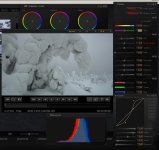
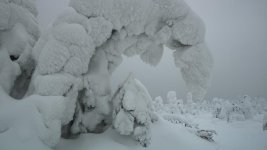
Nevertheless, here's an example of shots took a week ago of trees covered by icy snow. While shooting I tried to exposure as much to the right as possible without going out from the linear region of the sensor. So, in principle I should have obtained best possible sampling and saved as many tones as possible.

Still, the snow appears somewhat dirty and the image does not reflect the overwhelming feeling of very pure snow, and I guess the reason for this is that the bit depth is not high enough to capture enough tones --see the histogram and the spikes therein of the screen capture of Redcine-X. To compensate the effect of dirty snow I tinted the image bit towards blue to retain the impression of freshness.

I know that this is bit like shooting a gray card and asking for rich amount of tones, so I'm not blaming the camera. Instead, I'm interested in any ideas how the effect of dirty snow could be minimized. Guess Epic-X with Mysterium-X sensor will make a difference when shooting this kind of images.
 

Attachments

  • RCX-Tykky.jpg
    RCX-Tykky.jpg
    88 KB · Views: 0
  • Tykky.jpg
    Tykky.jpg
    42.6 KB · Views: 0
@Lauri Kettunen

I shoot consistently in the same conditions. Matt's reaction to your shot was the same as I had. I'm not sure what you are wanting from it with completely socked in sky...it's going to be pretty flat no matter what.
 
Matt's reaction to your shot was the same as I had.

Matt, Dane, sure the contrast is low. But, I'm afraid, your reasoning is reverted compared to what I'm trying to figure out. The question is, what is technically required from a camera to reproduce the gray tones cleanly in such low contrast conditions. Compare, if the dynamics of some sound is very low, you need a high quality mic and audio recording system to capture the small level differences.

I suspect the "dirtyness" follows from unsufficient bit depth and believe higher bit depth (of a sensor having higher dynamics) will improve the situation. These Red One images are already much better than what one can get with say 8-bit HDV/DV cameras. Consequently, I assume Mysterium-X will manage better than Mysterium sensor in capturing the gray tones in such conditions.
 
Matt, Dane, sure the contrast is low. But, I'm afraid, your reasoning is reverted compared to what I'm trying to figure out. The question is, what is technically required from a camera to reproduce the gray tones cleanly in such low contrast conditions. Compare, if the dynamics of some sound is very low, you need a high quality mic and audio recording system to capture the small level differences.

I suspect the "dirtyness" follows from unsufficient bit depth and believe higher bit depth (of a sensor having higher dynamics) will improve the situation. These Red One images are already much better than what one can get with say 8-bit HDV/DV cameras. Consequently, I assume Mysterium-X will manage better than Mysterium sensor in capturing the gray tones in such conditions.

A reference image of what you think it should look like would be helpful.
 
Im not sure what you mean by dingyness, but it sounds like something that a basic grade could fix. I doubt there is a lack of sensitivity of ability to interpret the grays. The sky is the same color as the snow, there is almot no contrast there. So, either you underexpose which saves the info but winds up with "grey" snow, or you push it up and get white snow with less detail. I dont think you can have both, no matter the camera.

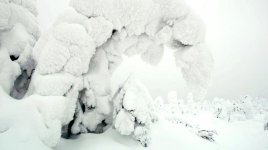
I attached a quick grade in PS of what I would expect the shot to look like. This was graded off of your jpeg, so obviously alot of data had been thrown out and a better job could be done with the raw file.
 

Attachments

  • Tykky.jpg
    Tykky.jpg
    43.8 KB · Views: 0
Not sure what the exposure methodology was exactly... but looks like you under-exposed making white look grey. You can certainly "fix" this with a grade, but the methodology will get you in trouble more often than not. Using the RAW histogram is never recommended to make an exposure judgment, only to check the extremes... which is why the new Build 30 gives you an RGB histogram (at selected ISO) with RAW "goalposts". Mid grey is also where it wants to be in the new build...

Jim
 
... but looks like you under-exposed making white look grey.

Jim, check the Redcine-X settings: the exposure setting is -1.33. It's exposured as much to the right as possible without compressing or blowing out the details from the white snow. As a result when I open the file in Redcine-X (using RedColor and RedGamma) the image appears far too bright which is why I have to bring it down.

Snow should not appear like plastic or metal so shooting snow fields should not be compared to shooting say a white car.

Deanan, good point, just don't know how to create a one from the files I have. Guess I needed a composition made of two images. Will check whether I have precisely the framing with two different exposures.
 
Lauri... it looks like all the info is there to do just about anything you want with that image. How big is the original R3D?

I'd suggest you reset exposure setting to 0. Use the FLUT Control to get the right "brightness" in the image. USE LGG to tune up the amount of contrast you want and get whites where you want them.

Jim
 
How big is the original R3D?

Can't check the size right now as I'm not in my office. But to give you an idea, there's a lot of files, all are 4K 16:9, 25fps and they last from 8 seconds to about one minute. So there should be rather small files.

I'd suggest you reset exposure setting to 0. Use the FLUT™ Control to get the right "brightness" in the image. USE LGG to tune up the amount of contrast you want and get whites where you want them.

Thank you, will try this in the evening.
 
It sounds like what you want is to move the mids and shadows up.
Maybe start with the global lift (below the circle) to get the shadows up a bit, then adjust gamma and gain to finish it off.
 
Back
Top