Welcome to our community

Be a part of something great, join today!

  • Hey all, just changed over the backend after 15 years I figured time to give it a bit of an update, its probably gonna be a bit weird for most of you and i am sure there is a few bugs to work out but it should kinda work the same as before... hopefully :)

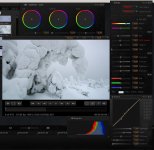
Re-grade your footage...

Lift, Gamma, Gain are powerful tools... which is why we included them in REDCINE-X.

Jim
 
Maybe start with the global lift (below the circle) to get the shadows up a bit, then adjust gamma and gain to finish it off.

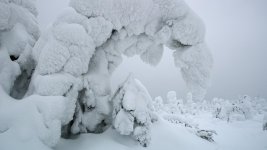
Ok, tried what you and Jim suggested. The RCX settings and the image is indeed bit better than before. Furthermore, LGG settings made it easier to set the image towards the desired results. I had to take the gamma down quite a bit.

The trees in the background appear quite as they should, but still would like to lighten a bit the lighter tones of the bended tree in the front. As it appears now, the snow appears somewhat dirty although in reality it created a strong feeling of extremely pure snow. My impression is that the difficulty to adjust the tones has to do with the sampling bit depth.

Saying this, should add that can't quite see why Jim says it's never recommended to make an exposure judgment with the raw view. For, anybody who understands properly mathematics and mathematical physics would explain why everybody everywhere so eagerly stucks on linearity. There's an affine part -a linear function + a constant- in the response of the sensor. Setting the highlights to the highest point of this affine part maximizes the distance from noise and gives the highest sampling of tones.

Then if in post/RCX the exposure setting follows the same affine function, thanks to the linear part, one can return back to the desired level of brightness as if one set the iris of the lens while shooting. The advantage of this is minimal noise and best possible sampling. Deanan, Graeme, you understand mathematics, what do you say?
 

Attachments

  • Sample-2.jpg
    Sample-2.jpg
    85.6 KB · Views: 0
  • Sample-2-frame.jpg
    Sample-2-frame.jpg
    87.8 KB · Views: 0
Then if in post/RCX the exposure setting follows the same affine function, thanks to the linear part, one can return back to the desired level of brightness as if one set the iris of the lens while shooting. The advantage of this is minimal noise and best possible sampling. Deanan, Graeme, you understand mathematics, what do you say?

Yes although it's gets into how the controls work with respect to the underlying data. It's similar to some grading tools that work well in print log density but not so well with video gamma. Linear light is similar in that the tools get quite clunky unless they're designed to work well with that kind of distribution.
 
Linear light is similar in that the tools get quite clunky unless they're designed to work well with that kind of distribution.

Thanks, so do you say in principle yes, but however it's bit clunky as the tools in REDcine-X are not designed to support such a workflow? Or, do you say, right, go on if you know what you are doing?
 
Thanks, so do you say in principle yes, but however it's bit clunky as the tools in REDcine-X are not designed to support such a workflow? Or, do you say, right, go on if you know what you are doing?

I meant in general for most grading tools but to some extent in RCX also.
For example, if you're using the curve, moving around the middle stops get pushed into the far left of the curve so end up with not much flexibility. Same goes for photoshop, etc.
 
so if I take away the scale and the prorez ( what codec would be faster? ) and go 4k with NR... would that speed things up a to a few hours?

or is the NR the real lagger.

I will get a rocket... but waiting on new macpros 1st.

1st time I've ever quoted myself to get some opinions... any advice would be appreciated. So, what's the fasted way to get to 2K editable in FCP from redcinex without a rocket?
 
I meant in general for most grading tools but to some extent in RCX also.

Jim, Deanan, there is something that puzzles me (as a fully trained scientist)quite a lot in your answers, so may I first try to straighten out what I'm trying to say:

First of all, in my experience there are cases when getting enough tones of gray become critical. The trees covered with icy snow was an example, and the image below is another one.

Sample-of-grays.jpg


The critical number of gray tones shows up in post. To get a documentary image I'm seeking for I have to pull the gray tones away from each other. This corresponds to making the RGB graphs in RCX histogram wider. The limited number of tones shows up as a spiky graphs in the histogram. When I open the 16-bit tiff files exported from RCX to Photoshop and open the curves, the spikes are there as well, see the images below:

Sample-curves.jpg


Sample-curves-2.jpg


Summing up, to get the best possible result, while shooting I should try to maximize the number of tones stored in the raw files. I'm pretty sure you agree up to this point.

Now, as a scientist I would say linearity is a certain property of a relation between two sets. Correspondingly when you talk of "linear light", it is difficult to know conceptually what you mean as in the lack of any reference to any sets the expression can be interpreted in many ways.

When I talk of linearity I mean the (linear part of the affine) relation between the input and output of the sensor. More precisely, the input is about light intensity and the output is about voltages.

Now, linearity is one of the great findings of science and mathematics, and it means, one may add and multiply either before or after without making any difference to the final result. In pragmatic words, as there is a linear correspondence between light intensity before the sensor and the voltages produced by the sensor, it does not matter whether one sets the iris and shutter speed (i.e. the exposure) or scales the voltages. All the same, the outcome is the same. (Of course, only "lightwise" and not imagewise as for instance the iris affects the depth-of-field and thus the image obtained with two different setting of the iris is different although one compensated the amount of light by changing the shutter speed.)

However, as soon as the AD-conversion is made the linear relationship is lost, but still something similar remains when one exposures to the right (maximizing the distance to noise and maximizing the amount of bit depth of sampling) and when one scales downwards (making the image darker) in post.

So, I would definitely say the raw workflow is NOT only about avoiding creating "baked images" but instead it's about making the best use of linearity (as all engineers and physicists who understand the main principle eagerly do when ever possible). This includes the idea of not baking in the image, but conceptually there's more than that.

Now, one can't obviously create "linear images" for the very reason that the response of our eyes to light is not linear. For this reason one needs to apply the gamma map at some point to create a proper relation between light intensity and the final image. And from the scientific point of view everyboyd knows this should be postponed to as late point as possible and this is precisely what RCX does: Deanan told me some time ago that the linear data is all applied at once before all other effects.

Now, I live in the part of the world where we have snow for 6 months a year and I would like to capture as many details as possible of the snow fields. For this reason I tend to exposure to the right up to the point that retains linearity, see the image below:

Sensor.jpg


Say the blue line is obtained with linear regression. I try to exposure low contrast target such that the highlights just hit the green point. This yields the best possible sampling. (One should flip the image horizontally as the way Graeme has made this image implies one should exposure to the left but never mind.) Then in post in RCX I want first to bring down the gray tones and only thereafter employ any nonlinear filters.

This is why Jim's suggestion of using the FLUT™™ setting first is like throwing away the wonderful advantage brought by linearity. This is also why I would like to know what corresponds to the green point in the exposure tools of the camera.

Obviously I'm aware that 99% of Red One users do not shoot this way. Cinema people have the advantage that they can use lights and while shooting they want to monitor the final result as accurately as possible. For the needs of those making wildlife shooting it is often enough to monitor something that is approximately close enough and enables one to focus properly. Furthermore as situations come and go very quickly there is even seldom time to adjust the monitoring.

But, we need to know that the exposure is set such that it maximizes sampling. We need to know that we've taken the best possible sampling and then we can worry of the rest in post.
 
Jim, Deanan, there is something that puzzles me (as a fully trained scientist)quite a lot in your answers, so may I first try to straighten out what I'm trying to say:

I'm not sure what it is that's puzzling you after reading that.

Quick comment though... spkes in histogram can mean different things depending on the image content. Additionally, you're looking at a binned representation of 65k values in 300 pixels so there will be histogram sampling issues.
 
I'm not sure what it is that's puzzling you after reading that.

Ok, let me put it in different words: We need the gamma map because the eye (and the brain) does not respond linearly on light. Moreover, the properties of the eye are not fixed but instead the eye is very if not extremely adaptive and how it 'reads light' varies a lot from one situation to another. For this reason in post we need software all these tools such as FLUT™, LGG, gamma curve setting etc. to emulate what the eyes do, and correspondingly different types of images call for their own specific settings.

Let us now assume for a moment that:

1. one has no control on the lights of the situation in which one is shooting.

This is the common case in (using Gibby's term) 'electronic mobile photography' such as wildlife photography. As the properties of the sensor are fixed, the natural philosophy is to gather as much data into every frame as ever possible -that is optmize sampling- and store the information of the prevailing conditions of how the eye reads the light into metadata, such as ISO etc.

In this case the first recipe of exposition is/should be extremely simple: take the full advantage of linearity and exposure right to the point I marked with green in the previous post. Doing this one never clips the highlights, i.e. loose any data but instead one collects maximal amount of data, and moreover everything is reversible in post.

The drawback of this approach is that one may loose tones of the dark end making them completely black, and thus, in the current situation one has to make compromizes and sometimes deliberately blow some highlights. But notice, the advantage of Mysterium-X over Mysterium is that there is less a need to make such compromizes. The same will happen in the future with Monstro over Mysterium-X, and eventually when the sensor dynamics is high enough one needs only this one simple rule: exposure to the right up to the point that makes everything reversible in post.

Conclusion: I would expect the reversible point of the sensor dynamics to be clearly shown in the metering of the camera allowing the user to clearly know where the exposure is set with respect to this point. Unfortunately, with Red One this is not the case.

No, let's assume the other alternative:

2. one has control over the lights while shooting.

This makes the shooting very different because when setting the lights one adjusts them for the eye and not for the sensor. This means, one needs to apply the gamma map already while shooting to properly anticipate the final outcome of the lights. Thinking this way I easily understand why build 30 includes things like FLUT™ -one needs to anticipate where the mid-grays are going to be- and why Jim says it's meant mainly for the professionals and other ones should be careful with it.

But now, while reading Jim's comments -for instance, when he suggests me to set first the brightness with FLUT™- I feel his reasoning is not accurate enough: Even in this case the basic strategy is to maximize the data gathered to each frame as this yields more freedom in post to make changes or fix mistakes made in setting the lights. So again, as far as I can see the camera should tell clearly and loudly to the user where is the rightmost reversible point of the sensor, exposure up to that point, and in this case store accurate metadata of the setting with the raw files. But of course I may have mistaken somewhere because obviously I can't know all the details. My rationale relies on some basic general rules which may well be affected by the details.

Summing up, my concern is that RED will push the design too much towards how cameras where used in the time of films when one was not able to clearly separate the reversible linear part of the workflow from the irreversible nonlinear part. Furthermore, this separation is what modern science very much suggests to do (still, I reserve the right to change my opinion if/when the more precise knowledge of details clearly indicate so).

My sincere wish is that RED does not follow the path of Canon and Nikon which have made their workflow to emulate that of film cameras neglecting the exploitation of the reversible linear part: The customers pay for this in worse image quality. Instead, I hope RED with a sense of purpose educated their 'old (film) school' users to take the best advantage of modern equipments. For instance, the discussion on 'which ISO' is so misleading as it's only metadata; It's time to go beyond such old traditions and move on to better image quality.

Final remark: All this with the reservation that there may well be details I'm not aware of. In the end of the day I just would like to understand.
 
Conclusion: I would expect the reversible point of the sensor dynamics to be clearly shown in the metering of the camera allowing the user to clearly know where the exposure is set with respect to this point. Unfortunately, with Red One this is not the case.

The raw exposure overlays does this by showing the highlight clipping point in red(or last reverseable point in your terminology?) and the noise floor in purple. Or do you mean something else? The goalposts, histogram, and highlight bar (next to the histogram all do the same also but in different ways.

It sounds as though what you're asking for is to be able to expose to the right and then have the camera automatically figure out where mid grey should be (ie. set the iso metadata and/or flut). But in the ETTR case, there is no real way to know what your intended midgrey point would be after you've ETTR.

We have not followed canon or nikon because our iso is just metadata and is only another tool so that one can use a light meter and rating that is familiar. The second part is to provide a correlation between the iso and a visual image so that if you're shooting at 2000 iso, you're not looking at a black image as you would if you were looking at a linear light image.
 
The raw exposure overlays does this by showing the highlight clipping point in red(or last reverseable point in your terminology?) and the noise floor in purple. Or do you mean something else? The goalposts, histogram, and highlight bar (next to the histogram all do the same also but in different ways.

In fact, up to the latest release build 21, people from RED have confirmed that only the 'barber's pole' indicates true raw metering. Furthermore, when the upper most red bar of the barber's pole is on, then clipping already occurs. So, only the orange light may be on.

But, and this is the big but, the sensor seems not to be fully linear up to the orange light but there is some roll-off/compression (or whatever you want to call it) meaning the graph showing the response of the sensor bends before clipping. If one exposures over this bend, then linearity and reversibility in post is lost.

So, the question is, which bar of the barber's pole corresponds to the highest point of linearity?

Second, Graeme has confirmed that the raw view has a mild gamma curve applied. In practice this shows up such that when using raw view often the red bar in the barber's pole is on indicating clipping but none of the trafic lights is yet on. Consequently, the raw overlay is not reliable (and I've fell to this pitfall and spoiled couple aerials by relying on the trafic lights/raw overlay when setting the exposure).

The second question is, which setting in RCX scales downwards the image along the linear part of the affine line? I assume now that there is some roll-on/bend of the sensor response graph in the dark end as well. Is this the case?

Third question, am I fully mistaken here?

And another detail here: It's not possible to choose simultaneously both the focus assisting tools (black & white view with the edges highlighted in blue) and the raw overlay to the quick buttons on the LCD and camera. Instead, one has to go through the menu system, and in practice in wildlife shooting one has to choose one or the other. There's no time to change the selection from the menus when situations come and go quickly.

It sounds as though what you're asking for is to be able to expose to the right and then have the camera automatically figure out where mid grey should be (ie. set the iso metadata and/or FLUT). But in the ETTR case, there is no real way to know what your intended midgrey point would be after you've ETTR.

No, I don't want the camera to do anything automatically as I don't believe such an automatic system were possible at the first place. And in fact, the midgreys have nothing to do with the exposure -that is with the map between light intensity before the sensor and the voltages after the sensor. So talking of midgreys in the context of exposure have no conceptual meaning, and I would like to avoid thinking of post issues while shooting as there's nothing I can do to the prevailing light. (Midgreys has to do with the post stage and they get a meaning once one gets to set/choose the gamme curve.)

What I'm asking for is:

to have in parallel a clearly documented workflow that separated the exposure (in-camera issue) and establisment of the gamma map (in-post issue) from each other.

Clear documentation means clear camera metering indication and clear documentation which setting in RCX corresponds to scaling in the desired way.

EDIT: Deanan, since this conclusion that I'm after the camera automatically figuring out where the mid-greys should be is quite against of what I'm trying to say here's an analogy: Say you were an recording engineer in a music studio. If you have only a stereo recorder and you make a live recording of some band, then you have to mix the whole thing simultaneously while you record the band. But, if you have a multitrack recorder, you record every single instrument using as high level as possible without distorting the sound to get the best possible sampling despite that some instruments are going to mixed very low in the final recording. While recording you often have to provide the musicians also with a preliminary mixing into their ear phones.

In the same sense, in the raw workflow one should try to get the best possible sampling and the preliminary 'mixing', i.e. gamma map adjustment, is left to metadata. The beauty of the raw flow is in linearity which allows to make a clear distinction between exposure (analogy: recording) and setting the gamma-map (analogy: mixing the final recording).
 
Back
Top