Welcome to our community

Be a part of something great, join today!

  • Hey all, just changed over the backend after 15 years I figured time to give it a bit of an update, its probably gonna be a bit weird for most of you and i am sure there is a few bugs to work out but it should kinda work the same as before... hopefully :)

Properly graded...

Status
Not open for further replies.
Very cool, Gavin.

Develop it and sell it...I'll buy one.

Working on it. :P

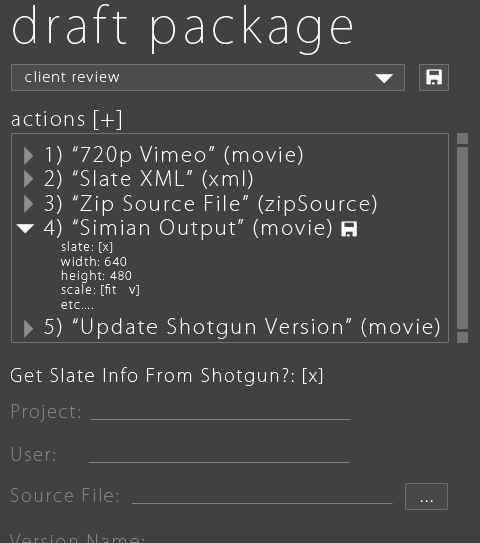
Thinkbox-Draft-v2.gif
 
Hi Björn,

To use R3D files natively for 3D results is given (with some limitations) via UV mapping. (Re:Map from RE:VisionFX) Which means you map the R3D files in post on the objects. Double resolution should be a given, as UV information should not be Anti Aliased. This limits some aspects of 3D/4D, but keeps the decision in Post, with all options. http://www.revisionfx.com/products/remap/overview/

Another option is to use QT Wrappers (just tested with CINEMA 4D). That was a quick test, I have to dive deeper into it. (I haven't used QTW so far, I try to use of course R3D, so I'm happy to get input tho this option)

It would be great to have a developer kit for those things. I'm happy to suggest this to our developer team and write a paper what needs to be done. No promise on my side, but I'm certainly interested to push that connection and if possible bring a RED developer and MAXON together. Again, I'm certainly not the biggest fish in that pond, but my last success was NUKE and Multi Layer EXR support in CINEMA 4D. C4D to NUKE is my favorite pipeline, BTW)

I have already RED footage integrated in my training, and one of the reasons I bought the Scarlet is to work on its integration inside 3D/4D.

To not hijack this thread, please feel free to contact me. I'm really happy to help or work on this.

Thanks for bringing that theme up, as well thanks for all your replies here in the forum, always fun to read.

Sassi

Hi Sassi,
Nice to read your post. Please if possible shoot an email to fredrik at syndicate dot se. He is our programer I think he and you should chat. A MAx maya plugin for r3d can not be that hard can it?
 
Davinci Resolve (Lite) is free. Have a look at its manual. It is incredibly comprehensive, with examples and real world scenarios where one might use certain features and controls.

Some might consider RCX Pro part of the camera they purchased for $30,000+.

Seems like it would take someone about 2 or 3 days to write a real, comprehensive manual for RCXPro given that they fully understand the intricacies of ALL the features and their implications on any given post workflow. For starters, a best practices guide would be useful- you could start with when or when not to check 'restrict SMPTE range' when transcoding to Prores, DnxHD Quicktime, or MXF. Haha. :) I would guess 90% of redusers wouldn't know the implications of this option on each of these formats and a lot of us have been dealing with red footage for a long time. To me it has proven that while I would love to tell everyone working with Red footage is so easy, uncomplicated, etc. the reality is that this is not the case and there are many 'gotchas' along the way. I think there is a lot of room for improvement - in terms of documentation and simplifying the user interface and endless options.
Your point about the Avid workflow is a good one. This had come up in a thread a long time ago, so anyone on that thread would have understood the correct procedure but the overall point is that if you missed this thread while it was happening, it's possible you might not get that tidbit of info that is very important. So, rather than dig through a forum to find the answer your next best choice would be RED.com. However, you would discover that the document that is linked to from the RED workflow section in regards to Avid workflow is very old. http://red.cachefly.net/newrdc/website/Workflow/Avid_RED_StepByStep.pdf
So, who's responsibility is it to make sure this information is available. RED as the camera manufacturer who knows their footage will be used with Avid? Avid themselves? Is it on us to contact those in the know who have the info we seek? This can be a tough one.

I have suggested in the past what Mike Burton mentioned earlier, hiring a small team dedicated to the task of informing and educating people about RED. This could be a team of 3-5 people who's sole purpose is to work on documentation and instructional videos. I can't speak to the financial side of what this would do to RED's bottom line but I think it's pretty safe to say it would go a long way to helping the industry and hence helping RED in the long run. There's a lot of work to keep up with the firmware changes, 3rd party software versioning, SDK, etc. RED has made efforts to get videos made, and the documentation has improved as well. I think the manual is far better than it was at the beginning. So, a dedicated team would just bring this to the next level.

It's easy to criticize from afar. Even the Perception thread I started could be seen as a criticism, but if there's any criticism going on it's solely intended to help make RED stronger. I can't even begin to imagine how much work has gone into getting this company to the point they are now. I've never attempted to do anything like this. And Jim has now done it multiple times. So, it's tough criticizing people who have achieved far more than I probably ever will. All I can offer is a perspective, one based on my experience. That's being out in the trenches with production and postproduction people. Running a company of that size does not show up on my resume. Therefore I am not an authority on how to run a business, so even though I think it's a good idea to hire this team of dedicated documentation and video instructors, perhaps it's not as easy as it seems.
 
I am surprised that Red have not yet produced a graphical flowchart to guide those determined to remain clueless. Same message as Jim's first post, but presented in a graphical manner. Something formatted to A4 paper size so that people worldwide can readily print it off the nearest mono laser printer and circulate among the colorist / grader / editor as need be.

It is evident that written word alone is not doing the job. People respond differently depending on how information is presented to them, and for many how it is presented takes precedennce over what.

If they do not like how it is presented, they won't bother with the what no matter how important it is to their self interest. Not everyone reads the fabulous manual. These people -must resist the urge to call them simpletons!- need pretty images and an 'infographics' style presentation to make a three step guideline digestable, as maddening as it might sound to the rest of us.

I think Red should oblige.

I agree with Liana. There should be flow chart.
 
My 2c is RED should put less energy into pushing R3D workflow - and more into making it easy to make DPX / EXR / DNxHD / ProRes files with great latitude by default.

I could not disagree more. For me, the RED camera is just a sensor. A great one, but just a sensor. But REDCODE is what I believe changed everything. It's the first format that really took the "Camera RAW" concept in still photography and really applied it to film.

1) It's wavelet based codec. Which is one of the best ways to compress video.

2) It doesn't apply de-bayering before compression

Sure, the processing power for it to feel weightless isn't there yet, but you're getting ridiculous latitude with manageable file sizes. If you really wrap your head around what that means, and how much control that gives you in post.

Personally, as a colorist, I prefer getting RED footage over just about anything else. because it means that right there, in my DaVinci I can access the raw data. DPX / EXR / DNxHD / ProRes all have their uses, but they're not what I want to grade with.
 
Just got a new monitor and didn't see the same results as I did before I changed it out and could not get it to work as expected. Used Jims REDcolor, REDlogfilm and output a couple of QT tests, and changed the color space to RGB instead of the 709 and bam everything looked as it should.
Thanks
 
For whatever it's worth, I want to share OUR workflow, that we use with all our DP's that shoot RED for us. I'm talking now as a producer/director.

1) For years now, as part of the deliverables the DP's hand over a "One Light" along with the raw R3D's. This allows THEM full control over what they intended and gives us a great starting point in edit. These are always rendered as Quicktimes with Avid DNX HD codec. MXF media works too.

2) When we are done with the edit, we hand over the EDL and R3D's to the colorist and presto...we're on our way to delivering a great product.

To me, empowering the DP to do a ONE LIGHT has really smoothed things out. DP's feel like their work and intentions are honored, and we as the production company feel safe knowing that we are starting off on the right foot.

We build in a couple of days for the One Light to arrive, and the DP's are of course compensated for their time. It's all part of the workflow.

Just sharing what's worked for us.
 
This thread is an interesting read, lots of varying opinions. I'm often puzzled as to where R3D workflow tends to break down for people. Hardware bottlenecks are common, but that can apply to any intensive workflows, and usually does, so nothing RED can really do there. When it comes to the proper exposure while shooting and post processing, lots of people make simple mistakes.

Personally, I don't think going to a ProRes or DNxHD proxy workflow is the answer. Nor is trying to promote DPX, EXR or other still image workflow. Wavelet compressed acquisition formats are great, if properly used. Trying to promote workflows that push people away from the R3D format will sacrifice much of what RED has already accomplished -- people will do what they do when shooting the Alexa. And that is recording to 1080p ProRes onboard and calling it "good enough" for their acquisition format. In all my Alexa jobs, I have never shot ARRI RAW. I have only worked with ARRI RAW once and all I can say is, meh... At the time there were hardly any controls, just one slider, maybe two. And I think this is one area where RED is [inadvertently] introducing user error. To disagree with Gavin on some level, I will maintain that REDCINE-X is very intuitive. But it is not so for those who are unfamiliar with complex image processing and color manipulation software. It's free, but it can be overwhelming, even intimidating, to people.

There are times I want to just scream out loud that processing R3D files is no different than processing RAW stills from a DSLR. And it's not. If more people understood this, I think we would see more consistently good results with R3D processing. As with still camera RAW, you set your exposure, your white point, and maybe one or two other things, but the exposure and white balance are the key ones you must do before you export to any baked format. Same with R3D, not sure why people don't understand that. But Gavin (and some others in here) are right. The tools are not so intuitive in that way. REDCINE-X is a behemoth of an app when you scroll through all the controls and compare to something like Adobe Camera Raw. In a nutshell, the tools are the same, but some have different names and behave a bit differently. And in R3D land there are a lot more buttons to fiddle with.

I don't think RED needs a different app. At times I've thought they need an "easy button" or a "novice mode" interface on REDCINE-X. Something with wizards and pop-up hints to help the user accomplish what they want. But then I think about that more and that's kinda silly. Photographers all over the world have become accustomed to processing RAW images without any of those things and without over-simplified apps to hold their hands. Granted, most are more simplified than REDCINE-X, so perhaps a "novice mode" stripped of a lot of the more technical extras wouldn't be a bad idea.

When I help others with shooting and post using RED, there doesn't seem to be any one area where people get caught up. Some have difficulties exposing their image while shooting or understanding how the onboard exposure tools work. Some struggle with data management. Some struggle with understanding RAW vs. how they deal with baked video from an HD camera...

What I think is needed most is a comprehensive manual or guide. Something that is easy read and gets right down to business, explains the hows and whys of RAW image capture and processing and how the R3D processing tools apply. And yet, such things already exist. RED has REDUCATION and REDUCATION-X. There is this forum, which is a phenomenal resource, if one can sort through a lot of the chatter and noise. Jay Kelley has made his RED 101 and RED 102 video training courses. FXPHD has put together some great tutorials on shooting and processing RED. Even RED has been posting tutorial videos to their site lately. All of these resources take time to create and deliver. RED is still very new, only been selling cameras for about 5 years. It's been far less than that since most people were able to get their hands on one.

All things considered, there is one group of people who do rub me the wrong way when it comes to R3D workflow issues. And that group is made entirely of lazy post facilities. Those who are too comfortable in their own complacency and denial to actually attempt to learn. Big company or not, that's just a weak excuse. If someone is offering a professional service, they better damn well have at least some idea what they are doing. Most of the big software applications -- NLE's, compositing software, grading and finishing, etc.. all support R3D natively these days. R3D workflow is pretty darn easy. For a post professional or post facility to contract with a client to process their R3D footage and then have no clue as to how it should be done is irresponsible. Doubly so if they try to blame the camera for their own lack of ability -- which happens all too often. We see people blaming the camera, blaming the software, not keeping their software up to date, etc.. No, sorry, can't really blame RED for that stuff. RED does move a bit fast with software updates, but they keep them in the same spot now and it's easy to find. If you're a RED customer and have proper contact info on file, you get email notices every time a software tool or camera firmware is updated. It may seem like RED is rocketing along at an extreme pace. Compared to the rest of the cinema camera segment of the market, they are. Compared to other segments of the industry -- like animation and VFX software, RED doesn't update any faster. And many of those people in the animation, VFX, or other industries like IT, security, etc.. are always on top of the new software and tools. They make it part of their job and service offerings. IMO, a good post house would do the same and keep on top of all the latest tools, formats, workflow practices and more.

Like most things in life worth doing, this all takes a little bit of effort. There are tons of RED cameras out there and countless productions being shot on them. The proof is there as to how great the cameras perform and how good the image can look. These days when people talk about how RED can't do this or that or has image problems or whatever, I'll ask them how they explain SpiderMan or The Hobbit or any number of other major films that are being shot or have been shot with RED cameras. The response is usually some very weak sauce, or there is no direct response at all. And yet, producers and directors alike continue to eat up the FUD that surrounds RED. Much of which seems to be propagated by the competition and much of the "old guard". Some of RED's fiercest opponents seem to be AC's who are very hard-set on which equipment they are willing to work with. And once again, RED's reputation has not been helped a whole lot in that regard with it's low purchase point and so many owner-ops running around with basic kits that leave the camera in a state that is often difficult to configure.

/rant off
 
I solved the problem Jim.

I do it myself. :)

Me too. I get the best results that way and also instant gratification in most cases. :)
 
I agree with Jeff. Lazzyness and unwillingness to learn and change processes from many established post houses and, not only that, on the set in terms of production is a major factor of the bad reputation and miss handling of red footage in both the image capture and post production phases. Its a turning point in the industry right now, and I point again to Michael Cioni's excelent article about the "new wave" and the new mindset of digital Cinema and audiovisual production after RED and the Digital Cinema revolution.

Also I do think that Red should not abandon R3D. Recently Jim and Jarred have hinted about the Prores module, but please never lose focus on the brilliance that is Redcode Raw. As computer technology evolves at a rapid pace, I can see a Red Rocketless R3d workflow coming soon, maybe next year or in 2 years. By then, and as solid as Redcode and R3D are it will be a de facto standard for digital cinema.

Redcine X is a wonderful program. Love it, very well designed and I feel completely at home with it right now. I could see a more "Visual" ( like Magic Bullet looks) kind of interface work for those getting in on the process though. I have to say I do like the "looks" interface. While it can still allow for individual settings, the layout is user friendly and uses a language most operators are familiar with. Redcine X could use a bit of "looks" to complement its current, also excellent interface.

Another thing Red could come up with is a Red developed "presets" or " templates" in the custom saved area. These presets could go from simple, frequent export calibrations for color grading like "sharpening", shadow and contrast pushes for "regular" conditions- in other words, have different "scene files" kind of settings that could be applied for varied situations, from basic export for grading to complex looks based on Epic, Scarlet or Red One shot Hollywood blockbusters. These looks obvioulsy would be only reference and could be fine tuned by the Red Cine X operator. I think this would help speed up the post process for some productions and wouldn't need much coding in the software side since Redcine X allows one to save its personal templates...
 
Sergio, Magic Bullet charges for their looks program and users have pay for play additions to their library of looks.

How much would you pay for an interface like Magic Bullet Looks built onto RCPX and how much would you pay for additional "looks" libraries?

At the moment MBL is $399 and additional looks libraries are $69 a pop.
 
Sergio, Magic Bullet charges for their looks program and users have pay for play additions to their library of looks.

How much would you pay for an interface like Magic Bullet Looks built onto RCPX and how much would you pay for additional "looks" libraries?

At the moment MBL is $399 and additional looks libraries are $69 a pop.

Well, I think this shouldn't be compared. Looks is a plugin for NLE's and works with any backed in footage- even R3D's if one considers applying Looks in Premiere in a r3D timeline. Redcine X is Red footage only software. The presets I suggest can be compared to scene files that come in certain cameras, like the Panasonics and the Sonys.

Having Redcine X have a Looks kind of interface to COMPLEMENT the existing one- I'm not saying substitute, but complement- doesn't seem to me to make such a big difference to offering a free Redcine X in the first place. I'm suggesting a more "visual" language for the interface to complement the excellent and existing parameter input-slider-numerical professional one. As for the presets, like I said, nothing different than what other camera companies are doing :) !
 
Wow half way through 2012 and I could have sworn this was a thread from 2009 ...for those struggling with a simple workflow

1. Reducation - best $2500 I've ever spent - probably a 10x return

2. Where is Cioni? Who was kind enough to give away his best practices at Reducation... Why? Because he knew 2 years ago that the more of us properly processing red footage, the more the camera will flourish

Fast forward 3 years and his solution still stands true... He calls it the CABOOSE EFFECT

START with your deliverable and reverse engineer the workflow from there... It's really that simple. Once you know the deliverable, its pretty easy to figure out how to process the RAW footage for best results.

Sign up for Reducation - it's as important for people new to Red as SSD's are to Scarlet and Epic

EDIT: magic Bullet sucks - worst invention that imho has contributed to the dying art of color grading simply because I've seen more Red footage ruined with Magic Bullet than any other process
 
EDIT: magic Bullet sucks - worst invention that imho has contributed to the dying art of color grading simply because I've seen more Red footage ruined with Magic Bullet than any other process

Tim, it is not Magic Bullet that sucks, but the users who use it poorly. Just like what happens when a Bad Red Operator or bad r3D Post-production management in redcine X, Resolve, Baselight, etc. does to Red footage. And there's a difference between Magic Bullet "Presets" and Magic Bullet Looks interface. I agree that Magic Bullet Presets are heavily overused and may have created a wave of content that gives color grading a "bad name", but both MAgic Bullet Looks and Colorista are actually quite powerful tools. Not Da Vinci Resolve, obviously, and are limited to the NLE's bit rate limitations. But the interface and the design are very good, in my opinion. What I'm suggesting is taking some design clues from them to help complement the excellent Redcine X interface. Its all about the quickness and intuitiveness of handling Red Raw footage for different type of users. I'm confortable with the Redcine X interface, but could see that a friendlier interface could help streamline or create a less intimidating impact to those coming from other workflows.
 
Sign up for Reducation - it's as important for people new to Red as SSD's are to Scarlet and Epic

EDIT: magic Bullet sucks - worst invention that imho has contributed to the dying art of color grading simply because I've seen more Red footage ruined with Magic Bullet than any other process[/QUOTE]


I totally agree with you about REDucation...but, in a conversation with folks that won't consider paying for essential software, forget asking them to actually PAY for school!!!!

Also, dont blame Magic Bullet for the countless horrors created by the same users who shoot horrible footage and blame the camera.
 
Awesome rant, Jeff!

But a workflow chart will suffice for now, for people like me who just cant attend REDucation. Id love to but my schdule just doesnt allow me. And whenever I am in North America, REDUCATION is not available.

Also what about REDUCATION for UAE (Dubai etc)?

I would love that.

I remember Andrew Clemson, saying there was possibility when I met up with him. But no news since then.

Again, Workflow charts.
 
If you can't DIY you're in serious trouble.

It is essential now to be able to finish what you shoot. Technology has given us the tools and if you want to get the best out of your images it is up to you.
The reality is most people editing or grading your footage are more concerned with when their next lunch break is rather than making sure your work stands up.
If a piece looks bad the client doesn't care whos fault it is.

Crews are getting smaller and smaller and speed has become essential.
The workflow is there:
RED - > CS6 -> Resolve is all real time and no transcoding and it just works.
And that is just one of many realtime quick and easy workflows.

Understanding how an image should be graded is a different story but you have to start somewhere.
 
Sergio, Magic Bullet charges for their looks program and users have pay for play additions to their library of looks.

How much would you pay for an interface like Magic Bullet Looks built onto RCPX and how much would you pay for additional "looks" libraries?

At the moment MBL is $399 and additional looks libraries are $69 a pop.

What is your deal? Someone doesn't agree to you and you start throwing down the !!!!!!'s?

You keep saying "How much would you pay?" - well I don't know, how much is it worth? Why doesn't RED sell the magic button app and see how many people buy it?

In the case of RED, the software is an extension of the camera. If I can't get files out of the camera and send them to the post house with maximum latitude and information to get a good grade without going through an intermediate step first then that step better be well documented and part of the cost of the camera. You want us to pay extra for software to make the files our camera (that we just paid 30K for) spits out so it has a fighting chance to look good through post production? Huh?

Why don't you ask Francis about the control he loses after sending the Justified files to post and how the networks destroy the image before it airs. Often times DP's on the biggest shows have no say how files are processed. Sure they get to supervise the grade but they have no idea what file format is used, why it's being used, etc.

When the files go to post they are going to get edited, conformed, sent off to fx houses (multiple fx houses) and then conformed again. Some will go into compositing packages that even if they had direct red support open up too much room for error as the settings applied might not match the settings applied by other houses. There needs to be some type of base step that gets everything to a place where they will match when put back together.

Anyway, how much would you pay to understand how the hollywood machine works? Perhaps you should take that class. Otherwise stop insulting us by asking how much we would pay Red so that we can understand how they expect us to work with their files in order to have them look good.
 
Status
Not open for further replies.
Back
Top