Welcome to our community

Be a part of something great, join today!

  • Hey all, just changed over the backend after 15 years I figured time to give it a bit of an update, its probably gonna be a bit weird for most of you and i am sure there is a few bugs to work out but it should kinda work the same as before... hopefully :)

Phil Holland Weapon Test

I can still remember the early Alexa demos where they put ProRes side by side with ARRIRAW and the differences were subtle, not obvious. That said, I'd sure rather take ARRIRAW or R3Ds into grading than a ProRes file. Of course, as we are often reminded by producers, most shows aren't going to get a "proper" grade due to time/cost issues so ProRes, especially in a log format like Log-C or RLF, is often the practical way to give the colorist (or more likely an editor asked to do color) enough meat to get a "good enough" result. It hurt to even write that phrase :-)

Cheers - #19

Yes, I'd like to remind everyone, that ARRI Prores is usually 444. Prores from Weapon is 422HQ. Anyone who has graded both flavors of Prores will immediately know the difference. Hint, once you start pushing 422 image around, it's not pretty. Prores 444 is much more robust and is specifically designed for post workflow as is 444XQ. I'm nto sure why Prores was limited to 422HQ.
 
Totally agree that 444 is way better for grading. I also was under the impression from Phil's sticky that the Weapon could do 444 and 444XQ ProRes. Hmmm...

This ProRes in this test was ProRes 422 HQ, which is max at 4K. At 2K you can do up to 4444XQ.
 
This ProRes in this test was ProRes 422 HQ, which is max at 4K. At 2K you can do up to 4444XQ.

What's the Weapon bottleneck that limits 4K to 422HQ? Seems odd, with the new internals 'n stuff, that there is any speed limits put on this bad boy.
 
This ProRes in this test was ProRes 422 HQ, which is max at 4K. At 2K you can do up to 4444XQ.
Yes, apparently it can, but in 4K it is limited to 422HQ and only up to 29.97:
Apple ProRes 4K (4096x2160), 422 HQ up to 29.97 fps
Apple ProRes 4K (4096x2160), 422 up to 29.97 fps
Apple ProRes 4K (4096x2160), 422 LT up to 29.97 fps
Apple ProRes 2K (2048x1080), 4444 XQ up to 120 fps
Apple ProRes 2K (2048x1080), 4444 up to 120 fps
Apple ProRes 2K (2048x1080), 422 HQ up to 120 fps
Apple ProRes 2K (2048x1080), 422 up to 120 fps
Apple ProRes 2K (2048x1080), 422 LT up to 120 fps

I hope people will not get stuck on 4k and do take advantage of DCI size at 444. This point needs to be widely disseminated to anyone, that is planning to use Prores for grading and finishing.
 
What's the Weapon bottleneck that limits 4K to 422HQ? Seems odd, with the new internals 'n stuff, that there is any speed limits put on this bad boy.

I'm not a RED Engineer, 4K support was added recently. I think it might be possible through a firmware update to allow 4K ProRes 4444XQ capture, but not during dual REDCODE RAW/ProRes capture, that's too much data in this case. I've already pinged about it being a feature request. Though in reality at that point .R3D has two pros in its favor as the main codec if the focus is 4K and quality.
 
Thanks for the hard work Phil.
Great work!

As to the test discussion: Different kinds of tests have different kinds of value and give different sides of the picture.
I think that i is god that there are testers like Phil and Geoff who in their different ways put a lot of knowledge and effort into their tests and document the process and choices.

How different the approach may seem, those are the kind of tests that I really learn a lot from.
i think it is good with purely technical tests (which you have done a lot of Phil) but also love "potential/documentation of behaviour" type tests.

We mostly don't shoot test charts.
And what I see from those tests is at least as informative as the "scientific ones".
they're just different sides of the whole story.

Thanks
 
Watching these over again at 4k, a thing I'm getting from these test indirectly, is just how much of a improvement black shading is in weapon. Its not this minor thing, I think it will add a lot of consistency between weapon camera's for normal people like me. In fact, based on just black shading for a specific shoot requirement, I bet if you a/b compared between two epic dragons slightly differently black shaded, the difference would be about the same as a/b between a epic dragon and a weapon just on the black shade difference. Also the black shade seems much more optimal, is actually spreading out some of the low order bits, while doing some spatial frequency stuff on them at the same time - I really like it.
 
I like the discussion here. Now that LUT's can be implemented it would be a good idea for RED to release a standardised set of LUTs.

Phil's contribution here is amazing. I do get the idea that doing standard looks alongside "home cooked" LUTs can create confusion but I also understand why the tests are done that way.

My takeaway is that standardised LUT's might be a good idea (but I also know that there are a full set of RED LUT's available if you just ask). Having that on a downloadable page might be good.

What Phil's test shows is how good things are out of the box and how much better they can be with a bit of tweaking. If he had said "customs grade" instead of "custom LUT" we probably would not have had to go through a drawn out conversation to ask RED to standardise the LUT now that it is implementable at the camera level FOR MONITORING. You still have to capture your footage with a RELOOK file when it comes to the R3D.

The point of tests is to answer questions but sometimes they create more questions.

David
 
Is it just me or do all the STH REDGAMMA4 shots make her skin look Green/Yellow ?
I have just watched this video on two different calibrated displays (set to Rec 709) and I see a very strong greenish/yellowish skin.

Anyone see this?

I see it too on my display. And on the Resolve vectorscope skin line.
 
I like the discussion here. Now that LUT's can be implemented it would be a good idea for RED to release a standardised set of LUTs.

Phil's contribution here is amazing. I do get the idea that doing standard looks alongside "home cooked" LUTs can create confusion but I also understand why the tests are done that way.

My takeaway is that standardised LUT's might be a good idea (but I also know that there are a full set of RED LUT's available if you just ask). Having that on a downloadable page might be good.

What Phil's test shows is how good things are out of the box and how much better they can be with a bit of tweaking. If he had said "customs grade" instead of "custom LUT" we probably would not have had to go through a drawn out conversation to ask RED to standardise the LUT now that it is implementable at the camera level FOR MONITORING. You still have to capture your footage with a RELOOK file when it comes to the R3D.

The point of tests is to answer questions but sometimes they create more questions.

David

Thank you David. The key thing here is I made matched color corrections to create specific LUTs for these specific lighting conditions for the OLPFs. That's all that is. And it is what people do. The film emulation also applies in this case as it is again, something people do.

And to be explicitly clear, as I'm taking a little offense to "home brewed/cooked LUTs" term mentioned earlier, which is why I was a bit peeved while getting to the core of things. Be aware I have made LUTs and performed color work for literally every major motion picture studio using similar methods as demonstrated in this test video. It's not an ego stroke stating that, it's how I've made a living. But holy crap I can't believe I'm defending the use of charts to generate a matched look.

This was and is a practical test. Color Charts are industry standard tools. Bleh. Can't believe I need to say that.


Anyways, back on point.


Is it just me or do all the STH REDGAMMA4 shots make her skin look Green/Yellow ?
I have just watched this video on two different calibrated displays (set to Rec 709) and I see a very strong greenish/yellowish skin.

Anyone see this?

I don't see a "very strong" anything. I see a relatively small variation. Each OLPF has a slightly different color response. STH is the most "film-like" out of the bunch to me. At least modern-ish Kodak film-like that is.

I have to dig up a scan of a test shoot ages ago, but I do have something that looks alarmingly like STH DC2/RG and that is interesting to me.

Some have mentioned this variance elsewhere and dial in a slight tint to correct it. I'm not one of those people in this specific case. STH and RG4 look fine to me here.
 
The key thing here is I made matched color corrections to create specific LUTs for these specific lighting conditions for the OLPFs. That's all that is. And it is what people do. The film emulation also applies in this case as it is again, something people do.

And to be explicitly clear, as I'm taking a little offense to "home brewed/cooked LUTs" term mentioned earlier, which is why I was a bit peeved while getting to the core of things. Be aware I have made LUTs and performed color work for literally every major motion picture studio using similar methods as demonstrated in this test video. It's not an ego stroke stating that, it's how I've made a living. But holy crap I can't believe I'm defending the use of charts to generate a matched look.

You can be peeved as much as you want and you can delete all my posts, but despite your insistence, that is NOT "what people do", sorry. Professionals don't use their own "secret" LUTs, they use industry standard tools, that are available to everyone. When you represent Red company, please use standard tools, so your findings can be duplicated and verified by everyone else.
Actually Phil, I'm disappointed, because instead of discussing your grading methodology, you chose to delete all my posts and then you indignantly write about me even daring to question your grading methods. And after all this you're the one who's peeved??? But I guess, it doesn't really matter, you're just going to delete this post as well...
 
I don't see a "very strong" anything. I see a relatively small variation. Each OLPF has a slightly different color response. STH is the most "film-like" out of the bunch to me. At least modern-ish Kodak film-like that is.

I have to dig up a scan of a test shoot ages ago, but I do have something that looks alarmingly like STH DC2/RG and that is interesting to me.

Some have mentioned this variance elsewhere and dial in a slight tint to correct it. I'm not one of those people in this specific case. STH and RG4 look fine to me here.

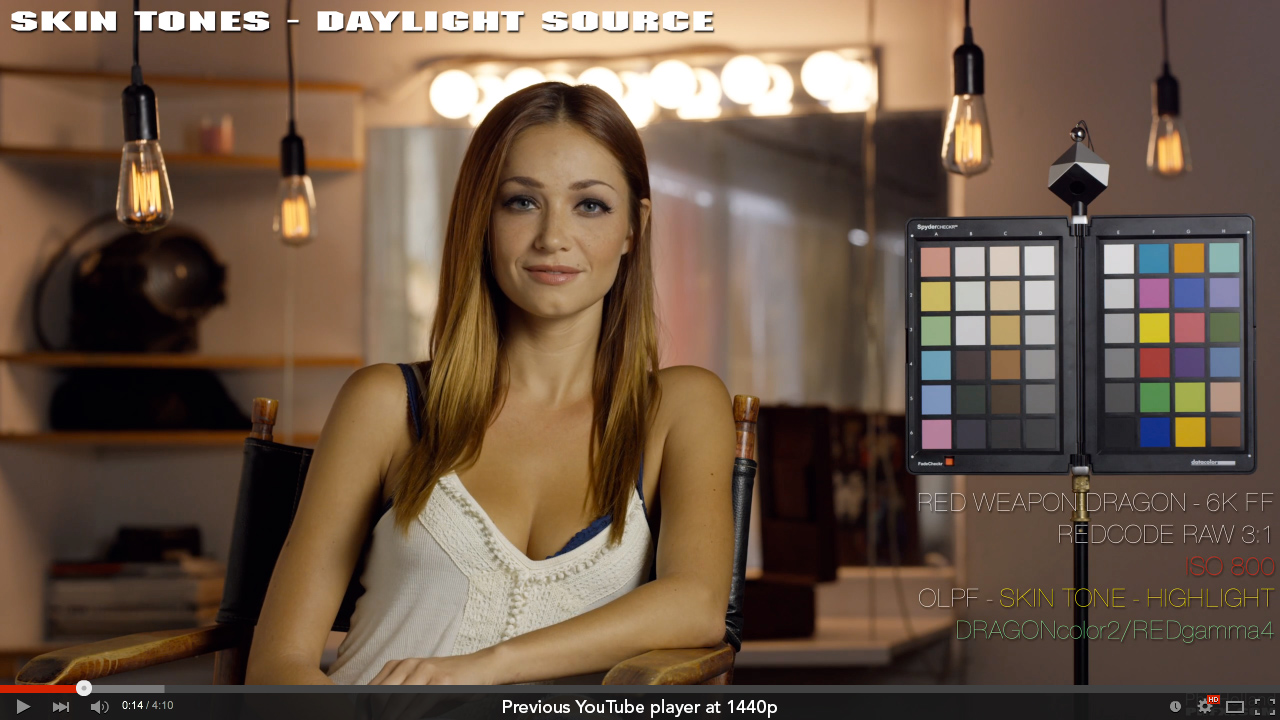
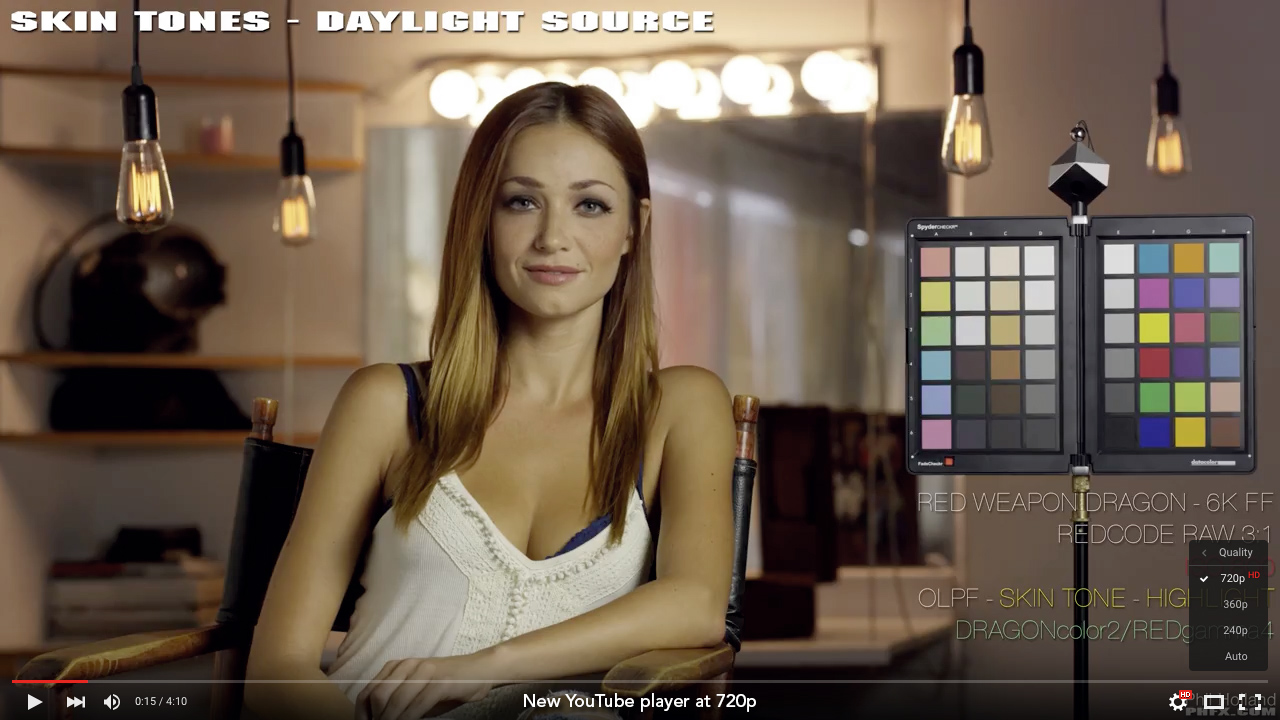
I'm pretty sure the issue is with YouTube. As some of you may have noticed, YouTube recently updated their player. I don't know if they did this everywhere or just in certain regions. In my case, on Mac OS X Mavericks 10.9.5, the new player was limited to 720p HD playback.

Three days ago when you uploaded the video, I also noticed a strong green tint when viewed in Safari 9.0. I don't have the best monitor in the world but it's calibrated and has a Delta-E of < 3, which is respectable.

I downloaded the video and played it in VLC. The color was much better. I couldn't check it in Quicktime Player because the files above 720p downloaded via the service I use won't play in the Mavericks version.

Knowing the 1440p files would play in the Yosemite version of Quicktime Player, I booted up there on the same machine and compared the same frame at the same size in Safari, Chrome, Firefox, VLC and Quicktime Player.

The Safari and QT images were the same and had the same greenish tint I noticed in Mavericks. Chrome, Firefox and VLC looked much better and were identical. I even went so far as to upgrade my Yosemite drive to El Capitan (I was going to do it anyway) with the same results.

Today, after having read Bevan's comment, I started to watch the video again using Safari in Mavericks. To my surprise, the video now looked great and I noticed the previous YouTube player was back, with all the higher resolutions now available.

Safari and Firefox are now identical while Chrome is the slightly green one (you can also see the colors shift quite noticeably on the color chart when comparing them). VLC is almost imperceptibly different from Safari, but the slight difference falls in Safari's favor.

I don't know if this was a YouTube only issue or a YouTube/Mac OS combo, but I'm convinced YouTube is the culprit.


EDIT:
Crazy! 30 minutes after I started writing this post, I opened the video in a new Safari tab and YouTube is back to the new player with the 720p limit and the green look. My YouTube suspicions are confirmed. Behold.

Same frame, same Safari window, two different tabs (open them both in a separate window and compare the two tabs):

YouTube-previous_player.jpg


YouTube-new_player.jpg
 
Last edited:
Wow.... I can't believe what I just read here today on this thread.

Not happy about it.

The color of the remarks made here is in need of a major color correction.
 
You can be peeved as much as you want and you can delete all my posts, but despite your insistence, that is NOT "what people do", sorry. Professionals don't use their own "secret" LUTs, they use industry standard tools, that are available to everyone. When you represent Red company, please use standard tools, so your findings can be duplicated and verified by everyone else.
Actually Phil, I'm disappointed, because instead of discussing your grading methodology, you chose to delete all my posts and then you indignantly write about me even daring to question your grading methods. And after all this you're the one who's peeved??? But I guess, it doesn't really matter, you're just going to delete this post as well...

Had to check and go back a few pages to see if anything was deleted. And no, nothing was. I haven't touched this thread or deleted a single one of your posts.

Your insistence on this "secret LUT" thing when I'm clearly stating it was created individually matched to the chart is just silly. Charts have been around since the mid 70s. The man who introduced them to me early on in my career won a Technical Academy Award. The people surrounding me back then and to date still use color charts. If they aren't a part of your workflow and life I understand that. Though that's shocking considering how much color work you do. For nearly 30 years color charts have been an industry standard in the film and digital workflow. I don't need to defend that. There's a reason charts as a point of reference have been added/supported in your main grading suite of choice as well. And to be clear, the reason to create individual LUTs once matched was to check the "stability" of the look in various grading applications. If for some reason one or the other didn't match in Resolve, SpeedGrade, Baselight, and now because it's supported - in the camera I would know something somewhere had an issue.

I'm done on this topic man. Just done. And no, I have no reason to delete any of your previous posts.
 
Back on topic.


EDIT:
Crazy! 30 minutes after I started writing this post, I opened the video in a new Safari tab and YouTube is back to the new player with the 720p limit and the green look. My YouTube suspicions are confirmed. Behold.

Holy crap! That is a very interesting difference. Thank you for those screen grabs. This is something I'll forward to YouTube actually. They need to see that weirdness.
 
Back on topic.


Holy crap! That is a very interesting difference. Thank you for those screen grabs. This is something I'll forward to YouTube actually. They need to see that weirdness.


Yeah I watched it again on a few different browsers. There is definitely a colour problem just viewing youtube in different browsers.


PHIL: Have you found colour issues with youtube in the past? Any reason you choose youtube over Vimeo?
 
Back
Top