Welcome to our community

Be a part of something great, join today!

  • Hey all, just changed over the backend after 15 years I figured time to give it a bit of an update, its probably gonna be a bit weird for most of you and i am sure there is a few bugs to work out but it should kinda work the same as before... hopefully :)

Phil Holland Weapon Test

(snip) Just that, boy do I wish DRAGON STANDARD were more like LLO and less like STH. (snip) Bruce Allen www.twitter.com/bruce_allen

I think you meant the other way around, that you were hoping STD would be more like STH. In any case, this discussion loops back to the basic philosophies of the major manufacturers. RED is all about providing as much image information as possible and letting you decide how to portray it during "development"/grading. Canon and Sony both employ fairly aggressive noise reduction early in the signal chain that tosses image information they believe most users wouldn't want anyway. In many cases, that's true - but what if you're going for a particular look where you might want image info near the noise floor for example. With a R3D file, some skills, (and perhaps a plug in or two ;-) you could eke out every last useful pixel if that served your creative goals.

Cheers - #19
 
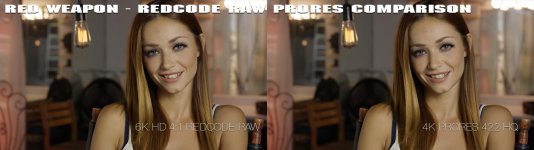
Anyone else think the Prores image looks slightly better? Looks like it contains a bit more DR on the low and high end when compared to the R3D version (a bit more flat and less contrasty). Detail looks identical to my eyes, but a full res image would be a better indicator.

That was one thing I was very keen to test out Matt. It's the first time we've had this capability in camera. Wanted to see if there were any true differences. Here's an image that tells the story:


So up there you have the .R3D and ProRes frames. Running a diff on them reveals perfect black, which is what we want. That tells me color, tonality, etc. are the same. However, when dividing the frames you can indeed see the difference in quality between the codec's compression schemes. The .R3D is indeed better quality overall.

The differences can also be reflected in workflow. Manipulating the files doing a bit of +/- EV when both are in the RGB space makes working on them identical. However, if you do go into the .R3D metadata and tweak things like ISO/FLUT, massive shifts in White Balance, and anything really that digs into the REDCODE RAW data you can see the advantages of working with .R3D a bit clearer.

That said, there will be peeps who do use ProRes to natively record for sure.

This one is going to be interesting for me. Being able to bake dailies in camera now changes things.


Dissagree. I'm not happy to use DEB @ 2000 iso.

That was one question I got online. None of this was processed using DEB or ADD.

I honestly haven't used DEB in a while. It takes away some of the "film vibe" from my STH images.


If I want stuff to look amazing, I'd rent a WEAPON with STH.

Like Mark mentioned, exploring lower ISO shooting is where things get scary good. ISO 250-500 on the STH produces a real clean and flexible image. When I received my Weapon I had 2 days with it prior to an actual shoot, which wasn't much time. First one out of the gate was 5.5K HD STH at ISO 800 and I love how that looked. Next shoot though everything happened at ISO 250-500 and that stuff look tremendous.
 
Last edited:
On my monitor the ProRes image looks a bit clamped - notice the white value on her wardrobe near the bottom of the image. In the RAW version, it's near reference white (at least on my monitor) and in the ProRes version it looks a stop lower.

Cheers - #19
 
Is DEB for current STO @ >2000 iso something from the past? Did the red noise dots dissapear in current STO OLPF?

Pat

Nope. Chromatic shadow noise is still there.


On my monitor the ProRes image looks a bit clamped - notice the white value on her wardrobe near the bottom of the image. In the RAW version, it's near reference white (at least on my monitor) and in the ProRes version it looks a stop lower.

Overlay them :)
 
(snip) Overlay them :)

Fair enough, you have far more precise information about the actual code values that one could ever determine by eye via monitor.

Just out of curiosity - and wondering if my monitor looks like other people's - am I the only one who can see this disparity on their monitor?

Cheers - #19
 
It definitely looks that way on my phone
 
That was one thing I was very keen to test out Matt. It's the first time we've had this capability in camera. Wanted to see if there were any true differences. Here's an image that tells the story:


So up there you have the .R3D and ProRes frames. Running a diff on them reveals perfect black, which is what we want. That tells me color, tonality, etc. are the same. However, when dividing the frames you can indeed see the difference in quality between the codec's compression schemes. The .R3D is indeed better quality overall.

Uh, I don't see how you got the perfect black. Difference is simply [Pixel B] - [Pixel A] while divide is [Pixel A] / [Pixel B]. If your difference is 0 everywhere (black) it means A=B. If A=B then A/B = A/A = 1 (white) everywhere also, but your result clearly shows some details on edges.
 
Last edited:
I'm seeing the different white levels in her top, could it be the solid black and white difference patches underneath causing the white of her top to appear deceptively lighter and darker?
 
I have said it over and over and over ... STO for the win. HANDS DOWN.

The LLO should be called "Dragon OLPF v1.0"

The STO should be called "Dragon OLPF v2.0"

and the STANDARD should be called "Dragon OLPF v1.5"

There is so much FUD re: LLO - because folks think they need it to shoot low light - because of the NAME - which is very misleading IMO.

Wasn't there a couple Dragon OLPF attempts before the current crop of interchangeables? Seems like Dragon engineering was never really finished before Weapon was released to replace it. Potential is sexy
 
Fair enough, you have far more precise information about the actual code values that one could ever determine by eye via monitor.

Just out of curiosity - and wondering if my monitor looks like other people's - am I the only one who can see this disparity on their monitor?

Cheers - #19

Try masking with a magazine the white and black images below and you will see the difference disappear. Here it is masked below.
 

Attachments

  • masked_phfx_REDWeaponTest2015_R3DProResCompare.jpg
    masked_phfx_REDWeaponTest2015_R3DProResCompare.jpg
    71.8 KB · Views: 0
"Pro Res : The refections of light on the models skin look less saturated - almost like a cooler light was being used compared with R3D.
Makes me feel like there is very very fine mist in the room."

That sounds similar to what I saw.

If there was really no chroma difference between ProRes and R3D ... I need to re-look at the snapshots.

AJ

EDIT : Refinement of my comment : I am not sure if my monitor calibration is correct, or if YouTube is affecting the image, but it seems that R3D seems to have a slightly deeper Yellow colour vs Red colour of ProRes on the models skin. Also, based on the 'smearing' around lighting in ProRes it seemed less able to handle the rapid change in luma. In the R3D I felt I could see her makeup. In the ProRes - I could not.

Fair enough, you have far more precise information about the actual code values that one could ever determine by eye via monitor. Just out of curiosity - and wondering if my monitor looks like other people's - am I the only one who can see this disparity on their monitor?
 
Last edited:
Last edited:
Hey Phil,

Can you upload the actual camera?
That way I will be able to use my Star Trek nano-replicator and avoid paying for an actual Weapon.

Heh heh heh.

:)

Also, your ProRes images with the lovely Sierra are some of the best ads for ProRes I've ever seen.
 
If you compare the two .tiffs in that zip, and use the division as a guide for what to look for, the pro res looks to have a smidge of sharpening, but also slightly smoother noise. Both of those differences aren't really noticeable viewed at 1080p, but interesting anyway.
 
I can still remember the early Alexa demos where they put ProRes side by side with ARRIRAW and the differences were subtle, not obvious. That said, I'd sure rather take ARRIRAW or R3Ds into grading than a ProRes file. Of course, as we are often reminded by producers, most shows aren't going to get a "proper" grade due to time/cost issues so ProRes, especially in a log format like Log-C or RLF, is often the practical way to give the colorist (or more likely an editor asked to do color) enough meat to get a "good enough" result. It hurt to even write that phrase :-)

Cheers - #19
 
Is it just me or do all the STH REDGAMMA4 shots make her skin look Green/Yellow ?
I have just watched this video on two different calibrated displays (set to Rec 709) and I see a very strong greenish/yellowish skin.

Anyone see this?
 
Bevan - not seeing the yellow/green push on my monitor. Are there any strong colors in your field of view when looking at the monitor? Or a green wall behind you? If everything around you is black or 18% gray, and you're wearing a neutral color shirt then I'd check the calibration.

Cheers - #19
 
Back
Top