Welcome to our community

Be a part of something great, join today!

  • Hey all, just changed over the backend after 15 years I figured time to give it a bit of an update, its probably gonna be a bit weird for most of you and i am sure there is a few bugs to work out but it should kinda work the same as before... hopefully :)

OFFHOLLYWOOD DRAGON R3Ds & MORE

Does Arri have a specific program for tinkering with raw files such as Red's RCX Pro? Resolve would do it justice, I assume, using lite edition would result in restricted output options. :/
 
Here's some sample RAW files you can swing around from a simple, very basic test to get some caparison files of Dragon R3D and Alexa XT ARRI RAW. I'll update this with the matching 2K LogC Prores files when I get to the office. We had very little time to knock this out - and with the fun weather we are having here in NYC right now, we couldn't do any high detail or exterior shots.

All shots rates ISO 800 on both cameras. All Dragon clips shot at 5:1 compression - 6K HD (5568x3132)

Wide Open T.14, 3200K
https://next-d.copy.com/hUfj1T1aTzqz

4:1 contrast ratio between back/edge light and key -
T5.6, 5600K
https://next-d.copy.com/jKICFkkUt3OA

T8, 5600K
https://next-d.copy.com/CHWRpf4zKY7z

T11, 5600K
https://next-d.copy.com/VhLMqhz9gfku

CLIP TEST
We used the exposure meters in each camera to indicate when clipping was starting to occur on the skin and backed off exposure until cameras exposure meters indicated no clipping on the face. (On the Dragon we used EXPOSURE meter in RAW view mode). We used this method to set our "no skin clip" exposure and then shot +1 and +1 over that. Using this method on the same lighting set up, ISO (800), color temp (5600K) - Dragon's "no skin clip" base exposure was T4 and Alexa XT's "no skin clip" base exposure was T2.8 - but obviously you should look at the RAW files to judge for yourself how accurate you think these respective on-camera meters are.

Dragon "no skin clip" - T4
https://next-d.copy.com/zYGLTRDcFf6j

Dragon "skin clip = no skin clip +1" - T2.8
https://next-d.copy.com/LEwnqIdLtQIK

Dragon "skin clip = no skin clip +2" - T2.0
https://next-d.copy.com/gnyFEPWHWbIW


Alexa XT "no skin clip" - T2.8
https://next-d.copy.com/FSVKq17sXG8p

Alexa XT "skin clip = no skin clip +1" - T2.0
https://next-d.copy.com/D7BYtZRO1j2K

Alexa XT "skin clip = no skin clip +2" - T1.4
https://next-d.copy.com/b64QoeroNMMG
 
Last edited:
i compared some first files

okay, resolution ... it´s what it is ... dramatic difference.

dynamic range: alexa shows how good it is here - i would say - both cameras are nearly on same level - but i think dragon is slightly better in the shadows, it sees bit more , you can see it in the right shadow half at the eye ...
noise is equal too, as alexa was always quite clean, dragon is on same level too now.

looking forward too see other impressions and results

no upgrade mail yet ;-( , but when it´s time, i am looking to do my own tests with both cams too
 
OK.

I'm going to go the "other direction" right off the bat. For all intents and purposes the images from both cameras are comparable (visually) but lets look not forget the whole point of more resolution at the outset.

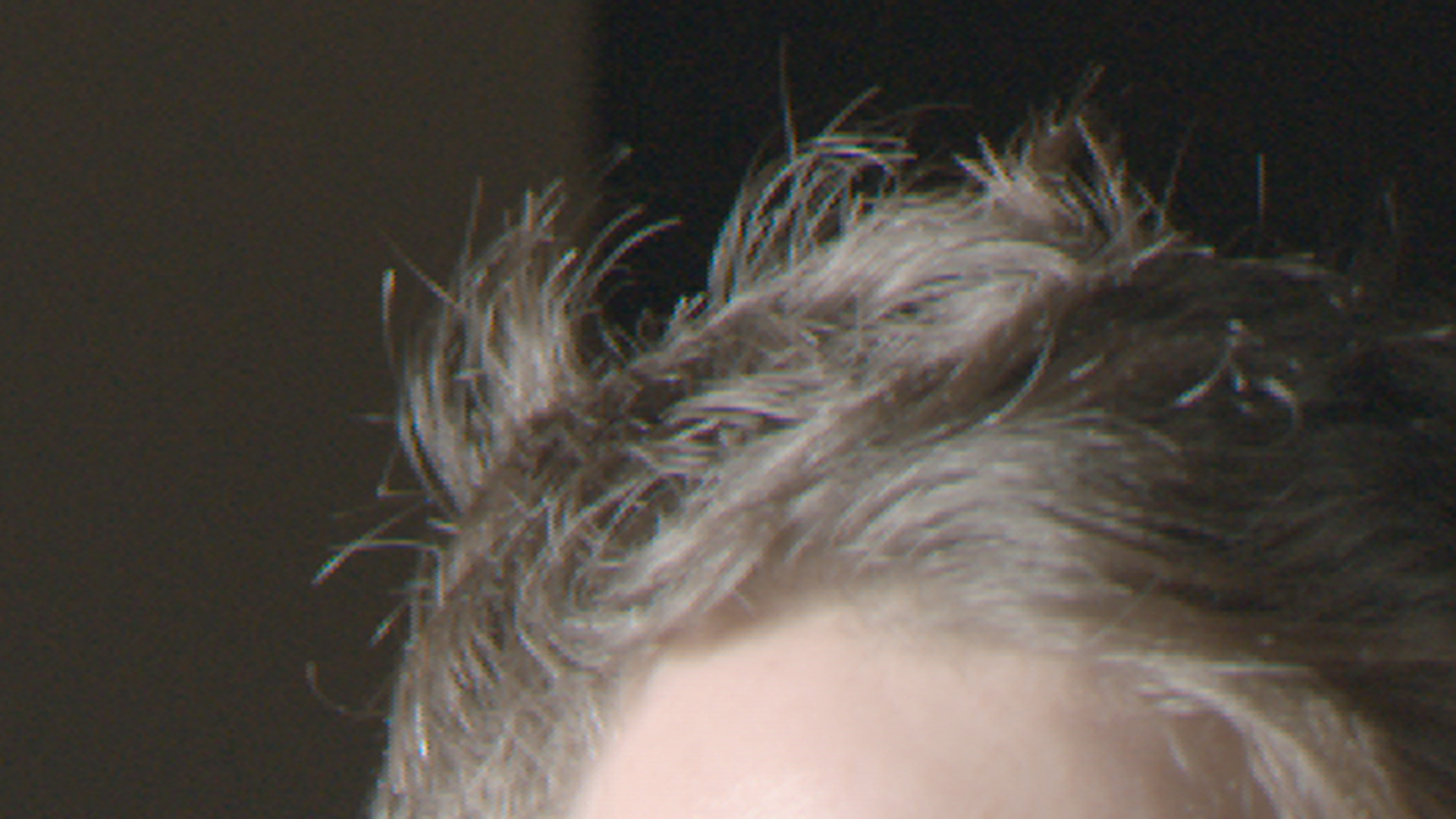
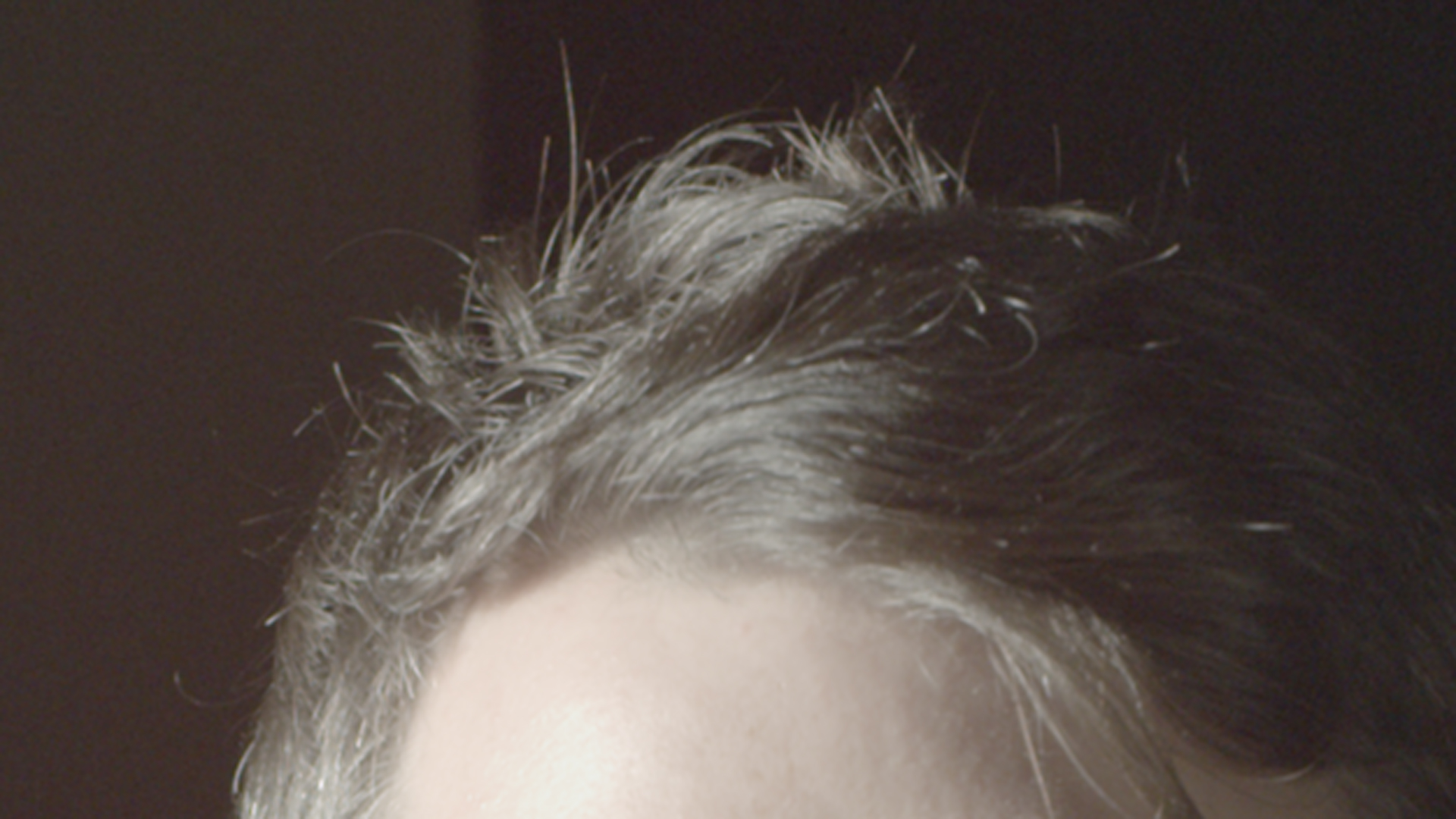
Jim has always stated that resolution is an important part of the equation, so here is a hair crop of the dragon and the alexa at the same exposure scaled to 4K, Dragon downscaled, Alexa upscaled.

With 4K delivery on the horizon, I know what I want to be gathering images with.

The camera with
1. more resolution
2. raw that keeps improving
3. seems to not blow out so much :)

I don't think I even have to label these images, it's just too obvious. Five years from now this will be a no brainer.

alexahair.jpg


dragonhair.jpg
 
Alexa RAw vs Dragon R3D.

The following test images were processed in ARRIRAWConverter and REDCINE-X Pro.

About their image quality and which one is better probably your should make your own image processing of this test

and decide later for yourself.

Btw, the image processing of this test is very simple and easy to make and also to understand.

Here we go:

Right-clicking opens an original size image in a new tab!!!


Log processed RAW images @ ISO 800:

dragon-iso800-RedLogFilm_01.jpg

Dragon R3D, ISO 800, K 3200, RedLogFilm

ARRIRAWConverter_Snapshot_iso800_LogC_01.jpg

Alexa RAW, ISO 800, K3200, Arri LogC


Film look evaluation of the processed RAW log images @ ISO 800:

dragon-iso800-FujiSuperia800_01.jpg

A film look applied: Dragon R3D, ISO 800, K 3200, PS6 Color Effex, Fuji Superia 800

ARRIRAWConverter_Snapshot_iso800_FujiSuperia800_01.jpg

A film look applied: Alexa RAW, ISO 800, K 3200, PS6 Color Effex, Fuji Superia 800


Log processed RAW images @ ISO 1600:

dragon-iso1600-RedLogFilm_01.jpg

Dragon R3D, ISO 1600, K 3200, RedLogFilm

ARRIRAWConverter_Snapshot_iso1600_LogC_01.jpg

Alexa RAW, ISO 1600, K 3200, Arri LogC


Film look evaluation of the processed RAW log images @ ISO 1600:

dragon-iso1600-FujiSuperia800_01.jpg

A film look applied: Dragon R3D, ISO 1600, K 3200, PS6 Color Effex, Fuji Superia 800

ARRIRAWConverter_Snapshot_iso1600_FujiSuperia800_01.jpg

A film look applied: Alexa RAW, ISO 1600, K 3200, PS6 Color Effex, Fuji Superia 800

Dragon has a real problem with so called Phantom Flare made by OLPF!!!!

That Dragon's OLPF flare issue was addressed by me earlier here at the forum.

Also I read somewhere on the internet from Dan Hudgins that:

"Different cameras types having different saturation points and that to compare cameras you can get

comparable results on the tonal level by finding their saturation ISO, then aligning the ISO settings/exposure so that they align.

Approximate Table to align the saturation points of the cameras in this test for ISO 250 color negative film,

Film=Arri=Red

4=25=100
8=50=200
16=100=400
32=200=800
64=400=1600
125=800=3200
[250=1600=6400]
500=3200=12800"


So what does it mean here for this test?

It means that when Alexa is exposed @ ISO 800 than # Dragon should be approximately exposed @ ISO 1600

that those two images can be compared and matched equally.

(# That means Dragon @ ISO 1600 should show about the same sensitivity as Epic X @ ISO 3200)


To conclude is to say that when Alexa is exposed @ ISO 800

than Dragon should be exposed in the range between ISO 1280 and ISO 1600

that these two cameras could be compared on approximately equal basis.


Something like these two images below!!!


Film look image evaluation should match ISO alignment
by the ratio 1:2 for any Alexa = Dragon comparison test


ARRIRAWConverter_Snapshot_iso800_FujiSuperia800_01.jpg

A film look applied: Alexa RAW, ISO 800, K 3200, PS6 Color Effex, Fuji Superia 800


dragon-iso1600-FujiSuperia800_01.jpg

A film look applied: Dragon R3D, ISO 1600, K 3200, PS6 Color Effex, Fuji Superia 800


Right-clicking opens an original size image in a new tab!!!

If you would like to use both cameras Alexa and Dragon for a job than

when you set Alexa @ ISO 800 than Dragon should be set close or exactly to ISO 1600

on whatever lighting you shoot (daylight or tungsten).

Keep this in mind (ISO setting in a ratio 1:2) when you work with both

Alexa and Dragon to use it for a testing purpose or any other shooting condition.

That means you can't compare images with the same ISO that were shot on these two cameras

and it should be in the ratio 1:2.

For example when Alexa is set @ ISO 800 Dragon should be set @ ISO 1600.


Conclusion!!!

According by colour the image quality is more or less the same on these two cameras and can easily be matched.

Dragon beats Alexa in terms of spatial resolution and with a bit of less noise @ higher ISO.

But Alexa still beats Dragon on another side at available light with candles or lamps

just because it doesn't show up an ugly light flare at higher ISO.

Hope that RED can fix that OPLF issue till April at NAB !?!?!?!?!?

So when you would like to choose between

less resolution and more noise (Alexa)

or more resolution with ugly flares (Dragon)

than you should think about what is exactly a priority for your choice.

Or if you don't like both of them than maybe have to look for a third camera solution.

rcxpro-01.jpg

RCX Pro application window.

arriraw-01.jpg

ArriRaw Converter application window.

Right-clicking opens an original size image in a new tab!!!
 
thanks david, the 4K hairs show a lot ;-)

noise is slightly better with dragon, indeed, the red raw stays more stable

the upscale of alexa to 4K is ... yes, we know better stuff ;-)
 
Sanjin

thanks for the stills, problem here is: both cameras have different focus, its difficult to judge - it seems there is more information in the light at the Arriraw, but the light in Red Raw is quite in defocus ...
same with face.
redlogfilm is more flat than logc - no surprise. the cameras are on a very same level, no doubt - but the resolution difference is massive. in your tests, i like more the color of dragon, alexa tends to more saturation ...
 
Alexa seems to lean towards green while the Dragon is a bit more red. Dragon looks sharper and has obvious advantages in terms of resolution. I do see flaring on the first, low light dragon clip.
Cranked to 3200 ISO the information available seems fairly comparable. Would be easier to judge noise with actual video clips.
 
I've been playing with these for a bit.

To keep it simple and to focus on differences that might be considered as pros or cons depending on what side of the fence you're on:

- Fairly large resolution differences between the Dragon 6K HD format (5568x3132) and the Alexa XT 16x9 (2880x1620).
- Large difference in the field of view between the two formats.

Since the primary argument when people get down to the real differences between these two systems has always been color I made a quick comparison on color corrected images.

phfx_offhollywood_CM_Dragon.jpg


phfx_offhollywood_CM_Alexa.jpg


The good news here is that color will not be something people can criticize when comparing Epic Dragon and the Alexa XT. Also, it's important to remember how much better the OLPF IR Cut is at higher neutral densities.

OLPF reflection/glare is something that people will obviously point out as it's visible and does happen. That to me is the only thing negatively impacting the image quality on Dragon at the moment, and it's situational in nature. Right now I'll just say it's part of the camera's personality :)

Thank you Mark and OFFHOLLYWOOD for these test images.
 
I've been playing with these for a bit.

To keep it simple and to focus on differences that might be considered as pros or cons depending on what side of the fence you're on:

- Fairly large resolution differences between the Dragon 6K HD format (5568x3132) and the Alexa XT 16x9 (2880x1620).
- Large difference in the field of view between the two formats.

The good news here is that color will not be something people can criticize when comparing Epic Dragon and the Alexa XT. Also, it's important to remember how much better the OLPF IR Cut is at higher neutral densities.

OLPF reflection/glare is something that people will obviously point out as it's visible and does happen. That to me is the only thing negatively impacting the image quality on Dragon at the moment, and it's situational in nature. Right now I'll just say it's part of the camera's personality :)

Thank you Mark and OFFHOLLYWOOD for these test images.

It's true Phil.


seems the only real difference is frame size/resolution and graded images (what the public will see) are = .


The "sitautional" OLPF flare does, in these test images stand out with light sources in the frame, I like your description of calling it part of the camera's personality. Like to see how it fairs with less controlled lighting situations. Maybe we an ask Toia for that test. :)

Resolution is a big one when it comes to compositing, etc but also future proofing.

Thanks again to Marc for posting the frames.

battistella
 
Hey Phil, did you manually colour balance those, or did you eye-dropper the white chip in each shot (and they happened to balance almost identically)?

Off topic (and I've asked it before, but didn't get a response), does anyone know if the IR cut OLPF will be coming to MX DSMC cameras?
 
Hey Phil, did you manually colour balance those, or did you eye-dropper the white chip in each shot (and they happened to balance almost identically)?

Off topic (and I've asked it before, but didn't get a response), does anyone know if the IR cut OLPF will be coming to MX DSMC cameras?

If I told you I'd have to kill you :) Combination of perceptual and numerical correction is the answer in this case. If I shot controlled charts and generated my own response curve I could make these identical in every way.


The "sitautional" OLPF flare does, in these test images stand out with light sources in the frame, I like your description of calling it part of the camera's personality. Like to see how it fairs with less controlled lighting situations. Maybe we an ask Toia for that test. :)

I've got some clips of it from headlights and it does have a nice sort of aesthetic to it. I'm not saying it's like an anamorphic flare, but I'd say it's as noticeable and perhaps it yields to a certain flavor in that regard.

There's certainly some interesting stuff happening if you're shooting at say T16 or T22 into a really bright source like the sun. The red dots are still there and that's another thing to be mindful of. There's some really interesting internal flare on some lenses that in combination with the bushing design produces some wild effects. A matte box or flag solves this for those specific lenses.

Often I wonder if there's any true value to posting this information. There are many other artifacts in the other top end cameras that nobody ever talks about. More or less I think I'm posting it to show how to avoid it if you want to avoid I guess.
 
Back
Top