

- Moderator
- #1

Jeff Kilgroe
Well-known member
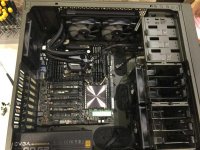
I have been talking about this in the other X99 thread here recently, but figure this deserves its own thread. The following is a case study in the assembly of a new, and reasonably practical, workstation to be used for Adobe CC, DaVinci Resolve, RedCine-X and a multitude of other applications for general content creation with an affinity for R3D workflow.
The target for this build was to keep the entire system within a somewhat practical budget, do-able by most working professionals. This system should provide a nice balance of power for cost and provide some of the best performance money can buy within applications or workflow processes that don't require more than 8-cores/ 16-threads or 64GB of RAM.
So here is the build list:
ASUS X99-E WS motherboard
Intel i7-5960X CPU (8-cores, 3GHz)
64GB DDR4 2800MHz rated RAM (G.Skill RipJaw 4's, 15-16-16-35)
EVGA Titan X SuperClocked 12GB GPU
Samsung 512GB M.2 PCIe X4 SSD
ASUS Thunderbolt EX/II interface card
Areca ARC-1883i 12Gbp/s SAS RAID host
BlackMagic DeckLink 4K Extreme I/O card
Corsair H100i GTX liquid CPU cooler
Corsair C70 Vengeance tower case
EVGA 1300G2 power supply
6 x 6TB Seagate 7200rpm 128MB cache SAS 12Gbps HDDs
Pioneer Blu-Ray writer 16X
RED mini-mag reader for mounting internally
Assorted cables, brackets and other junk as needed...
Component list notes -- Originally I had specified a Corsair H110i GT CPU cooler, but found that its radiator is oversized compared to other 280mm units on the market. It would not fit properly in the C70 case, which left me with two options -- either pick a different cooler or move the build to a larger case, namely the Corsair Obsidian 750D. I opted for the new cooler since the C70 case fits this build just fine otherwise. The H100i GTX that is now installed is also oversized compared to previous Corsair 240mm radiators and most on the market. But fits with ample room up top in the C70.
The 1300W PSU is overkill, but gives ample headroom for anything I might throw into this system, including a second GPU. I tend to over-do the PSUs in most of my builds as I find they hold up better over time, especially when running around the clock on renders or other tasks, when the PSUs are not stressed.
The ASUS Thunderbolt EX/II card I have is the dual port version. While it still sits atop a single PCIe 2.0 X4 interface, bridged from a PCIe v3.0 X2 link, the second TB port is more of a convenience than a functional asset. This card is known to not work with this motherboard in the past, however I have been told by a tech guy at ASUS that the latest BIOS revision (possibly more than one) handle the dual-port card now. We shall see very soon.
PCIe slots and lanes are at a premium in this system. I am not sure how they will all divide out and I run the risk of dropping the GPU to an X8 link or sharing bandwidth for another slot. This issue right here, a problem with having only 40 lanes to work with, is a strong argument for moving to a dual Xeon build for power user workstations that need to support multiple GPUs *AND* other peripheral cards.
So let the build commence...
Pictures and more info soon.
The target for this build was to keep the entire system within a somewhat practical budget, do-able by most working professionals. This system should provide a nice balance of power for cost and provide some of the best performance money can buy within applications or workflow processes that don't require more than 8-cores/ 16-threads or 64GB of RAM.
So here is the build list:
ASUS X99-E WS motherboard
Intel i7-5960X CPU (8-cores, 3GHz)
64GB DDR4 2800MHz rated RAM (G.Skill RipJaw 4's, 15-16-16-35)
EVGA Titan X SuperClocked 12GB GPU
Samsung 512GB M.2 PCIe X4 SSD
ASUS Thunderbolt EX/II interface card
Areca ARC-1883i 12Gbp/s SAS RAID host
BlackMagic DeckLink 4K Extreme I/O card
Corsair H100i GTX liquid CPU cooler
Corsair C70 Vengeance tower case
EVGA 1300G2 power supply
6 x 6TB Seagate 7200rpm 128MB cache SAS 12Gbps HDDs
Pioneer Blu-Ray writer 16X
RED mini-mag reader for mounting internally
Assorted cables, brackets and other junk as needed...
Component list notes -- Originally I had specified a Corsair H110i GT CPU cooler, but found that its radiator is oversized compared to other 280mm units on the market. It would not fit properly in the C70 case, which left me with two options -- either pick a different cooler or move the build to a larger case, namely the Corsair Obsidian 750D. I opted for the new cooler since the C70 case fits this build just fine otherwise. The H100i GTX that is now installed is also oversized compared to previous Corsair 240mm radiators and most on the market. But fits with ample room up top in the C70.
The 1300W PSU is overkill, but gives ample headroom for anything I might throw into this system, including a second GPU. I tend to over-do the PSUs in most of my builds as I find they hold up better over time, especially when running around the clock on renders or other tasks, when the PSUs are not stressed.
The ASUS Thunderbolt EX/II card I have is the dual port version. While it still sits atop a single PCIe 2.0 X4 interface, bridged from a PCIe v3.0 X2 link, the second TB port is more of a convenience than a functional asset. This card is known to not work with this motherboard in the past, however I have been told by a tech guy at ASUS that the latest BIOS revision (possibly more than one) handle the dual-port card now. We shall see very soon.
PCIe slots and lanes are at a premium in this system. I am not sure how they will all divide out and I run the risk of dropping the GPU to an X8 link or sharing bandwidth for another slot. This issue right here, a problem with having only 40 lanes to work with, is a strong argument for moving to a dual Xeon build for power user workstations that need to support multiple GPUs *AND* other peripheral cards.
So let the build commence...
Pictures and more info soon.


 I will be building a computer exactly to this spec. Thanks for opening up a new thread on how to build a exact configuration Jeff! I haven't built a pc from parts for two decades, so looking forward to some pictures
