Welcome to our community

Be a part of something great, join today!

  • Hey all, just changed over the backend after 15 years I figured time to give it a bit of an update, its probably gonna be a bit weird for most of you and i am sure there is a few bugs to work out but it should kinda work the same as before... hopefully :)

New Workstation Build - i7 X99, Titan X, Overclocking...

Jeff Kilgroe

Well-known member
Joined
Jan 3, 2007
Messages
17,055
Reaction score
42
Points
48
Location
Colorado
I have been talking about this in the other X99 thread here recently, but figure this deserves its own thread. The following is a case study in the assembly of a new, and reasonably practical, workstation to be used for Adobe CC, DaVinci Resolve, RedCine-X and a multitude of other applications for general content creation with an affinity for R3D workflow.

The target for this build was to keep the entire system within a somewhat practical budget, do-able by most working professionals. This system should provide a nice balance of power for cost and provide some of the best performance money can buy within applications or workflow processes that don't require more than 8-cores/ 16-threads or 64GB of RAM.

So here is the build list:

ASUS X99-E WS motherboard
Intel i7-5960X CPU (8-cores, 3GHz)
64GB DDR4 2800MHz rated RAM (G.Skill RipJaw 4's, 15-16-16-35)
EVGA Titan X SuperClocked 12GB GPU
Samsung 512GB M.2 PCIe X4 SSD
ASUS Thunderbolt EX/II interface card
Areca ARC-1883i 12Gbp/s SAS RAID host
BlackMagic DeckLink 4K Extreme I/O card
Corsair H100i GTX liquid CPU cooler
Corsair C70 Vengeance tower case
EVGA 1300G2 power supply
6 x 6TB Seagate 7200rpm 128MB cache SAS 12Gbps HDDs
Pioneer Blu-Ray writer 16X
RED mini-mag reader for mounting internally
Assorted cables, brackets and other junk as needed...

Component list notes -- Originally I had specified a Corsair H110i GT CPU cooler, but found that its radiator is oversized compared to other 280mm units on the market. It would not fit properly in the C70 case, which left me with two options -- either pick a different cooler or move the build to a larger case, namely the Corsair Obsidian 750D. I opted for the new cooler since the C70 case fits this build just fine otherwise. The H100i GTX that is now installed is also oversized compared to previous Corsair 240mm radiators and most on the market. But fits with ample room up top in the C70.

The 1300W PSU is overkill, but gives ample headroom for anything I might throw into this system, including a second GPU. I tend to over-do the PSUs in most of my builds as I find they hold up better over time, especially when running around the clock on renders or other tasks, when the PSUs are not stressed.

The ASUS Thunderbolt EX/II card I have is the dual port version. While it still sits atop a single PCIe 2.0 X4 interface, bridged from a PCIe v3.0 X2 link, the second TB port is more of a convenience than a functional asset. This card is known to not work with this motherboard in the past, however I have been told by a tech guy at ASUS that the latest BIOS revision (possibly more than one) handle the dual-port card now. We shall see very soon.

PCIe slots and lanes are at a premium in this system. I am not sure how they will all divide out and I run the risk of dropping the GPU to an X8 link or sharing bandwidth for another slot. This issue right here, a problem with having only 40 lanes to work with, is a strong argument for moving to a dual Xeon build for power user workstations that need to support multiple GPUs *AND* other peripheral cards.

So let the build commence...

Pictures and more info soon.
 
  • Thread starter
  • Moderator
  • #2
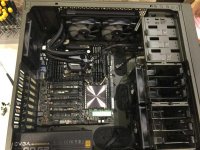
Pic of the inside of the case. Motherboard, CPU, RAM, H100i GTX cooler, case fans, m.2 SSD installed...

The H100i radiator and fans were set up as an exhaust, which I find works best for top-mount radiator positions. Overall the best thermal performance seems to come, in my experience, with bottom-mounting the radiator setup with intake airflow and then having exhaust fans blowing air out the top of the system. With the choice of the Corsair Vengeance C70 case, I would have to sacrifice the bottom drive cage (3 of the 6 3.5" bays) in order to bottom-mount the radiator. It would also be a real stretch for the hoses to reach the CPU and may not work.

I have had more issues with top-mount intake setups than I can discuss here. Biggest issue though is it requires far greater airflow through the system and it becomes more difficult to eliminate hot air pockets inside since hot air wants to rise and we're pushing cold air down on top of that hot air. But I get asked this a lot and Corsair and other manufacturers always recommend mounting the radiator and fans as an air intake.
 

Attachments

  • NewX991.jpg
    NewX991.jpg
    94.5 KB · Views: 0
Last edited:
  • Thread starter
  • Moderator
  • #3
Reserved 2.
 
  • Thread starter
  • Moderator
  • #4
Resserved 3.
 
The WS board can handle 3 devices at 16X for sure and you dont drop PCI-E lanes on the video cards as long as their in the right slots. Any client that required 3 video cards or more we normally recommended an expansion chassis with PCI-E 3.0 16X controller for the 3rd device if they needed other cards such as Raid controller and Blackmagic card. If the box was primarily rendering frames for C4D with Octane then it was 3x GPU's for sure and the performance increase is exponential there with Octane.
 
Thanks Jeff. Jeff also gave me some advice on my very recent build that is essentially the same ice cream, but a slightly different flavor. I went with the Asus X99 Rampage V mobo, Corsair H110i GT CPU cooler, Corsair AX1200i PSU, and the Corsair Obsidian 750D for the case. My main reasons for the variation is my drive (spinning disk RAID) requirements are slightly different and I do have M.2 and 2.5 SSDs in here as well.

I've been able to get the CPU (Intel i7-5960X) OC'd up and stable at 4.6GHz, though I've been running at 4-4.2GHz mainly.

Very curious about your RAID optimization Jeff. I'm still fiddling, but I'm very impressed and happy with the general behind this build.
 
Eagerly Subscribing. I feel like X99 builds need their own subthread now lol.

Jeff, like Eric said, I haven't had any issues with that config running at 16X. I do however when adding a 10Gb network card and the second Titan-X into the mix, obviously as that many create an 8X arrangement. One option is to use the EXII purely for an ultrastudio to keep a 16X Lane priority but then you'll lose storage bandwidth obviously. I think tossing all the 4x/8x cards (minus EXII) into a chassis is a nice alternative from the Xeon savings.
 
  • Thread starter
  • Moderator
  • #13
Finally getting back to this and will have more info soon. System is up and running with most hardware installed Windows 8.1 setup just finished.

Even in the latest firmware for the X99-E WS motherboard, ASUS still hasn't addressed the Legacy BIOS and UEFI startup conflicts. Or maybe it really comes back to AMI on this one because so many motherboards from various manufacturers all have the same issues. I see this throw a lot of unexperienced users, and even experienced users at times, for a loop when they think they can just put their M.2 SSD on a new motherboard and install Windows to it. Just so you guys know, if you go down that hardware path, make sure you disable all the legacy boot options or push them to last in the boot order.

I've got most of the drivers installed. Dual port Thunderbolt EX/II card seems to be functioning, but I'll be testing that after I get a bit of sleep. Have not configured the RAID yet. But the 1883i SAS controller is installed and drivers loaded. Should have this thing up and running within the next 24 hours. I'm downloading installing Adobe CC now. Will let it work on that while I sleep.
 
What is your official slot arrangement? Did the EXII wind up in the recommended spot or did you try to rearrange in the BIOS to make room for the others?

Edit: I may have missed it but did you grab the SM951 or the XP941 Samsung? Curious to see what you get from the M2 slot on the Asus board.
 
  • Thread starter
  • Moderator
  • #15
Thunderbolt card is in Slot-2, which I think is the only slot it runs in on this motherboard. I can manually set the bandwidth of that slot or let it automatically do it. With the TB2 card in there it sets itself to X2, which is how it should work.

Current slot usage looks like this:

Slot 1: ARC-1883i SAS
Slot 2: ASUS Thunderbolt EX/II Dual
Slot 3: EVGA Titan X SC
Slot 4: Covered
Slot 5: Open
Slot 6: Open
Slot 7: BMD DeckLink 4K Extreme

If I decide to install a second GPU, it would occupy slots 5 and 6. If I put in a 10GE card it could reside in either of those slots unless I add that second GPU, then I would have to choose between 10GE connectivity and Thunderbolt.

I have a couple devices unaccounted for in Device Manager and I'm not sure if they're just strays or if I'm missing a driver somewhere. Trying to sort that out now.


For the M.2 SSD, I'm using the Samsung XP941 512GB. Seems nice and speedy so far. Overall the system is pretty quiet and seems very stable. My goal for today is to get all the software installed (Adobe CC is mostly installed) and fix a few small issues. If I have time, I'll start working with some RAID setups and testing, but that may have to wait until tomorrow. Over the next few days I'll start working on the overclocking. CPU has not risen above 34°C, but I have not really stressed it yet.
 
  • Thread starter
  • Moderator
  • #16
All devices accounted for in Device Manager. Not sure what the strays were, but after a full shut-down and restart everything was properly identified. Still some more software to install, but almost done. I have not tested the Thunderbolt card yet, going to do that now, I guess....
 
  • Thread starter
  • Moderator
  • #17
6 x 6TB SAS HDDs up and running as RAID-0. Nice and speedy! About 1.4GB/s write and 1.2GB/s read with both BMD and AJA benchmarks. Haven't run Crystal yet. With 33TB formatted size available it's just crazy and faster than I had hoped for. I think I'm going to go for a RAID-50 setup next and see how it pans out, but I'm thinking it will give about 700MB/s or so, R/W average with these drives.

The system is running great with the exception of waiting on the other Thunderbolt card and one little issue I need to iron out. System doesn't properly sleep. It will go to sleep when I tell it to, or when the appropriate inactivity time is reached. However, it mysteriously wakes from sleep shortly after. Event logs don't give me any info other than the system woke up. Gee, that's helpful. Can't seem to identify which process or device is causing it to wake. I guess I'll get it sorted sometime soon.

So far, I'm really pleased with the HDD performance and they run near silent too. These drives were a steal at $260 each. The capacity is overkill for a workspace RAID, but the performance is great for spinning disks.
 
Curious to know exactly what your RAID settings are Jeff. I'm having intensely fast reads and not-as-intense writes in RAID 0 somehow.
 
  • Thread starter
  • Moderator
  • #19
I'm actually pretty surprised by the write performance, but people using these drives are reporting faster writes than reads with these units. Somewhat curious. As individual drives they seem to consistently give 205MB/s read and 225MB/s writes.

As for settings, I just did a quick RAID set creation in the 1883i BIOS for RAID-0. Caching enabled, write protection off (I don't have a battery backup anyway). I used a 256KB stripe size. In Windows, I just allocated the entire volume as a single NTFS drive. I've copied a bunch of stuff to and from the drive, a few TB's worth at this point. Ran speed tests. All looks great. I'm not so sure if RAID-0 makes the most sense here though. Going to set up a RAID-10 and a RAID-50 to see what sort of numbers I get with those modes. I think that's where the downfall of this particular configuration is... It's pretty massive for a workspace RAID-0 and could become problematic if I don't manage the space and keep backups in check. OTOH, most of the times my workspace RAIDs are set up as RAID-0 for performance reasons. I'm just second guessing that with this one due to the huge capacity and it seems like I could add some level of redundancy here while still keeping the performance high enough to work from. Will also try a straight RAID-5 on here vs. the RAID-50 and see.

I guess I'm doing a lot of tinkering with this system.. Heh.

Fixed the sleep issue. Turns out it's an issue with the Corsair Link software. Overall it's worthless, but it's really the only way to keep tabs on the state of the CPU cooler. Not too worried though, the ASUS monitoring at least can give me all the temp readings and other pertinent info. There's no fan control to be had with the CPU cooler anyway, it just has constant speed SP fans.
 
6 x 6TB SAS HDDs up and running as RAID-0. Nice and speedy! About 1.4GB/s write and 1.2GB/s read with both BMD and AJA benchmarks. Haven't run Crystal yet. With 33TB formatted size available it's just crazy and faster than I had hoped for. .

Well Jeff, I am just going to sit back and shut up ;) That performance sounds awesome. I saw Nvidia just released the new GTX 980 Ti based on the Titan X core. Could be a cheaper way into the TitanX world.
 
Back
Top