- Admin
- #381

Brent Carter
REDUSER.NET
FYI, REDCINE-X for Windows just officially posted as beta on http://www.red.com/support/release_history/2196541#181 .
BC
BC

Follow along with the video below to see how to install our site as a web app on your home screen.

Note: this_feature_currently_requires_accessing_site_using_safari
FYI, REDCINE-X for Windows just officially posted as beta on http://www.red.com/support/release_history/2196541#181 .
BC

PROBLEM ENCOUNTERED WITH V.104
Import an entire folder: grade clips...move down to other clips....
*Sometimes the grade will be there when i go back to it
*Other times the grade is completely GONE
It is rather random. I can grade a clip, to to metadata, then back to grade and the Grade i did is then GONE....?????

Are you grading from the bin or the timeline?
Meaning do you pull the files into the bin first and then pull the clips into the player and then grade?


Hey,
I am getting these random black frames in different places in my footage when exporting.
I am running build 104 on a 2009 MBP 17" w/ Snow Leopard. The material is shot both in 4k 16:9 and 4.5 WS at REDCODE 28. Export settings are 25p 2048x1152, ProRes HQ.
Looking at rendered QuickTime proxies in FCP 7 there are no black frames in the footgage. Also no black frames when exporting from REDALERT. But this doesn't help very much since I would like to use FLUT™™ and all the other good stuff in REDCINE-X 104.
Never had a problem like this before.
Solution anyone?
Thanks,
Calle
Deanan,
I've done both. Pulled them direct into the VIEWER (and those clips go direct to BIN). But also i've pulled clips direct to the TIMELINE and graded both ways. Honestly, i was not paying attention if clips from the BIN or TIMELINE were giving me problems. I only noticed my grades would not hold on random ciips that I had graded. Am i supposed to grade only from BIN ?
thanks Deanan
I too am experiencing the random black frame.
I noticed several bugs when testing REDCINE-X today.
I'm still trying to narrow them down precisely but one involves cropping and TC burn-ins when doing a scaled output :
If the output size is not at 4096 burn-in are OK as long as no crop is applied. Once you apply a crop using framing tool, burn-ins are ignored.
A 4096 output is OK even with a crop but the burn in position seems to always refer to the original aspect ratio and can also get partially cropped if rendering at 4096 with a smaller height.
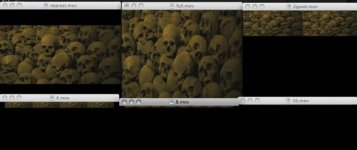
Also on the output panel, the de-bayer settings seems broken here. Only nearest fit renders fine, all the other setting produce several stretched images on a row at top... see capture below. (16 images for 1/16th...). Happened with QT, tiffs or dpx
Are those already known issues or is it worth sending some logs / detailed reports by email ?
tests were done on OS X RCX B104 with 4K 16/9 files
I think this might be where the confusion is:
If you pull from browser to player, the grade doesn't have anywhere to save (that changes with the RMD files coming soon).
If you put the clip in the bin, then grade the clip from the bin or timeline in the player, then it should save the grade as expected.
Deanan,
I keep seeing posts where you tell folks to turn on VERBOSE LOGGING. Should this be standard and to always have it on? Is there any down side? slower performance etc...??
I have NO IDEA what that is....?
JF
Grades now seem to be sticking within REDCINE-X v104. Now for some other minor feedback:
While in the viewer and a clip is in the bin or timeline: if i set an IN POINT, the play head (most of the time) jumps ahead by a few seconds.....then i have to move it back to begin looking for my outpoint.
Still looking for more.....
If it's repeatable for you, we'd like to get a verbose log file from you.
The black frames are random..
Not in the same place if I export again.
Sometimes not at all.

Yes, please send the verbose logs and details by email. We should be able to fix it once we recreate as we're not seeing that here.