Welcome to our community

Be a part of something great, join today!

  • Hey all, just changed over the backend after 15 years I figured time to give it a bit of an update, its probably gonna be a bit weird for most of you and i am sure there is a few bugs to work out but it should kinda work the same as before... hopefully :)

New Mac Pro

That's my question too. Will RR and Decklink work through a TB chassis???


Yes they do.

Just havent gone extensively yet.

We tested the BMD DeckLink Extreme HD.
 

Uh, thanks, but that still doesn't directly answer my question, nor confirm what I want to know. And there's too much conflicting info out there elsewhere. Your second link doesn't have anything to do with a new Mac Pro, just a MacBook Pro and in the case of the MBP, the answer is NO, it doesn't support this (MST via Thunderbolt2 to DisplayPort 1.2)...

Having previously owned a Sharp PN-K321, the DisplayPort stream settings had to be changed to enable 60Hz, even at resolutions less than UHD.

Having tried to seek additional clarification, the best I could get from Apple's support is this document, which is also linked in your second link you had. Unfortunately, it's worthless… http://support.apple.com/kb/HT5219
 
I have to retract some previous Statements on Red Giant and AE. After testing some with a clients work the Red Giant FX are threading across all 24 threads on this 12 Core single Xeon. BTW PNG on Windows is not threading well at all though on export so avoid that when possible. Other Quciktime codecs/formats are threading well. PNG is threading ok in OSX.
 
Uh, thanks, but that still doesn't directly answer my question, nor confirm what I want to know. And there's too much conflicting info out there elsewhere. Your second link doesn't have anything to do with a new Mac Pro, just a MacBook Pro and in the case of the MBP, the answer is NO, it doesn't support this (MST via Thunderbolt2 to DisplayPort 1.2)...

Having previously owned a Sharp PN-K321, the DisplayPort stream settings had to be changed to enable 60Hz, even at resolutions less than UHD.

Having tried to seek additional clarification, the best I could get from Apple's support is this document, which is also linked in your second link you had. Unfortunately, it's worthless… http://support.apple.com/kb/HT5219

The new Mac Pro is discussed in both links so you must not have actually read what I put there. It says Mac Pro (Late 2013). You connect a single miniDP2DP cable from one of the Thunderbolt ports to the Sharp or Asus display and set those monitors into the stream mode to get 4K @ 60hz on those monitors using two MST streams from the GPU. It even says as much in the user manuals for the monitors, which you should be familiar with since you repeatedly claim to have owned the Sharp for a few days. The next generation of monitors, including the probable Apple Cinema Display as well as the updated Sharp display coming next year will use HBR and that will give you a full 4K @ 60hz with 10-bit color signal. Once those monitors are available, Apple will enable HBR in the drivers and software and you'll get a single cable with a single 4K @ 60hz video signal through the DisplayPort though straight Thunderbolt will be your choice since it will be offered on those monitors in addition to DisplayPort using HBR.
 
Last edited:
Atto and Decklink work on my Magma on my existing Mac Book Pro. I wonder if I will see any performance gains vis-a-vis Read/Write from RAID due to Thunderbolt 2 ports on the New Mac Pro. Hopefully Magma will upgrade the enclosure soon.
I have been going back and forth with Colorfront about Express Dailies and they have assured significant performance enhancement over 12 Core 2012 Mac Pro. I have asked them about processing Dragon r3ds without the card.
"ExD now uses OpenCL instead of CUDA to support the New Mac Pro. Expect FAST Debayer and image processing, 4K@60p RAW support."
"Anamorphic Opengate 3.4K ARRIRAW in 4K@60, in ACES with deBayer, desqueeze, color grade."


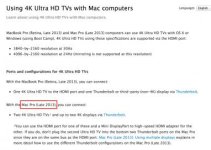
The new Mac Pro is discussed in both links so you must not have actually read what I put there.

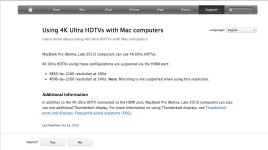
Er… Not trying to be obtuse or argumentative here, but… Got both links open and have double and triple checked. No mention of the Mac Pro in your second link, nor 60Hz in that link. See attached image. Second link only talks of MacBook Pro and only UHD/4K at 30/24 Hz. While the late 2013 MacBook Pro does support DP1.2 MST output, it does not, DOES NOT, NOT support UHD/4K at greater than 30Hz even though the GPUs in the system technically do. If something has changed with the 10.9.1 Mavericks release or latest EFI/TB2 update, someone please tell me, but it did not work as of a couple weeks ago.

You connect a single miniDP2DP cable from one of the Thunderbolt ports to the Sharp or Asus display and set those monitors into the stream mode to get 4K @ 60hz on those monitors using two MST streams from the GPU. It even says as much in the user manuals for the monitors, which you should be familiar with since you repeatedly claim to have owned the Sharp for a few days.

I know how the monitor works. I know Apple is nice enough to include the necessary $7 cable. I'm even 90% sure it all works and runs 4K at 60Hz. This stupid link is poorly written, as most of these are, and what we want to know is obfuscated by a complete lack of necessary detail. It talks of using a 4K monitor. It talks of 60Hz via multi stream mode on the monitor. It does not just come right out and say 4K @ 60Hz. It's not helpful because we have to go into the display settings and activate MST to get anything over 1080p 60Hz on these displays. I want to read it that way, as if it does indeed output 4K @ 60Hz, but I've had too much experience with this stuff over the years to ever make such an assumption. Compound that with the initial reports I've seen/read so far where people say the nMP does not support 60Hz at 4K via TB2. So then I have to ask, do these people not know how to configure the monitor? Do they know and it actually doesn't work? I just want someone with both the system and the display to confirm it. A friend of mine has the ASUS 4K PQ321Q, if either of us had a Mac Pro here, it would be the first thing we'd try as we set it up.

Call me paranoid, but I just want the actual confirmation. Mostly because I have tons of people asking me which 4K display to get and which one does what and how this Sharp (or ASUS or Dell) will work with the nMP and I can't give them a 100% definitive answer.

I sent back my Sharp PN-K321 because it had terrible light leakage all across the bottom of the screen, nVidia drivers at the time struggled with the dual input format and I had paid $4750 for it and felt that price wasn't acceptable with the light leakage mostly. I knew the driver issue would be sorted and nVidia already stated they were on it before I sent the monitor back. Light leaks, mostly on the bottom edge, seemed to be a common problem early on with these displays. My friend's ASUS doesn't exhibit any of that. I'd buy one of these displays again if they slashed another $1K off the price, probably the Dell model because of the additional controls and LUT support. Not going to spend $3K+ for one at this point when updated or alternative models are only a few months away.

The next generation of monitors, including the probable Apple Cinema Display as well as the updated Sharp display coming next year will use HBR and that will give you a full 4K @ 60hz with 10-bit color signal. Once those monitors are available, Apple will enable HBR in the drivers and software and you'll get a single cable with a single 4K @ 60hz video signal through the DisplayPort though straight Thunderbolt will be your choice since it will be offered on those monitors in addition to DisplayPort using HBR.

I'm operating on the same impressions/ assumptions. I think we're going to see a flood of 4K goodness including HDMI 2.0 and Thunderbolt-2 connectivity at CES.
 

Attachments

  • 4knonmp.jpg
    4knonmp.jpg
    50.2 KB · Views: 0
Er… Not trying to be obtuse or argumentative here, but… Got both links open and have double and triple checked. No mention of the Mac Pro in your second link, nor 60Hz in that link. See attached image.

That is weird. When i click it, it clearly talks about the new Mac Pro.
 

Attachments

  • Screen Shot 2013-12-20 at 9.33.32 PM.jpg
    Screen Shot 2013-12-20 at 9.33.32 PM.jpg
    19.7 KB · Views: 0
Thanks for the updated PDF Bob. Interesting info and some good insight as to how the buses are laid out.

As for Atto, Rockets and Decklinks they work just fine on Thunderbolt. I don't understand the people that say "no expandability". I've run a Pegasus R4 (or R6), 2 Decklinks, Rocket, ATTO R360 (or R680), QIO, and Lacie ESata Hub with an Ethernet to TB adapter in the end of a chain on my laptop and still ran 5K 7:1 24fps in realtime with Davinci Live utilizing both BMD cards.
9754100925_1f36641cd1.jpg

11473709626_9e8722899a.jpg


PCIe is plug and play now with TB. I jump between a Magma, Express Pro, Express II, or Pro III Rack Mount now and let the job decide if it needs a little 4RU flypack or a full on cart. Plus I've spent less than I did vs my Magma Expansion Chassis, Cyclone or Cubix. Same performance? Nope. Good for 8/10 jobs? Yepp. So why not?
 
Mac Pro vs iMac (Round 1)

Finally, some benchmarks, and the new Mac Pro isn't always made of fairy dust in the benchmarks, as the 2013 iMac i7 gives it a run for the money at times at half the price with only a single GTX 780M (that's the mobile non-desktop part! )

http://www.macworld.com/article/208...-speedster-weve-been-waiting-for-finally.html

"We tested a Mac Pro provided by Apple that was customized to use an 8-core 3.0GHz Xeon E5 processor, 512GB of flash storage, 32GB of RAM, and dual AMD FirePro D700 graphics with 6GB of video memory for each card....
As points of comparison for the 8-core Mac Pro that we tested, we looked at the results from two 2012 Mac Pros, a CTO 27-inch 2013 iMac, and a late 2013 15-inch Retina MacBook Pro. We ran an updated version of our overall system performance test suite, Speedmark, which is now at version 9....

The new Mac Pro did well on graphics tests, especially compared to the older Mac Pros, but the 27-inch iMac’s Nvidia GeForce GTX 780M with 4GB of RAM performed a bit better in one test (Cinebench’s GPU benchmark) than the workstation-class D700 graphics in the new Mac Pro."

So, you have to configure VERY carefully for your needs and study the benchmarks as the Mac Pro performance is very application dependent depending on your GPU / CPU selection (as many suspected), and you should certainly consider future HDMI 2.0 compatibility, DDR4 coming and expansion/upgradeability in your evaluation criteria, etc.

I think the next Mac Pro II with optimized software application performance may be the real winner, as the Apple II was back in the day...

I'm looking forward to a future 4K iMac, as it may be the best value pound-per-pound all things considered...
 
Last edited:
The first public Final Cut tests with 4K on this new beast are in and it is like Godzilla in that it just takes whatever you throw at it while happily accepting more. That's a huge improvement over the previous generation of MacPro. With the next hardware refresh bringing DDR4 among other things, this new design will be unstoppable for all hardware intensive media work.
 
The first public Final Cut tests with 4K on this new beast are in and it is like Godzilla in that it just takes whatever you throw at it while happily accepting more. That's a huge improvement over the previous generation of MacPro. With the next hardware refresh bringing DDR4 among other things, this new design will be unstoppable for all hardware intensive media work.

Just imagine how fast it'd be with 2 processors and modern GPU architecture!
 
Just imagine how fast it'd be with 2 processors and modern GPU architecture!


Geez, according to these reports the machine can play many simultaneous streams of 4K material with more than 15 effects applied in real time with no dropped frames. What more can you possibly really need in an editing environment?
 
Geez, according to these reports the machine can play many simultaneous streams of 4K material with more than 15 effects applied in real time with no dropped frames. What more can you possibly really need in an editing environment?

For offline editing, an iMac or cheap PC would suffice.

If you include online editing, I'd love to have basically a super-Quantel / super-Mystika.

Add on to that stuff like:

1. Real-time temporal noise reduction
2. Real-time optical flow for speed ramps and stereo scene adjustment
3. Real-time lens defect removal (distortion, chromatic abberation, contrast / bloom deconvolution, etc) with option to add it in again at the end (or the look of another lens)
3. Advanced sharpening / tone mapping that's temporally aware
4. Real-time 3D scene reconstruction, camera and object tracking so that I can draw masks on the door of a moving car in the scene and it will apply a color correction tracked to the door (or actor's eyes etc)
5. Real-time selective lens bokeh defocus
6. Real-time bloom / flare with chromatic abberation, lens grit etc (not just a simple Blur + Add mode) - well they have the lens flare bit partly done already:
http://vimeo.com/23687553
7. Film simulation
8. Real-time addition of motion blur with correct highlight behavior
9. 4 streams of R3D / F65 / Alexa II (whenever they make it) decoding at full quality
10. Real-time authoring of H.265 4K files
11. All of this in 48fps 4K stereo (calculated at 6K 32-bit floating point, then downsampled to 4K at the end using a high-quality downsample)

I think we'd need another order of magnitude of computing power for all of that!

And of course, when we go to lightfield cameras we'll need a ton more computing power but that's a while away!

For on-set DIT computer, I'd want not just something that can copy and review footage, but a system that could work in conjunction with real-time camera tracking to composite VFX elements into the director's feed in real time. All of this needs a LOOOOT of GPU power!

Bruce Allen
www.boacinema.com
 
Geez, according to these reports the machine can play many simultaneous streams of 4K material with more than 15 effects applied in real time with no dropped frames. What more can you possibly really need in an editing environment?

I think many people are pooh-pooing Apple's choice of GPUs here. To say they're not a modern GPU architecture is downright silly. The negative view of them comes from a lackluster release and initial software tuning in the Windows world. It's starting to look like Apple has done a pretty darn good job at selecting hardware and tuning it to perform well, especially with their own software.

Another advantage we should see forthcoming here are optimizations from Adobe and others. With a significant number of these systems being ordered and a consistent known GPU and hardware architecture, it gives developers incentive to concentrate optimizations for this platform, rather than trying to broadly adapt their OpenCL (or CUDA if it had been nVidia) code to perform across a multitude of offerings. Apple always does a good job tuning their hardware. We see this time and time again with the Macbook Pro and Macbook Air. It looks like they have taken that to a whole new level with this Mac Pro.

Can't wait to get my hands on the one I ordered.

I think we'd need another order of magnitude of computing power for all of that!

And of course, when we go to lightfield cameras we'll need a ton more computing power but that's a while away!

At least an order of magnitude more. I think that's where I have my sticking point with a lot of the people saying the new Mac Pro should've had this or that. Even if the thing could take another CPU or another GPU or two or have different GPU offerings, much of this stuff just isn't going to happen on a single desktop workstation. No matter what.

The Mac Pro is already an expensive computer by most peoples' standards and yet it's actually priced very aggressively for what it is. Apple has released a much more streamlined and specialized version of the bulky tower that always tried to be more than it is. On the other hand, it's just not going to accomplish the same things that are possible with a PC that has 2 or 4 CPUs and 4 or more GPUs. It's just not that system.

Although, I have a hunch that it's going to prove to be far better tuned and optimized than a typical PC using the same or similar hardware.
 
Last edited:
I think many people are pooh-pooing Apple's choice of GPUs here. To say they're not a modern GPU architecture is downright silly. The negative view of them comes from a lackluster release and initial software tuning in the Windows world. It's starting to look like Apple has done a pretty darn good job at selecting hardware and tuning it to perform well, especially with their own software.

Did you notice the fastest GPU config (dual D700) is slower running Cinema 4D R15's OpenGL benchmark than the laptop-grade GPU in the iMac?

"The new Mac Pro did well on graphics tests, especially compared to the older Mac Pros, but the 27-inch iMac’s Nvidia GeForce GTX 780M with 4GB of RAM performed a bit better in one test (Cinebench’s GPU benchmark) than the workstation-class D700 graphics in the new Mac Pro."

http://www.macworld.com/article/208...-speedster-weve-been-waiting-for-finally.html

Another advantage we should see forthcoming here are optimizations from Adobe and others. With a significant number of these systems being ordered and a consistent known GPU and hardware architecture, it gives developers incentive to concentrate optimizations for this platform, rather than trying to broadly adapt their OpenCL (or CUDA if it had been nVidia) code to perform across a multitude of offerings.

If I were a Mac developer, I wouldn't want to ignore the iMac (nVidia) and the MacBook Pro (nVidia) markets. And also: what if Apple puts nVidia in the next Mac Pro?

So, no: I don't think that they will be able to concentrate optimizations for this platform.

Apple always does a good job tuning their hardware. We see this time and time again with the Macbook Pro and Macbook Air. It looks like they have taken that to a whole new level with this Mac Pro.

Can't wait to get my hands on the one I ordered.

Jeff, imagine for a minute that Apple put you - Jeff Kilgroe - in charge of Mac Pro hardware decisions. Would you have recommended that they do what they have done?

EG put two old-ish, mediocre AMD cards in their spiffy cylinder with expensive Xeon chip? Instead of putting, say, a single 6GB Titan in them as standard (maybe with option to add another 1 or 2 Titans)?

That would give great OpenGL performance and decent compute performance with existing apps, plus the option for amazing compute performance for those who actually need it.

Bruce Allen
www.boacinema.com
 
The Mac Pro is already an expensive computer by most peoples' standards and yet it's actually priced very aggressively for what it is.
Respectfully disagreed

The D700 has exact spec matches to the FirePro W9000
2048 Stream Processors
384-bit memory bus width
264 GB/s memory bandwidth
6 GB Vram GDDR5

W9000 specs at 4 teraflops single precision while Apple has the D700 at 3.5 teraflops.

FirePro W9000 cost US$ 3000+. Apple is providing two D700′s in all Mac Pro configurations as options. That’s over $6K in GPU costs alone.
 
Respectfully disagreed

The D700 has exact spec matches to the FirePro W9000
2048 Stream Processors
384-bit memory bus width
264 GB/s memory bandwidth
6 GB Vram GDDR5

W9000 specs at 4 teraflops single precision while Apple has the D700 at 3.5 teraflops.

FirePro W9000 cost US$ 3000+. Apple is providing two D700′s in all Mac Pro configurations as options. That’s over $6K in GPU costs alone.

Nobody really bought FirePro W9000s because they sucked. So that price isn't really that meaningful.

Apple could include dual Sony 2/3 DigiBeta camcorders with the Mac Pro and pretend they're saving you $70K. But they're not really. Because you would never buy them. But if you're interested:
http://www.bhphotovideo.com/c/product/410747-REG/Sony_DVW970_DVW_970_2_3_Inch_3_CCD_Digital.html

You might notice that (apart from RAM), the specs of this "$3000" card are also slightly lower than a $300 R9 280X card.

Bruce Allen
www.boacinema.com
 
Back
Top