Welcome to our community

Be a part of something great, join today!

  • Hey all, just changed over the backend after 15 years I figured time to give it a bit of an update, its probably gonna be a bit weird for most of you and i am sure there is a few bugs to work out but it should kinda work the same as before... hopefully :)

New Mac Pro

Louis Maddalena

Well-known member
Joined
Nov 19, 2008
Messages
1,914
Reaction score
0
Points
0
Location
New Jersey
And Mavericks looks promising. It's available today for free. Really interested in how it leverages video cards.
 
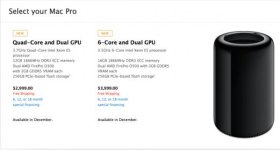
6-Core and Dual GPU

3.5GHz 6-Core Intel Xeon E5 processor
16GB 1866MHz DDR3 ECC memory

Dual AMD FirePro D500 with 3GB GDDR5 VRAM each
256GB PCIe-based flash storage1

complete specs up in the store:

http://store.apple.com/us/buy-mac/mac-pro
 

Attachments

  • macpro.jpg
    macpro.jpg
    16.4 KB · Views: 0
70% less power consumption than previous models. That's impressive.
 
Now that the cat is out of the bag, what is Jeff's take on the minimum setup needed for a smooth 4K workflow. Of course the fully geared up machine will work the fastest, but comparing the different setups a bit would be nice :)
 
70% less power consumption than previous models. That's impressive.

Kinda easy when you remove the second physical CPU!


probably around 6K for the 12 core?


6core is priced at $4k.


its probably using an e5-2643 although they list boost at 3.9 when a 2643 is 3.8


the 12core e5-2697vs is about a $1000 more.


crumby Amd D500 to D700 graphics, who knows $$$.
 
Apple said in the keynote it has 40 lanes of PCIe, same as the current Mac Pro. With dual GPU's at 16 lanes each, that only leaves 8 lanes shared between 6 thunderbolt ports. Can that be right?? Or do the Firepro D700's use only 8 lanes each? There's no mention of that model on AMD's website, but all the other Firepro cards specify PCIe 3.0 x16.
The Rocket-X wants 16 lanes, so the new Mac Pro is already completely maxed out of PCIe expansion before we add RAID, SDI monitoring, etc.
 
Now that the cat is out of the bag, what is Jeff's take on the minimum setup needed for a smooth 4K workflow. Of course the fully geared up machine will work the fastest, but comparing the different setups a bit would be nice :)

What is needed for a smooth 4k workflow? That's my question too.


So we know the basics.
New Mac Pro 4-core $2999
New Mac Pro 6-core $3999

Is the 6-core enough?
Is more ram needed? I did not see pricing.

Where can we find the external boxes necessary to house additional cards?
I have a Red rocket, and Black Magic Decklink Hd extreme (needed for Davinci I believe)
and an E-sada card to link my raids.

Just trying to plan the financial hit.

What are the important things to know as we move forward? Calling all gurus. Pile in whenever you're ready Jeff.
 
CPU limitation, not an apple specific one. E5 cpu only supports 40 lanes, so when you only use 1, your stuck stuck with 40 lanes.

The 6 thunderbolts ports are on 3x falcon ridge controllers, so 12x PCI 2.0 lanes max, yes you can run out of bandwidth quickly.


Apple said in the keynote it has 40 lanes of PCIe, same as the current Mac Pro. With dual GPU's at 16 lanes each, that only leaves 8 lanes shared between 6 thunderbolt ports. Can that be right?? Or do the Firepro D700's use only 8 lanes each? There's no mention of that model on AMD's website, but all the other Firepro cards specify PCIe 3.0 x16.
The Rocket-X wants 16 lanes, so the new Mac Pro is already completely maxed out of PCIe expansion before we add RAID, SDI monitoring, etc.
 
Apple said in the keynote it has 40 lanes of PCIe, same as the current Mac Pro. With dual GPU's at 16 lanes each, that only leaves 8 lanes shared between 6 thunderbolt ports. Can that be right?? Or do the Firepro D700's use only 8 lanes each? There's no mention of that model on AMD's website, but all the other Firepro cards specify PCIe 3.0 x16.
The Rocket-X wants 16 lanes, so the new Mac Pro is already completely maxed out of PCIe expansion before we add RAID, SDI monitoring, etc.

Good question. I sincerely hope that the CPU/GPU relationship is not via PCIe lanes at all, and if it is, that the 40 lanes mentioned are available after the 2 GPUs take 32. Hard to believe Apple would only leave 8 open PCIe lanes for all the remaining I/O requirements...

Cheers - #19
 
Maxxed out would look something like this:
- 2.7GHz 12-Core Intel Xeon E5 processor with 30MB L3 Cache
- 64GB 1866MHz DDR3 ECC memory
- Dual AMD FirePro D700 with 6GB GDDR5 VRAM each
- 1TB PCIe-based flash storage

It would be swell if Jeff (or someone) could review which of these items above are REALLY worth upgrading from the base model specs here:

- 3.7GHz 4-Core Intel Xeon E5 processor with 10MB L3 Cache
- 12GB 1866MHz DDR3 ECC memory
- Dual AMD FirePro D300 with 2GB GDDR5 VRAM each
- 256GB PCIe-based flash storage

And a general question: why do processor Ghz go down as the quantity of cores goes up?
 
Currently there is no way to link the communication of the GPU's without using the PCI-E controllers. Apple would have to add a Bridge PCI-E controller outside the CPU to add further lanes.
 
If I remember correctly the x6 TB2 ports are PCI-e Gen2 and its x4/x4 per controller, which has two TB2 ports per controller, so its really three x4/x4 (or x4/x4, x4/x4, x4/x4, so 24 Gen2 lanes total) which is equal to the bandwidth of x12 total PCI-e Gen3 lanes. The motherboard or host chipset will also have its own x4 or x8 PCI-e lanes, in addition to the x40 PCI-e lanes of the CPU. Additionally the unit could have a PLX chip and additional PCI-e lane splitter, so there's no shortage of bandwidth or lanes, if anything the new Mac Pro's potential bandwidth will be under utilized.

I really wish Apple had included an x8 or x16 PCI-e Gen3 iPass port, that would have made it compatible with all the existing PCI-e boxes and chassis already available, as well as have allowed for a direct interface with Nvidia GPU's.
 
Back
Top