Welcome to our community

Be a part of something great, join today!

  • Hey all, just changed over the backend after 15 years I figured time to give it a bit of an update, its probably gonna be a bit weird for most of you and i am sure there is a few bugs to work out but it should kinda work the same as before... hopefully :)

New iPhone/iPad Time Lapse App Coming Soon

Steve_Fish

Well-known member
Joined
Nov 29, 2012
Messages
78
Reaction score
0
Points
0
Location
On the move, currently on a 3 lap round the world
Website
www.fishtalesfilms.com
My new RedLapse time lapse App for RED DSMC cameras has just been submitted to Apple. Here's a brief description of the App:

RedLapse is a Time Lapse controller for RED Dragon, EPIC and SCARLET digital cinema cameras. It allows you to quickly and easily adjust the necessary settings for filming time lapse scenes. It will calculate scene lengths and real time recording lengths for you at any RED frame rate and playback rate. It will automatically start and stop recording and give you countdown and count up info while filming. It also allows you to change Aperture, Shutter Speed, ISO, REDCODE compression and Color Temperature from within the App.


The App controls your camera over a WiFi connection. To use the App with your RED DSMC camera, you must have a WiFi link via hardware such as the REDLINK BRIDGE or OFFHOLLYWOOD WiFi adapter.

The App is Universal, so it is compatible with both iPhone and iPad. It supports any iPhone or iPad compatible with iOS8 (including the new iPhone 6 and 6 Plus). It's currently in the review process, but it will probably take some time for approval as everyone and their brother is trying to get iOS8 apps approved right now.

For a peek at some screen shots and a more thorough description, I have put a page on my FishTalesPress site: www.FishTalesPress.com/RedLapse
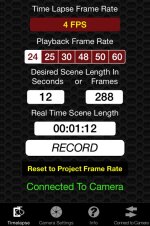
 

Attachments

  • TimeLapse.jpg
    TimeLapse.jpg
    81 KB · Views: 0
Are you simplifying the rather confusing frame averaging and frame summing , interval, shutter angle and other aspects of the red time lapse menu, or are you just doing something that's more like a simple intervalometer ?
 
It uses RED built in frame rates. This version is not doing any frame averaging or frame summing. So it will only go down to 1 FPS which is the slowest "native" frame rate. I considered going slower than that, but usually if I want to do a time lapse with a very slow frame rate and long exposures, something like Astrophotography for instance, I do that with a DSLR instead of my RED.
 
Possible, but...

Possible, but...

Interesting that you should mention this. I did mull that feature over and decided to leave it for the next update. Right now, it just lets you set the aperture, but it is certainly possible to ramp it. For that to be useful though, you really need to be shooting at frame rates slower than 1FPS which is the lowest "native" frame rate. As I mentioned earlier, I usually don't shoot slower than 1 FPS with the RED, I switch over to a DSLR for that. I've always had better results with long exposures on a DSLR than by using frame summing on the RED. Much less noise.

That said, when I was considering a feature for ramping the exposure, My first thought was to allow the user to set a start and end aperture that the app would ramp over the real time length of the scene. Trouble with that is that you don't always know what you want that ending aperture to be, because that is in the future, you can,t measure it. So I was thinking that the slick way to do it would be to let the iPhone (or iPad) act as your "light meter" and change the aperture dynamically. If that sounds like "Auto Exposure", I guess it really is. Maybe an idea for another App ;<)

Now for the reality of the situation. This is a really small market. There aren't that many RED cameras out in the wild, and only a tiny subset of those have the WiFi interface that is needed to do this kind of stuff. So if it's just you and me and a half dozen other shooters that can actually use Apps for this stuff, I'll only develop the Apps that I need for myself because I'm not likely to ever make any $$ doing it. Before I do any more apps (or update this still unreleased version), I'll have to get an idea what the market size is actually going to be.
 
Trouble with that is that you don't always know what you want that ending aperture to be, because that is in the future, you can,t measure it. So I was thinking that the slick way to do it would be to let the iPhone (or iPad) act as your "light meter" and change the aperture dynamically. If that sounds like "Auto Exposure", I guess it really is. Maybe an idea for another App ;<)

I've been doing timelapse for quite a while now and have a good idea where my aperture needs to be now, and in the future. Of course, it depends on the subject matter but generally I can get away with going from an f8 to being wide open and that would cover me. However I do understand, what you're saying because on my Dslr, sometimes there are shots where I'll ramp shutter speed from 1/250th all the way to 1/2 second for those really nice day to night city transitions.
I dig your idea about using the phone as a guide to measure light. That would be pretty sweet.
 
From a developer's point of view, Android's a hot mess. If I developed for Android, I would have dozens of screen sizes to worry about and hundreds of other hardware configurations. That might be OK for something with a big market, but with a an App targeted for RED cameras with WiFi capability, how many additional sales would I get for the trouble. iOS is getting bad enough, I now have 4 screen sizes for iPhone/iPod Touch plus iPad. But at least I can be sure that I can operate on 90% of all iPhones, and all iPads from the iPad 2 onward. So No, not a chance of an Android version.
 
Apple asked me to send them a link to a video demo of the App working with a camera. They don't have any way to actually test an App like this since it is dependent on external hardware, so I have to show it to them via a video. The demo is very basic, all shot in one take in real time, but if anyone would like a peek at it, here's a link: https://dl.dropboxusercontent.com/u/2273458/RedLapse Demo.m4v
 
OK, I just got my approval email from Apple, so RedLapse is now live on the App Store! It's still so fresh that it doesn't show up in a search yet, but here is a link to its page on iTunes Preview (and you can open the actual iTunes page from there): https://itunes.apple.com/us/app/redlapse/id919102963?ls=1&mt=8.

When everything is propagated through the system, I'll be able to make a link that goes straight to the iTunes page.
 
It looks like Apple now has refreshed all of the iTunes databases that a new App needs to show up in, so it is searchable in iTunes, just search for RedLapse. Or you can use this new direct link: https://itunes.apple.com/us/app/redlapse/id919102963?mt=8&uo=4

I have an idea for another new RED App, so I might as well start on it Monday while the RED SDK is still fresh in my brain :<)
 
One thing you might do is have the app make a suggestion to the user (after it checks what their settings are) that they shoot with the fans set to adaptive. This is particularly important when doing a timelapse as you'll be running much longer takes. You'll get better results when the camera temperature is maintained at the specific level that you've blackshaded at.
 
Back
Top