Welcome to our community

Be a part of something great, join today!

  • Hey all, just changed over the backend after 15 years I figured time to give it a bit of an update, its probably gonna be a bit weird for most of you and i am sure there is a few bugs to work out but it should kinda work the same as before... hopefully :)

New DJI Ronin M

MIne has arrived, but my power has not. Should know more soon.

Fingers crossed.

Stephen
 
I have been having a similar issue. Upon startup the roll is level, but after vigorous movement *occasionally* the horizon will start to tilt. Roll smoothtrack is off.

I would have to do more testing but it always rolls in the same direction and seems more prevalent in upright mode.

Flying a gh4, and was also running a stiff cable to a smallhd monitor. Removing the monitor didn't seem to effect whether it inevitably leaned or not.

Rebooting was fine. What I noticed though, is that when set down on a stand... It can slowly drift back to level...I'll see with the app data whether it is aware of its lean.


Same symptoms here. Losing the horizon in the same direction, stiff monitor cable, corrects on reboot, roll axis on smooth track is off.
I read something today that briefcase mode may affect this? I'll do more tests later this week.
 
Same symptoms here. Losing the horizon in the same direction, stiff monitor cable, corrects on reboot, roll axis on smooth track is off.
I read something today that briefcase mode may affect this? I'll do more tests later this week.

Yeah, I usually don't run with briefcase mode on, though.

Although I was thinking about perhaps turning Roll smoothtrack ON and setting deadband rather high and speed slow would at least allow me to make adjustments without rebooting.
 
Look what we have here....
 

Attachments

  • Screen Shot 2015-07-08 at 7.14.05 PM.jpg
    Screen Shot 2015-07-08 at 7.14.05 PM.jpg
    8.8 KB · Views: 0
Good luck, Matt! Just got my Cinemilled extenders. Now all I need is my cables.

Stephen
 
Thanks! Unfortunately I got my extenders/monitor mount/and thumb controller before the actual Ronin M. Which just shipped via UPS's slowest method...

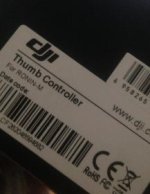
Anyone else have a thumb controller? Or a Ronin M and want to try it? (in LA)
 
Where is a link for the Ronin-M thumb controller????

Stephen
 
Shipping was slower for me, but still much faster than a few weeks. I think estimated ship time was 2-3 days and that's what it took to ship at the time.

Thumb controller looks very cool. Ronin arrives Tuesday... Those the same exact accessories I picked up!

Back in stock at B&H btw. Although I snagged the last $999 used one (hopefully it wasn't returned for a reason.... is there a way to check serial numbers on these guys?).
 
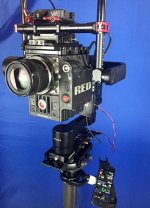
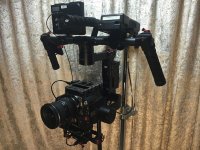
I got my M, and i love it!
i will probably use it handheld on a rare occasion, but i am not shooting steadicam without that thing,
shooting on Sunday will share some footage
 

Attachments

  • IMG_1011.jpg
    IMG_1011.jpg
    59.8 KB · Views: 0
I used to dislike the Ronin for its size and weight. It was always such a drag to rig it and handle it and so on. Don't even get me started on the size of the box it comes in. I just got the M today and I have to admit that thing is proper! Obviously You won't fly a master prime, matte box, fiz and cinetape on it but I'm super happy with this little bastard. Fits in my carry on!!!
 
How are you powering it?

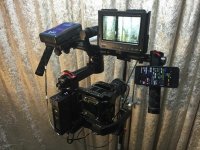
when hand held - from Tilta battery plate mounted on side handle with endura 7s, gives me about an hour for the epic body, when on steadicam - from the sled. Hand held setup is over 20lb, and i am afraid even when small hd monitor comes it will not be noticeably lighter. I am thinking to move the battery off the rig, belt clip, or something, i am not very strong, i am 200lb and i still bench 225, but after five minutes hand held i need to rest another 5 :)
i power hotlink from the USB port on Ronin, at first i was using p tap for that, but when ronin's battery down one notch it fails to provide enough power and hotlink is down; USB port provides power for the hotlink till the battery is drained.
I tried my GH4 on it, completely different feeling, you can run with that setup for hours. Bottom line i am using this hand held only if steadicam can't do the shot, like super low angle, or shooting from the car, otherwise mount this thing on steadicam and it does wonders!
 

Attachments

  • IMG_1026.jpg
    IMG_1026.jpg
    88.5 KB · Views: 0
  • IMG_1023.jpg
    IMG_1023.jpg
    85.7 KB · Views: 0
I'm having trouble getting my Ronin-M to connect to my computer. Will it not work on a computer? Must it be a mobile device? I'm using a MacBook Pro and Bluetooth is on, but nothing is showing up.

Thanks.

Stephen
 
I'm having trouble getting my Ronin-M to connect to my computer. Will it not work on a computer? Must it be a mobile device?

Thanks.

Stephen

To connect to the computer you need to have the USB attached to it, just do turn off the Motors so if it spins during update/cycle calibration won't yen it out.
 
My iPhone won't show a bluetooth device for it, either. The remote is connected and controls the Ronin, but no luck with it being recognized by my phone.
 
No, but I did on my computer. I assumed that the phone would at least show a bluetooth device without having the app installed. And, like I said, my computer, with the GB gimbal installed doesn't show a bluetooth device either.

But now I'm thinking. Is there a difference between the DJI "assistant app" and the "GB" program???

Thanks.

Stephen
 
Back
Top