


Aris_Gavriilidis
Well-known member
This was not easy to write,
Ever since I discovered the following issue on my camera a few days ago, I've been debating as to whether or not I should post here since my thoughts on the problem I'm about to describe will rub several people here the wrong way, alas, I have to get this out there and move on, given it infuriated me beyond measure.
My EPIC DRAGON, with a paltry 540 hours on it, never rented out, mistreated, or used near lasers, has several clusters of dead pixels on its sensor and upon discovering this I instantly wished I had gotten an ARRI Mini instead when I blew my life's savings on this camera 5 years ago, even though I could only have afforded that one without the ARRIRAW and the rest of the extra licenses. Be that as it may, the ARRI would most certainly not have displayed the inexcusable quality control issues my $26,200 (at the time of purchase) DRAGON turned out to suffer from.
Before people start asking if I had blackshaded the camera, which on this forum appears to be the recommended solution even if a camera was literally on fire, here is the full procedure I followed, to no avail:
-Several blackshade calibrations, even at different temperatures (my preferred one is 65C but I went lower as well)
-Updating firmware (I had been running 6.3.102 since 2017 so I upgraded to the latest, 6.3.106)
-Changing OLPFs and Lenses
-Cleaning both OLPFs
-Cleaning the sensor glass behind the OLPF
-Factory Reset (twice)
-More blackshading
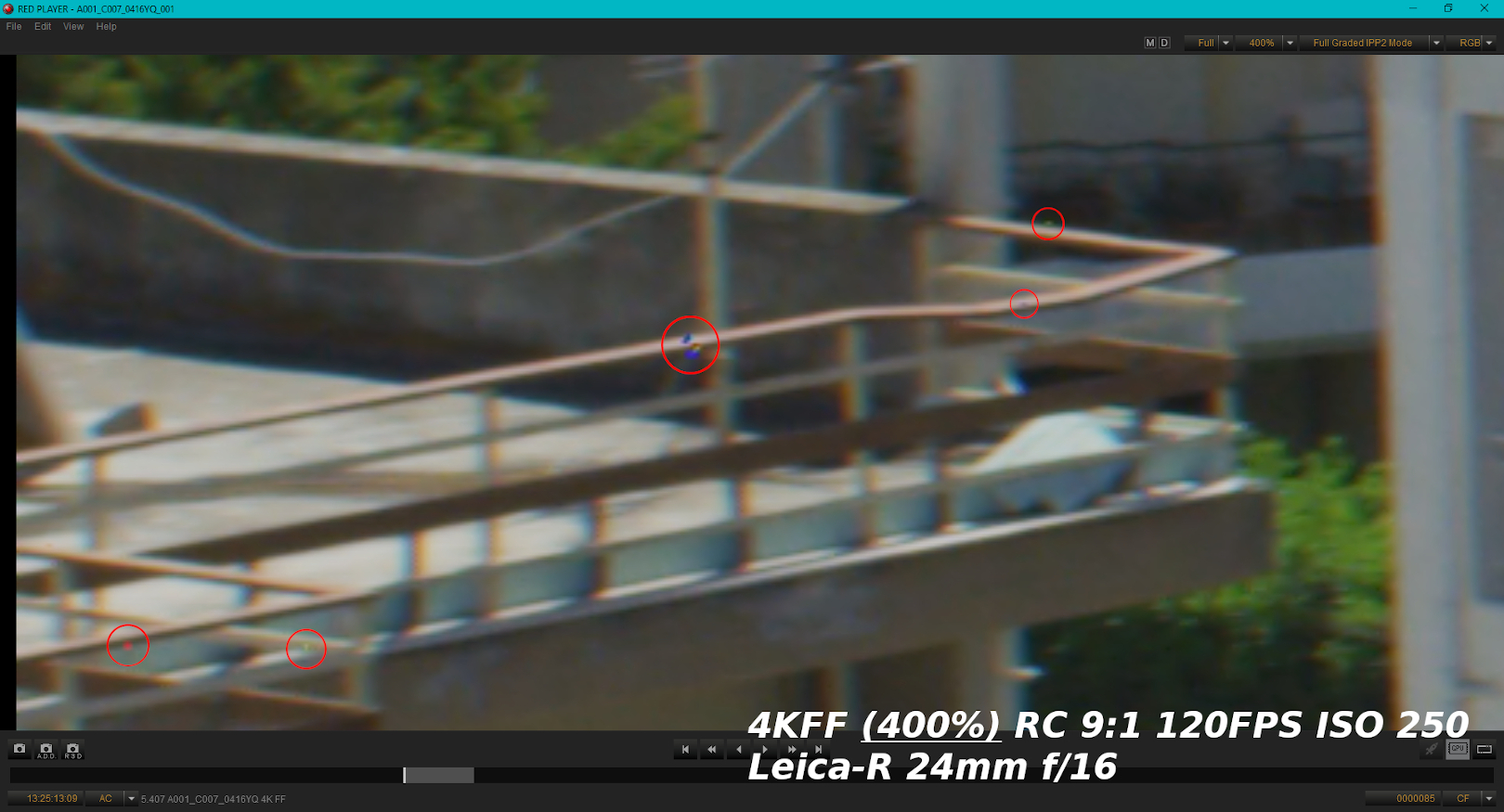
The dead pixels persisted. The giveaway should have been the fact that these pixels (clusters rather) don't "light up" when I use the "Focus" and "Edge Focus" modes in the camera, whereas the occasional "lit" pixels I've had that blackshading gets rid off, become thick white dots during focus peaking. I'm guessing the fact that these ones don't, means the processing of the camera isn't even registering them as even being there at all - because they're dead pixels. What's more is that depending on what's happening in the frame, these spots change/flash different colors, particularly if they pass between distinctly-colored objects (a big difference in area contrast), otherwise they appear as semi-transparent spots. One would have to look at the footage in motion as opposed to a screengrab like the one I've attached to get the full picture, it's tough to articulate. There's two big square-ish clusters of about 20 pixels each that are very visible at all times near the center of the frame and several tiny spots spread across the rest of the sensor that are virtually invisible when looking at the image at 100%, but the two main clusters are visible, very much so in fact.
This is probably the point at which dead-pixel-removal tools during post are suggested. Resolve's dead pixel fixer is utterly useless, then in After Effects the CC wire-removal is also unable to handle the two main clusters as they're far bigger than one single pixel, thus the "masking" makes things worse. What occasionally works is the Content-Aware-Fill tool, though it's hit or miss and largely depends on the specific shot and what's happening in it, so I've had very mixed results.
Now, as for my thoughts on this shocking discovery,
The fact remains that a camera at this level and price range should not have dead pixel clusters on its sensor, at least not after ~500 hours, nor should I have to do any more post work to get a useable image out of the camera than I already have to do when dealing with the color (different matter altogether, won't go into that here). The warranty on the camera expired 3 years ago and I'm well aware that DSMC-1 bodies are no longer serviced but even if they were, I wouldn't pay $12,000 to replace the sensor on a camera that is clearly and unequivocally manufactured to a far, far inferior standard than the competition. There just doesn't seem to be any consistency in QC and if not my own personal experience, then the countless threads on a myriad of issues across this forum serve as proof.
All image-quality arguments aside, having discovered it the painful way, I now finally understand why ARRI and SONY charge 2-3x more for their products. "You get what you pay for". This is the end of my journey with RED, I'm stepping off this train. I tried to like the camera, I wanted, truly wanted, my anger notwithstanding, to be part of this community, but I simply have no faith left in such flawed cameras. I put up with the nonsense blackshade mechanic, the awkward ergonomics, the overstated DR, the OLPF fiasco, the loud fans, the subpar color science - necessary sacrifices for a great image that as it turns out, I can no longer get. This isn't me getting a "dud" camera out of bad luck - this is me falling for the over-marketed and under-manufactured gimmick that is the RED product lineup when I impulsively bought into this system at 19 years of age all this time ago... My EPIC is old and current models' specs may be different, but I have no reason to believe that QC has gotten any better. No doubt someone will say I'm being way too OCD about this, posting a 400% magnification framegrab, but the spots do show even at 100% and also, I have every right to be "OCD" after investing so heavily on what was touted as the king of all cameras at that time. I have every right to be angry about this and I hope no aspiring DP in their early 20s out there makes the same mistake as I did back then, so I'm putting this out there, even though it'll surely be viewed as defamation and probably get deleted.
Below are two images, the first marking SOME of the dead pixels - frankly there's too many for me to count and don't show up at the same time, again, depending on what's in the frame - including one of the two main clusters. The second image is a 100% crop of a 2K frame of a Panavision chart (same lens) showing the second cluster near the center, as well as two additional spots that happen to show in this particular frame.

Looking on the bright side, I've got the fanciest paperweight in existence.
Aris
Ever since I discovered the following issue on my camera a few days ago, I've been debating as to whether or not I should post here since my thoughts on the problem I'm about to describe will rub several people here the wrong way, alas, I have to get this out there and move on, given it infuriated me beyond measure.
My EPIC DRAGON, with a paltry 540 hours on it, never rented out, mistreated, or used near lasers, has several clusters of dead pixels on its sensor and upon discovering this I instantly wished I had gotten an ARRI Mini instead when I blew my life's savings on this camera 5 years ago, even though I could only have afforded that one without the ARRIRAW and the rest of the extra licenses. Be that as it may, the ARRI would most certainly not have displayed the inexcusable quality control issues my $26,200 (at the time of purchase) DRAGON turned out to suffer from.
Before people start asking if I had blackshaded the camera, which on this forum appears to be the recommended solution even if a camera was literally on fire, here is the full procedure I followed, to no avail:
-Several blackshade calibrations, even at different temperatures (my preferred one is 65C but I went lower as well)
-Updating firmware (I had been running 6.3.102 since 2017 so I upgraded to the latest, 6.3.106)
-Changing OLPFs and Lenses
-Cleaning both OLPFs
-Cleaning the sensor glass behind the OLPF
-Factory Reset (twice)
-More blackshading
The dead pixels persisted. The giveaway should have been the fact that these pixels (clusters rather) don't "light up" when I use the "Focus" and "Edge Focus" modes in the camera, whereas the occasional "lit" pixels I've had that blackshading gets rid off, become thick white dots during focus peaking. I'm guessing the fact that these ones don't, means the processing of the camera isn't even registering them as even being there at all - because they're dead pixels. What's more is that depending on what's happening in the frame, these spots change/flash different colors, particularly if they pass between distinctly-colored objects (a big difference in area contrast), otherwise they appear as semi-transparent spots. One would have to look at the footage in motion as opposed to a screengrab like the one I've attached to get the full picture, it's tough to articulate. There's two big square-ish clusters of about 20 pixels each that are very visible at all times near the center of the frame and several tiny spots spread across the rest of the sensor that are virtually invisible when looking at the image at 100%, but the two main clusters are visible, very much so in fact.
This is probably the point at which dead-pixel-removal tools during post are suggested. Resolve's dead pixel fixer is utterly useless, then in After Effects the CC wire-removal is also unable to handle the two main clusters as they're far bigger than one single pixel, thus the "masking" makes things worse. What occasionally works is the Content-Aware-Fill tool, though it's hit or miss and largely depends on the specific shot and what's happening in it, so I've had very mixed results.
Now, as for my thoughts on this shocking discovery,
The fact remains that a camera at this level and price range should not have dead pixel clusters on its sensor, at least not after ~500 hours, nor should I have to do any more post work to get a useable image out of the camera than I already have to do when dealing with the color (different matter altogether, won't go into that here). The warranty on the camera expired 3 years ago and I'm well aware that DSMC-1 bodies are no longer serviced but even if they were, I wouldn't pay $12,000 to replace the sensor on a camera that is clearly and unequivocally manufactured to a far, far inferior standard than the competition. There just doesn't seem to be any consistency in QC and if not my own personal experience, then the countless threads on a myriad of issues across this forum serve as proof.
All image-quality arguments aside, having discovered it the painful way, I now finally understand why ARRI and SONY charge 2-3x more for their products. "You get what you pay for". This is the end of my journey with RED, I'm stepping off this train. I tried to like the camera, I wanted, truly wanted, my anger notwithstanding, to be part of this community, but I simply have no faith left in such flawed cameras. I put up with the nonsense blackshade mechanic, the awkward ergonomics, the overstated DR, the OLPF fiasco, the loud fans, the subpar color science - necessary sacrifices for a great image that as it turns out, I can no longer get. This isn't me getting a "dud" camera out of bad luck - this is me falling for the over-marketed and under-manufactured gimmick that is the RED product lineup when I impulsively bought into this system at 19 years of age all this time ago... My EPIC is old and current models' specs may be different, but I have no reason to believe that QC has gotten any better. No doubt someone will say I'm being way too OCD about this, posting a 400% magnification framegrab, but the spots do show even at 100% and also, I have every right to be "OCD" after investing so heavily on what was touted as the king of all cameras at that time. I have every right to be angry about this and I hope no aspiring DP in their early 20s out there makes the same mistake as I did back then, so I'm putting this out there, even though it'll surely be viewed as defamation and probably get deleted.
Below are two images, the first marking SOME of the dead pixels - frankly there's too many for me to count and don't show up at the same time, again, depending on what's in the frame - including one of the two main clusters. The second image is a 100% crop of a 2K frame of a Panavision chart (same lens) showing the second cluster near the center, as well as two additional spots that happen to show in this particular frame.
Looking on the bright side, I've got the fanciest paperweight in existence.
Aris


