Welcome to our community

Be a part of something great, join today!

  • Hey all, just changed over the backend after 15 years I figured time to give it a bit of an update, its probably gonna be a bit weird for most of you and i am sure there is a few bugs to work out but it should kinda work the same as before... hopefully :)

NAB13- REDCINE-X Professional Build 18 Alpha

Just tried the alpha v2 on my Clevo notebook with ultraSDI USB BM card and I am so happy to see on my Panasonci 52 now !!!
Thank you a lot. I will change my workflow because it is much more easy now to pregrade in RedCine X than in Adobe CS6.

Great function for me, thank you !!


Olivier
 
Sorry I did the automatic download and update via the menu of RCX 17 and only 17 opens. I tried control-click from applications folder and 17 still opens up -and of course none of the plug-ins are enabled. Would love to know the work around here (aside from telling my system its 3 months older).

Running Mac Pro. 10.7.3 12GB RAM Red Rocket.
 
As of build 17 the effects are only available if you have an R3D in the viewer, so they will hide if you don't have an R3D loaded.

Build 18 is an Alpha so you cannot "update" to it as build 17 was a Stable Release. Build 18 Alpha will also not auto update to any other version, To use build 18 Alpha you have to download it directly from this forum.
 
This may be a silly question, but is there any reason it would be preferable to monitor RCX through a BlackMagic or AJA card instead of the HD-SDI out of the RedRocket? Or is it simply the advantage of having more HD-SDI outs for multiple monitors; or as a gift to those users without Rockets?

I use for 90% of my work a notebook, so no Rocket in it. And if you use a rocket, you need to plug/unplug the hdsdi from your monitor. The thunderbolt box could be an answer, but you need external power, so it is not really a mobile configuration. With this great upgrade, and a small HD monitor and BM USB3 card I am fully "mobile" with all what I need and I can go Premiere-->RCX-->Premiere as much as I want. Before this upgrade, I had to stay in Premiere for the R3D control and that a complete different story !
At 1/4 resolution, i am comfortable with RedCine X. So the real reason to have a Rocket is for transcoding and rendering time. It is enough for me to buy Red Rocket X too ;-)

Olivier
 
I am not able to get a preview through a BM Ultrastudio SDI USB 3 :-(
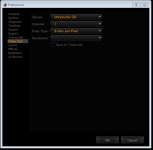
In the preferences panel I am able to select the output, set the channel, and select a bit depth, but the output resolution field is blanco.

I have the same, and it works perfectly. Does the BM work with Premiere ?
 
Hi Olivier,
Yes the BM works perfectly with Premiere and After Effects.
BTW, I am running Windows 7 x64

attachment.php
 

Attachments

  • preferences.jpg
    preferences.jpg
    29.4 KB · Views: 0
I just tested the video out option with an AJA T-TAP and the Rocket in a MLogic-R enclosure. The video goes black and shows the format 1080 23.98P as the input on the monitor but the video doesn't playback over the T-Tap.

I am running 10.7.5 on a MBP 10,1 Retina
 
For folks like me without a Rocket, the SDI output is a welcome addition, thank you!
My Decklink SDI is outputting 720p50 for some reason. The resolution preference dropdown menu is blank and not selectable. Is anyone else able to get 1080p?
 
Can you run this beta side by side with the latest build 17 or will overwrite?
 
Just tried 18 Alpha-w-my Kona 3. WOW! Thanks ever so much for that monitor out feature. Worked perfectly. My Kona 3G and Hi5-4K are on order, so I am eager to see how it will all work with my Seiki 4K panel.

________________________________
Scarlet X # 1859 “Bettie Page”
“… preparing to ‘whip’ the competition …”

Zeiss Lenses:

CY 21/2.8
ZF 28/2.0
CY 35-70/3.4
CY 50/1.4
ZF100/2.0

Nikon Lenses:
G 14-24/2.8
G 24-70/2.8
D 80-200/2.8

Tokina Lenses:

11-16/2.8
 
As of build 17 the effects are only available if you have an R3D in the viewer, so they will hide if you don't have an R3D loaded.

Build 18 is an Alpha so you cannot "update" to it as build 17 was a Stable Release. Build 18 Alpha will also not auto update to any other version, To use build 18 Alpha you have to download it directly from this forum.

In build 17 the plugins are now saying not licensed for use...which has a time stamp on it I know. How can I get 18 to replace 17 since I need to use Alchemy and Saturation, etc to match my other clips? Do I have to uninstall 17?
 
Back
Top