Welcome to our community

Be a part of something great, join today!

  • Hey all, just changed over the backend after 15 years I figured time to give it a bit of an update, its probably gonna be a bit weird for most of you and i am sure there is a few bugs to work out but it should kinda work the same as before... hopefully :)

Movi M10 Setups, FAQs, and More

Jonathan Stevenson

Well-known member
Joined
Nov 20, 2008
Messages
1,829
Reaction score
0
Points
36
Location
Denver
Hey there folks!

With the ship date of the M10 approaching quickly, I wanted to create a Reduser resource for M10 configurations, setups, accessories, pictures, videos, and FAQs. Please feel free to contribute any information, testing notes, footage, or otherwise!

EDIT: COMPILING INFORMATION FROM THE BELOW THREAD. I WILL ADD RELEVANT LINKS AND PRICING AS THEY BECOME AVAILABLE.

Theoretically, an ideal Movi Setup for Epic will include the following:

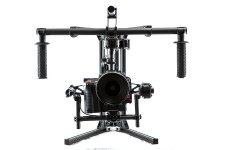
Movi M10 Rig (Powered by included Lipo batteries, connectors and chargers)
http://www.movirig.com/products/m-vi-m10
Price: $15,000

RedRock microRemote Follow Focus Kit (Powered by Lipo batteries using custom cable from Freefly)
http://store.redrockmicro.com/Catalog/microRemote-Bundles/Remote-wireless-focus-bundle
LINK TO CUSTOM CABLE WILL BE ADDED WHEN AVAILABLE
Price: $2,400

SmallHD DP4 Monitor for Movi Operator, mounted to M10 handles, Powered by batteries of your preference from SmallHD.
http://smallhd.com/products/dp4/index.html
Price: $450
Note: Apparently, the Red LCD braided cables are too stiff for use on a Movi. The stiffness of the cable can interfere with the operation of the gimbals. However, using the non-braided, older versions of the Red LCD/EVF cables should work because those are more flexible. However, you'll need to either find an old cable or purchase a custom cable from a 3rd party since Red no longer offers these. Obviously, this will allow you to use the Red LCD and skip the DP4. However, there are some "streamlining advantages" to using the DP4, described below.

Paralinx or Teradek wireless monitoring for Focus Puller/Directors Monitor/ Pan-Tilt Operator.
http://www.paralinx.net/store/arrow-plus-12-package
Price: $2,100 for paralinx kit with 2 receivers
$2,300 for Teradek Bolt (HDMI model with 2 receivers, transmitter also has 1hr built in battery)


The Paralinx and Teradek can be powered by the USB output on the SmallHD DP4 (using a custom micro-to-micro USB cable from Freefly), meaning no additional batteries are needed for the wireless monitoring. Furthermore, the SmallHD DP4 has an HDMI passthrough port, allowing the DP4 to send an HDMI signal to your wireless unit. This means only 1 HDMI cable (needs to be an ultra thin cable available from amazon) needs to be coming off the camera. This actually seems like a better setup than the Red LCD because, when using the LCD, you would then need to run additional power for the paralinx/teradek, as well as an additional HDMI cable to provide the signal. Although using your existing Red LCD is potentially a cheaper route, use of the DP4 seems more "streamlined" in terms of cabling and clutter.

In this setup, the only gear actually sitting on the M10 gimbals will be the camera body, lens, and Follow focus unit w/ lipo battery. The rest is mounted on the handles of the rig.

POTENTIAL TOTAL COST OF THIS SETUP: ABOUT $20,000. (minus the camera and lenses obviously)

Manuals/Documentation for Movi M10 available here:
http://www.freeflysystems.com/media/instruction-manuals.php

Tutorial and Setup Videos here:
https://vimeo.com/freeflycinema/videos
 
Gary Haynes was kind enough to meet up with me this weekend to give me some hands-on time with the rig. I first want to say that Gary was extremely knowledgable, helpful, and generous for taking the time to show me everything in person. If you have any questions about the Movi, he's a great guy to ask! Thanks so much Gary!

For those that don't want to read my whole writeup, here's the reader's digest version:
- Build quality: Awesome!
- Setup: Easy after some practice, but the first few times will be slow.
- Operation: Works as advertised when setup properly. It's very heavy with an Epic. Get an Easy Rig!
- Overall: Very cool piece of gear, but don't underestimate it's complexity. It will take lots of practice to become a good operator, and I highly advise against just renting out the gear without the owner or technician going with it.


Build Quality
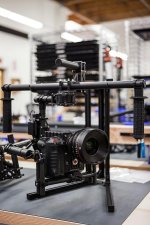
Freefly really has an impressive piece of equipment on their hands here. The build quality was exceptional. They are using very high quality, custom built components (not "off the shelf" parts like people seem to be saying), all of which come together in what is clearly a well-thought-out design. The entire rig is comprised of carbon fiber components and was sturdy but extremely light. When I first picked up the rig (without the camera mounted) I almost accidentally threw it up into the air; it was much lighter than I was expecting. The included stand is light, compact, quick to set up, and easy to pack away.

Setup/Configuration
Once the rig is "unfolded" and setup on the stand, the balancing and fine tuning took about an hour. This was mostly due to the fact that we hadn't put an Epic on the rig before, so it took some time to align the center of gravity in multiple directions. However, it's very easy to see that, once you've balanced up your rig a few times, it should take no more than 15-20 minutes to balance at the start of your day or between lens changes (and with lens changes, you really should only have to make adjustments along the tilt axis to account for different length or weights of lenses, so setup changes should be relatively simple.) Just like a steadicam, it's important that all your accessories are on the camera before trying to balance. Even putting the lens cap on the lens during balancing greatly threw off the center of gravity.

The biggest challenge I foresaw during the balancing is simply getting the camera to hold still. When you balance a rig, the motors have to be off, meaning that the camera kind of "flops around" while you're trying to balance it. It would be great is if there was a way to "lock off" the motors individually, so you can focus on balancing one axis at a time (at least for the initial rough balance) and then unlock all three to do your fine tune adjustments. However, I think with practice, it will probably be a non-issue.

A small problem we ran into was adjusting the roll axis while the camera was attached. Balancing the roll axis requires access to 4 small bolts directly behind the camera (it's the horizonal bar behind the camera with the Movi logo on it). At least with the Epic, there wasn't any room to get the included hex wrench behind the camera to loosen or tighten the bolts. Instead, we were forced to remove the camera from the plate, adjust the roll bar, and re-attach the camera. So, a 90 degree hex wrench would be better suited in this situation. Another factor to consider was that I had the +1 module attached to the camera, meaning the body was a few inches longer than usual. Without the module, it's conceivable that adjusting the roll axis wouldn't require you to remove the camera.

The only other strange thing I noticed was that the sliding plate that you attach to the bottom of the camera wouldn't accept the 3/8" bolts that I have for my camera, you could only fit 1/4-20 bolts through the holes. Since there's only one 1/4-20 tap on the body of the Epic, you can only attach the camera to the plate with one bolt. That made me a little nervous, but Gary reassured me that even quadcopter guys are only attaching their bodies with one bolt. Also, it would be very easy to take a drill and slightly modify the sliding plate to fit a 3/8" bolt just by boring out the hole a little more. Anyway, not really a huge deal, just something to be aware of.

Operation/ Results
Unfortunately, I still haven't received a few items that I need for the kit, mainly the Redrock wireless follow focus and my Paralinx kit, so for the time being, we only put the Epic body with side handle and lens onto the rig. We were able to attach the 5" Touch LCD to the handle bars and run the LCD cable to the brain. However, I would advise against doing this, simply because the LCD cable from RED is very stiff and restricted the free movement of the motors. A thin HDMI cable to a DP4 monitor would be a better option IMO.

My first thought when picking up the rig was, "this is much heavier than I expected." The weight of the camera and accessories will add up quickly. I found myself needing to set the rig back on the stand after only a few minutes of holding it out in front of me (and I consider myself to be in decent shape). Using this on a set will definitely require your AC to be ready to take the rig away from you when they call cut. I would also highly recommend the use of an Easy Rig. They are relatively inexpensive and will make the operator's life much easier.

Otherwise, everything worked as advertised. I was impressed with the smoothness of Majestic mode and it felt very intuitive. In fact, Majestic Mode will probably be used 90% of the time, if I had to guess. Had we had a little more time, we probably could have done a better balance on the camera. You will notice your footage being a little wobbly at times or off axis if you don't get the balance just right.

The other thing I noticed is that, as an operator, I'm at a serious disadvantage being only 5' 11". Gary is probably 6' 5" and I had a very hard time getting the camera eye level with him without getting instant shoulder fatigue. But that's my problem, not Freefly's ;-)

Overall impressions
Lots of people argue over the superiority of steadicams vs. Movi or vice versa. In my opinion, it's just like the Red vs. Alexa or Red vs. DSLR argument; the Movi is another tool for the cinematographer's arsenal. It's not a replacement for steadicam, it's an alternative approach. Many shots that could be achieved on a Movi cannot be done with steadicam, but there are probably many situations where steadicams will blow a Movi out of the water (3D Alexa Rig anyone?). What matters is knowing what tool to pick for the job, and this will be a great option for a multitude of situations.

This is a serious piece of gear, it's not some gimmick. After seeing it in person, I realized that probably the biggest misconception about the Movi is that you can just pick it up and go on your first try. Wrong. This rig is just as delicate to balance as a steadicam rig. Operating it smoothly will take practice. Configuring your camera well will take trial and error. Getting good shots will take experimentation. In my opinion, becoming a skilled Movi operator will take time. This is not a piece of gear that you can just rent out to jobs. You will need to go along with it as a technician (at the very least). People who think that they can just pick it up and get perfect shots every time will be very frustrated. On the other hand, Movi owners who spend the time to become experts with their gear will likely be very successful and gain a solid reputation.

That's about all I can think of at this point. Unfortunately I was so excited to be seeing the rig that I forgot to take a lot of pictures like I had hoped. But, it's really nothing you haven't seen already anyway. It was great to see it in person. I feel like the veil of mystery surrounding the product has finally been lifted (at least for me).

Happy to answer any questions you may have!

(I've also posted this over at the freefly forum - http://forum.freeflysystems.com/index.php?threads/first-impressions.2121/ )
 
EDIT: 9/16 ADDED PICS

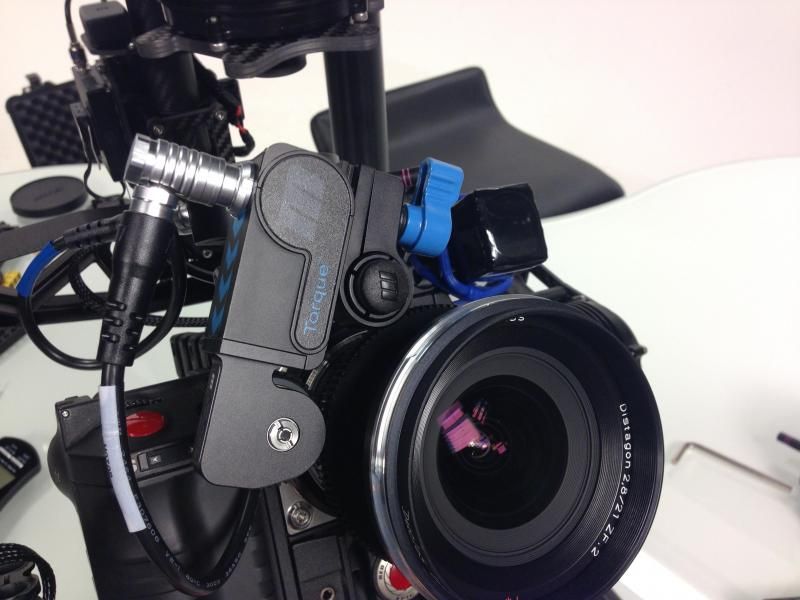
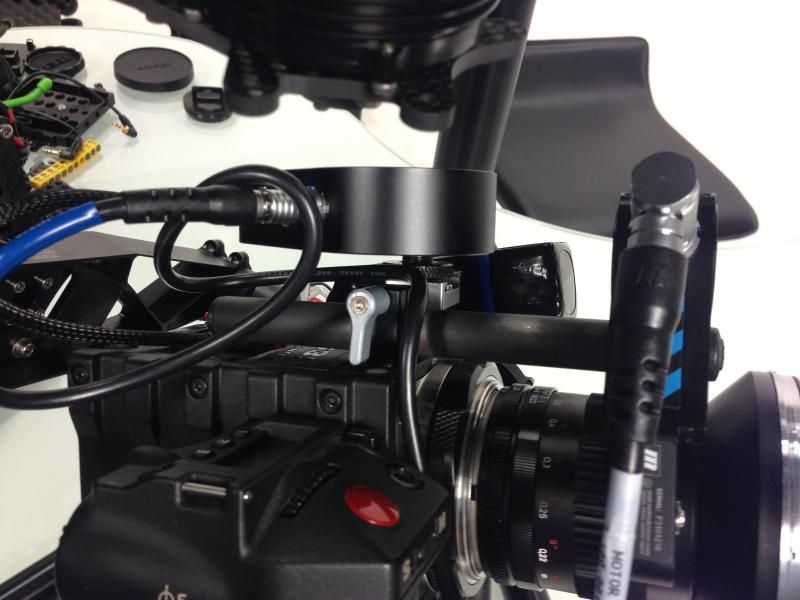
So excited to finally get the rig. Haven't had any time to do some test shots, but I snapped a few pics of my initial setup. Just wanted to share a few configuration pictures since there's a surprising lack of closeups of people's rigs. I figured you guys would like to see how I have mine working. Only took me about an hour to come to this configuration after unpacking everything from the box. If you're thinking it looks a little "thrown together," that's because it is. Because no one else was telling me how to mount this stuff, I had to sort of figure it out myself once everything showed up. So a lot of this was improvised.

image-3_zps816a1e0b.jpeg


First, a quick rundown of what comprises the kit:
- Movi M10 (obviously)
- Red Epic with Side Handle (I'd rather use Redvolts and play it safe in powering the camera)
- RedRock microRemote wireless follow focus
- SmallHD DP4 w/ Canon batteries
- Paralinx Arrow Plus for directors monitor/focus puller/pan-tilt operator
- Lenses I used for this setup are Zeiss ZFs. Nice and light!

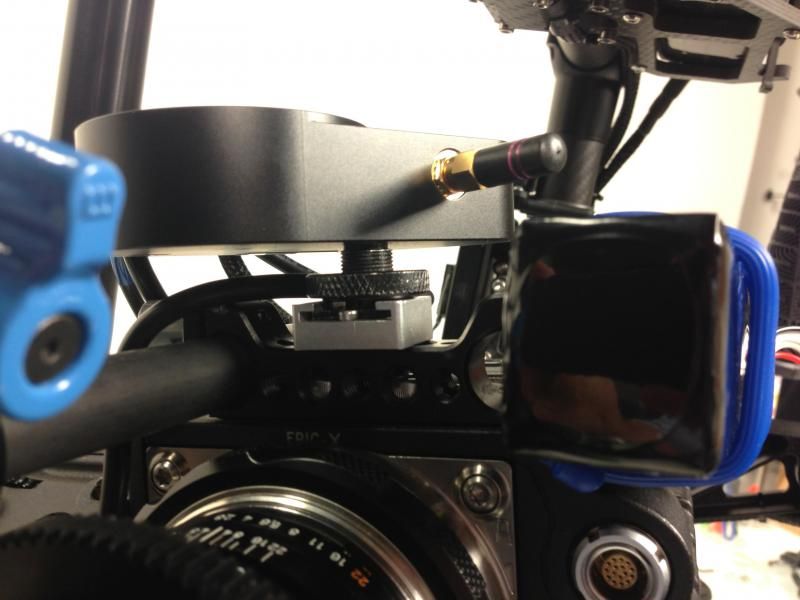
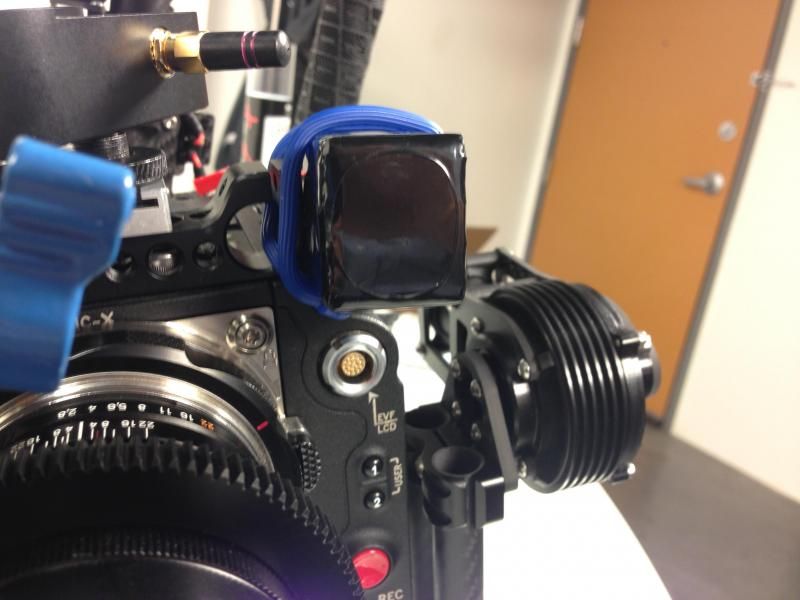
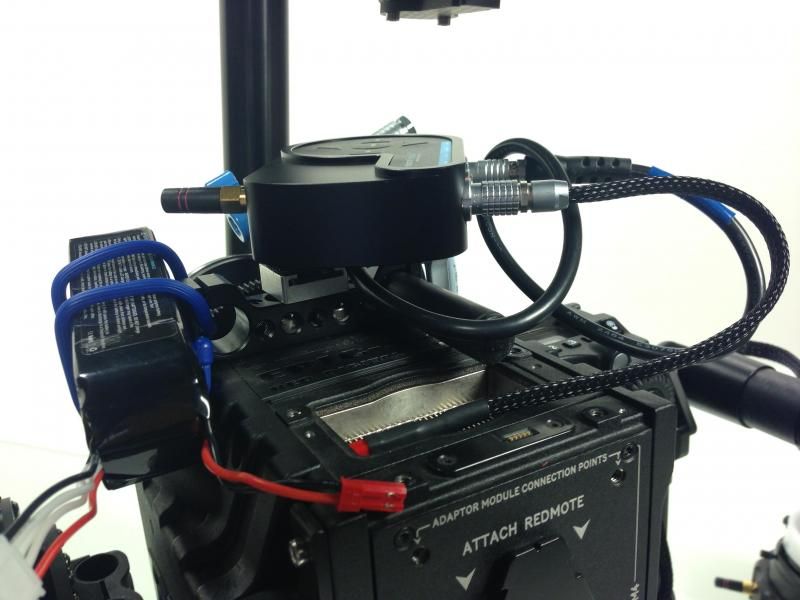
Here's a few snaps of how I am mounting the follow focus rig. On the top of the camera is a small 15mm LWS bracket from WC.
image-6_zps5a01548c.jpeg


On top of the 15mm Bracket, there are a few extra 1/4-20 taps, so I screwed in the WC cold shoe mount. I dug up a little Cold shoe adapter in my bits and parts and screwed that into the back of the Redrock base station.
image-5_zps84001fe4.jpeg

image_zpscb34ad62.jpeg


On the other side, I have a Freefly Lipo to power the Redrock. I bought two extra batteries when making my final payment on the M10, as well as the Lipo to 2pin Lemo adapter cable for the redrock (this only works if you have a follow focus kit that is newer than Feb 2013, btw. Cable isn't plugged in in this picture). I had to improvise tonight and hold the Lipo to the 15mm bracket with a rubber Gear Tie, but I plan on using a little velcro strap to just mount the battery to the other 15mm rod. The rubber tie definitely didn't work, the battery kept shifting and screwing with the balance.

image-7_zps8e100296.jpeg


image-1_zpsf22b5eaa.jpeg


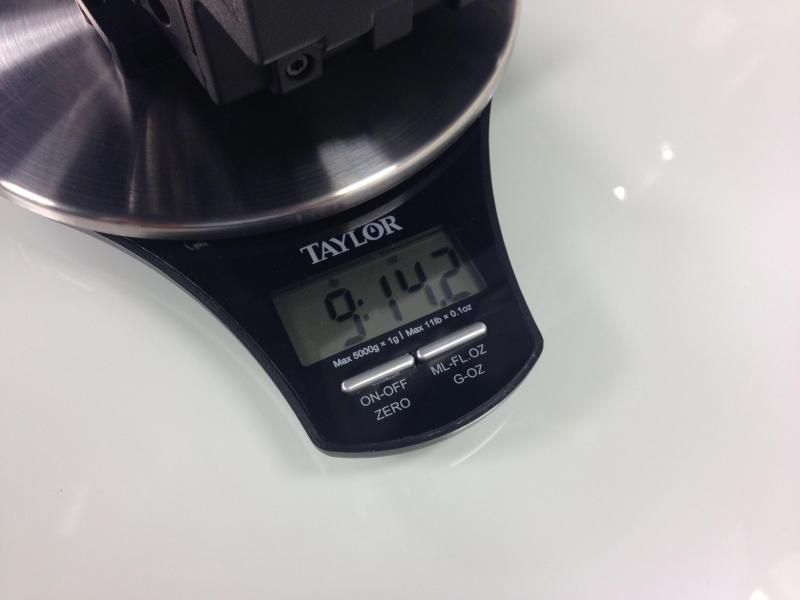
When all is said and done, the camera setup only weighed just under 10lbs. (I got a little food scale from Target, 11lb max on this one. Comes in super handy). BTW, I also have the Viewfactor top plate for the Epic and plan on keeping it on the camera. I took it off originally to save weight, but when I realized I was barely at 10lbs, I decided I would put it back on the next time (The plate itself is like 2oz).

image-10_zpscfca34c5.jpeg


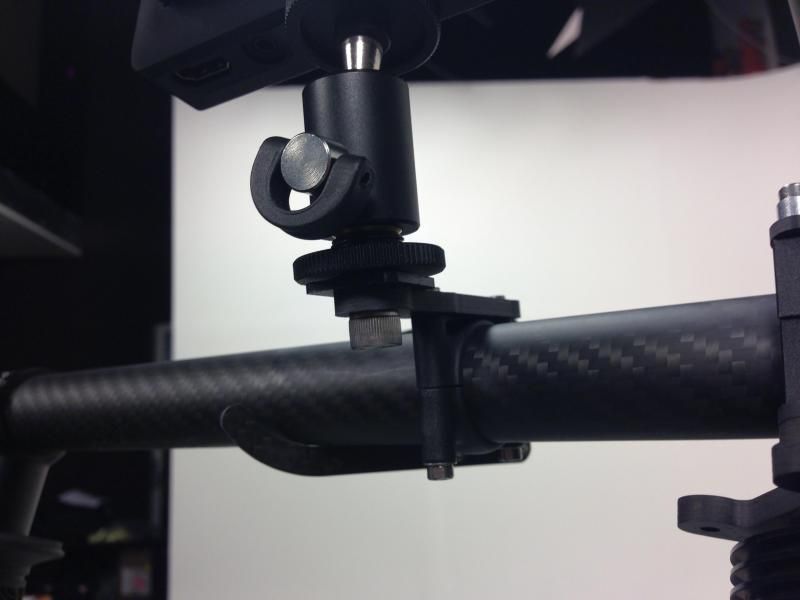
Also, for those wondering, it was very easy for me to mount my SmallHD DP4 to the included bracket on the handles. The little ball mount that comes with the DP4 also has a 1/4-20 tap on the underside, so I just screwed a short 1/4-20 screw through the bracket into the mount.

image-12_zps12595852.jpeg


Ran out of time, so I didn't test the Paralinx tonight, but I plan on powering it off the USB port from the DP4, as well as feeding it a signal from the DP4 HDMI passthrough port. Should be a super handy way of running it all together.
 
I'm game to see how the Lipos can and might power an Epic.

How light can we be and also can steadicams hook up to it or tripods on wheels?!

Also wanna see how it stabilizes inside a movie car (perhaps shooting the driver)?!

Looking forward to seeing your gear in action!
 
I haven't yet Austin. Hoping for any day now. Just trying to be proactive in getting all this put online because I plan to do a lot as soon as I get it!
 
Wow, nice! Fellow RED + Movi users unite.
Have you guys prepped up all your wireless solutions?
 
Here are some production version images Tabb posted on the Freefly forum. Looks almost like we might have some 15mm mounting options going on there.

FF1.jpg


FF2.jpg


FF3.jpg


FF4.jpg


FF5.jpg


FF6.jpg


FF7.jpg


FF8.jpg
 
Last edited:
FYI Image/links don't show unless you've joined the Freefly forum.
 
These should display. Nothing too revealing though.
 

Attachments

  • _MG_8812.jpg
    _MG_8812.jpg
    81.1 KB · Views: 0
  • _MG_8811.jpg
    _MG_8811.jpg
    64.9 KB · Views: 0
  • _MG_8809.jpg
    _MG_8809.jpg
    80.8 KB · Views: 0
  • _MG_8802.jpg
    _MG_8802.jpg
    72.5 KB · Views: 0
  • _MG_8790.jpg
    _MG_8790.jpg
    78.3 KB · Views: 0
A few more.
 

Attachments

  • _MG_8777.jpg
    _MG_8777.jpg
    76.1 KB · Views: 0
  • _MG_8770.jpg
    _MG_8770.jpg
    84.1 KB · Views: 0
  • _MG_8769.jpg
    _MG_8769.jpg
    88.3 KB · Views: 0
  • _MG_8766.jpg
    _MG_8766.jpg
    75.3 KB · Views: 0
Thanks for setting this thread up Jonathan.

Charles, Reduser Brad Allen and I are looking at a Paralinx arrow plus. Terrific reviews everywhere and excellent price point.
RedrockMicro Wireless FF bundle as well. (Don't know how many times I've looked at the Groupbuy thread hoping i would read a round 2 was in the offing.)
How about you?

Anyone have any ideas for a cable solution to be able to use the Red touch as the current RED lemos are too sturdy apparently?
 
Regarding video out: I think I will try a simple long SDI or HDMI cable to a portable monitor lile a Marshall or something.
Tthe user feedback about the Teradeck frightens me off wireless video.
The question is wether the cable will disturb the MOVI or not.

Jochen
 
I wouldn't be scared off about wireless Jochen. Lot of people around using it very successfully. But I "think" most people are using it for the remote ops, not for the actual MOVI op?
The two people I have spoken directly too anyway about their setups were using HDMI cabled monitors with their rigs.
Hard to tell with what looks to me like a DP4 Tabb is using whether it is attached via HDMI... but I'm guessing so...

dsc00605.jpg


The question that Corey very generously answered for me regarding his Burton snowboard shoot with the MOVI may be of use interest to some on this thread - so I've cut and pasted below.
http://www.youtube.com/watch?v=AlUfT2ZWSUY
Note Jochen that Corey says they used a DP4 via HDMI on board the rig.


"Hey Liam, Stoked to meet another Future Movi Operator. So far I have personally been on 4 completely different shoots with the MOVI and the boys at the office have been in the field for the last 3 months consitently shooting with the MOVI. The M10 has come a long ways since NAB. It is has gotten very easy to balance and set up and I am sure you will be blown away with what you can accomplish. I will try to answer qusestions as best as I can."

How do you find the weight with a long one shot like the factory scene?

The weight is definately a slight issue but not bad. Fully rigged out with an Epic, SideHandle, redvolts, MOvi, CP2 glass and monitors and Teradek w were running around 15lbs. The first shot was about 2.5 minutes long and was holding it 2 minutes of that with all the passoffs we did. Basically get yourself to a gym. Steadycam guys take care of themselves and being in slightly good shape you will be fine.

Have you tried it with an easy rig or on an arm?

I actually just used the MOVI for some 15min interviews with the Easy Rig. Works amazing! If you aren't doing huge moves I would say an EASY Rig is an easy choice to have in your arsenal.

What monitor and cable set up were you guys using with your Epic?

For Monitoring we had a Small HD DP 4 onboard for reference via HDMI. Then we used the Teradek Bolt to broadcast via SD-HDMI to our controler as well as an AC with a third monitor to pull Focus. My personal setup consists of an Atomos Blade on board for monitoring and the ability to capture Pro-Res. My monitor for the controler panel is a DP-7 Pro and my third and Fourth monitors for my AC and Director are also both AC-7 from Small HD with Teradek Bolt HD-SDI receivers

How "tricky/fiddly" do you think it is to have on set?

The intial setup for you shoot take roughly an hour to get all geared up and balanced. Once you have your M10 all configured on set the MOVI becomes basically hassle free. I usually just use a C-Stand to let the MOVI live in on when not in use.

I've been hearing a few people say it's niche will be for "specialty" shots, whereas some are clearly looking/hoping it to be a bit more of a one stop grip shop, love your thoughts on this?
Some have posted that they thought it would not work well for slow/gradual shots. What has your experience been?


I basically use the MOVI for as much as possible when I am looking for Movement. You could easily shoot an entire commercial or Movie on the MOVI if you want to. It really depends on the look you are going for. All I can say is don't let other influence you. Once you get this thing in your hands you will quickly realize its amazing range and potential. There is no doubt in mind it will change the way you approach shots and will save massive amounts of time on set or in the commercial world

What do you make of majestic mode - and what is your preferred set up operator wise? One op, one remote control, one on focus?

I have not had a huge amount of time on Majestic mode but it is a powerful asset. I am heading to CHile in a few weeks to shoot a bunch of Skiing and Snowboarding with the MOVI. The few times I have used Majestic it has worked beautifully and you can make ajustments to how the MOVI reacts to your movements in Majestic mode via the FreeFly GUI

Finally, how robust do you think it is to the general rigours and wear and tear of shooting?

The MOVI M10 is very robust. I mean you can't drop it off a building or anything but all in all I have had no problems with its realiability. Last week we were in New Mexico shooting BMX for Red Bull. We were running around all day in the Sand and Dirt, transporting it in cars, hanging out of Helicopters and using Razors to get high speed tracking. The M10 worked magically.
 
Yes that's my planned configuration also. Although I'm having a hard time figuring out how to power the camera, paralinx, AND remote FF without resorting to V-lock batteries which obviously would exceed the weight limit. However, I keep seeing pictures of Freefly using these setups, so I know it's possible. The fact that they have thus far not released any specifics on this kind of stuff or the operation of the thing in general is exceedingly frustrating.

Thanks for setting this thread up Jonathan.

Charles, Reduser Brad Allen and I are looking at a Paralinx arrow plus. Terrific reviews everywhere and excellent price point.
RedrockMicro Wireless FF bundle as well. (Don't know how many times I've looked at the Groupbuy thread hoping i would read a round 2 was in the offing.)
How about you?

Anyone have any ideas for a cable solution to be able to use the Red touch as the current RED lemos are too sturdy apparently?
 
Back
Top