Welcome to our community

Be a part of something great, join today!

  • Hey all, just changed over the backend after 15 years I figured time to give it a bit of an update, its probably gonna be a bit weird for most of you and i am sure there is a few bugs to work out but it should kinda work the same as before... hopefully :)

Monkey Extract Questions

Multiple EDL support

Multiple EDL support

Hi There,

I was wondering if anybody can help. I need to know if there is some sort of multiple EDL support for RM.

I render a lot of DPX. sequences from EDL's made in AVID, and they are often different versions of the same edit.
This means that in each EDL some shots remain the same, and a couple change each time.

How do i avoid rendering duplicate shots for each EDL, without manually working out which shots havn't changed, and then unticking them?

ANy help will be appreciated

Thanks,

Shaun
 
You're looking for change list management which is more complex. Also, some workflows want new DPX's for the entire shot that has changed and not just the delta. Avid FilmScribe does provide change list management and we are just getting to the end of the Scan Change as XML. Once that is done, it will be available for third parties to use in their pipeline.

Michael
 
Hi There,

I was wondering if anybody can help. I need to know if there is some sort of multiple EDL support for RM.

I render a lot of DPX. sequences from EDL's made in AVID, and they are often different versions of the same edit.
This means that in each EDL some shots remain the same, and a couple change each time.

How do i avoid rendering duplicate shots for each EDL, without manually working out which shots havn't changed, and then unticking them?

ANy help will be appreciated

Thanks,

Shaun

Shaun,

Simple idea is to have all sequence in single Timeline and remove duplicate shots/frames and start rendering out.
 
Is the new REDLINE built supposed to work with Monkey Extract and the RED ROCKET?
 
Hi guys, I'm having some a problem with monkey extract. When I start the application it says that I have a un-tested version of Redline and that I should go with Red Alert 3.60. All seems to be working but the fact that I can't chose ProRes LT in the rendersettings - I can just chose between SD or HD. If I downgrade from the latest version to 3.60 the error message in the beginning dissapears, but LT is still missing. Is there something I'm doing wrong?
 
The previous build of REDLINE with RR support was working, but I'm asking if the latest REDLINE work with the latest REDLINE or not.

I do get some information that the later REDLINE development is influencing the 3rd party development not so well.
 
Monkey Extract Crash

Monkey Extract Crash

I'm trying to export DPXs with monkey extract and I'm crashing every time. It's worked every day up to today.

- I've tried many versions of monkey extract including the betas.
- I've tried the current, the beta, and many of the older versions of the redcode codec.
- I've tried exporting as xml, edl, I've cut the sequences down to only one clip, still no luck.
- I've tried several versions of redline, (although I need the most recent to avoid getting those yellow shifts)
- I've tried changing the processors to 1,

I've tried just about every combination of render settings I can.But crashes every time when it's generating thumbnails just as it's about to go to that list view screen. Please help me, I'm pretty desperate to get these clips out today. My last resort is to go over to another machine, but I don't know if monkey extract will allow me to open on another machine. with the license I have. I'm quite sure the problem has to do with the codec crashing when it's trying to render thumbnails. I hate these thumbnails, they've crashed me more than they've helped me, I wish there was an option to turn thumbnails off. I know it's a big feature and other people want it, but... Well anyway, any help would be really really appreciated.

Thanks in advance,
Danny
 
I'm trying to export DPXs with monkey extract and I'm crashing every time. It's worked every day up to today.

- I've tried many versions of monkey extract including the betas.
- I've tried the current, the beta, and many of the older versions of the redcode codec.
- I've tried exporting as xml, edl, I've cut the sequences down to only one clip, still no luck.
- I've tried several versions of redline, (although I need the most recent to avoid getting those yellow shifts)
- I've tried changing the processors to 1,

I've tried just about every combination of render settings I can.But crashes every time when it's generating thumbnails just as it's about to go to that list view screen. Please help me, I'm pretty desperate to get these clips out today. My last resort is to go over to another machine, but I don't know if monkey extract will allow me to open on another machine. with the license I have. I'm quite sure the problem has to do with the codec crashing when it's trying to render thumbnails. I hate these thumbnails, they've crashed me more than they've helped me, I wish there was an option to turn thumbnails off. I know it's a big feature and other people want it, but... Well anyway, any help would be really really appreciated.

Thanks in advance,
Danny

Hi Danny,

It is likely that the redcode quicktime codec is crashing when Monkey Extract asks quicktime to render the frame. Are you using the latest redcode intall from red.com/support ?

I have already added a "disable thumbnails" option to the next version that is now in testing. At some point I will ditch the redcode codec and just render my own thumbnails. This version is now in testing with redline 261 and will hopefully be out soon (provided all the redline bugs are fixed).
 
Yeah, I've tried all different codecs, including the most recent. I'm either getting it from the final cut studio 3 installer or from the version history/1 folder on their site. Maybe you could you post a link to the one that works best?

And gee, I'd love to get my hands on that test version of monkey extract where you can turn off thumbnails. If possible, could you please email me at barone998@hotmail.com. Otherwise, I'll keep checking here. Thanks so much for the quick reply, I really appreciate it.

Danny
 
update

update

I found that beta on your site (with the disable thumbnail option). It didn't help, I'm still crashing in the same spot right after it's through the scanning folders screen. If it's a problem of the codec, exactly which version of that codec runs best with monkey extract? and what does "disable redline output" mean? I never noticed it before. Anyway, I'm going to see if I can try another machine now.

Danny
 
So, I'm on another machine now. Still no luck. I'll write again if things get better.

Danny
 
Alright, when I re-install red-alert it works. Problem is, my exported footage looks yellow and wrong again (mysterium-x related stuff I guess, I don't know). Then when I re-install the latest redline from the redcine download link, it works again normally, colors are correct etc. Horray!

Anyway, maybe this all has to do with redline? Either way, that's what fixed it.

EDIT** So, in case anyone else is having this problem, it is related to the retrieving of the metadata somehow. You have to install red alert, open your xml in monkey extract, start to process your footage (even if it looks yellow or wrong), then cancel it, then quit. Then you have to re-install the new redline from the latest redcine, then open that same sequence, and now that the thumbnails folder is already built so it will load up and start processing correctly.
 
Last edited:
Hi

Anyone have a date (vague or firm) for the release of the latest Monkey extractor capable of dealing with latest Red builds?

I'm working around this at the moment but I'd like to know if I should just move on in our workflow (ie permanently exclude ME from our process)??

What are others thinking??

thanks

Michael
 
Avid MC4 -> Monkey Extract -> Lustre Workflow

Avid MC4 -> Monkey Extract -> Lustre Workflow

I've got a workflow query, conforming an edit for grading in a Lustre, hoping someone might be able to help me out!

Film was cut in Avid MC4, exporting the EDL in the RED16 Type to Monkey Extract. Monkey Extract renders the DPX filenames based on the frames used from the R3D files and generates a new edl that links to these files. Great!

BUT the post-house that is handling the grade with wants each spool supplied as a sequential DPX sequence. Therefore I need a method to render the first frame in the EDL as "sp01.000001" and so on...and for later reels I can manually set the start frame number.

From what I can tell MonkeyExtract isn't setup to work this way, but if someone has a suggestion as to how I can achieve this I'd love to hear from you. Our current workaround theory involves:

1) Export Filmscribe XML instead of RED16 EDL
2) Use MonkeyExtract to render these files into DPX's (individual folders)
3) Bring the XML that MonkeyExtract generates into After Effects CS5 and use this program to render out the clips in sequential order.

Thanks for your help!

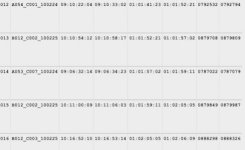
I've attached a screenshot of the thumbnails screen which includes all the information we need. The EDLs and XMLs seem to truncate some of this information (as far as I can tell...I could be wrong). Is there a simple way to save the information i'm seeing displayed here?
 

Attachments

  • MonkeyExtractInfo.jpg
    MonkeyExtractInfo.jpg
    15.2 KB · Views: 0
Last edited:
Hmmm, it seems that version 3.100 doesn't support any REDline above v21.0. I had REDline v262 (from REDCINE-X package) installed but Monkey said "No redline installed" at start. And then didn't want to render.
Do you have any workaround?
After I replaced v262 with old v210 RED-Alert package everything is OK except yellow tinted output from MX cameras.
Is there a plan to new version?
 
We have a new version of Monkey Extract in testing.
We've struggled with a few key bugs in the recent redline releases so its been a long time coming. It is looking close this time though.
 
Back
Top