Welcome to our community

Be a part of something great, join today!

  • Hey all, just changed over the backend after 15 years I figured time to give it a bit of an update, its probably gonna be a bit weird for most of you and i am sure there is a few bugs to work out but it should kinda work the same as before... hopefully :)

Mixing different ISOs in resolve

Jesse Rambis

Well-known member
Joined
Aug 13, 2013
Messages
93
Reaction score
0
Points
0
Hi Everyone,

I wanted to see if it was possible to mix different isos in Resolve... For example, I have a shot where the highlights look perfect at 100iso, but everything else is significantly under exposed, then at 1000iso the midtones and everything else is right where I want it, but the highlights are blown out (see attached images). Is it possible to combine these two exposure into one shot within resolve?

 

Attachments

  • 100iso.jpg
    100iso.jpg
    87.4 KB · Views: 0
  • 1000iso.jpg
    1000iso.jpg
    92.8 KB · Views: 0
That is unnecessary. Pick a single ISO value which gives a balanced signal distribution and adjust shadows/mids/highlights.
 
What Hrvoje said. Or use masks/power windows.
Plus, why didn't You light (better)?
 
I tried that initially, but it didn't yield the results I was looking for - the roll-off between the midtones to shadows or highlights was very "crunchy" and it never look quite right. Is it possible to create two nodes where the ISO is 100 on one and 1000 on the other within resolve and then mix them?

No lighting on this one, its a DR and post test.
 
I think you'd need to use two video layers and then come up with a way to blend them if you wanted to do this and the results could be unexpected in the transitional areas, unless you had a hard separation between the areas of dark and light.
If you are talking just about the shot you've attached, it does look like you should be able to pick ISO 400ish and then brighten the subjects a little and darken the edges of the frame with power windows easily enough.
 
I tried that initially, but it didn't yield the results I was looking for - the roll-off between the midtones to shadows or highlights was very "crunchy" and it never look quite right. Is it possible to create two nodes where the ISO is 100 on one and 1000 on the other within resolve and then mix them?
No, but it is possible to use power windows to balance the various factors together. No amount of color correction can fix bad lighting; having sufficient fill is important for all cameras (Red included). As long as there's enough fill, you don't have to worry about loss of detail depending on how contrast is added during final color.

Andrew has the general idea above.
 
I tried that initially, but it didn't yield the results I was looking for - the roll-off between the midtones to shadows or highlights was very "crunchy" and it never look quite right. Is it possible to create two nodes where the ISO is 100 on one and 1000 on the other within resolve and then mix them?

No lighting on this one, its a DR and post test.

If it's a DR and post test, I suggest testing how to do it the proper way instead of having to compensate with acrobatics. The latter is cool for exploration but not for compensation. Not sure what "crunchy" means to you but if it didn't feel good you did something wrong, or just didn't spend enough effort on finesse.
 
I tried that initially, but it didn't yield the results I was looking for - the roll-off between the midtones to shadows or highlights was very "crunchy" and it never look quite right. Is it possible to create two nodes where the ISO is 100 on one and 1000 on the other within resolve and then mix them?

No lighting on this one, its a DR and post test.

Ah...
Use different gamma space then! RLF is cool. Log3G10 too.
Manually create contrast (Contrast, Curves, Levels, Alchemy...) and pop Saturation to Your likings! Or somethin'...:biggrin:

P.S.
Don't know about two nodes, never used Resolve. :ack2:
 
Use one layer with low iso one with high and a key in layer in between that let the low iso into the highlights and the high iso into the lowlights and then grade the key layer so it blends to your liking.
 
No, but it is possible to use power windows to balance the various factors together. No amount of color correction can fix bad lighting; having sufficient fill is important for all cameras (Red included). As long as there's enough fill, you don't have to worry about loss of detail depending on how contrast is added during final color.

Andrew has the general idea above.

This ^

Now, there are cases where you really do have a truly high dynamic range scene and you truly do want to map that high dynamic range into a narrower dynamic range. For example, to capture some detail in the sky, good exposure on the main subject, and some details in the shadows. HDRx and tone-mapping can help. What you don't want to do is to try to correct an erroneous lack of illumination of your subject that happens to be in the shadows against a super-bright background and try to construct, in post, the lighting you should have gotten right during the shot.
 
Great, thanks for all the input everyone - Marc I think hit the nail on the head. I'm going to do a few more test and will post results.

BTW - I did manage to get better results in RLF with an ISO of 500, and a few power windows, but was not exactly what I was hoping as a result.
 
Use one layer with low iso one with high and a key in layer in between that let the low iso into the highlights and the high iso into the lowlights and then grade the key layer so it blends to your liking.
I think that's way, way more complicated than it needs to be. There should be enough information in a RedLogFilm signal to be able to seamlessly compensate between foreground and background without that much trouble.

If the o.p. can post a few frames of the R3D, I'm sure some tests could be done.

Looking at the images again, I think everybody has to balance what the realities are with key-to-fill ratio, which is a very basic principle of lighting. Adding more fill will help reduce the noise in the picture and will allow you to take the ISO down, basically matching the faces and background a little more in terms of level. The answers aren't always technical; often I think the answer boils down to "use more light." Shooting tests prior to production will tell you very quickly what the real-world dynamic range of the camera is.
 
So.......

How do you have the same shot twice in a sequence with two different ISO settings?

I know how to use remote and local grades but....

haven't worked out how to have two clips from the same source have different ISO settings. Any tips???
- no love in the manual
- haven't found an answer online

cheers
 
So.......

How do you have the same shot twice in a sequence with two different ISO settings?

I know how to use remote and local grades but....

haven't worked out how to have two clips from the same source have different ISO settings. Any tips???
- no love in the manual
- haven't found an answer online

cheers

You'd need 2 video tracks.
 
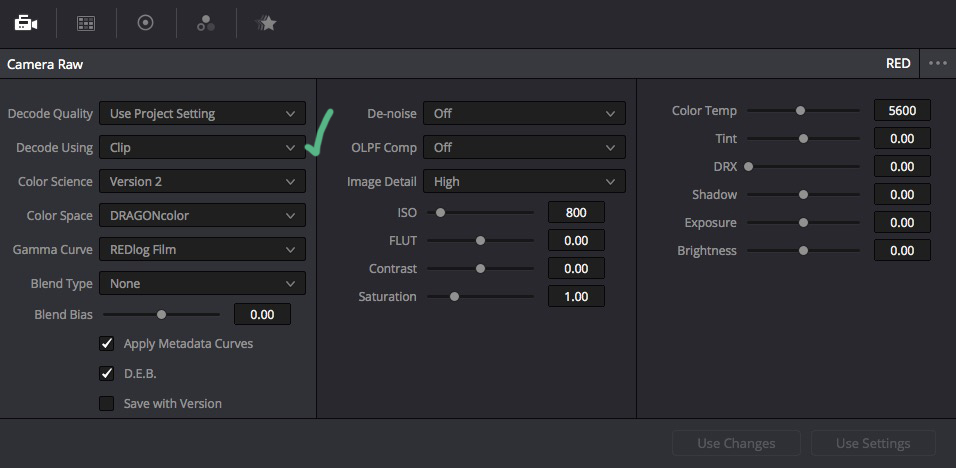
You can set the parameters for any individual clip in Resolves color room. So If you want to stack a clip five times based on opacity and color windows with different ISO settings for each clip you can, but as the guys mentioned there are better ways to do that. :)

it is handy for the odd shot where you want to redistribute the middle grey values. THe other thing to keep in mind is that the RED ISO slider is not linear (like "real" ISO). it has a soft knee and shoulder so you will see things getting clamped down in the blacks or the whites depending on if you are pushing or pulling a shot.

David


resolve01.jpg
 
You can set the parameters for any individual clip in Resolves color room. So If you want to stack a clip five times based on opacity and color windows with different ISO settings for each clip you can, but as the guys mentioned there are better ways to do that. :)

it is handy for the odd shot where you want to redistribute the middle grey values. THe other thing to keep in mind is that the RED ISO slider is not linear (like "real" ISO). it has a soft knee and shoulder so you will see things getting clamped down in the blacks or the whites depending on if you are pushing or pulling a shot.

David


resolve01.jpg

Just to clarify: You can only have 1 raw setting per clip, these settings are prior to any nodes. So if you want different raw settings within the clip, you need to stack video tracks with copies of the clip, so not very convenient...
 
1 ISO setting per clip. But if you have 5 instances of that clip you can have 5 different ISO's

David
 
Back
Top