Welcome to our community

Be a part of something great, join today!

  • Hey all, just changed over the backend after 15 years I figured time to give it a bit of an update, its probably gonna be a bit weird for most of you and i am sure there is a few bugs to work out but it should kinda work the same as before... hopefully :)

Learning proper exposure!!!

AGREED. Post process is MUCH more film-like. Exposure however (IMHO) is more video-like. Difference is you can pull so much more out of the underexposed areas of the RAW Red images than you can with a typical video cam.

Exactly. The trick is knowing how much you can pull up your mids before they start getting too much noise, particularly in a high contrast setting.
 
Shooting film especially with the newer Vision stocks, one should always protect your highlights, no info means no info, while it can really see into the shadow detail.
Furthermore the newer TK machines such as spirit 2k's etc do prefer a thinner neg as opposed to older machines that thrived with a thicker neg.
 
I'm having a lot of trouble getting this through my head.

I think someone needs to really explain this, with examples and illustrations, for the community.

I've always tried not to clip, but my main concern was always my subject, and I wanted him as high in the histogram as possible while compromising on how much I was clipping the sky, etc. How do you know when your subject is too dark?
 
Who was it that created an in-camera setting that allowed you to view a preview of a "pushed" curve as you shot?
 
anyone can do that in the video menu. I don't really know what I'm doing with that so I leave it alone, but it's there.
 
I think what is needed is a third video that discusses post processing on an introductory level and makes comparisons between the footage shot by the host and the footage shot later with Ted. Show basic color correction on some of the clips and demonstrate how flexible the properly exposed footage can be.

The best thing to keep in mind when exposing your image on the RED One is to shoot a "full histogram". Always be mindful of the right side of the histogram, expose to the right, but stop just before you clip, watch for the RGB "traffic lights".

I would very much like to see some of those post videos as well.
 
In the first video, he turned the camera to 50 ASA or something and that's why his highlights were all gone.

In the second video, Ted shot it right, but something was up with the post processing where the blacks were all crushed. Better, but still screwy.
 
Any chance to see the color corrected footage that Ted shot.. Still waiting..
The second video is great... but .. we need to see the results.
So please don't let this good job without a finale.
 
after watching the two videos..
well, I think this style of underexposing an image to protect the highlights in raw format shooting came actually from styles of nikon and canon still camera's .. as they tend to act the same way in exposure..
I agree totally that each camera have its own secrets to get the best out of it.. and you have to follow this secrets/techniques to get your image right..
one thing I thought of is this style is not really apply-able on every RAW format shooting camera as I said in the beginning of this post its nikon/canon style..
for example.. (maybe the only i can mention now) fujifilm digital camera's with SuperCCD SR.. they tend to protect the highlights by expanding more DR..
I'll post a sample test as soon as I finish it..
btw, we are talking how to expose RAW style shooting and I'm not comparing cameras..
 
I too would like to see a 3rd video, the color corrected result of what Ted shot. You could see in the HD camera it was pretty bright, but in the RED the images looked so dark. I would like to see what is possible with these dark images when all is said and done.

Please post a finished 3rd video if you can find the time.

Thanks,
 
Fuji S20 Pro DR test

Fuji S20 Pro DR test

OK test files are ready...
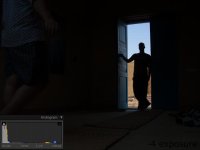
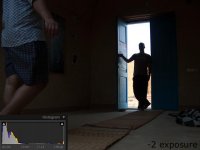
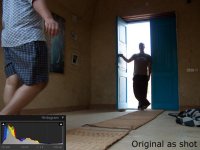
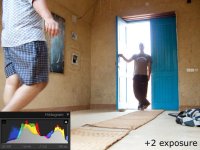
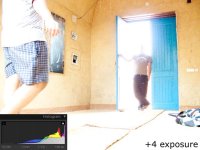
I know that this image isn't a very good one to show but I really found it optimal for showing how this amazing DR camera performs and to point out that not all RAW style shooting needs under exposing the image.. but add to your considerations that:

1- this was shot using Fuji S20 Pro ... this a 5 year old camera with 6 megapixels using SR technologie means 3 mpixels bright and 3 mpixels dark.. technologies have grown too much in those 5 years..

2- its cheap non professional grade like SLRs in perfomance.. and of course with fixed zoom lens.. which means (at its price point) a very low quality optics.. but actually the sensor rules in DR capturing..

3- the shot was taken in a very bad conditions dark inside blown outside.. harsh enviroment to get well exposed image..

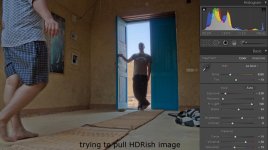
I got the original .RAF (Fuji RAW file format) tried to do some variations under and over exposing using Adobe LightRoom.. the +/- exposure values imposed over the image reference to the number being shown beside the exposure slider in lightrom..

the HDRish look I tried to do.. isn't representing a good final image to impress people with the image its just to show how much DR you can put when the image is baked down using no spatial algorithms.. maybe if one tried shadow/highlight control in PS there would a better representive image ..

thanks to all you, hope this test is useful

PS: the HDRish try is on the next post.. maximum allowed files are 5.. so I had to do this..
 

Attachments

  • minus-four-exposure-slider-image.jpg
    minus-four-exposure-slider-image.jpg
    36.3 KB · Views: 0
  • minus-two-exposure-slider-image.jpg
    minus-two-exposure-slider-image.jpg
    47.3 KB · Views: 0
  • Original-image-as-shot.jpg
    Original-image-as-shot.jpg
    65.4 KB · Views: 0
  • plus-two-exposure-slider-image.jpg
    plus-two-exposure-slider-image.jpg
    81.2 KB · Views: 0
  • plus-four-exposure-slider-image.jpg
    plus-four-exposure-slider-image.jpg
    71.5 KB · Views: 0
Fuji S20 Pro DR test continued

Fuji S20 Pro DR test continued

last image... :-)

EDIT: btw.. if any one wants the original .RAF file to try with.. just pm me..
 

Attachments

  • final-image-HDRish look.jpg
    final-image-HDRish look.jpg
    76 KB · Views: 0
Me too, but not just color corrected, but corrected by someone who knows what they are doing with Red RAW footage.

I'm am sick and tired of the post houses doing their supposed "side-by-side" tests but massacre the RED footage because they have no experience with it.

I too would like to see a 3rd video, the color corrected result of what Ted shot. You could see in the HD camera it was pretty bright, but in the RED the images looked so dark. I would like to see what is possible with these dark images when all is said and done.

Please post a finished 3rd video if you can find the time.

Thanks,
 
Thanks Luca, that was a good read.

I guess the hard part is that you have to protect the highlights, but make sure you haven't underexposed at the same time, or you will get the horrible noise artifacts...

And another thing, when Ted pulled the mids down to protect the highlights, do you automatically need a grading tool with secondaries to process? Can't do it with Red Alert or you will blow the highlights out again when you pull up the mids.

In other words, you need to be able to isolate the highlights and set them differently to your mids?
 
And another thing, when Ted pulled the mids down to protect the highlights, do you automatically need a grading tool with secondaries to process? Can't do it with Red Alert or you will blow the highlights out again when you pull up the mids.

Ted didn't pull the mids down, he pulled the exposure down.

You only need primary grading to pull your mids back up and create an appropriate gamma curve with good contrast.

To fully understand how this works you need to have a play with some footage and see how much detail you can retain in your highlights whilst lifting your mid-tones to the correct level and maintaining good solid blacks.
 
Ted didn't pull the mids down, he pulled the exposure down.

You only need primary grading to pull your mids back up and create an appropriate gamma curve with good contrast.

To fully understand how this works you need to have a play with some footage and see how much detail you can retain in your highlights whilst lifting your mid-tones to the correct level and maintaining good solid blacks.

Yes, and with build 20 and new color science this is easier as you have less and "better" noise.
 
Back
Top