Welcome to our community

Be a part of something great, join today!

  • Hey all, just changed over the backend after 15 years I figured time to give it a bit of an update, its probably gonna be a bit weird for most of you and i am sure there is a few bugs to work out but it should kinda work the same as before... hopefully :)

KOMODO....

+1 on the flat look. The other one looks dated. The Red brand should be about moving forward. :)

Where do things stand on a clean feed vs feed with camera info? Is it toggle-able? Separate outputs?
 
Stanly, I love your idea. However - and I hope that Jarred considers this - there is a case for some kind of skeuomorphism:

https://daringfireball.net/2019/05/vibrant_tapdown_states

I agree. When Apple went to the super flat and square graphics/UI of iOS 7, I hated it. Absolutely hated it. It wasn't "clean and modern", it just looked and felt so cheap. Like Windows. Like someone handed it over to a designer and said re-make this like you would if it was for the government(as cheap, grey, boring and draining & taxing to use on the part of the end user as possible). I mean it was actually harder to see and differentiate items, so how in the world did someone think this was a good idea? We're talking about small items on a small cell phone screen. Easy visibility is a major requisite. Still not a fan all these years later.

Maybe old dogs like me really hate the flat style, because we've already been through it before. When that's all they could really pull off and it wasn't really a stylistic choice, but more of a technical limitation. Kinda like the high-waisted "Mom Jeans". I remember them the first time around in the 90's. The look was horrible even back then. Why in God's name are we going through it again? We're supposed to learn from our mistakes.
 
And of course those quick settings overlays:

attachment.php


There are a lot of usability possibilities here, especially with the Resolution & FPS UI & UX!

TBH, I had to look up what skeuomorphism means, but this does look very clean. My 2c:

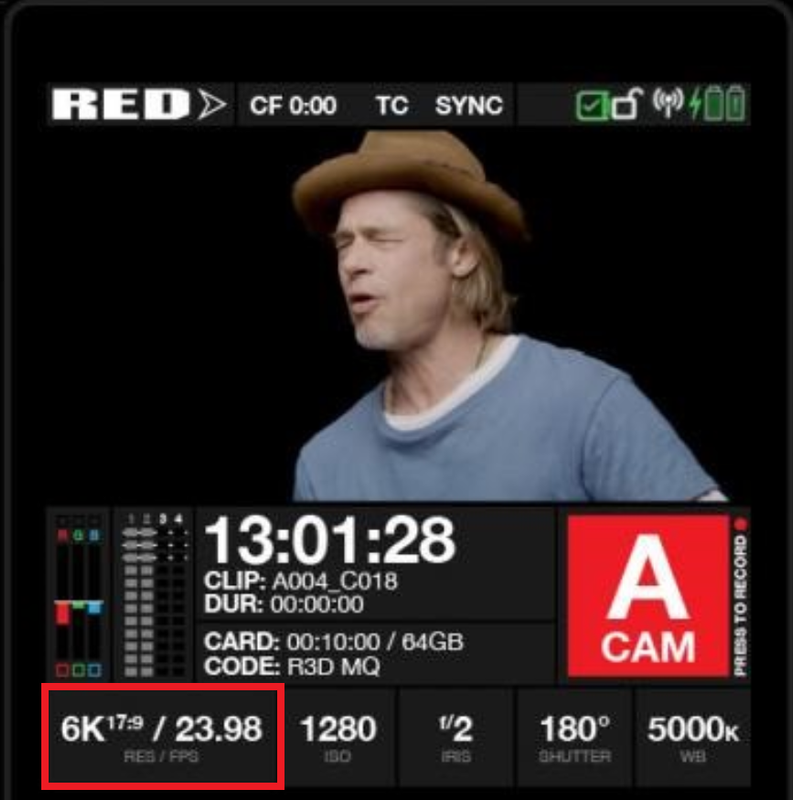
Shouldn't the RES/FPS each have their own button so their quick settings overlays are cleaner? Also for control via physical buttons.
Is the small grey RES/FPS, ISO, IRIS, SHUTTER, WB text necessary? Removing it may make space for two lines of info for things like 6K 17:9.
Maybe the A CAM button can go red when recording to make it really obvious you are rolling, and have a red outline or something when in standby?
Seems like a lot of space dedicated to "A CAM". Maybe DUR could appear inside the record button when rolling with A CAM small at the bottom of the button?
Is the CF 0:00 at the top not the same as CARD: 00:10:00?
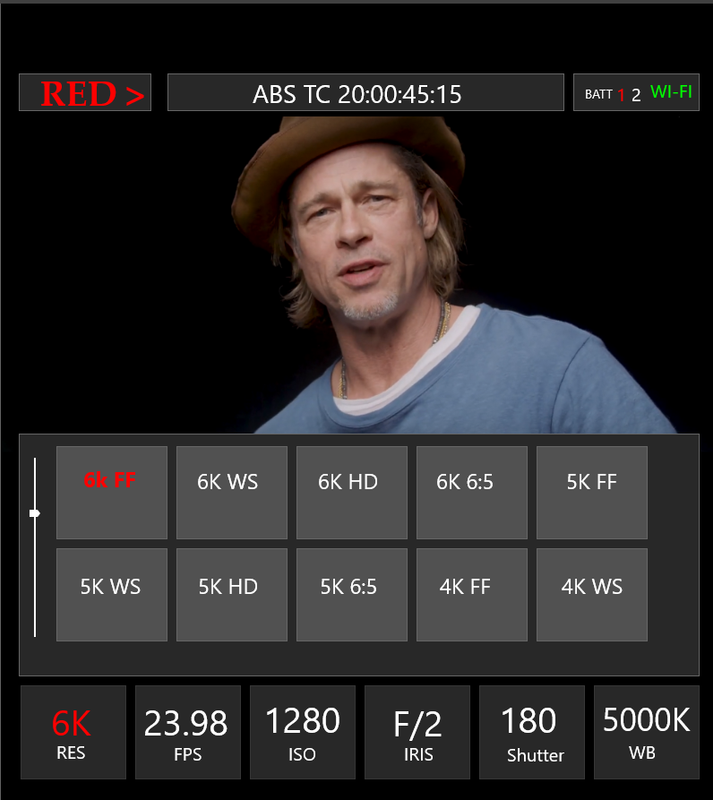
Love the quick settings overlay - nice to see all the options and just hit one rather than press then swipe to select.
Would be great if recording format and compression could also fit in the bottom menu.

Wondering how customisable this will be and if there will be a traditional histogram option?
 
+1 to flat and clean. BMD does some nice UI by the look of it (never used it).

You could always allow people to upload skins, back to full on winamp :)

Do we know what res that top screen is. I mean how awesome would it be if we could focus off it at a push!

I hope the wifi is solid. In my experience at the moment there is so much wifi clogging the air space that things get flakey very fast - from lights, to monitoring to audio. Sometimes i wonder if bluetooth is a better bet (too late for that i'm sure)

cheers
Paul
 
I like the scrolling tape for ISO adjustment, especially if it allows for 1/3rd stop increments. That would be a complex mess in a list or table format and likely need scrolling through pages of tiny ISO buttons.
I also like the idea of skeuomorphic buttons with clear state indications for functions with flat fields for fixed info display.
+1 for the giant pause symbol.
 
Like what you did here... good job and appreciate the effort. UI feedback input is welcome right now as I am torn between a few different overall directions. So speak up...

+ 1 more for flat and clean design similar to Stanley’s mockup.

Screen real estate is already at a minimum, the settings need to be as large and easy to read as possible. I don’t want my eyes or brain to be distracted (even on a subconscious level) when dialing in important settings that can make or break a shot.

Also, there’s a reason everyone definitively moved away from skeuomorphic-heavy UI design, with Apple actually being one of the last major players to do so with iOS 7, and that’s because of overwhelming consumer feedback along with psychological studies on design user experience.
 
+ 1 more for flat and clean design similar to Stanley’s mockup.

Screen real estate is already at a minimum, the settings need to be as large and easy to read as possible. I don’t want my eyes or brain to be distracted (even on a subconscious level) when dialing in important settings that can make or break a shot.

Also, there’s a reason everyone definitively moved away from skeuomorphic-heavy UI design, with Apple actually being one of the last major players to do so with iOS 7, and that’s because of overwhelming consumer feedback along with psychological studies on design user experience.

Which brings up something interesting: Why do some people then prefer skeuomorphic designs and find it much easier to read/see(of course comes down to the exact individual design)? Strictly using Apple/iOS7 as an example, because from what I’ve seen so far here, the examples and mock-up examples are completely legible. The nerd in me would love to see the psychological study(or summary) and explanation, because my user experience was different than the apparent broader consensus. I wonder what the age break-down is? i.e: is it more younger people preferring “flat” than older people or is it spread evenly or the opposite? And if there is a preference one-way or the other between male/female?
 
Why do some people then prefer skeuomorphic designs and find it much easier to read/see(of course comes down to the exact individual design)? Strictly using Apple/iOS7 as an example, because from what I’ve seen so far here, the examples and mock-up examples are completely legible.

Totally agree with you: age, cultural background... can influence the perception we have of skeuomorphism.
But it appears to me that people who try to oppose the two approaches really oppose two generations.
WinAmp/iOS 7 versus BlackMagic/Hasselblad...

In my opinion, there are old "flat and clean designs" as well as there is a new "skeuomorphic designs".

Komodo's UI has to be functional and fast, we'll all agree on that. IMO, it has to be original too.


7a42a3949bad55f66a9c7c7988332171--electronic-art-ui-inspiration.jpg


7a55ecdfacecd02dcb0a21ebe25feffe.jpg
 
If it’s an OLED display, make a less graphic intensive dark mode option... sure it might only give you 30secs more battery life, but I’d rather have that 30seconds than a flashy GUI.

And yeah, I prefer a simplified GUI with less clutter and the biggest possible display area... wouldn’t even mind a square aspect ratio when punching in to 1:1 focus assist (presuming you can record while doing so.)
 
Stanly,


I would be interested in how you would propose the "RES/FPS" selection menu would look if you have the time.

thanks!


Screenshot-1200.png
 
Removing our logo from anywhere is not an option.

Even on UI ?
I don't recall any DSMC's UI, and Red Ones too with a written RED in their menu home and yet, the Komodo has the smallest monitor.
Every users know which camera they are using without any brand on UI, just by looking at it.

But then, if space isn't needed, there is indeed no use to talk about saving space on UI.
 
Even on UI ?
I don't recall any DSMC's UI, and Red Ones too with a written RED in their menu and yet, the Komodo has the smallest monitor.

Good point, but remember, this will be RED's most accessible camera yet, therefore to remove logo when it has the potential to be put in the hands of most and seen by many more people, Jarred wants nobody to mistake the camera for somebody else's.

The button layout seems pretty solid to me, disregarding the physical appearance. Perhaps separating resolution and FPS but I imagine they are bundled together as to avoid confusion for the end user when they try to select one speed or resolution and can't figure out why 6K can't be consistent with 120 FPS. LOL

REMEMBER: With the launch of KOMODO, there is going to be a whole new user base who is new to RED and new to cameras who are entering the RED ecosystem with KOMODO. SIMPLICITY IS MOST IMPORTANT FOR THE IDEAL END USER IN THIS SCENARIO.

Just some thoughts, feel free to disagree!
 
Kinda like the high-waisted "Mom Jeans". I remember them the first time around in the 90's. The look was horrible even back then. Why in God's name are we going through it again? We're supposed to learn from our mistakes.
Fit young women look good in those '90s clothes. It's weird but they do! Men, however, should never roll up their trousers or tuck in their t-shirts. Please. Don't!


Bring back the '80s! Imagine a phone with this kind of interface.
 
I've forwarded RED and Jarred my GUI mock-up. I'm more or less with Stanly's effort in terms of creating a simplified UI, I've made a couple of critical changes however and I'm curious to see what is available at launch and "down the line" as things are refined.

Won't spoil much, but my suggestions were based around functionality, maximizing monitoring potential, and possible shortcut/hot key integration with a bit of clarity as to what's currently going on in that little Komodo brain.
 
Here's my attempt. Stanly, I hope you don't mind that I hacked up your image.

First image is interface while recording. Second is in standby (with a subtle functionality hint :).

EDIT: updated with a dotted line added to the histogram to roughly indicate raw exposure plus traffic lights.

CdlGX40.jpg


XwBzwMW.jpg
 
Last edited:
Here's my attempt. Stanly, I hope you don't mind that I hacked up your image.

First image is interface while recording. Second is in standby (with a subtle functionality hint :).

EDIT: updated with a dotted line added to the histogram to roughly indicate raw exposure plus traffic lights.

CdlGX40.jpg


XwBzwMW.jpg

Haha am pretty sure those metters won't be on the camera. At least I recall Jarred saying that due to the size and format of the screen they are trying something different.
 
"Jarred wants nobody to mistake the camera for somebody else's."


Then why u all trying to make it an android UI, cheap, flat. Please give me the EXTRA looking drop shadow which screams fun and expensive camera.

Please include a copy of mock up pro for anon users like "Stanly" and everyone else so they can make whatever the h-ll they want.

TBH, I quite like the bevels and details on the current interface. Just didn't add them to my attempt because it would look like crap if I tried to do it.
 
Plus, all the menus would look like Stanly's but with a "Scoll Wheel". I didn't know all of the corresponding resolutions for Komodo to put under each of the headings below.


Screenshot-1211.png

My first impression of this was "Yuck! Too much like my Panasonic GH5s!!". What I don't like about the Panasonic menus is that there are too many of them, strangely organized, and they try to do too much.

To me, things like base frame rate, format, shutter angle are very much project and/or scene specific. Good to know what universe we are living in, but not things I want to change willy-nilly. Iris, ND, WB, and maybe ISO are things that need to change on the fly.
 
Back
Top