Welcome to our community

Be a part of something great, join today!

  • Hey all, just changed over the backend after 15 years I figured time to give it a bit of an update, its probably gonna be a bit weird for most of you and i am sure there is a few bugs to work out but it should kinda work the same as before... hopefully :)

It this normal? 50fps/50fps on scarlet mx playbacks 200%speed!

Lluís Velamazán

Active member
Joined
Aug 14, 2013
Messages
30
Reaction score
0
Points
0
Hello!

I ve worked in a project where we shot at 50 fps project frame rate and 50 fps recording frame rate in order to get twice the frames in one second than 25fps as requested by VFX dept to have more info to work on the greenscreens we shot.

But it result in a playback at fast speed(x2) in redcineX and Davinci Resolve in projects with a 50fps timeline.

When changing the timeline fps at 25 fps it playbacks at normal speed but there s 25 frames in a second not 50fps as intended.Any reason why is this happening? perhaps we had to be shooting 25fps project frame rate and speed it up at 200% in a 50fps timeline sequence? Or Ive setted up camera properly and it is the camera/meda thats failing?

Thank you very much.

Lluís.
 
50 frames is 50 frames.
Whether you shot it at a timebase of 25 or 50 or 23.98 you asked the camera to shoot 50 frames per second. The frame count is still 50 so this makes perfect sense to me. You play 50 frames back in a 25 FPS sequence then it is slow motion. Unless you are finishing at a timebase of 50FPS then I can't see the reasoning as you have explained ti here. I don't get why it had to be shot this way.

What was your shutter set to?
 
Ok, then thats what i thought, but the problem is that if I put a 25fps timeline it does not playback in slowmotion but normal motion like we recorded at 25fps not 50fps. When we playbacl 50fps at 50fps sequence it playbacks in fast motion and when we playback at 25 timeline it is normal motion not slowmotion. The metadata of the r3d shows it was shot at 50fps/50fps so its not the camera was set up badly.

Shutter was at 180 degrees!

The decision of shooting 50fps instead of 25 came from vfx dept and I was not the DoP of the project.

Thanks for your reply. If you want I can attach you a r3d clip.

Lluis
 
Because VFX dept wanted 50frames in a second because there was lots of movement and fire in greenscreen. Usually in other projects I recoend changing the shutter angle to help this but I was not DoP of project.I also dont understans they wanted to capture more frames but thhe fact is they wanted 50 fps in a second and there are 25 because playback at 50fps timeline its x2 speed and when at 25fps its normal but incamera it says we recorded 50fps not 25, very strange.

Thanks!
 
But you shot 50 frames per second.

Your TIMEBASE in the sequence you are viewing in needs to be clocked at a TIMEBASE of 50 and not 25. I think you are confusing TIMEBASE and FRAMERATE. they are completely different things. Where are you watching/interpreting the footage. You can open it in AE and interpret it correctly to view 50 FPS in a project with a 50 TIMEBASE.


David
 
Yes, I ve shot 50 fps but the problem is that in a second there are 25 frames not 50 frames . In a 50 fps sequence it plays at double speed and at 25fps it is played in realtime, but at the metadata it says 50fps record frame rate.

VFX wanted 50 frames because its a composition where they are faking an infinite pan of objects on screen and at 25fps it doesnt playback rightly.

Im going to contact RED and attach the frame because it really seems a hardware issue.
 
PLease post an R3D snapshot.

You said your recording frame rate and your recording timebase was 50 FPS correct?

If you did not change the TIMEBASE then you did record at a PROJECT TIMEBASE of 25.

They are 2 different things the PROJECT FRAME RATE and the PROJECT TIME BASE.

You understand that, correct?

It's not a hardware issue if the camera was set improperly.

David
 
If you were not set up like this then everything you are describing is completely normal.

5050.JPG
 
Hello David, thank you for your assistance,

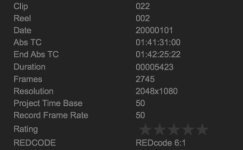
I've shot 50fps and 50fps in both just like you posted in the image. I'm going to attach a screenshot of the file metadata and a wetransfer with one shot so you can see its 50/50 but playbacks at twice the speed.

Thank you very much.

Lluís.
 

Attachments

  • Captura de pantalla 2017-05-27 a les 18.30.43.jpg
    Captura de pantalla 2017-05-27 a les 18.30.43.jpg
    10.6 KB · Views: 0
Last edited:
Ok.

Where does it play back at double speed? In the camera? In premiere? Redcinex? FcpX

David
 
I ve tested everywhere, camera, redcineX , premiere , after effects and also checked in Davinci Resolve. Im worried because Im the camera owner and I ll see if there s something wrong, Ill try updating firmware. It is not a media problem apparently because it happens in both redmags I have and there are no drops in the metadata. Maybe a setting that could be trigfered incamera that im not aware of?

Thank you again for your time and assistence.

Lluis
 
If it plays back double speed in the camera I would def save a log file and send it through to red by filing a support ticket.

What is the clip duration compared to the number of frames in the clip?

IE, clip is 10 seconds there are 500 frames? Or 250 frames
 
Take the clip in red cine x mark in and outs of a segment with 1 second duration, export DPX / JPG or tiff sequence. Count the number of files in the folder you exported to. if you got 50 frames in that folder all is good. If you got something else, 25frames or such then thats very odd.
 
Bjorn is correct on this. Try that test.

I think you might not be putting the clips into a timeline with a 50FPS timebase.

David
 
Hello Bjorn, thank you,

I've done what you've said , exported a DPX image sequence in redcineX of one sec of duration and it exports 50 images , but the problem is that the frames are seen at x2 speed in a 50 fps sequence in resolve/premiere etc(The way everything moves is too fast so its clear its not real time motion) . Also checked frame by frame the images and they don't seem to have the desired effect it lwooks like the camera was set up 50 frames per second time base but recorded at 25 frames per second for unknown reason because in the metadata it says 50/50 both. Really weird.
 
can you upload that to wetransfer.

I think your problem is with premiere.

David
 
It's sounds like the editing program you are using is interpreting the footage in some weird way. Are you in the adobe pipeline? Either premiere pro or after effects?
 
Looked at the clip in flame, as they say here its your NLE system that got some issues.
In premier you should be able to create a 25p timeline and then drop one of these clips into it and tell the timeline not to adapt to the clip but the clip to adapt to the timeline. Should give you a clip twice as long as realtime.

The clip you uploaded was 977 frames long and metadata says 50/50. So in 25p it should be the same amount of frames only play back at half the speed which it does in my end.

Here is the link to the clip in 25p with a quick key/composite. Looks to be the right speed / has realtime, no?


https://app.frame.io/f/JdLkVsaU
 
Back
Top